1. Ifihan
Thank you for choosing the Soundmaster Eliteline IR300SI Internet DAB+ FM Radio. This device offers a wide range of audio entertainment options, including Internet Radio, DAB+ digital radio, FM radio, Bluetooth connectivity, and USB playback. It also features Amazon Alexa compatibility for voice control and can be managed via the UNDOK app. This manual provides essential information for setting up, operating, and maintaining your radio.
2. Alaye Aabo
- Read all instructions carefully before use and retain them for future reference.
- Ma ṣe fi ẹrọ naa han si ojo, ọrinrin, tabi awọn iwọn otutu to gaju.
- Rii daju pe fentilesonu to dara; maṣe dina eyikeyi awọn ṣiṣi atẹgun.
- Lo oluyipada agbara nikan ti a pese pẹlu ẹyọkan.
- Ma ṣe gbiyanju lati ṣii tabi tun ẹrọ naa funrararẹ. Tọkasi gbogbo iṣẹ si oṣiṣẹ oṣiṣẹ.
- Jeki ẹrọ naa kuro ni awọn aaye oofa ti o lagbara.
3. Package Awọn akoonu
Jọwọ ṣayẹwo pe gbogbo awọn nkan wa:
- Soundmaster Eliteline IR300SI Internet DAB+ FM Radio
- Adapter agbara
- Isakoṣo latọna jijin
- Afowoyi Olumulo (iwe-ipamọ yii)
- Installation material (e.g., antenna, if separate)
4. Ọja Ipariview
Familiarize yourself with the various parts and controls of your Soundmaster IR300SI radio.

olusin 4.1: Igun iwaju view of the Soundmaster IR300SI radio, showing the display, speakers, and control buttons.
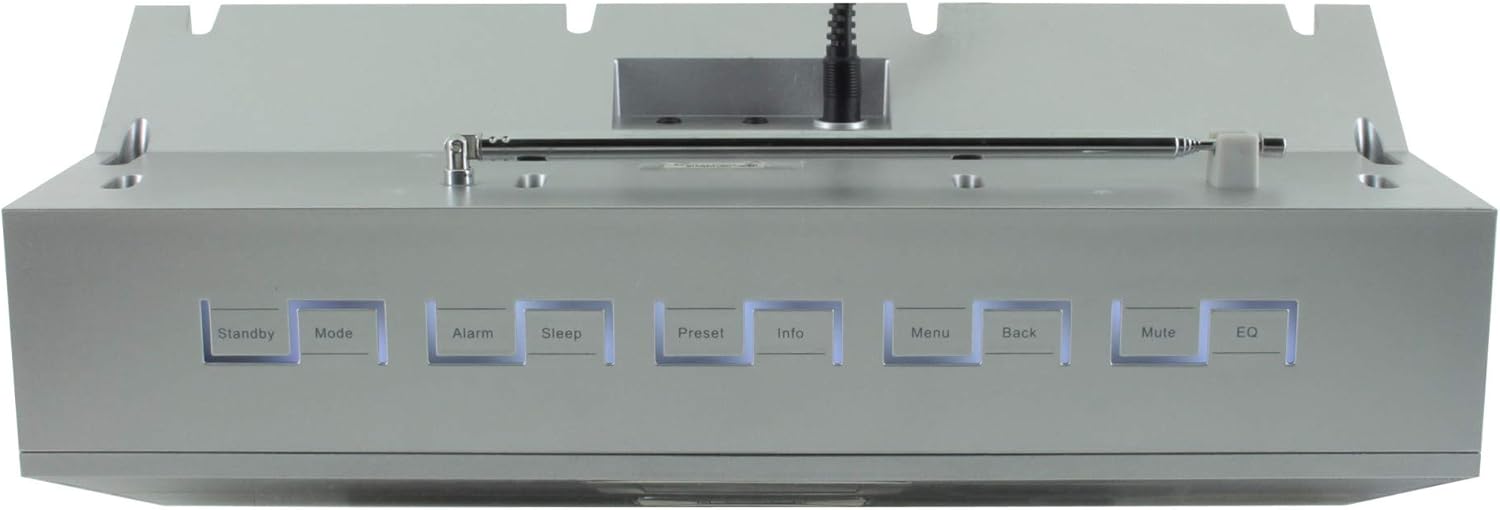
olusin 4.2: Top view of the Soundmaster IR300SI radio, highlighting the control buttons: Standby, Mode, Alarm, Sleep, Preset, Info, Menu, Back, Mute, and EQ.
Iwaju Panel
- 2.4" / 6 cm TFT Color Display: Shows station information, menus, and time.
- Awọn agbọrọsọ: Stereo sound output.
- Control Dial/Buttons: Fún ìlọ kiri àti yíyàn.
Awọn Isakoso Igbimọ Top
- Duro die: Agbara tan/pa.
- Ipo: Switch between Internet Radio, DAB+, FM, Bluetooth, USB, AUX.
- Itaniji: Ṣeto ati ṣakoso awọn itaniji.
- Orun: Activate sleep timer.
- Tito tẹlẹ: Access and save favorite stations.
- Alaye: Display additional information about the current broadcast.
- Akojọ: Wọle si awọn eto eto ati awọn aṣayan.
- Pada: Pada si akojọ aṣayan iṣaaju.
- Pa ẹnu mọ́: Mu ohun dakẹjẹkẹyin/mu ohun.
- EQ: Yan tito oluṣeto.
Rear/Side Panel Connections
- Iṣagbewọle agbara: So ohun ti nmu badọgba agbara ti a pese sii.
- Eriali telescopic: For DAB+ and FM reception.
- Ibudo USB: For MP3 playback from USB storage devices.
- 3.5mm Aux-In Port: So awọn orisun ohun ita pọ.
- Jack agbekari: Fun ikọkọ gbigbọ.
5. Eto
5.1 Asopọ agbara
- Connect the power adapter to the DC input on the rear of the radio.
- Pulọọgi ohun ti nmu badọgba agbara sinu iṣan ogiri kan.
- Tẹ awọn Duro die button on the top panel or remote control to turn on the radio.
5.2 Eriali Oṣo
Extend the telescopic antenna fully for optimal DAB+ and FM radio reception.
5.3 Initial Wi-Fi Network Setup
Nígbà tí o bá kọ́kọ́ tan-an, rédíò náà yóò darí rẹ nípasẹ̀ olùṣètò ìṣáájú àkọ́kọ́:
- Select your preferred language using the control dial and confirm.
- Rédíò náà yóò ṣe àyẹ̀wò fún àwọn nẹ́tíwọ́ọ̀kì Wi-Fi tó wà.
- Yan nẹtiwọki rẹ lati inu akojọ.
- Enter your Wi-Fi password using the on-screen keyboard and control dial. Confirm to connect.
- Once connected, the radio will display the main menu.
6. Awọn ilana Iṣiṣẹ
Lo awọn Ipo button to switch between different audio sources.
6.1 Internet Radio
- Tẹ Ipo to select "Internet Radio".
- Navigate through categories (e.g., Location, Genre, Popular) using the control dial.
- Yan ibudo kan lati bẹrẹ si iṣiṣẹ.
- Láti fi ibùdó kan pamọ́ gẹ́gẹ́ bí èyí tí a ti ṣètò tẹ́lẹ̀, tẹ kí o sì di mọ́lẹ̀ Tito tẹlẹ button, then select a preset number.
6.2 DAB + Radio
- Tẹ Ipo to select "DAB+ Radio".
- The radio will automatically scan for available DAB+ stations.
- Use the control dial to browse and select stations.
- Tẹ mọlẹ Tito tẹlẹ to save a station.
6.3 Redio FM
- Tẹ Ipo to select "FM Radio".
- The radio will automatically scan for available FM stations.
- Use the control dial to browse and select stations.
- Tẹ mọlẹ Tito tẹlẹ to save a station.
6.4 Bluetooth Asopọmọra
- Tẹ Ipo to select "Bluetooth". The radio will enter pairing mode.
- Lori ẹrọ alagbeka rẹ (foonuiyara, tabulẹti), mu Bluetooth ṣiṣẹ ki o wa awọn ẹrọ to wa.
- Select "Soundmaster IR300SI" from the list to pair.
- Nígbà tí o bá ti sopọ̀ mọ́ ọn, o lè gbé ohùn láti ẹ̀rọ rẹ sí rédíò.
6.5 USB Sisisẹsẹhin
- Insert a USB storage device (formatted as FAT32) containing MP3 files sinu USB ibudo.
- Tẹ Ipo to select "USB".
- Navigate through folders and select tracks using the control dial.
6.6 Iṣawọle AUX
- Connect an external audio device (e.g., MP3 player) to the 3.5mm Aux-In port using an audio cable (not supplied).
- Tẹ Ipo to select "AUX".
- Ṣakoso ṣiṣiṣẹsẹhin lati ẹrọ ita rẹ.
6.7 Alarms and Sleep Timer
- Awọn itaniji: Tẹ awọn Itaniji button to set up to two alarms. Configure time, source (buzzer, radio), and frequency (daily, weekdays, weekends).
- Akoko oorun: Tẹ awọn Orun button to set a countdown timer (e.g., 15, 30, 60 minutes) after which the radio will automatically turn off.
6.8 Oluṣeto (EQ)
Tẹ awọn EQ button to cycle through pre-programmed sound settings (e.g., Normal, Jazz, Rock, Classical, Pop, News) to optimize audio output for different content.
6.9 Amazon Alexa and UNDOK App Control
- Amazon Alexa: The radio is compatible with Amazon Alexa. Follow the instructions in the Alexa app to link your Soundmaster IR300SI for voice control functionalities.
- Àpù UNDOK: Download the UNDOK app from your mobile device's app store. Ensure your mobile device and the radio are on the same Wi-Fi network. The app allows you to control the radio, browse stations, and manage settings remotely.
7. Itọju
7.1 Ninu
- Always unplug the radio from the power outlet before cleaning.
- Lo asọ ti o tutu, ti o gbẹ lati nu awọn ita ita.
- Ma ṣe lo abrasive Cleaners, waxes, tabi epo bi wọn ṣe le ba ipari jẹ.
7.2 Ibi ipamọ
If you plan to store the radio for an extended period, unplug it from the power source and store it in a cool, dry place, away from direct sunlight and extreme temperatures.
8. Laasigbotitusita
Ti o ba pade awọn ọran, tọka si awọn iṣoro ti o wọpọ ati awọn ojutu wọnyi:
| Isoro | Owun to le Fa | Ojutu |
|---|---|---|
| Ko si agbara | Ohun ti nmu badọgba agbara ko ti sopọ tabi aṣiṣe iṣan. | Ṣayẹwo awọn asopọ agbara. Gbiyanju iṣan ti o yatọ. |
| Ko si ohun | Volume too low, muted, or incorrect source selected. | Mu iwọn didun pọ si. Tẹ Pa ẹnu mọ́. Ensure correct mode (Internet Radio, DAB+, etc.) is selected. |
| Ko le sopọ si Wi-Fi | Ọrọigbaniwọle ti ko tọ, ifihan agbara ti ko lagbara, tabi ọran olulana. | Verify password. Move radio closer to router. Restart router. |
| Gbigba DAB+/FM ti ko dara to | Eriali ko gbooro sii tabi agbegbe ifihan ti ko dara. | Fully extend the telescopic antenna. Reposition the radio. |
| Sisopọ Bluetooth kuna | Radio not in pairing mode, or device too far. | Ensure radio is in Bluetooth mode. Move devices closer. Restart Bluetooth on both devices. |
9. Awọn pato
| Ẹya ara ẹrọ | Sipesifikesonu |
|---|---|
| Orukọ awoṣe | IR300SI |
| Brand | Olukọni ohun |
| Asopọmọra Technology | Bluetooth, USB, Wi-Fi |
| Pataki Awọn ẹya ara ẹrọ | Integrated Clock, Internet Radio, DAB+, FM, Bluetooth, USB MP3 Playback, AUX-In, Headphone Jack, 2 Alarms with Weekend Function, Sleep Timer, Equalizer, Amazon Alexa Compatible, UNDOK App Control, Network Music Player (DLNA) |
| Ipo Ijade Ohun | Sitẹrio |
| O pọju Agbọrọsọ o wu Power | 2 x 10 Wattis RMS |
| Ifihan | 2.4" / 6 cm TFT Color Display |
| Ọna Iṣakoso | Remote Control, UNDOK App, On-device Buttons |
| Orisun agbara | AC Powered (100 Volts input) |
| Awọn iwọn Ọja (L x W x H) | 17 x 18 x 15 cm |
| Iwọn Nkan | 2.3 kilo |
| Àwọ̀ | Fadaka |
| Awọn ẹrọ ibaramu | Personal Computer, Television, Tablet, Smartphone, Laptop |
| Iṣagbesori Iru | Tabili |
10. Atilẹyin ọja ati Support
The Soundmaster Eliteline IR300SI comes with a spare parts availability period of 1 year from the date of purchase. For technical support, warranty claims, or further assistance, please contact your retailer or the Soundmaster customer service department. Refer to the contact information provided with your purchase documentation.


