1. Ifihan
This manual provides instructions for the AULCMEET RC-SA01 replacement remote control, designed for use with various Seiki Smart TV models. This remote control requires no programming and is ready for use after battery installation.
2. Eto: Fifi sori batiri
Follow these steps to install batteries into your remote control:
- Ṣii Ideri Batiri naa: Locate the battery compartment on the back of the remote control and slide the cover downwards or press the latch to open it.
- Fi Awọn batiri sii: Insert two new AAA alkaline batteries (not included), ensuring the positive (+) and negative (-) terminals align correctly with the markings inside the compartment.
- Pa Ideri Batiri naa: Gbe ideri batiri pada si aaye titi yoo fi tẹ ni aabo.

3. Awọn ilana Iṣiṣẹ
After installing the batteries, the remote control is ready for immediate use. Point the remote control directly towards the infrared (IR) sensor on your Seiki Smart TV. Ensure there are no obstructions between the remote and the TV sensor.
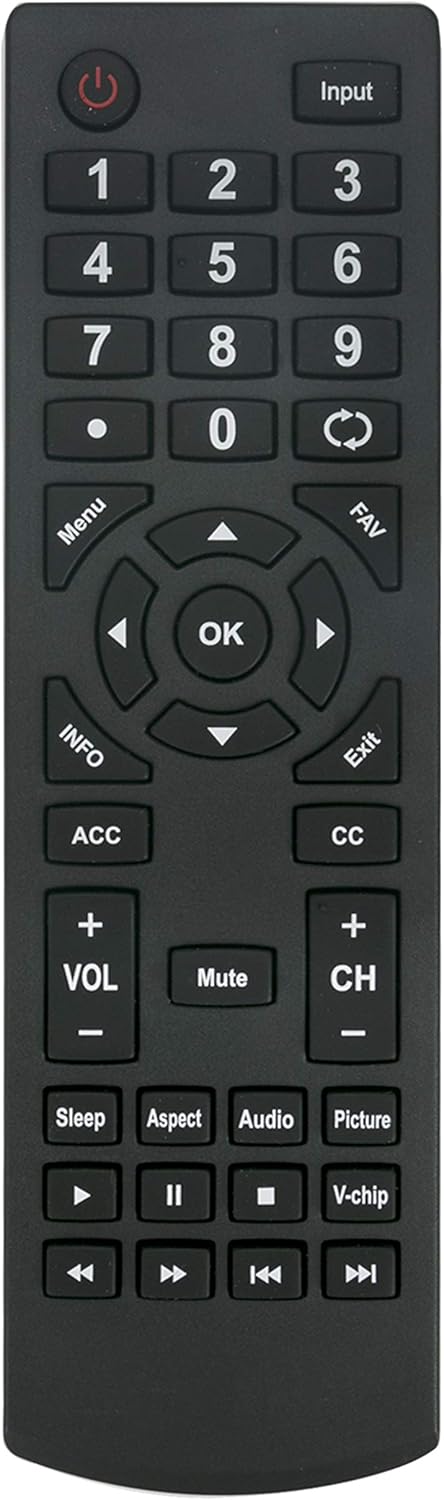
Awọn iṣẹ bọtini:
- Agbara (⏻): Tan TV si tan tabi paa.
- Iṣawọle: Selects video input sources (HDMI, AV, etc.).
- Paadi Nọmba (0-9): Aṣayan ikanni taara.
- Akojọ: Ó wọlé sí àkójọpọ̀ TV.
- Lilọ kiri (Soke, Isalẹ, Osi, Ọtun, O DARA): Lilọ kiri nipasẹ awọn akojọ aṣayan ati jẹrisi awọn aṣayan.
- VOL (+/-): Ṣe atunṣe ipele iwọn didun.
- CH (+/-): Ayipada TV awọn ikanni.
- Pa ẹnu mọ́: Pa ohun TV kuro tabi mu ohun foonu kuro.
- Jade: Exits current menu or on-screen display.
- Media Controls (Play, Pause, Stop, Rewind, Fast Forward): Controls playback of media content.
- Apa: Ṣe atunṣe ipin iboju.
- Ohun: Yan awọn orin ohun tabi awọn ipo.
- Aworan: Ṣe àtúnṣe àwọn ètò àwòrán.
- Orun: Ṣeto aago oorun fun TV.
- V-chip: Accesses parental control settings.
4. Compatible Seiki Smart TV Models
This AULCMEET RC-SA01 replacement remote control is compatible with the following Seiki Smart TV models:
- SC-32HS703N
- SC-32HS880N
- SC-32HS950N
- SC32HS703N
- SC32HS880N
- SC32HS950N
- SC40-FS703N
- SC40FS703N
- SC-32HK860N
- SC-32HS970N
- SC-39HS950N
- SC-40FS703N
No programming is required for these models; simply insert batteries and begin use.
5. Awọn pato
| Ẹya ara ẹrọ | Ẹ̀kúnrẹ́rẹ́ |
|---|---|
| Brand | AULCMEET |
| Awoṣe | RC-SA01 (Replacement) |
| Awọn ẹrọ ibaramu | Seiki Smart Televisions |
| Orisun agbara | Awọn batiri 2 x AAA (kii ṣe pẹlu) |
| Asopọmọra Technology | Infurarẹẹdi (IR) |
| Àwọ̀ | Dudu |
| Ọja Mefa | 7.2 x 1.8 x 0.65 inches |
| Iwọn Nkan | 1.58 iwon |
6. Laasigbotitusita
- Latọna jijin Ko Dahun:
- Rii daju pe awọn batiri ti fi sori ẹrọ daradara pẹlu polarity to dara.
- Rọpo awọn batiri atijọ pẹlu awọn batiri ipilẹ AAA tuntun.
- Ṣayẹwo fun eyikeyi awọn idena laarin isakoṣo latọna jijin ati sensọ IR ti TV.
- Verify that the remote is pointed directly at the TV's IR sensor.
- Confirm your TV model is listed in the compatible models section.
- Awọn bọtini kan pato Ko Ṣiṣẹ:
- This remote is a direct replacement and should not require programming. If specific buttons do not function, double-check compatibility with your exact TV model.
- Ensure the remote is clean and free from debris that might obstruct button presses.
7. Itọju
Láti rí i dájú pé ìṣàkóso latọna jijin rẹ pẹ́ tó àti pé ó ń ṣiṣẹ́ dáadáa:
- Keep the remote control dry and away from moisture.
- Yẹra fún fífi ohun èlò ìṣiṣẹ́ aláàbò sílẹ̀ tàbí kí o fi agbára ńlá rẹ̀ hàn.
- Clean the remote with a soft, dry cloth. Do not use liquid cleaners or abrasive materials.
- Remove batteries if the remote control will not be used for an extended period to prevent battery leakage.
8. Atilẹyin
If you encounter any issues not covered in this manual or require further assistance, please contact the product seller or manufacturer for support. Refer to your purchase documentation for contact information.


