1. Ifihan
This manual provides detailed instructions for the proper installation and operation of your ORACLE Lighting 5300-005 Illuminated Grill Crosshairs. Please read this manual thoroughly before beginning installation to ensure correct procedure and optimal performance. This product is designed to enhance the aesthetic of your vehicle's grill.
2. Ọja Ipariview
The ORACLE Lighting 5300-005 Illuminated Grill Crosshairs are an electroluminescent (EL) insert designed to fit into the factory grill of 2011-2014 Dodge Charger models. When powered, these crosshairs emit a soft, ambient amber glow, providing a distinctive visual accent. The product is waterproof and includes an adhesive backing for secure mounting.

Figure 2.1: The ORACLE Lighting 5300-005 Illuminated Grill Crosshairs, featuring the amber electroluminescent strip designed for installation into a vehicle's front grill.
3. Alaye Aabo
Please observe the following safety guidelines during installation and operation:
- Ensure the vehicle's power is disconnected before performing any electrical work.
- This product requires a 12V power source. Incorrect voltage le ba awọn kuro.
- The electroluminescent (EL) effect is not visible during daylight hours.
- This product is intended for 'car show' use only and is not designed for on-road use.
- The Charger crosshairs will not fit the SRT model. Verify your vehicle model before installation.
- Handle all wiring with care to prevent shorts or damage.
4. Package Awọn akoonu
Daju pe gbogbo awọn paati wa ṣaaju ki o to bẹrẹ fifi sori:
- ORACLE Lighting 5300-005 Illuminated Grill Crosshairs (Amber)
- Integrated 3M adhesive backing
5. fifi sori
Follow these steps for proper installation of the illuminated grill crosshairs:
- Prepare the Grill Area: Ensure the factory grill surface where the crosshairs will be applied is clean, dry, and free of any debris, wax, or grease. Use an alcohol wipe if necessary and allow to dry completely.
- Idanwo Ibamu: Carefully position the crosshairs in the desired location on your factory grill to confirm fitment and placement before removing the adhesive backing.
- Waye alemora: Peel off the protective film from the 3M adhesive backing on the crosshairs.
- Secure Crosshairs: Align the crosshairs precisely with the grill and firmly press them into place. Apply even pressure across the entire surface of the adhesive for several seconds to ensure a strong bond.
- So agbara: Route the wiring from the crosshairs to a suitable 12V power source within the vehicle. This typically involves tapping into an existing 12V circuit that activates with the vehicle's ignition or lighting system. Consult a professional if you are unsure about electrical connections.
- Iṣe idanwo: Once wired, turn on the vehicle's ignition or relevant lighting system to verify that the crosshairs illuminate correctly.
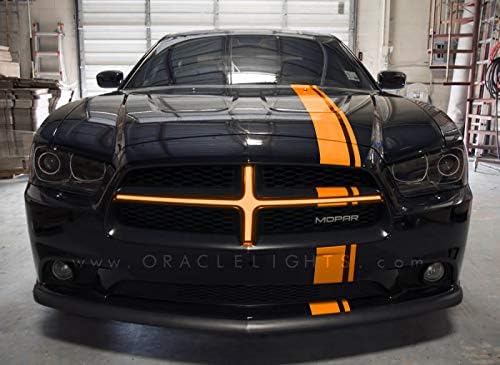
Figure 5.1: A front view of a black 2011-2014 Dodge Charger with the ORACLE Lighting 5300-005 Illuminated Grill Crosshairs installed and illuminated in amber, showcasing its appearance on the vehicle.
6. Isẹ
The ORACLE Lighting 5300-005 Illuminated Grill Crosshairs operate automatically once properly installed and connected to a 12V power source. They will illuminate when the connected power source is active (e.g., when the vehicle's ignition is on or headlights are activated, depending on your wiring choice).
7. Itọju
To ensure the longevity and appearance of your illuminated grill crosshairs:
- Clean the surface gently with a soft, damp asọ. Yago fun abrasive ose tabi simi kemikali.
- Periodically inspect wiring connections for any signs of wear or corrosion.
- Ensure the adhesive bond remains secure.
8. Laasigbotitusita
If the illuminated crosshairs do not function as expected, consider the following:
- Ko si Imọlẹ:
- Check the 12V power connection. Ensure it is secure and receiving power.
- Verify that the vehicle's ignition or relevant lighting system is active.
- Inspect wiring for any breaks or loose connections.
- Confirm the fuse for the connected circuit is intact.
- Intermittent Illumination:
- Check for loose wiring connections or a faulty ground.
- Rii daju pe orisun agbara jẹ iduroṣinṣin.
- Adhesive Ko Daduro:
- Ensure the surface was properly cleaned and dry before application.
- Apply additional pressure to the crosshairs to re-secure the bond.
If issues persist, contact ORACLE Lighting customer support for assistance.
9. Awọn pato
| Ẹya ara ẹrọ | Ẹ̀kúnrẹ́rẹ́ |
|---|---|
| Brand | ORACLE Lighting |
| Nọmba awoṣe | 5300-005 |
| Ibamu | 2011-2014 Dodge Charger (excluding SRT models) |
| Boolubu Iru | LED (Electroluminescent) |
| Voltage | 12 Volts |
| Àwọ̀ | Amber |
| Iṣagbesori | 3M alemora Fifẹyinti |
| Ọja Mefa | 4 x 9 x 9 inches |
| Iwọn Nkan | 1 iwon |
10. Atilẹyin ọja ati Support
ORACLE Lighting products are manufactured to high standards. For information regarding warranty coverage, technical support, or replacement parts, please contact ORACLE Lighting directly through their official webojula tabi onibara iṣẹ awọn ikanni. Tọju iwe-ẹri rira rẹ bi ẹri rira.


