1. Ifihan
The Maxell Bass 13 Wireless Headphones (Model B13-WHPS) are designed to provide a versatile audio experience. These headphones feature 40mm drivers for clear sound, an integrated microphone for communication, and comfortable ear pads for extended listening. They offer both wireless Bluetooth connectivity and a traditional 3.5mm wired option.
2. Ohun ti o wa ninu Apoti
- Maxell Bass 13 Wireless Headphones
- Okun Ngba agbara USB
- 3.5mm Audio Cable (if applicable, not explicitly listed but common for hybrid headphones)
- Itọsọna olumulo
3. Ọja Ipariview
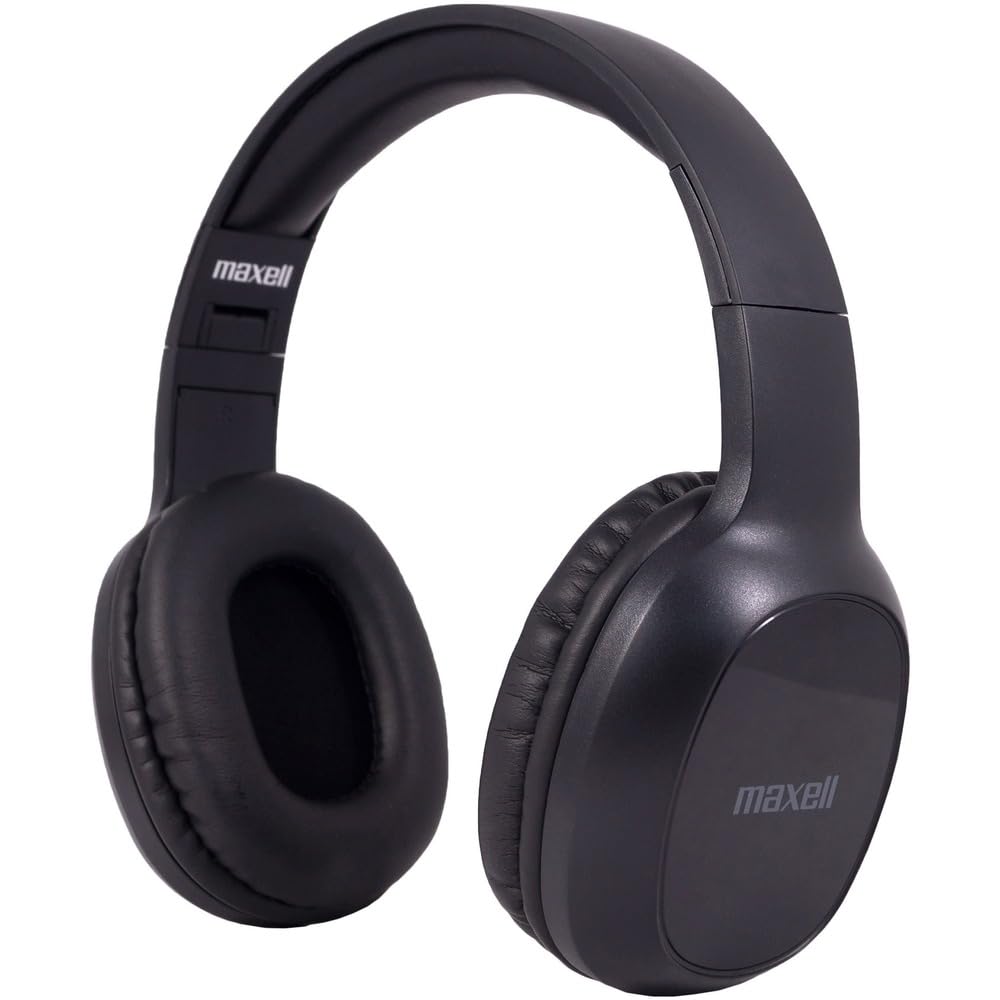
Figure 1: Maxell Bass 13 Wireless Headphones

Figure 2: Earcup Controls (Power, Volume, Play/Pause)
Awọn ẹya pataki:
- Awọn Awakọ Yiyi 40mm: Deliver clear and powerful audio performance.
- Gbohungbohun ti a ṣepọ: Nṣiṣẹ ipe ti ko ni ọwọ.
- Noise-Isolating Earpads: Provide comfort and help reduce external distractions.
- Bluetooth 5.0 Asopọmọra: For stable wireless connection.
- Jack Audio 3.5mm: Allows for wired connection to compatible devices.
- Akọkọ ti o le ṣatunṣe: Ó ń rí i dájú pé ó rọrùn láti lò fún oríṣiríṣi.
- Igbesi aye batiri titi di wakati 8: For extended listening and talk time.
4. Eto
4.1 Ngba agbara si awọn Agbekọri

Figure 3: Connecting the USB Charging Cable
- Locate the charging port on the headphone earcup.
- Connect the small end of the provided USB charging cable to the headphone's charging port.
- Connect the larger end of the USB cable to a USB power source (e.g., computer USB port, USB wall adapter).
- The LED indicator on the headphones will illuminate to show charging status. It will typically turn off or change color when fully charged.
- A full charge provides up to 8 hours of continuous talk/play time.
4.2 Sisopọ Bluetooth
- Rii daju pe awọn agbekọri ti gba agbara ni kikun.
- Tẹ bọtini agbara lori ago agbekọri naa ki o si di mu titi ti ifihan LED yoo fi tan imọlẹ bulu ati pupa, ti o fihan ipo isopọmọ.
- Lori ẹrọ rẹ (foonuiyara, tabulẹti, kọmputa), lọ si awọn eto Bluetooth.
- Wa fun available devices. Select "Maxell Bass 13" from the list.
- Once paired, the LED indicator will typically show a solid blue light or flash blue slowly.
- Ti o ba beere fun koodu iwọle, tẹ "0000".
4.3 Asopọ onirin (Jack Audio Jack 3.5mm)

Figure 4: Connecting the 3.5mm Audio Cable
For devices without Bluetooth or when battery is low, you can use the 3.5mm audio cable:
- Plug one end of the 3.5mm audio cable into the audio input jack on the headphone earcup.
- So opin keji mọ inu jacki ohun 3.5mm ti ẹrọ rẹ.
- The headphones will operate in passive mode, and Bluetooth functionality will be disabled.
5. Awọn ilana Iṣiṣẹ
5.1 Agbara Tan / Pa
- Agbara Tan: Tẹ mọlẹ bọtini agbara fun isunmọ awọn aaya 3 titi ti Atọka LED yoo tan imọlẹ.
- Agbara Pa: Press and hold the Power button for approximately 3-5 seconds until the LED indicator turns off.
5.2 Iṣakoso iwọn didun
- Mu iwọn didun pọ si: Tẹ bọtini Iwọn didun Up (+).
- Din iwọn didun silẹ: Tẹ bọtini Iwọn didun isalẹ (-).
5.3 Sisisẹsẹhin Orin
- Ṣiṣẹ/Daduro: Tẹ bọtini Multi-function (nigbagbogbo bọtini Power tabi bọtini Play/Duro ti a yasọtọ) lẹẹkan.
- Orin t’okan: Press and hold the Volume Up (+) button (or double-press, refer to specific product button layout).
- Tẹlẹ Orin: Press and hold the Volume Down (-) button (or double-press, refer to specific product button layout).
5.4 ipe Management
- Idahun/Ipe Ipari: Tẹ bọtini Olona-iṣẹ lẹẹkan.
- Kọ Ipe: Tẹ bọtini Multi-function ki o si mu fun bii iṣẹju-aaya meji.
- Nọmba Ikẹhin Tun Tun: Tẹ bọtini Olona-iṣẹ lẹẹmeji.
6. Itọju
6.1 Ninu
- Mu awọn agbekọri nu pẹlu asọ, gbẹ, asọ ti ko ni lint.
- Ma ṣe lo awọn olutọpa abrasive, awọn nkanmimu, tabi awọn ohun elo aerosol.
- Yago fun gbigba ọrinrin sinu eyikeyi awọn ṣiṣi.
6.2 Ibi ipamọ

Figure 5: Headphones Folded for Storage
- Tọ́jú àwọn agbekọri náà sí ibi tí ó tutù tí ó sì gbẹ, tí kò sí ibi tí ó le koko jù.
- When not in use for extended periods, ensure the headphones are fully charged before storage to preserve battery health.
- The headphones feature a foldable design for compact storage and portability.
6.3 batiri Itọju
- Yago fun gbigba agbara si batiri ni kikun nigbagbogbo.
- Charge the headphones regularly, even if not used often.
- Do not expose the battery to excessive heat or direct sunlight.
7. Laasigbotitusita
| Isoro | Owun to le Fa | Ojutu |
|---|---|---|
| Awọn agbekọri ko ṣiṣẹ | Batiri kekere | Gba agbara si awọn agbekọri ni kikun. |
| Ko le so pọ nipasẹ Bluetooth | Awọn agbekọri ko si ni ipo sisopọ; Ẹrọ Bluetooth kuro; Ju jina lati ẹrọ | Ensure headphones are in pairing mode (flashing blue/red). Turn on device Bluetooth. Move headphones closer to device. |
| Ko si ohun | Ohùn tó lọ sílẹ̀ jù; Orísun ohùn tó pé; Àwọn agbekọrí kò so pọ̀ | Increase headphone and device volume. Check if headphones are properly paired/connected. Verify audio output settings on your device. |
| Didara ipe ti ko dara | Weak Bluetooth signal; Microphone obstructed | Move closer to your device. Ensure microphone is not covered. |
8. Awọn pato
| Ẹya ara ẹrọ | Ẹ̀kúnrẹ́rẹ́ |
|---|---|
| Nọmba awoṣe | B13-WHPS |
| Brand | Maxell |
| Asopọmọra Technology | Bluetooth 5.0 |
| Audio Driver Iwon | 40 mm |
| Igbesi aye batiri | Up to 8 Hours (continuous talk/play time) |
| Awọn agbekọri Jack | 3.5 mm Jack |
| Àwọn Ẹ̀yà Ìṣàkóso Ariwo | Sound Isolation, Noise Cancelling |
| Ipalara | 32 ohms |
| Ifamọ | 100 dB |
| Idahun Igbohunsafẹfẹ | 20 Hz |
| Gbigbe Eti | Lori Eti |
| Fọọmù ifosiwewe | Lori Eti |
| Ọja Mefa | 7.25 x 3 x 9 inches |
| Iwọn Nkan | 8.4 iwon |
| Ohun elo | Electronic Components, Foam, Plastic, Wire |
| Awọn ẹrọ ibaramu | Tablets, Laptops, Desktops, Portable Devices with 3.5mm Audio Jack |
9. Official ọja Video
Video 1: Maxell Bass 13 Bluetooth Headphones Overview. This video provides a visual demonstration of the headphones' features and design.
10. Atilẹyin ọja ati Support
Maxell products are designed for reliability and performance. For specific warranty information, please refer to the warranty card included with your purchase or visit the official Maxell website. For technical support or customer service inquiries, please contact Maxell customer support through their official channels.


