1. Ifihan
This manual provides essential information for the safe and effective operation of your Behringer C210 Powered Column Loudspeaker. The C210 is a modular column loudspeaker designed for portable PA applications and high-quality music playback. It features an 8-inch subwoofer, four high-frequency drivers, 200 watts of multi-channel Class-D power, Bluetooth audio streaming, an integrated MP3 player, LED lighting, and remote control capabilities.
Jọwọ ka iwe afọwọkọ yii daradara ṣaaju ṣiṣiṣẹ ẹrọ naa ki o da duro fun itọkasi ọjọ iwaju.
2. Awọn ilana aabo
- Orisun Agbara: So ẹrọ naa pọ mọ ibudo agbara AC ti vol ti a sọ tẹlẹ nikantage. Rii daju pe okun agbara ko bajẹ tabi pin.
- Afẹfẹ: Ma ṣe dina eyikeyi awọn ṣiṣi atẹgun. Fi sori ẹrọ ni ibamu pẹlu awọn ilana ti olupese.
- Omi ati Ọrinrin: Do not expose this apparatus to rain or moisture. Do not place objects filled with liquids on the apparatus.
- Ooru: Maṣe fi sori ẹrọ nitosi awọn orisun ooru gẹgẹbi awọn imooru, awọn iforukọsilẹ ooru, awọn adiro, tabi awọn ohun elo miiran (pẹlu ampliifiers) ti o gbe ooru jade.
- Ninu: Mọ pẹlu asọ gbigbẹ nikan.
- Ṣiṣẹ: Maṣe gbiyanju lati ṣe iṣẹ ọja yii funrararẹ. Tọkasi gbogbo iṣẹ si awọn oṣiṣẹ iṣẹ ti o peye. Iṣẹ nilo nigbati ohun elo ba ti bajẹ ni ọna eyikeyi, gẹgẹbi okun ipese agbara tabi plug ti bajẹ, omi ti ta silẹ tabi awọn nkan ti ṣubu sinu ẹrọ, ohun elo naa ti farahan si ojo tabi ọrinrin, ko ṣiṣẹ deede, tabi ti lọ silẹ.
- Ibi: Ensure the loudspeaker is placed on a stable, level surface to prevent tipping.
- Idaabobo igbọran: Prolonged exposure to high sound pressure levels can cause permanent hearing loss. Use caution when setting volume levels.
3. Package Awọn akoonu
Nígbà tí o bá ń tú àwọn ohun èlò náà, jọ̀wọ́ rí i dájú pé gbogbo àwọn ohun èlò náà wà ní ipò tó dára:
- Behringer C210 Powered Column Loudspeaker Unit (Subwoofer base and column array)
- Okun agbara
- Isakoṣo latọna jijin
- Afowoyi Olumulo (iwe-ipamọ yii)
If any items are missing or damaged, please contact your retailer immediately.
4. Ọja Ipariview
The Behringer C210 is a compact yet powerful column loudspeaker system designed for ease of transport and quick setup. It consists of a subwoofer base unit and a column array that houses the high-frequency drivers.
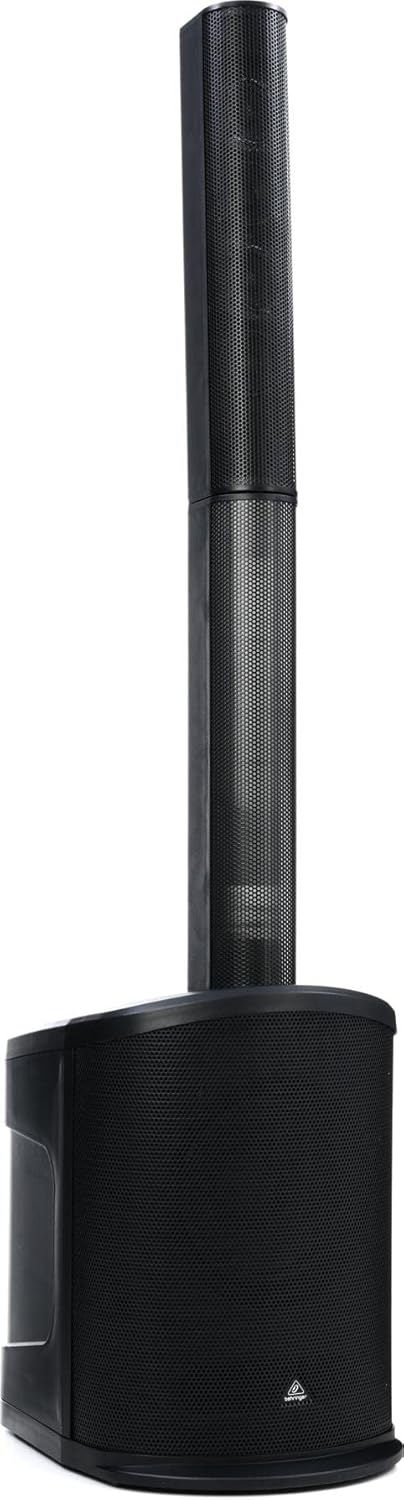
olusin 4.1: Iwaju view of the C210 loudspeaker, illustrating its modular design with the subwoofer base and the column array.
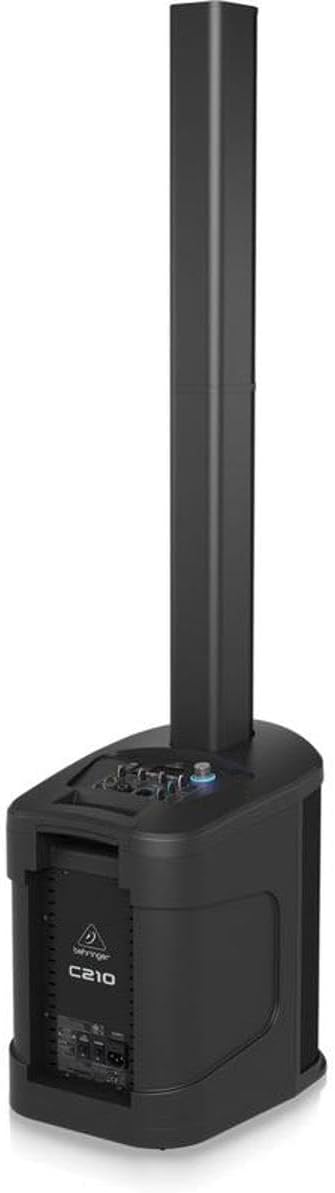
Àwòrán 4.2: Ẹ̀yìn/ẹ̀gbẹ́ view of the C210, highlighting the integrated control panel and input/output connections on the subwoofer unit.
Awọn eroja pataki:
- Subwoofer Base: Houses the 8-inch subwoofer, Class-D amplifier, control panel, and input/output connections.
- Column Array: Contains four high-frequency drivers for wide sound dispersion. It connects directly to the subwoofer base.
- Ibi iwaju alabujuto: Located on the top of the subwoofer base, providing access to volume, input selection, MP3 player controls, and LED lighting settings.
- Isakoṣo latọna jijin: Allows for convenient adjustment of volume, track selection, and LED lighting from a distance.
5. Eto
Follow these steps to set up your C210 loudspeaker:
- Yọọ kuro: Ni ifarabalẹ yọ gbogbo awọn paati kuro ninu apoti.
- Ibi: Choose a stable, level surface for the subwoofer base. Ensure there is adequate space around the unit for ventilation. Avoid placing it directly against walls or in corners if possible, to optimize sound dispersion.
- Assemble Column Array: Align the bottom of the column array with the connector on the top of the subwoofer base. Gently push down until it is securely seated. The connection is designed to be firm and stable.
- Asopọ agbara: Connect the supplied power cable to the AC inlet on the rear of the subwoofer base. Plug the other end into a suitable grounded electrical outlet.
- Agbara Ibẹrẹ Tan: Before turning on the unit, ensure all volume controls are set to their minimum level. Power on the unit using the main power switch.
6. Ṣiṣẹ
6.1. Ipilẹ isẹ
- Titan/Apapa: Use the power switch located on the rear of the subwoofer base to turn the unit on or off.
- Iwọn Titunto: Adjust the main volume knob on the control panel to control the overall output level of the loudspeaker.
- Aṣayan igbewọle: Use the input selector buttons or knob on the control panel to switch between different audio sources (e.g., Bluetooth, MP3, Line In).
6.2. Ṣíṣanwọle Ohun Bluetooth
The C210 supports high-quality Bluetooth audio streaming from compatible devices.
- Mu Bluetooth ṣiṣẹ: Select the Bluetooth input mode on the C210's control panel. The unit will enter pairing mode, indicated by a flashing Bluetooth indicator.
- Ohun elo Pàpọ: On your smartphone, tablet, or other Bluetooth-enabled device, open the Bluetooth settings and search for available devices. Select "Behringer C210" from the list.
- Sopọ: Once paired, the Bluetooth indicator on the C210 will become solid, and you can begin streaming audio from your device.
6.3. Iṣẹ́ ti ẹrọ orin MP3
The integrated MP3 player allows playback of audio files from USB sticks and SD/MMC cards.
- Fi Media sii: Insert a USB stick into the USB port or an SD/MMC card into the card slot on the control panel.
- Select MP3 Input: Switch the input mode to MP3. The unit will automatically detect and begin playing compatible audio files.
- Awọn iṣakoso: Use the dedicated MP3 player controls (Play/Pause, Next Track, Previous Track) on the control panel or remote control to manage playback.
6.4. Imọlẹ LED
The C210 features integrated LED lighting. Use the dedicated controls on the unit or the remote control to activate and select various lighting modes and effects.
6.5. Isakoṣo latọna jijin
Iṣakoso latọna jijin ti o wa pẹlu rẹ pese iwọle si awọn iṣẹ pataki ti o rọrun:
- Titan / Paa
- Master Volume Up/Down
- Aṣayan Orisun titẹ sii
- MP3 Player Controls (Play/Pause, Skip)
- LED Lighting Mode Selection
7. Itọju
Proper maintenance ensures the longevity and optimal performance of your C210 loudspeaker.
- Ninu: Disconnect the power before cleaning. Use a soft, dry cloth to wipe down the exterior surfaces. Do not use abrasive cleaners, waxes, or solvents.
- Ibi ipamọ: If storing the unit for an extended period, disconnect it from power and store it in a dry, dust-free environment. It is recommended to use the original packaging for protection during storage or transport.
- Afẹfẹ: Máa ṣàyẹ̀wò déédéé pé eruku àti ìdọ̀tí kò ní sí nínú àwọn ihò afẹ́fẹ́ láti dènà kí ó má baà gbóná jù.
8. Laasigbotitusita
If you encounter issues with your C210, refer to the following common problems and solutions:
| Isoro | Owun to le Fa | Ojutu |
|---|---|---|
| Ko si agbara | Power cable disconnected; Power outlet faulty; Unit power switch off | Check power cable connection; Try a different outlet; Ensure power switch is ON |
| Ko si ohun jade | Volume too low; Incorrect input selected; Audio source issue; Column array not connected properly | Increase master volume; Select correct input; Check audio source device; Re-seat column array |
| Bluetooth ko so pọ | C210 not in pairing mode; Device already paired; Interference | Ensure C210 is in Bluetooth input and flashing; Disconnect from other devices; Move closer to C210 |
| MP3 playback issues | Ti ko ni atilẹyin file format; Corrupt media; Incorrect input selected | Rii daju files are MP3; Try different USB/SD card; Select MP3 input |
| Isakoṣo latọna jijin ko ṣiṣẹ | Àwọn bátírì tí ó ti kú; Ìdènà; Kò sí ní ìpele tí a lè rà mọ́ | Replace batteries; Remove obstructions; Move closer to unit |
Ti iṣoro naa ba wa lẹhin igbiyanju awọn iṣeduro wọnyi, jọwọ kan si atilẹyin alabara.
9. Awọn pato
Technical specifications for the Behringer C210 Powered Column Loudspeaker:
| Ẹya ara ẹrọ | Sipesifikesonu |
|---|---|
| Orukọ awoṣe | C210 |
| Agbọrọsọ Iru | Subwoofer (with Column Array) |
| Iṣagbesori Iru | Sisun |
| Agbọrọsọ Amplification Iru | Ti nṣiṣe lọwọ |
| Agbọrọsọ Agbara Ijade ti o pọju | 200 Wattis |
| Iwọn Iwọn Woofer | 8 inches |
| Opin Tweeter | 2.75 inches (x4) |
| Idahun Igbohunsafẹfẹ | 20 Hz - 20 kHz (approximate, based on 2E+4 Hz) |
| Asopọmọra Technology | Bluetooth |
| Imọ-ẹrọ Ibaraẹnisọrọ Alailowaya | Bluetooth |
| Ọna Iṣakoso | Latọna jijin |
| Pẹlu MP3 ẹrọ orin bi? | Bẹẹni |
| Orisun agbara | Okun Itanna |
| Iwọn Nkan | 30.6 iwon (13.88 kg) |
| Awọn iwọn Ọja (L x W x H) | 17.32 x 12.99 x 54.53 inches (44 x 33 x 138.5 cm) |
| Se mabomire | ERO |
| Olupese | Orin Orin |
| UPC | 653341353139 |
10. Atilẹyin ọja ati Support
Your Behringer C210 Powered Column Loudspeaker comes with a limited warranty provided by the manufacturer, Music Tribe. The specific terms and duration of the warranty may vary by region and retailer.
For detailed warranty information, product registration, technical support, or service inquiries, please visit the official Behringer website or contact your authorized Behringer dealer.
O le wa alaye diẹ sii ati awọn orisun atilẹyin ni aaye naa Behringer Store on Amazon or the official Music Tribe webojula.


