1. Ifihan
This instruction manual provides detailed information on the installation, operation, and maintenance of your Pioneer DEH-5600 car audio system. Please read this manual thoroughly before using the product to ensure correct usage and to prevent accidents. Keep this manual in a safe place for future reference.
2. Alaye Aabo
Ṣe akiyesi awọn iṣọra ailewu atẹle lati yago fun ipalara tabi ibajẹ ọja naa:
- Do not operate the system in a way that distracts you from driving safely.
- Ensure proper installation by a qualified technician to prevent electrical shorts or other hazards.
- Do not disassemble or modify the unit. This may result in electric shock, fire, or other malfunctions.
- Jẹ́ kí ohùn náà wà ní ìpele kan níbi tí o ti lè gbọ́ ìró ìta, bí ìró ìró ọkọ̀ pajawiri.
- Lo awọn ẹya ẹrọ ati awọn ẹya ti a sọ pato nikan.
3. Package Awọn akoonu
Jẹrisi pe gbogbo awọn ohun kan wa ninu package:
- Main Unit (DEH-5600)
- Ikun iṣan
- Gbohungbohun ti ko ni ọwọ
- Installation Screws Set
- Remote Control (with CR2025 Lithium Battery)
- Ilana Afowoyi (iwe yii)
- Kaadi atilẹyin ọja
4. Eto ati fifi sori
Proper installation is crucial for optimal performance and safety. It is recommended to have this unit installed by a professional.
4.1 Awọn isopọ onirin
Connect the wiring harness according to your vehicle's specifications. Ensure the ground wire is securely connected to a metal part of the vehicle chassis or the battery's negative terminal.
Pataki: Connect the vehicle-specific harness to the main unit harness before installation. Ensure all connections are secure to prevent short circuits.
4.2 Iṣagbesori Unit
Install the DEH-5600 into a 1DIN opening in your vehicle's dashboard. Use the provided installation screws to secure the unit.
4.3 Hands-free Microphone Installation
Mount the hands-free microphone in a location that allows clear voice pickup, typically near the driver's sun visor or on the steering column. Route the cable carefully to avoid interference with driving controls.
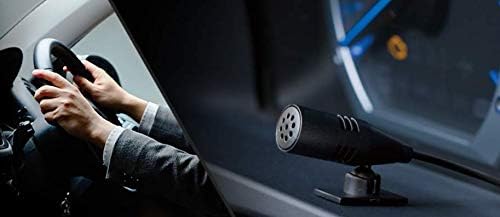
Image: Hands-free microphone for clear communication during calls.
5. Awọn ilana Iṣiṣẹ
5.1 Ipilẹ Mosi
- Titan/Apapa: Press the SRC/OFF button to turn the unit on or off.
- Iṣakoso iwọn didun: Rotate the rotary knob to adjust the volume.
- Aṣayan Orisun: Press the SRC/OFF button repeatedly to cycle through available sources (CD, Bluetooth, USB, iPhone, AUX, Tuner).
5.2 CD Sisisẹsẹhin
Insert a CD into the disc slot. Playback will start automatically. Use the track skip buttons to navigate between tracks.
5.3 Tuner isẹ
Select the Tuner source. Use the seek buttons to find radio stations. Press and hold a preset button to store a station.
6. Eto Audio
The DEH-5600 features a high-performance DSP for precise sound customization.
6.1 Time Alignment
Adjust the time alignment settings to ensure that sound from all speakers reaches the listener at the same time, creating a more focused sound stage. Refer to the on-screen menu for detailed adjustments.
6.2 13-Band Graphic Equalizer
Utilize the 13-band graphic equalizer to fine-tune the audio frequency response. This allows for detailed sound shaping to match your preferences and vehicle acoustics.

Image: The 13-band graphic equalizer interface for detailed sound adjustments.
7. Bluetooth Asopọmọra
The DEH-5600 supports Bluetooth for hands-free calling and audio streaming.
7.1 Sisopọ ẹrọ Bluetooth kan
- Turn on the Bluetooth function on your smartphone or other device.
- On the DEH-5600, navigate to the Bluetooth settings menu.
- Select "Pairing" or "Add Device".
- Wa fun "DEH-5600" on your device and select it.
- Jẹrisi koodu sisopọ ti o ba ṣetan.
7.2 Ipe laisi ọwọ
Once paired, you can make and receive calls through the DEH-5600. Use the dedicated call buttons on the unit or remote control. Your voice will be picked up by the external microphone.
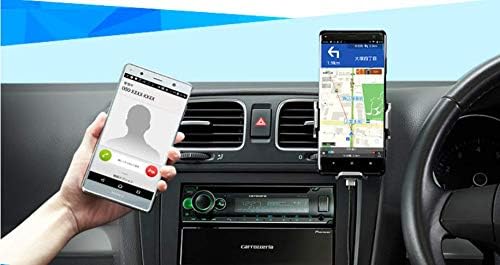
Image: Hands-free calling functionality with a connected smartphone.
7.3 Bluetooth Audio ṣiṣan
Select the Bluetooth Audio source to stream music from your paired device. Use the unit's controls to play, pause, and skip tracks.
8. USB/iPod/iPhone Playback
Connect your USB device, iPod, or iPhone to the USB Type-A port for direct audio playback and charging.
- Supported formats for USB: WMA, MP3, WAV, AAC, FLAC.
- For iPhone/iPod, use a compatible USB cable. The unit supports iOS control.

Image: Various media playback options including iPhone, Android smartphone, and USB device.
9. Itọju
To ensure long-lasting performance of your DEH-5600:
- Ninu: Wipe the unit's front panel with a soft, dry cloth. Do not use abrasive cleaners or solvents.
- Itọju Disiki: Mu awọn CD nipasẹ awọn egbegbe wọn. Jeki wọn mọ ki o si free ti scratches.
- Awọn imudojuiwọn famuwia: Ṣayẹwo Aṣáájú-ọnà webaaye lorekore fun eyikeyi awọn imudojuiwọn famuwia ti o wa fun awoṣe rẹ.
10. Laasigbotitusita
| Isoro | Owun to le Fa | Ojutu |
|---|---|---|
| Ko si agbara | Asopọmọra ti ko tọ; Fiusi ti fẹ | Ṣayẹwo awọn asopọ agbara; Rọpo fiusi ti o ba wulo. |
| Ko si ohun | Iwọn ti o kere ju; Mu dakẹ ṣiṣẹ; Ọrọ onirin agbọrọsọ | Mu iwọn didun pọ si; Muu dakẹ; Ṣayẹwo awọn asopọ agbọrọsọ. |
| Sisopọ Bluetooth kuna | Ẹrọ ko si ni ipo sisopọ; kikọlu | Ensure device Bluetooth is on and in pairing mode; Try pairing again. |
| CD fo tabi ko dun | Dirty or scratched disc; Unit vibration | Clean or replace disc; Ensure unit is securely mounted. |
If the problem persists after trying these solutions, contact Pioneer customer support or a qualified service center.
11. Awọn pato
- Orukọ awoṣe: DEH-5600
- Brand: Aṣáájú-ọ̀nà
- Awọn iwọn ọja: 16.5 x 17.8 x 5 cm (Ijinle x Iwọn x Giga)
- Iwọn Ọja: 1.32 kg
- Iṣagbesori Iwon: 1 DIN
- Imọ-ẹrọ Asopọmọra: Bluetooth, USB
- Iru Adari: iOS (for compatible devices)
- Awọn ẹya pataki: DSP, WAZE (via smartphone app)
- Media atilẹyin: CD, USB (WMA, MP3, WAV, AAC, FLAC), iPhone, iPod, AUX
- Ampolutọpa: Power MOS FET 50W x 4 channels
- Ṣiṣẹ ohun: Time Alignment, 13-Band Graphic Equalizer
- Àwọ̀: Dudu / Alawọ
12. Atilẹyin ọja ati Support
Your Pioneer DEH-5600 comes with a manufacturer's warranty. Please refer to the included warranty card for details regarding coverage period and terms. For technical support, service, or inquiries, please visit the official Pioneer website or contact your local Pioneer customer service center.
Awọn orisun Ayelujara: Pioneer Carrozzeria Official Webojula