Ọrọ Iṣaaju
This manual provides comprehensive instructions for the setup, operation, maintenance, and troubleshooting of your Logitech G703 Hero Lightspeed Wireless Gaming Mouse. Designed for precision and responsiveness, this mouse features the 16,000 DPI Hero optical sensor and Lightspeed wireless technology, along with customizable RGB illumination.
Ọja Pariview
The Logitech G703 Hero is a high-performance wireless gaming mouse engineered for competitive play and daily use. Key features include:
- Sensọ HERO 16K: Delivers precise 1:1 tracking and 16,000 max DPI.
- Alailowaya LIGHTSPEED: Provides pro-grade connectivity with an incredibly fast 1 ms report rate.
- Apẹrẹ Ergonomic: Shaped for comfort with rubber grips.
- Awọn bọtini eto: Six customizable buttons for personalized control.
- Òṣuwọn Adijositabulu: Includes an optional 10g removable weight.
- Ìmọ́lẹ̀ RGB LIGHTSYNC: Customizable 16.8M color illumination.
- POWERPLAY Compatible: Supports continuous wireless charging with a POWERPLAY mouse pad (sold separately).
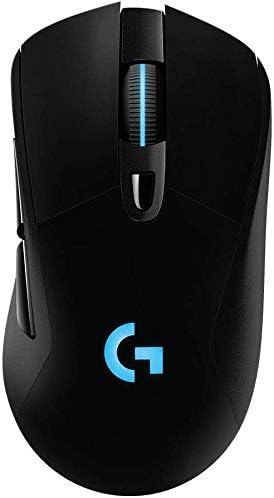
olusin 1: Top view of the Logitech G703 Hero Wireless Gaming Mouse, showcasing its ergonomic design and illuminated 'G' logo.

olusin 2: exploded view illustrating key components including 6 programmable buttons, advanced button tensioning, charging/data cable, wireless extension adapter, LIGHTSPEED wireless nano receiver, ergonomic design with rubber grip, and 16.8M color RGB lighting.

Figure 3: Bottom and side profile of the G703 mouse, highlighting the ON/OFF switch, HERO 16K sensor, and the slot for the 10g removable weight. Dimensions are also shown.

Figure 4: Details of the HERO 16K Sensor, emphasizing 1:1 tracking, 16,000 max DPI, and class-leading efficiency.

Figure 5: Illustration of LIGHTSPEED Wireless technology, providing pro-grade connectivity with an incredibly fast 1 ms report rate.

Figure 6: The G703 mouse shown with a POWERPLAY mouse pad, indicating compatibility for continuous wireless charging and up to 60 hours of rechargeable battery life.
Ṣeto
- Gba agbara si Asin naa: Connect the included charging/data cable to the mouse and a USB port on your computer. Allow the mouse to fully charge before first use.
- Connect the LIGHTSPEED Receiver: Insert the LIGHTSPEED wireless nano receiver into an available USB port on your computer. For optimal performance, use the included wireless extension adapter to position the receiver closer to the mouse.
- Agbara Tan: Wa ON/PA yipada ni isalẹ ti Asin ki o rọra si ipo 'ON'.
- Install G HUB Software: For full customization of buttons, DPI settings, and RGB lighting, download and install the Logitech G HUB software from the official Logitech webojula.
- Optional Weight: If desired, insert the 10g removable weight into the designated slot on the bottom of the mouse for personalized feel and balance.
Awọn ilana Iṣiṣẹ
Awọn iṣẹ bọtini
The G703 Hero features six programmable buttons. By default, these buttons perform standard mouse functions. You can customize their actions using the Logitech G HUB software.
- Tẹ apa osi (Bọ́tìnì 1): Iṣe akọkọ.
- Tẹ apa ọtun (Bọ́tìnì 2): Igbese keji.
- Middle Click/Scroll Wheel (Button 3): Activates middle click, scrolls up/down.
- DPI Cycle (Button 4): Cycles through preset DPI sensitivity levels.
- Forward (Button 5): Lilọ siwaju sinu web aṣàwákiri tabi awọn ohun elo.
- Back (Button 6): Lilọ kiri sẹhin sinu web aṣàwákiri tabi awọn ohun elo.
DPI Atunṣe
The DPI (Dots Per Inch) setting determines the mouse cursor's sensitivity. Use the DPI Cycle button (Button 4) to switch between different DPI profiles. You can configure these profiles in the G HUB software to match your preferences for various games or tasks.
Isọdi Imọlẹ RGB
The G703 Hero features LIGHTSYNC RGB lighting on the 'G' logo and scroll wheel. Use the Logitech G HUB software to select from 16.8 million colors, synchronize lighting effects with other Logitech G devices, or create custom animations.
Iṣakoso batiri
The mouse offers up to 60 hours of battery life on a single charge. When the battery is low, the RGB lighting may flash to indicate the need for recharging. Connect the charging/data cable to continue using the mouse while it charges. For continuous wireless charging, the mouse is compatible with the Logitech POWERPLAY Wireless Charging System (sold separately).
Itoju
To ensure optimal performance and longevity of your Logitech G703 Hero mouse, follow these maintenance guidelines:
- Ninu: Lo asọ rirọ, ti ko ni lint lati pa asin mọlẹ. Fun idoti alagidi, die-die dampen aṣọ pẹlu omi. Yago fun awọn kemikali lile tabi awọn ohun elo abrasive.
- Itọju Sensọ: Keep the optical sensor on the bottom of the mouse clean and free of dust or debris. Use a can of compressed air to gently clear any obstructions.
- Ibi ipamọ: Nigbati o ko ba wa ni lilo fun awọn akoko ti o gbooro sii, tọju asin naa sinu mimọ, agbegbe gbigbẹ kuro ni iwọn otutu to gaju.
Laasigbotitusita
| Isoro | Owun to le Solusan |
|---|---|
| Asin ko dahun |
|
| Lag tabi lemọlemọ asopọ |
|
| DPI or button settings not working |
|
| Imọlẹ RGB ko ṣiṣẹ |
|
Awọn pato
- Brand: Logitech
- Awoṣe: G703 Hero Lightspeed
- Imọ-ẹrọ Asopọmọra: Wireless (LIGHTSPEED)
- Imọ-ẹrọ Ṣiṣawari gbigbe: Opitika (Sensọ HERO 16K)
- DPI ti o pọju: 16,000
- Awọn bọtini eto: 6
- Imọlẹ RGB: LIGHTSYNC RGB (16.8M colors)
- Ìwúwo: 7.8 ounces (without optional weight)
- Optional Weight: 10g
- Igbesi aye batiri: Up to 60 hours (without lighting), up to 35 hours (with default lighting)
- Awọn iwọn (L x W x H): 5.67 x 3.35 x 3.31 inches (Awọn iwọn idii)
- Àwọ̀: Dudu
- Ọjọ akọkọ ti o wa: Oṣu kejila ọjọ 11, ọdun 2017
Atilẹyin ọja ati Support
This product is sold as "Renewed" and may come with specific return policies. Please refer to your purchase documentation for details on the return policy, which typically allows for returns or replacements within 90 days. For technical support, driver updates, and additional resources, please visit the official Logitech support webojula.
Logitech Atilẹyin Webojula: support.logi.com


