1. Ifihan
This manual provides detailed instructions for the installation, operation, and maintenance of your ZEBRONICS H81 LGA 1150 Socket Motherboard. Designed for Intel Core i7/i5/i3 processors, this ATX motherboard supports DDR3 memory and features an Intel H81 Chipset. Please read this manual thoroughly before proceeding with installation to ensure proper functionality and to prevent damage.

Aworan 1: Akọkọ view of the ZEBRONICS H81 LGA 1150 Motherboard, showcasing its layout and components.
2. Awọn pato
The following table outlines the key technical specifications of the ZEBRONICS H81 Motherboard:
| Ẹya ara ẹrọ | Apejuwe |
|---|---|
| Atilẹyin ilana | Intel Core i7/i5/i3 processors (LGA 1150 Socket) |
| Chipset | Intel H81 |
| Iranti Support | 2 x DDR3 dual-channel slots, 1066/1333/1600MHz, Max 32GB |
| LAN | Realtek 8105E 100/1000 Mbps |
| Ohun | Realtek 662, 3x Audio Jacks for 6 channel HD Audio |
| Back Panel Ports | 1x USB Mouse/Keyboard, 1x VGA, 1x HDMI, 2x USB 3.0, 2x USB 2.0, 1x LAN, 3x Audio Jacks |
| On-Board Connectors | Front panel, Speaker, Front panel audio, USB 2.0, 4x SATA, 4-pin CPU fan, SYS fan, 24-pin ATX power, 4-pin ATX 12V power, Clear CMOS header |
| Imugboroosi Iho | 1 x PCI Express x16 iho |
| Fọọmù ifosiwewe | ATX |
| Awọn iwọn | 21.3 x 5.7 x 26.8 cm |
| Iwọn | 560 g |

Image 2: Visual representation of key features including H81 Chipset, DDR3 support, LGA 1150 socket, HDMI, 5.1 Audio, 100/1000 LAN, 4 SATA ports, and PCIe slot.
3. Eto Itọsọna
Follow these steps for proper installation of your motherboard and its components:
- Igbaradi: Ensure your computer case is compatible with the ATX form factor. Gather necessary tools including a screwdriver, thermal paste, and anti-static wrist strap.
- Fi Sipiyu sori ẹrọ: Open the CPU socket lever. Carefully align the CPU with the socket (match the golden triangle on the CPU with the triangle on the socket) and gently place it in. Close the lever to secure the CPU. Apply a thin, even layer of thermal paste to the CPU's heat spreader.
- Fi ẹrọ kuru Sipiyu sori ẹrọ: Mount the CPU cooler according to its manufacturer's instructions, ensuring good contact with the CPU and proper fan orientation. Connect the CPU fan cable to the 4-pin CPU fan connector on the motherboard.
- Fi Ramu sori ẹrọ: Open the clips on both ends of the DDR3 memory slots. Align the RAM modules with the slots, ensuring the notch on the module matches the key in the slot. Press down firmly on both ends until the clips snap into place.
- Modaboudu Oke: Install the I/O shield into the rear opening of your computer case. Carefully place the motherboard into the case, aligning the screw holes with the standoffs. Secure the motherboard with screws.
- So agbara: Connect the 24-pin ATX main power connector and the 4-pin ATX 12V CPU power connector from your power supply to the corresponding ports on the motherboard.
- So Awọn ẹrọ Ipamọ: Use SATA cables to connect your hard drives or SSDs to the SATA ports on the motherboard. Connect the power cables from your power supply to these devices.
- So Awọn Cable Panel Iwaju: Connect the power switch, reset switch, HDD LED, power LED, and front panel audio/USB cables from your case to the respective headers on the motherboard. Refer to the motherboard diagram for correct pin assignments.
- Fi Awọn Kaadi Imugboroosi sii (Aṣayan): If installing a graphics card or other PCI Express cards, insert them into the appropriate slots and secure them with a screw.
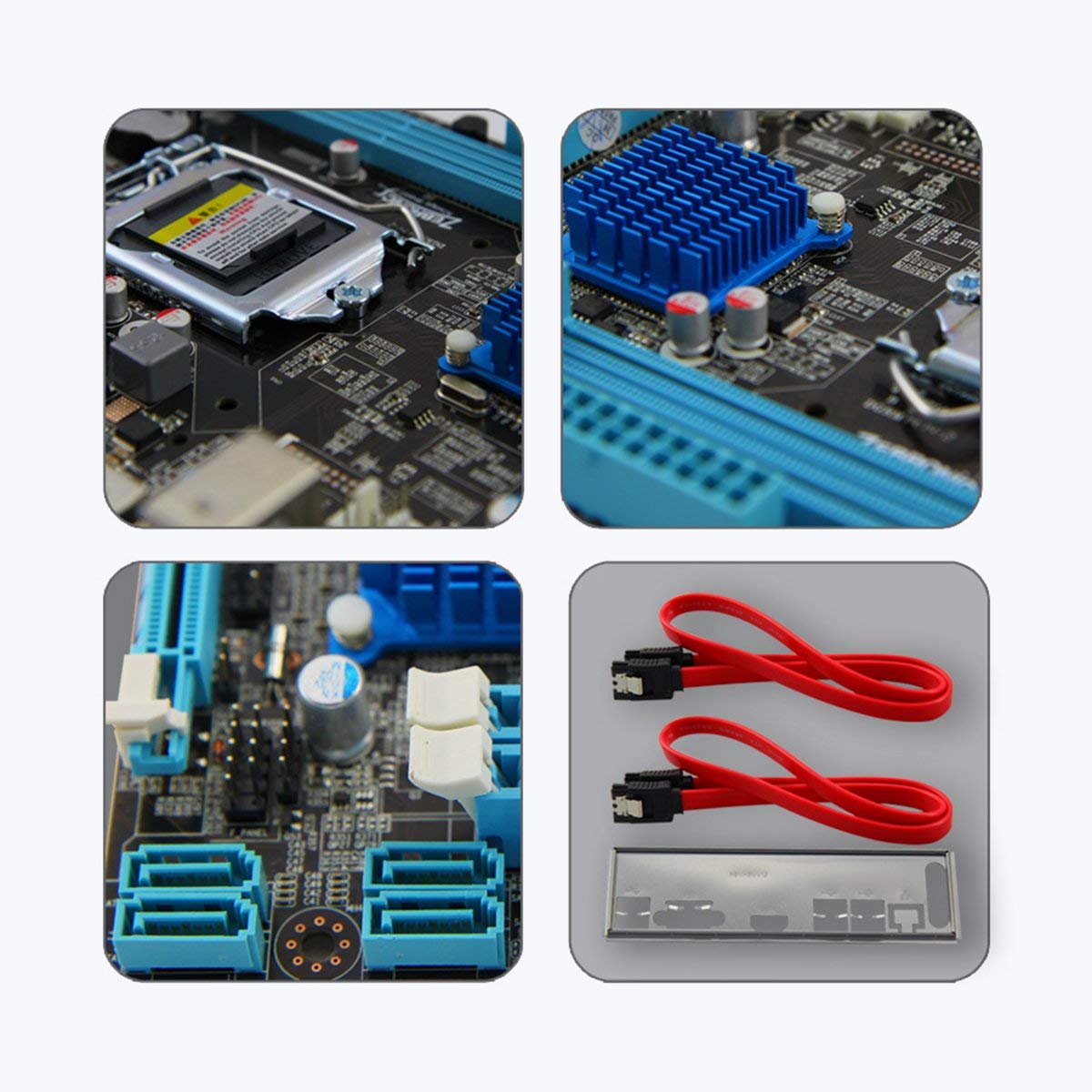
Aworan 3: Isunmọ views of motherboard components such as the CPU socket, chipset heatsink, SATA ports, and included accessories like SATA cables and the I/O shield.
4. Awọn ilana Iṣiṣẹ
Ni kete ti gbogbo awọn paati ti fi sii ati ti sopọ, o le fi agbara sori ẹrọ rẹ:
- Agbara Ibẹrẹ Tan: After ensuring all connections are secure, connect your monitor, keyboard, and mouse. Plug in the power cord and press the power button on your computer case.
- Eto BIOS/UEFI: During startup, repeatedly press the designated key (usually DEL or F2) to enter the BIOS/UEFI setup utility. Here you can configure boot order, system time, and other advanced settings. Save changes and exit to continue booting.
- Fifi sori ẹrọ eto iṣẹ: Fi media fifi sori ẹrọ ẹrọ rẹ sii (dirafu USB tabi DVD) ki o tẹle awọn ilana loju iboju lati fi OS sori ẹrọ.
- Fifi sori Awakọ: After OS installation, install the necessary drivers for your motherboard (chipset, LAN, audio, graphics) from the included driver CD or the ZEBRONICS webojula.
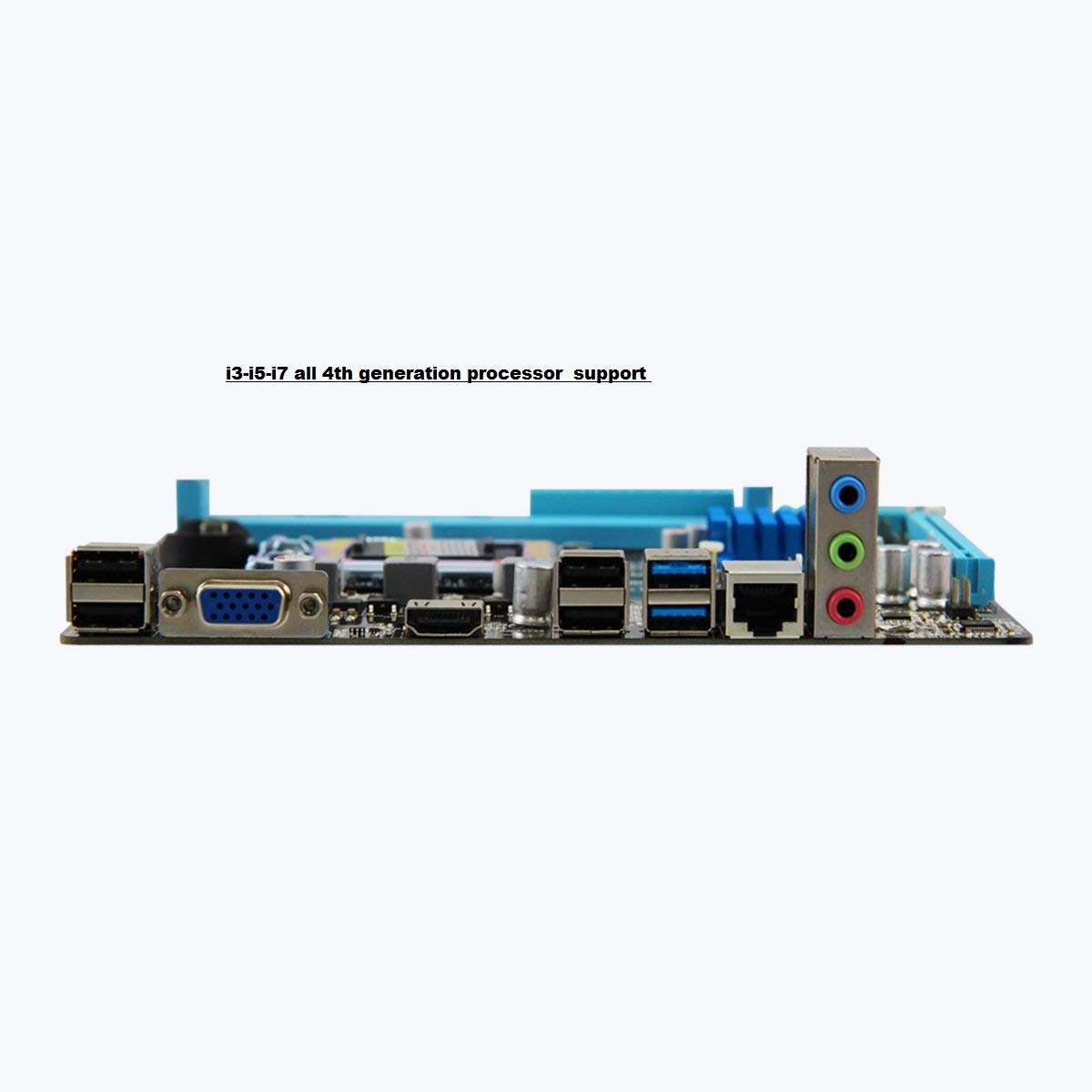
Image 4: Rear I/O panel of the ZEBRONICS H81 Motherboard, showing ports for USB, VGA, HDMI, LAN, and audio.
5. Itọju
Itọju deede ṣe iranlọwọ rii daju igbesi aye gigun ati iṣẹ to dara julọ ti modaboudu rẹ:
- Yiyọ eruku kuro: Lokọọkan nu eruku lati inu ọran kọnputa rẹ, pataki lati awọn heatsinks ati awọn onijakidijagan, ni lilo afẹfẹ fisinuirindigbindigbin. Rii daju pe eto naa ti wa ni pipa ati yọọ kuro ṣaaju ṣiṣe mimọ.
- Awọn imudojuiwọn Awakọ: Keep your motherboard drivers (chipset, LAN, audio) updated to the latest versions available from the ZEBRONICS official webojula lati rii daju ibamu ati iṣẹ.
- Awọn imudojuiwọn BIOS/UEFI: Only update the BIOS/UEFI if necessary, following the instructions provided by ZEBRONICS carefully. Incorrect BIOS updates can render your motherboard inoperable.
- Iṣakoso USB: Rii daju pe awọn kebulu inu ti wa ni ipa-ọna daradara lati mu ilọsiwaju afẹfẹ dara ati ṣe idiwọ kikọlu.
6. Laasigbotitusita
Ti o ba pade awọn ọran pẹlu modaboudu rẹ, tọka si awọn igbesẹ laasigbotitusita ti o wọpọ wọnyi:
- Ko si Agbara/Ko si bata:
- Check all power connections (24-pin ATX, 4-pin ATX 12V, CPU fan).
- Rí i dájú pé agbára náà ti tan àti pé ó ń ṣiṣẹ́ dáadáa.
- Daju iwaju nronu agbara yipada asopọ.
- Try clearing the CMOS (refer to the Clear CMOS header on the motherboard).
- Ko si Ifihan:
- Ensure the monitor is connected to the correct video output (VGA or HDMI on the motherboard, or dedicated graphics card).
- Reseat the RAM modules. Try booting with only one RAM module.
- If using a dedicated graphics card, ensure it is properly seated and powered.
- Aisedeede/iparun eto:
- Ṣayẹwo fun overheating. Rii daju pe olutọju Sipiyu ti fi sori ẹrọ daradara ati pe awọn onijakidijagan n yi.
- Ṣiṣe awọn irinṣẹ idanimọ iranti lati ṣayẹwo iduroṣinṣin Ramu.
- Update motherboard drivers and BIOS/UEFI.
- Peripheral Issues (USB, LAN, Audio):
- Ensure drivers for these components are installed and up to date.
- Check physical connections of cables and devices.
- Test with different peripherals to isolate the issue.
7. Atilẹyin ọja ati Support
Your ZEBRONICS H81 Motherboard comes with a 2-odun atilẹyin ọja provided by CORE COMPUTERS. Please retain your proof of purchase for warranty claims.
For technical support, driver downloads, or further assistance, please visit the official ZEBRONICS support webojula tabi kan si wọn onibara iṣẹ.


