Ọrọ Iṣaaju
Welcome to the world of vinyl! This instruction manual provides detailed guidance on setting up, operating, and maintaining your new Udreamer Vinyl Record Player (Model: UD001). Designed for both entertainment and home decoration, this belt-driven vintage phonograph offers versatile playback options and built-in speakers. Please read this manual thoroughly to ensure proper use and longevity of your device.
Ohun ti o wa ninu Apoti
- 1 x Udreamer Turntable
- 1 x Itọsọna olumulo
- 1 x 5V, 1.5A Power Cord

Figure 1: Included components of the Udreamer Vinyl Record Player package.
Ọja Pariview
Familiarize yourself with the main components and controls of your Udreamer record player.
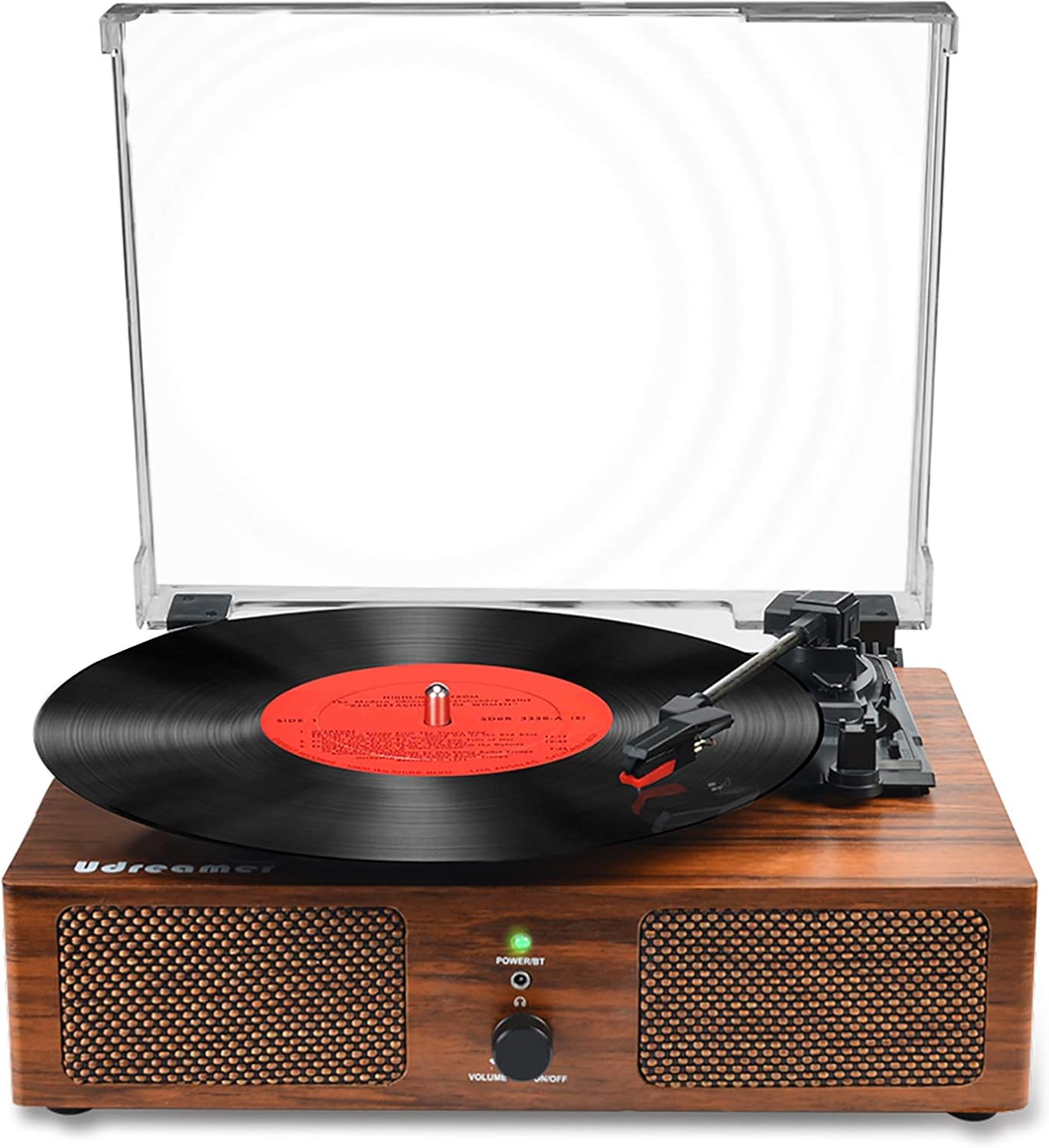
olusin 2: Iwaju view of the Udreamer Vinyl Record Player.

Figure 3: Key components and control panel.
Control Panel & Ports:
- Power Button & Volume Control: Turn the unit on/off and adjust volume.
- Power/BT Indicator: Lights up when powered on, flashes for Bluetooth pairing.
- Jack agbekari: Fun ikọkọ gbigbọ.
- Akoko-IN: Connect external audio devices via 3.5mm cable.
- RCA (R&L) Output: Connect to external speakers for enhanced sound.
- Input USB: Play music directly from a USB drive.
- Power In (DC5V-1A): So ohun ti nmu badọgba agbara pọ.
Turntable Components:
- Platter: Where the vinyl record rests.
- Ohun orin: Ó di stylus mú, ó sì ń tọ́pasẹ̀ àwọn ihò àwo orin náà.
- Àmì (Abẹ́rẹ́): Reads the audio from the record.
- Arm Raise Lever: Gently raises and lowers the tonearm.
- Turntable Auto Stop Switch: Enables/disables automatic stopping of the platter at the end of a record.
- Turntable Speed Switch: Select playback speed (33 1/3, 45, 78 RPM).
- Detachable Dust Cover: Protects the platter and tonearm from dust.
Ṣeto
- Yọọ kuro: Ni ifarabalẹ yọ gbogbo awọn paati kuro ninu apoti.
- Ibi: Gbe awọn turntable lori kan idurosinsin, ipele dada kuro lati orun taara, ooru awọn orisun, ati nmu gbigbọn.
- Asopọ agbara: Connect the provided 5V, 1.5A power cord to the 'Power In' port on the back of the turntable and plug the adapter into a wall outlet.
- Ideri Ekuru: Attach the detachable dust cover by aligning its hinges with the slots on the back of the turntable.
- Agbara Ibẹrẹ Tan: Rotate the Power/Volume knob clockwise to turn on the unit. The Power/BT indicator light will illuminate.

Figure 4: Rear connection ports for power, USB, AUX, and RCA.
Awọn ilana Iṣiṣẹ
Ti ndun fainali Records
- Àkọsílẹ̀ Ibi: Gently place a vinyl record on the turntable platter.
- Yan Iyara: Adjust the Turntable Speed Switch to match the RPM of your record (33 1/3, 45, or 78 RPM). Use the 45 RPM adapter for 7-inch records if needed.
- Duro Aifọwọyi: Set the Turntable Auto Stop Switch to ON if you want the platter to stop spinning automatically at the end of the record. Set to OFF for continuous play.
- Ohùn ìdúró: Fi pẹ̀lẹ́pẹ̀lẹ́ gbé ohun orin náà sórí ihò ìbẹ̀rẹ̀ tí a fẹ́ nínú àwo orin náà.
- Apá ìsàlẹ̀: Use the Arm Raise Lever to slowly lower the tonearm onto the record. The music will begin to play.
- Ṣatunṣe Iwọn didun: Rotate the Power/Volume knob to adjust the sound level.
- End Playback: At the end of the record, if Auto Stop is ON, the platter will stop. If OFF, manually lift the tonearm using the Arm Raise Lever and return it to its rest.

Figure 5: Stylus, belt-driven system, and supported record speeds.
Asopọ Bluetooth
- Mu Bluetooth ṣiṣẹ: Turn on the record player. The Power/BT indicator light will flash blue, indicating it's in Bluetooth pairing mode.
- Activate Device Bluetooth: Lórí fóònù alágbèéká rẹ tàbí ẹ̀rọ mìíràn tí ó ní Bluetooth, mu Bluetooth ṣiṣẹ́ kí o sì wá àwọn ẹ̀rọ tó wà.
- Sopọ: Select "Turntable" or "Udreamer" from the list of devices. Once connected, the Power/BT indicator light will stop flashing and remain solid blue.
- Mu Orin: You can now play music from your device through the record player's built-in speakers.
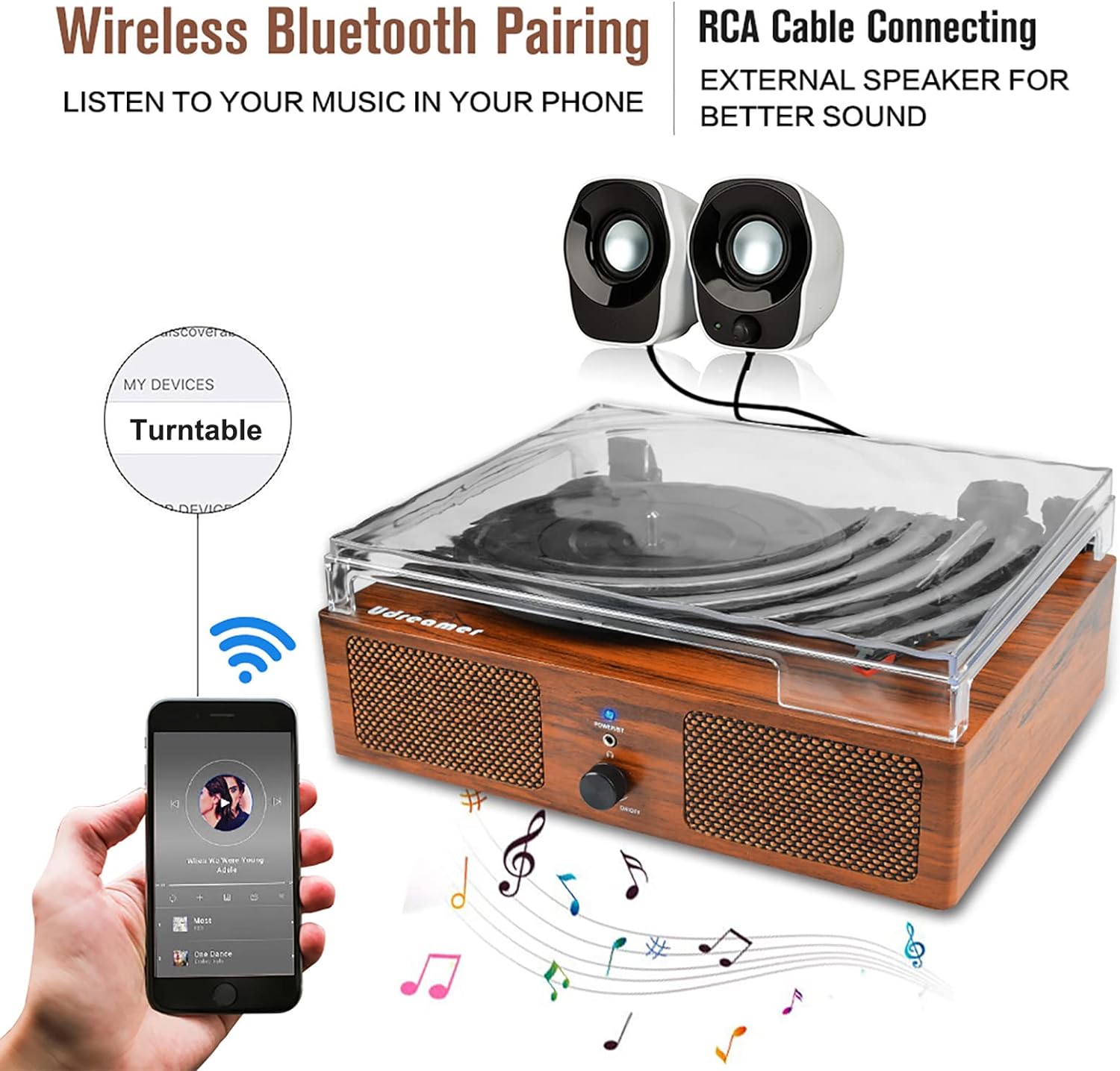
Figure 6: Bluetooth pairing and RCA output options.
USB Sisisẹsẹhin
- Insert USB: Insert a USB flash drive into the USB input port on the back of the record player.
- Sisisẹsẹhin Aifọwọyi: The unit will automatically switch to USB mode and begin playing audio files lati wakọ.
- Iṣakoso Sisisẹsẹhin: Use the controls on your connected device (if applicable) or the record player's volume knob to manage playback.
Apọju AX
- So ẹrọ pọ: Use a 3.5mm audio cable (not included) to connect your external audio device (e.g., MP3 player, CD player) to the AUX-IN port on the back of the record player.
- Mu Orin: Play music from your external device. The audio will be routed through the record player's speakers.
- Ṣatunṣe Iwọn didun: Control the volume using the record player's volume knob and/or your external device's volume control.
Connecting External Speakers (RCA Output)
- Connect RCA Cables: Use RCA cables (not included) to connect the RCA (R&L) Output ports on the back of the record player to the corresponding input ports on your external amplifier tabi agbara agbohunsoke.
- Power On External System: Ensure your external audio system is powered on and set to the correct input.
- Ṣatunṣe Iwọn didun: Adjust the volume primarily through your external audio system. The record player's volume knob will still affect the sound from its built-in speakers.
Itoju
Ninu awọn Turntable
- Yọọ ẹyọ kuro nigbagbogbo lati iṣan agbara ṣaaju ṣiṣe mimọ.
- Lo asọ ti o tutu, ti o gbẹ lati nu awọn ita ita.
- Do not use harsh chemicals, abrasive cleaners, or waxes.
- For the dust cover, use a soft cloth and a mild, non-abrasive cleaner.
Stylus Itọju
- Handle the stylus with extreme care. Avoid touching the stylus tip with your fingers.
- Clean the stylus regularly using a soft brush, brushing gently from back to front.
- If the stylus is damaged or worn, it should be replaced to prevent damage to your records.
Itọju igbasilẹ
- Keep records clean and free of dust. Use a carbon fiber brush before each play.
- Store records vertically in their sleeves to prevent warping.
- Avoid touching the record grooves with your fingers.
Laasigbotitusita
| Isoro | Owun to le Fa | Ojutu |
|---|---|---|
| Ko si agbara | Okun agbara ko sopọ; iṣan ko ṣiṣẹ. | Ensure power cord is securely connected; try a different outlet. |
| Ko si ohun lati ọdọ awọn agbohunsoke | Volume too low; incorrect input mode; external speakers not connected properly. | Increase volume; ensure correct mode (Vinyl, Bluetooth, USB, AUX); check RCA connections if using external speakers. |
| Fífò ìgbàsílẹ̀ | Record is dirty or scratched; turntable not level; stylus is worn or dirty. | Clean record; ensure turntable is on a stable, level surface; clean or replace stylus. |
| Bluetooth ko sopọ | Ẹ̀rọ náà kò sí ní ipò ìsopọ̀; ó jìnnà jù sí ẹ̀rọ tí a lè fi yípadà; ìdènà. | Ensure turntable is in Bluetooth pairing mode (flashing blue light); move device closer; restart both devices. |
| Platter ko nyi | Power off; belt dislodged; Auto Stop switch is ON and tonearm is at rest. | Check power; inspect drive belt; ensure tonearm is lifted or Auto Stop is OFF. |
Awọn pato
| Ẹya ara ẹrọ | Ẹ̀kúnrẹ́rẹ́ |
|---|---|
| Orukọ awoṣe | UD001 |
| Brand | Olódùmarè |
| Ọja Mefa | 12.8 x 9.8 x 4.7 inches |
| Iwọn Nkan | 4.84 iwon |
| Asopọmọra Technology | Bluetooth |
| Iyara Yiyipo ti o pọju | 78 RPM |
| Awọn irinše to wa | Turntable, User Manual, Power Cord |
| Pataki Awọn ẹya ara ẹrọ | AUTO stop switch, Detachable cover, Built-in 2 stereo speakers, RCA output, Bluetooth input, AUX input, Headphone jack, 3 Speeds (33 1/3, 45, 78 rpm), 3 Record Sizes (7", 10", 12") |
| Ohun elo | Igi, Ṣiṣu |
| Àwọ̀ | Brown |
| Olupese | Olódùmarè |
| Ilu isenbale | China |
Atilẹyin ọja ati Support
Udreamer is committed to providing quality products and excellent customer service. For any questions or concerns regarding your Udreamer Vinyl Record Player, please feel free to contact our support team. We strive to provide 24-hour one-on-one service to assist you.
Jọwọ tọka si iwe aṣẹ rira rẹ fun awọn alaye atilẹyin ọja kan pato ati alaye olubasọrọ.


