1. Ifihan
Thank you for choosing the Ducasa Warmtestraler Model 0637817 Electric Radiator. This manual provides essential information for the safe and efficient installation, operation, and maintenance of your new appliance. Please read this manual thoroughly before use and retain it for future reference.
The Ducasa Warmtestraler is a high-performance electric radiator designed for indoor heating. It features a backlit digital display, multiple operating modes, and a robust cast aluminum housing with a chamotte body for high heat output. Advanced functions include a weekly programming schedule, keyboard lock, overheating protection, and an 'open window' sensor.

olusin 1: Iwaju view of the Ducasa Warmtestraler Model 0637817 electric radiator. This image shows the complete unit, highlighting its sleek, white design and vertical heating elements.
2. Awọn ilana aabo
Lati yago fun ipalara tabi ibajẹ, nigbagbogbo ṣe akiyesi awọn iṣọra ailewu wọnyi:
- Ka gbogbo awọn itọnisọna ṣaaju lilo ohun elo yii.
- Ohun elo yi wa fun lilo ninu ile nikan. Maṣe lo ni ita.
- Rii daju pe ipese agbara voltage baamu aami igbelewọn lori ohun elo naa.
- Do not cover the radiator. Covering the radiator can cause overheating and fire.
- Keep flammable materials (curtains, furniture, etc.) at a safe distance from the radiator.
- Do not operate the radiator with a damaged cord or plug, or after the appliance malfunctions or has been dropped or damaged in any manner.
- Do not insert or allow foreign objects to enter any ventilation or exhaust opening as this may cause an electric shock or fire, or damage the radiator.
- Always unplug the radiator when not in use or before cleaning.
- Ohun elo yii kii ṣe ipinnu fun lilo nipasẹ awọn eniyan (pẹlu awọn ọmọde) pẹlu idinku ti ara, imọlara tabi awọn agbara ọpọlọ, tabi aini iriri ati imọ, ayafi ti wọn ba ti fun wọn ni abojuto tabi itọnisọna nipa lilo ohun elo nipasẹ eniyan ti o ni iduro fun aabo wọn.
- Awọn ọmọde yẹ ki o wa ni abojuto lati rii daju pe wọn ko ṣere pẹlu ohun elo naa.
- The radiator is equipped with an overheating protection system. If the radiator overheats, it will automatically shut off. Unplug the unit and allow it to cool before attempting to restart.
3. Package Awọn akoonu
Carefully unpack the box and ensure all items are present and undamaged. If any items are missing or damaged, contact your retailer immediately.
- Ducasa Warmtestraler Model 0637817 Electric Radiator Unit
- Wall mounting bracket(s) and hardware (screws, anchors)
- Afowoyi Olumulo (iwe-ipamọ yii)
4. Fifi sori ẹrọ ati Oṣo
4.1 Ṣiṣii silẹ
Remove all packaging materials from the radiator. Keep packaging materials away from children. Inspect the radiator for any signs of damage during transit.
4.2 Mounting the Radiator
The Ducasa Warmtestraler is designed for wall mounting. Professional installation is recommended for electrical appliances to ensure safety and proper function.
- Choose a suitable wall location, ensuring adequate clearance from flammable materials and obstructions.
- Ṣe àmì sí àwọn ibi tí a ti ń lu bọ́ọ̀tì ìfìkọ́lé ògiri nípa lílo àwòṣe tí a pèsè tàbí nípa dídi bọ́ọ̀tì náà mọ́ ògiri.
- Drill holes and insert wall anchors suitable for your wall type.
- Ṣe aabo akọmọ iṣagbesori si odi nipa lilo awọn skru ti a pese.
- Carefully lift the radiator and hook it onto the wall mounting bracket. Ensure it is securely seated.
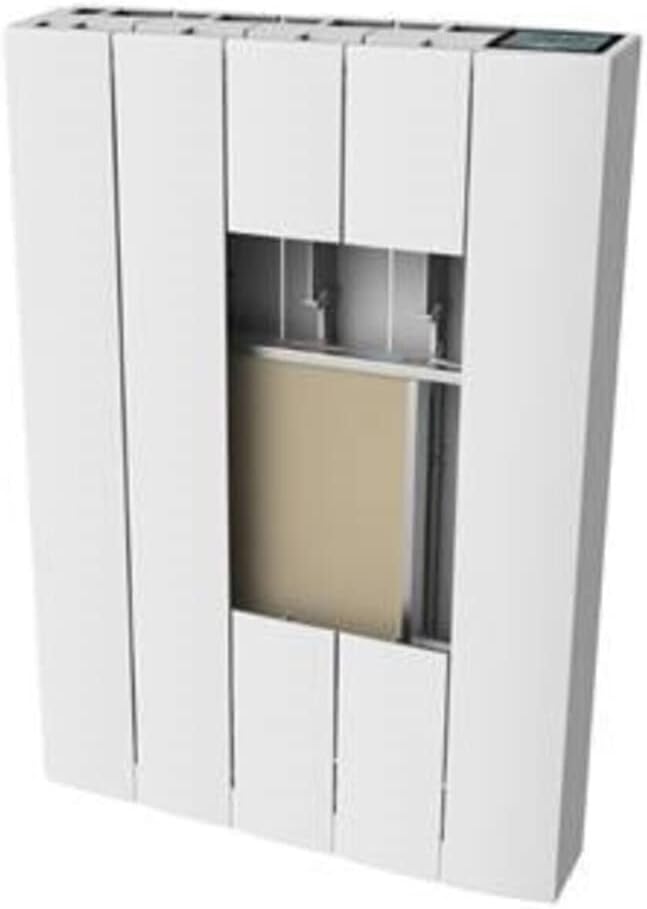
olusin 2: Ti abẹnu view of the Ducasa Warmtestraler. This image illustrates the internal structure, including the chamotte heating elements and potential mounting points, providing insight into its construction.
4.3 Itanna Asopọ
Connect the radiator to a grounded electrical outlet. Ensure the outlet is easily accessible and that the power cord is not stretched or pinched. Do not use extension cords or multi-plugs with this appliance.
5. Awọn ilana Iṣiṣẹ
5.1 Ifihan Loriview
The radiator features a backlit digital touchscreen display with a protective cover. This display shows the current temperature, selected operating mode, and other relevant information.
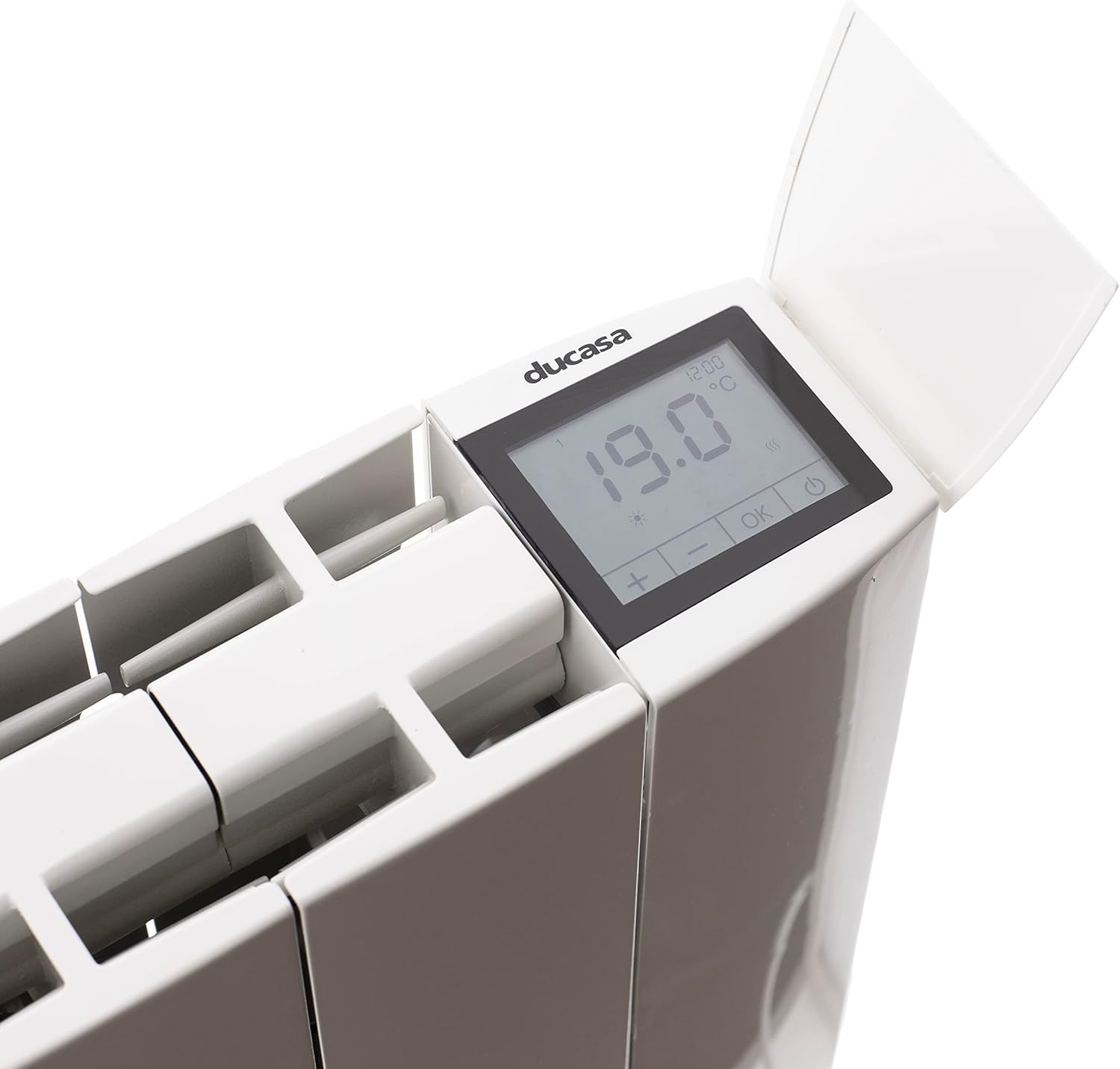
Figure 3: Close-up of the Ducasa Warmtestraler's digital display. This image clearly shows the touchscreen interface, current temperature reading (19.0°C), time, and control buttons (plus, minus, OK, power).
5.2 Ipilẹ isẹ
- Titan/Apapa: Press the power button on the display to turn the radiator on or off.
- Atunṣe iwọn otutu: Use the '+' and '-' buttons on the touchscreen to set your desired temperature.
- Aṣayan Ipo: Press the 'OK' button or navigate through the menu to select an operating mode.
5.3 Awọn ọna ṣiṣe
The radiator offers 5 distinct operating modes:
- Ipo Itunu: Maintains a comfortable, user-defined temperature.
- Ipo Eco: Ó ń ṣiṣẹ́ ní ìwọ̀n otútù díẹ̀ ju ti Comfort mode lọ láti fi agbára pamọ́.
- Anti-Ice Mode: Prevents the room temperature from dropping below a critical level (e.g., 5°C) to protect against freezing.
- Ipo Tan/Pa: Allows manual switching of the radiator on or off.
- Ipo afọwọṣe: Provides direct control over the heating output without following a program.
5.4 siseto
The radiator features a 24-hour/7-day weekly programming function. Refer to the on-screen menu for detailed instructions on setting up your desired heating schedule for each day of the week.
5.5 Pataki Awọn ẹya ara ẹrọ
- Titii Keyboard: This feature prevents accidental changes to settings. Activate/deactivate via the display menu.
- Open Window Sensor: The radiator can detect a sudden drop in temperature (e.g., when a window is opened) and temporarily reduce heating to save energy.
6. Itọju
Regular maintenance ensures the longevity and efficient operation of your radiator.
- Ninu: Before cleaning, always unplug the radiator and allow it to cool completely. Wipe the exterior surfaces with a soft, damp asọ. Ma ṣe lo awọn afọmọ abrasive, nkanmimu, tabi awọn kẹmika lile.
- Yiyọ eruku kuro: Periodically remove dust from the air inlets and outlets using a soft brush or vacuum cleaner attachment.
- Ibi ipamọ: If storing the radiator for an extended period, ensure it is clean and dry. Store it in a cool, dry place, preferably in its original packaging.
7. Laasigbotitusita
If you encounter issues with your Ducasa Warmtestraler, refer to the table below for common problems and solutions. If the problem persists, contact qualified service personnel.
| Isoro | Owun to le Fa | Ojutu |
|---|---|---|
| Radiator kìí tan. | Ko si ipese agbara. Overheating Idaabobo mu ṣiṣẹ. | Ṣàyẹ̀wò bóyá okùn agbára náà wà ní ìsopọ̀mọ́ra àti pé ìjáde náà ń ṣiṣẹ́ dáadáa. Unplug the radiator, allow it to cool for 30 minutes, then plug it back in. Ensure it is not covered. |
| Alapapo ti ko to. | Incorrect operating mode or temperature setting. 'Open window' sensor activated. | Adjust the operating mode (e.g., to Comfort mode) and increase the target temperature. Close windows/doors. The radiator will resume normal operation. |
| Display is not responding. | Keyboard lock is active. Ibùgbé software glitch. | Deactivate the keyboard lock via the display menu. Unplug the radiator for a few minutes, then plug it back in to reset. |
8. Awọn pato
- Nọmba awoṣe: 0637817
- Brand: Ducasa
- Ìwọ̀n Nkan: 8.3 kilo
- Awọn iwọn idii: 62 x 46 x 14 cm
- Ọna gbigbona: Gbigbawọle
- O wu Ooru: 2000 Watt
- Orisun Agbara: Ina pẹlu okun
- Iru fifi sori: Odi-oke
- Awọn ẹya pataki: Digital display, Backlit display, 5 operating modes, Weekly program, Keyboard lock, Overheating protection, Open window sensor
- Àwọ̀: Funfun
- Lilo: Ninu ile nikan
- Awọn batiri ti a beere: Rara
9. Atilẹyin ọja ati Support
Fún ìwífún nípa àtìlẹ́yìn, jọ̀wọ́ tọ́ka sí àwọn ìwé tí a pèsè ní àkókò tí o ń rà á tàbí kí o kan sí olùtajà rẹ. Pa ẹ̀rí ìrà rẹ mọ́ fún àwọn ẹ̀tọ́ àtìlẹ́yìn èyíkéyìí.
If you require technical support or have questions not covered in this manual, please contact Ducasa customer service or your authorized dealer.


