1. Ifihan
The ANENG AN8009 is a compact, auto/manual ranging True-RMS digital multimeter designed for accurate measurement of various electrical parameters. It is suitable for use in automotive maintenance, electrical engineering, and educational laboratories. This manual provides detailed instructions for the safe and effective operation, setup, and maintenance of your AN8009 multimeter.
2. Alaye Aabo
To ensure safe operation and service of the meter, please read all instructions carefully before use. Failure to observe safety warnings can result in electric shock, fire, or damage to the meter.
- Always disconnect test leads from the circuit before changing functions.
- Maṣe lo diẹ sii ju iwọn voltage, bi a ti samisi lori mita, laarin awọn ebute tabi laarin eyikeyi ebute oko ati ilẹ aiye.
- Lo iṣọra pupọ nigbati o ba n ṣiṣẹ pẹlu voltages loke 30V AC RMS, 42V tente oke, tabi 60V DC. Iru voltages duro a mọnamọna ewu.
- Keep your fingers behind the probe barriers during measurements.
- Ma ṣe lo mita naa ti o ba han pe o bajẹ tabi ti idabobo ti o wa lori awọn itọsọna idanwo ba ni ipalara.
- Ensure the battery cover is securely closed before operating the meter.
- Rọpo awọn batiri lẹsẹkẹsẹ nigbati ifihan batiri kekere ba han lati rii daju pe o peye awọn kika.
3. Ọja Ipariview
The ANENG AN8009 multimeter features a large, backlit LCD display for clear readings in various lighting conditions. It includes a rotary function switch, input jacks, and various buttons for mode selection and data hold.
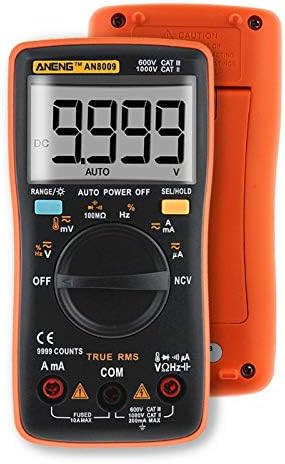
olusin 3.1: Iwaju View of ANENG AN8009 Digital Multimeter. This image displays the multimeter's front panel, showing the large digital display, rotary function switch, input jacks (VΩHz, COM, A, mA), and various function buttons. The orange casing is visible around the black main body.
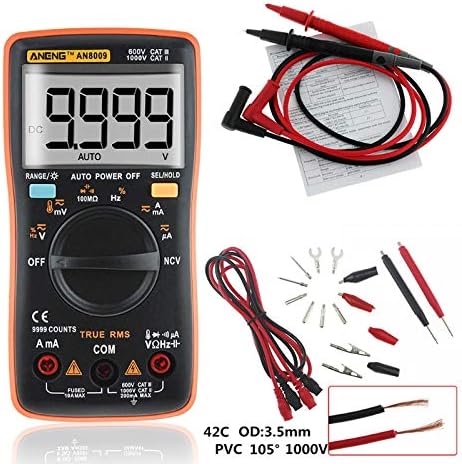
Figure 3.2: ANENG AN8009 Digital Multimeter with Test Leads and Accessories. This image shows the ANENG AN8009 multimeter alongside its standard accessories, including red and black test leads, alligator clips, and various probe tips. A user manual is also visible in the background.
3.1 Awọn paati bọtini
- Ifihan LCD: Ṣe afihan awọn kika wiwọn, awọn ẹya, ati awọn afihan iṣẹ.
- Yipada iṣẹ: Rotary dial to select measurement modes (Voltage, Current, Resistance, àti bẹ́ẹ̀ bẹ́ẹ̀ lọ).
- Awọn Jacks ti nwọle: Terminals for connecting test leads (VΩHz, COM, A, mA).
- Awọn bọtini: For features like RANGE, AUTO POWER OFF, SEL/HOLD, and backlight activation.
4. Eto
4.1 Fifi sori batiri
The ANENG AN8009 requires two 1.5V AAA batteries (not included) for operation.
- Rii daju pe multimeter naa ti wa ni pipa.
- Wa yara batiri ni ẹhin mita naa.
- Lo screwdriver lati ṣii ideri iyẹwu batiri naa.
- Fi awọn batiri AAA 1.5V meji sii, ki o si kiyesi polarity ti o tọ (+ ati -).
- Rọpo ideri kompaktimenti batiri ki o ni aabo pẹlu dabaru.
4.2 Nsopọ Awọn itọsọna Igbeyewo
Always connect the black test lead to the COM (common) jack. Connect the red test lead to the appropriate input jack based on the desired measurement:
- VΩHz: Fun voltage, àwọn ìwọ̀n resistance, ìgbagbogbo, capacitance, diode, àti continuity.
- mA: Fun awọn wiwọn lọwọlọwọ titi di 600mA.
- A: Fun awọn wiwọn lọwọlọwọ titi di 10A.
5. Awọn ilana Iṣiṣẹ
Turn the rotary switch to the desired function. The meter typically defaults to auto-ranging. Press the 'SEL' button to switch between functions within a single rotary switch position (e.g., AC/DC voltage, diode / itesiwaju).
5.1 DC / AC Voltage Measurement (V, mV)
- Connect the black lead to COM and the red lead to VΩHz.
- Turn the rotary switch to the V (Voltage) position. The meter will typically default to DCV. Press 'SEL' to switch to ACV if needed.
- So àwọn ìwádìí ìdánwò pọ̀ ní ìfẹ̀sẹ̀mọ́ra pẹ̀lú àyíká tàbí èròjà tí a ń dán wò.
- Ka voltage iye lori ifihan.
5.2 DC/AC Current Measurement (A, mA, uA)
Iṣọra: Never connect the meter in parallel to a voltage source when measuring current. This can blow the fuse or damage the meter. Always connect in series with the load.
- Connect the black lead to COM. Connect the red lead to mA for currents up to 600mA, or to A for currents up to 10A.
- Turn the rotary switch to the A (Current) position. Press 'SEL' to switch between DC/AC current or different ranges (uA, mA, A) if necessary.
- Open the circuit where current is to be measured and connect the meter in series.
- Ka iye lọwọlọwọ lori ifihan naa.
5.3 Ìwọ̀n Àìfaradà (Ω)
- Connect the black lead to COM and the red lead to VΩHz.
- Turn the rotary switch to the Ω (Resistance) position.
- Ensure the circuit is de-energized before measuring resistance. Connect the test probes across the component.
- Ka iye resistance lori ifihan.
5.4 Capacitance Measurement (nF, uF, mF)
- Connect the black lead to COM and the red lead to VΩHz.
- Turn the rotary switch to the Capacitance position.
- Discharge the capacitor completely before measurement. Connect the test probes across the capacitor terminals.
- Ka iye kapasito lori ifihan.
5.5 Frequency Measurement (Hz, KHz, MHz)
- Connect the black lead to COM and the red lead to VΩHz.
- Turn the rotary switch to the Hz (Frequency) position.
- Connect the test probes in parallel to the signal source.
- Ka iye igbohunsafẹfẹ lori ifihan.
5.6 Idanwo Diode
- Connect the black lead to COM and the red lead to VΩHz.
- Turn the rotary switch to the Diode/Continuity position. Press 'SEL' until the diode symbol appears.
- So ohun elo pupa mọ anode ati ohun elo dudu mọ katode ti diode naa.
- A forward voltage drop will be displayed for a good diode. Reverse the probes; the display should show 'OL' (open loop).
5.7 Igbeyewo Ilọsiwaju
- Connect the black lead to COM and the red lead to VΩHz.
- Turn the rotary switch to the Diode/Continuity position. Press 'SEL' until the continuity symbol appears.
- So àwọn ìwádìí ìdánwò pọ̀ mọ́ ara wọn ní gbogbo àyíká tàbí ẹ̀yà ara wọn.
- Tí ìtẹ̀síwájú bá wà (ìdènà tó wà ní ìsàlẹ̀ tó nǹkan bí 50Ω), ohun tí ó ń dún yóò dún.
5.8 Wiwọn iwọn otutu
- Connect the temperature probe (K-type thermocouple) to the VΩHz and COM jacks, observing polarity.
- Turn the rotary switch to the Temp position.
- Fi ìsàlẹ̀ ohun tí a fẹ́ wọn sí orí tàbí nítòsí ohun tí a fẹ́ wọn ìwọ̀n otútù rẹ̀.
- Read the temperature value on the display (in °C or °F).
5.9 Non-olubasọrọ Voltage (NCV) erin
- Yipada yiyi pada si ipo NCV.
- Move the top end of the meter close to the conductor being tested.
- Ti AC voltage is detected, the meter will emit an audible beep and the NCV indicator will light up.
5.10 Data idaduro Išė
Tẹ bọtini 'DÍDÁ' láti di kíkà tó wà lórí ìbòjú náà mú. Tẹ̀ ẹ́ lẹ́ẹ̀kan síi láti tú iṣẹ́ ìdúró náà sílẹ̀.
5.11 Imọlẹ ẹhin
Press the backlight button (often combined with 'HOLD' or 'SEL') to turn the display backlight on or off. The backlight typically turns off automatically after a short period to conserve battery life.
6. Itọju
6.1 Ninu
Pa ọran naa pẹlu ipolowoamp Aṣọ àti ọṣẹ ìfọṣọ díẹ̀. Má ṣe lo àwọn ohun ìfọṣọ tàbí àwọn ohun olómi. Jẹ́ kí àwọn ibi tí a fi ń wọlé wà ní ìpamọ́ pẹ̀lú ẹ̀gbin àti ọrinrin.
6.2 Batiri Rirọpo
When the low battery indicator appears on the display, replace the batteries as described in Section 4.1. Using the meter with a low battery can lead to inaccurate readings.
6.3 Fiusi Rirọpo
If the current measurement function fails, the fuse may need replacement. The AN8009 typically uses two fuses: a 200mA/250V fast-blow fuse for the mA input and a 10A/250V fast-blow fuse for the A input. Refer to the markings on the meter for exact fuse specifications. Fuse replacement should only be performed by qualified personnel.
- Ensure the meter is powered off and test leads are disconnected.
- Open the battery compartment and then the main casing screws (if applicable, consult the meter's physical design).
- Carefully remove the old fuse and replace it with a new fuse of the identical type and rating.
- Tún so mita náà pọ̀, kí o sì rí i dájú pé gbogbo skru náà ti di mọ́lẹ̀.
6.4 Ibi ipamọ
If the meter is not to be used for an extended period, remove the batteries to prevent leakage and damage. Store the meter in a cool, dry place, away from direct sunlight and extreme temperatures.
7. Laasigbotitusita
- Ko si ifihan tabi ifihan ti ko lagbara: Ṣàyẹ̀wò fífi bátìrì sílẹ̀ kí o sì gba agbára. Rọpò bátìrì tí ó bá pọndandan.
- 'OL' (Overload) displayed: The input value exceeds the selected range or the maximum measurement capability of the meter. Select a higher range or ensure the input is within specifications.
- Awọn kika ti ko tọ: Check battery level, ensure test leads are properly connected, and verify the correct function is selected. Clean input jacks if dirty.
- Wiwọn lọwọlọwọ ko ṣiṣẹ: Check the fuse for the respective current input (mA or A). Replace if blown.
8. Awọn pato
| Paramita | Sipesifikesonu |
|---|---|
| Awọn iwọn otutu ti nṣiṣẹ | 0 - 40 °C |
| Ọriniinitutu ti nṣiṣẹ | 75% RH |
| Ibi ipamọ Ipo | -20 ~ 60 °C |
| Ọriniinitutu ipamọ | 80% RH |
| Ipo Iṣiṣẹ | Aifọwọyi / Afowoyi Raging |
| Iwọn Iwọn Iwọn otutu | -20 ~ 1000 °C / -4 ~ 1832 °F |
| Wiwọn Iwọn Agbara | 9.99nF / 99.99nF / 999.9nF / 9.99uF / 99.99uF / 999.9uF / 9.999mF |
| Idiwọn Voltage Range (DC/AC) | 999.9mV / 9.999V / 99.99V / 999.9V (DC) / 750V (AC) |
| Measuring Current Range (DC/AC) | 99.99uA / 999.9uA / 999.9mA / 9.999A |
| Iwọn Iwọn Resistance | 99.99Ω / 999.9Ω / 9.999kΩ / 99.99kΩ / 999.9kΩ / 99.99MΩ |
| Iwọn Igbohunsafẹfẹ | 99.99Hz / 999.9Hz / 9.999KHz / 99.99KHz / 999.9KHz / 9.999MHz |
| Ijade Igun Square | 50Hz - 1000Hz (various steps) |
| Ifihan Iru | Digital Display (9999 Counts) |
| Idanwo Diode | Bẹẹni |
| Itesiwaju | Bẹẹni |
| Ojuse Cycle | 1% - 99% |
| Sample Oṣuwọn | 3 igba fun keji |
| Agbara | Awọn batiri AAA 2 * 1.5V |
9. Atilẹyin ọja ati Support
For warranty information and technical support, please refer to the documentation provided with your purchase or contact the seller/manufacturer directly. Keep your purchase receipt as proof of purchase.


