Ọrọ Iṣaaju
This manual provides essential instructions for the safe operation, installation, and maintenance of your Chicago Pneumatic Digital Timer for Lamps & Appliances. Please read this manual thoroughly before using the product and retain it for future reference. Proper use ensures optimal performance and extends the product's lifespan.
Awọn Itọsọna Aabo
Nigbagbogbo ṣe akiyesi awọn iṣọra ailewu atẹle lati yago fun ipalara tabi ibajẹ ọja naa:
- Do not immerse the timer in water or expose it to excessive moisture.
- Do not exceed the maximum load rating specified for the timer.
- Rii daju pe aago ti wa ni edidi ni aabo sinu iṣanjade ti ilẹ.
- Do not disassemble or attempt to repair the timer yourself. Contact qualified service personnel.
- Jeki kuro ni arọwọto awọn ọmọde.
- Unplug the timer from the power outlet before cleaning.
Package Awọn akoonu
Jẹrisi pe gbogbo awọn ohun kan wa ninu package:
- 1 x Chicago Pneumatic Digital Timer
- 1 x Itọsọna olumulo (iwe yii)
Ọja Pariview
Familiarize yourself with the components of your digital timer.
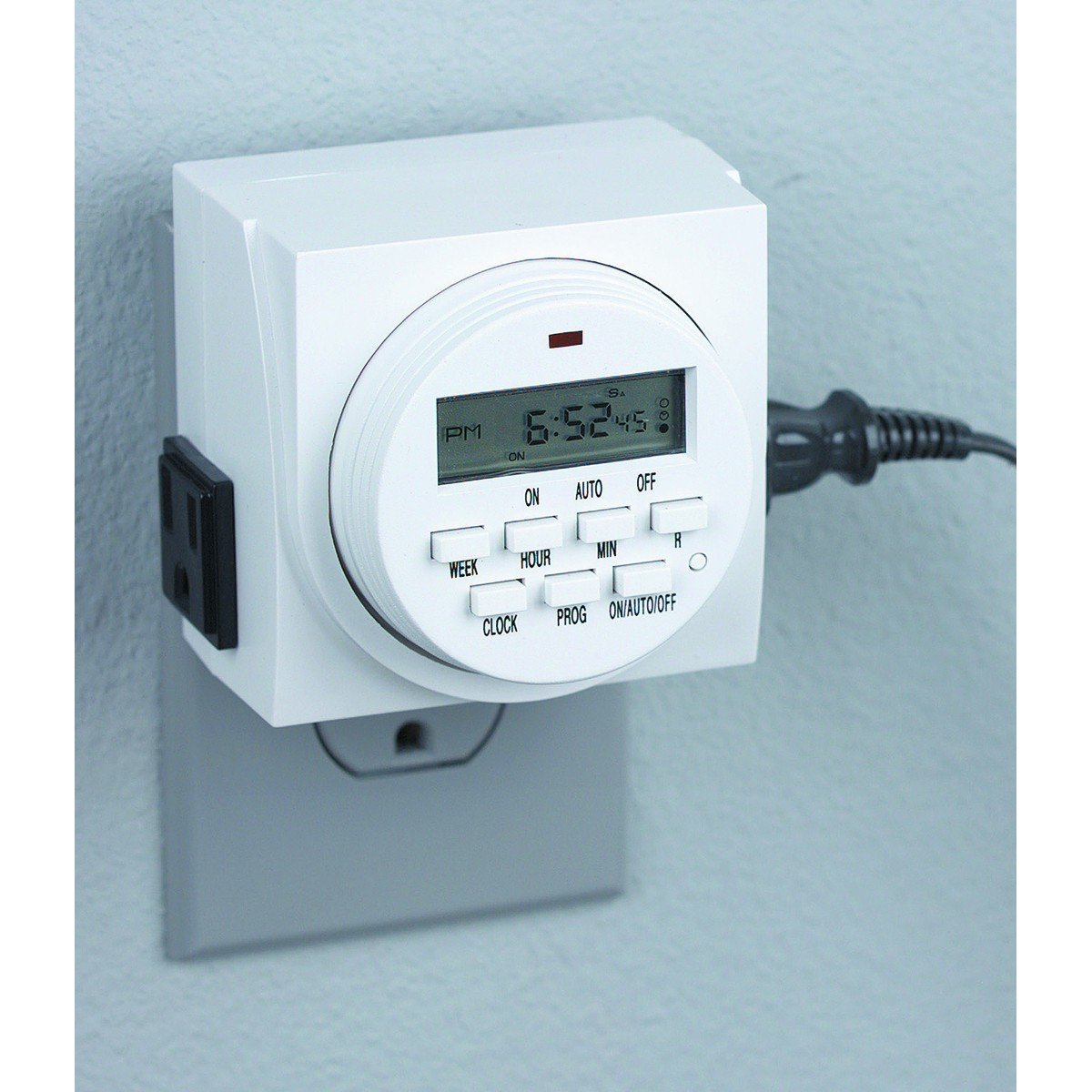
Nọmba 1: Iwaju view of the Chicago Pneumatic Digital Timer. This image displays the digital screen, which shows the current time and programming status, along with various control buttons for setting programs, adjusting time, and manual override.
The timer features a clear digital display, multiple programming buttons, and a power outlet for connecting appliances.
Ṣeto
- Idiyele Ibẹrẹ: Before first use, plug the timer into a live electrical outlet for at least 30 minutes to charge the internal battery. This battery retains settings during power outages.
- Ko Gbogbo Eto kuro: Press the "RESET" button (often a small recessed button requiring a pen tip) to clear all previous settings and restore factory defaults.
- Ṣeto Akoko lọwọlọwọ:
- Press the "CLOCK" button.
- Use the "HOUR" and "MINUTE" buttons to set the current time.
- Use the "WEEK" button to set the current day of the week.
- Press "CLOCK" again to confirm and exit time setting mode.
Awọn ilana Iṣiṣẹ
Siseto ON / PA Times
Aago naa gba laaye fun ọpọlọpọ awọn eto ON/OFF. Tẹle awọn igbesẹ wọnyi lati ṣeto eto kan:
- Press the "PROG" button. The display will show "1 ON".
- Use "WEEK" to select the day(s) for this program (e.g., MO, TU, WE, TH, FR, SA, SU, or combinations like MO-FR, SA-SU, MO-SU).
- Use "HOUR" and "MINUTE" to set the desired ON time.
- Press "PROG" again. The display will show "1 OFF".
- Use "WEEK", "HOUR", and "MINUTE" to set the desired OFF time for the same program.
- Tún ìgbésẹ̀ 1-5 ṣe fún àwọn ètò afikún (fún àpẹẹrẹ, "2 ON", "2 PA", àti bẹ́ẹ̀ bẹ́ẹ̀ lọ).
- After setting all programs, press the "CLOCK" button to return to the current time display.
Idojukọ Afowoyi
To manually switch the timer's output ON or OFF, or to cycle through modes:
- Press the "MANUAL" or "ON/AUTO/OFF" button repeatedly.
- The display will cycle through "ON" (always on), "AUTO" (follows programs), and "OFF" (always off). Select "AUTO" for programmed operation.
Connecting an Appliance
Plug the appliance you wish to control into the outlet on the front of the digital timer. Ensure the appliance's power switch is in the ON position if it has one, so the timer can control its power supply.
Itoju
- Ninu: Disconnect the timer from the power outlet. Wipe the exterior with a soft, dry cloth. Do not use abrasive cleaners or solvents.
- Ibi ipamọ: Tọju aago naa ni itura, aye gbigbẹ nigbati ko si ni lilo.
- Batiri: The internal battery is designed for long life and typically does not require replacement. If the display becomes dim or settings are frequently lost, ensure the timer is regularly plugged in to charge the battery.
Laasigbotitusita
| Isoro | Owun to le Fa | Ojutu |
|---|---|---|
| Aago naa ko tan/pa ni awọn akoko ti a ṣeto. |
|
|
| Ifihan ti ṣofo tabi baibai. |
|
|
| Awọn eto ti sọnu lẹhin agbara outage. | Internal battery not sufficiently charged. | Plug the timer into a live outlet for several hours to fully charge the internal battery. |
Awọn pato
| Awoṣe | Aago oni-nọmba |
| Brand | Chicago Pneumatic |
| Ohun elo | Ṣiṣu |
| Iwọn Nkan | 8.4 iwon |
| Package Mefa | 7.68 x 7.44 x 3.86 inches |
| UPC | 367877920504 |
| ASIN | B082P3B3TY |
| Agbara Rating | (Wo aami ọja fun iwọn didun kan patotage/ampigba) |
Atilẹyin ọja ati Support
Chicago Pneumatic products are manufactured to high-quality standards. For warranty information, please refer to the warranty card included with your purchase or visit the official Chicago Pneumatic webojula. Tọju iwe-ẹri rira rẹ bi ẹri rira.
For technical support, troubleshooting assistance beyond this manual, or to inquire about replacement parts, please contact Chicago Pneumatic customer service. Contact details can typically be found on the product packaging or the official brand webojula.
Awọn orisun Ayelujara: For additional support and product information, visit the official Chicago Pneumatic webojula.


