Ọrọ Iṣaaju
The Hyperkin Armor3 NuWave Controller is designed to provide accurate and fluid motion control for your Nintendo Wii U and Wii consoles. Featuring built-in Nu+ technology, this controller enhances your gaming experience by offering a wider range of motion in compatible titles. This manual provides essential information on setting up, operating, maintaining, and troubleshooting your NuWave Controller.
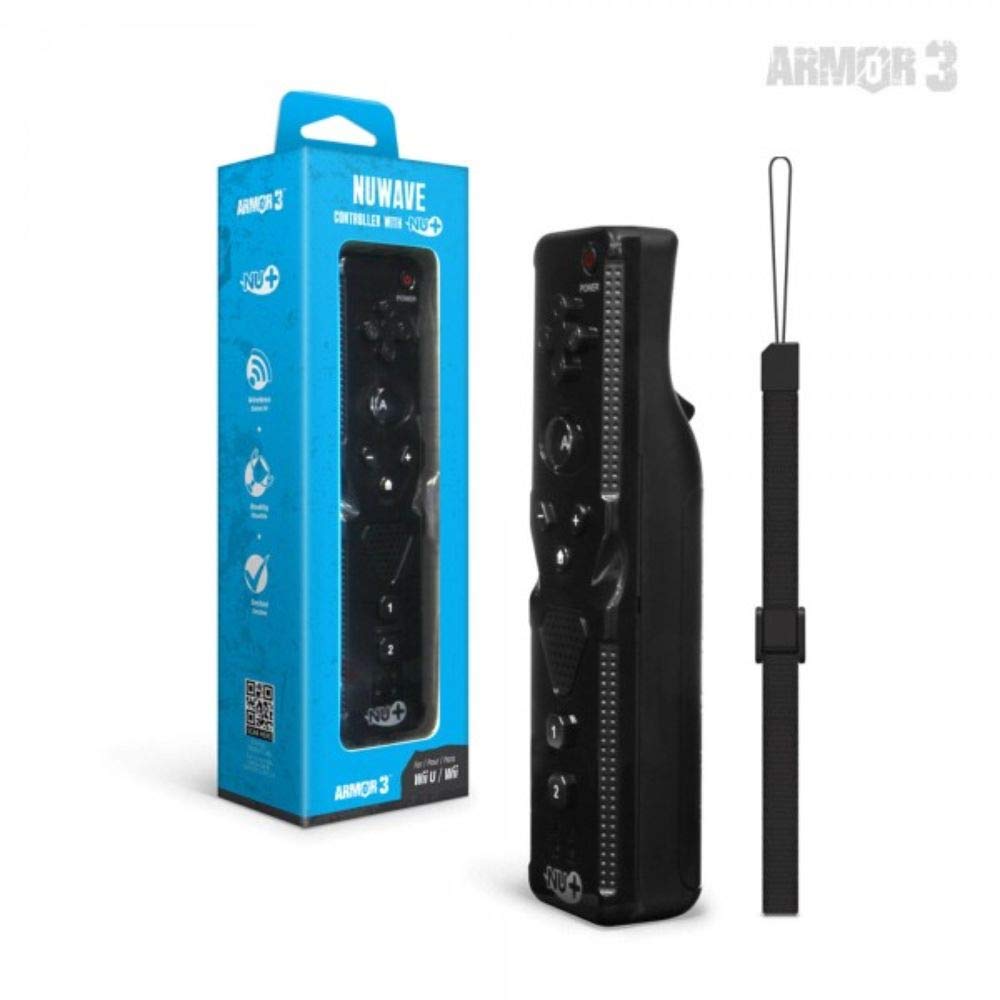
Nọmba 1: Hyperkin Armor3 NuWave Controller and its packaging. The controller is black with a wrist strap, and the packaging highlights its Nu+ technology and compatibility with Wii U and Wii.
Ọja Pariview
The Armor3 NuWave Controller is a motion-sensing controller compatible with both Wii U and Wii systems. It integrates advanced Nu+ technology for enhanced motion detection and precision in supported games.
Awọn ẹya pataki:
- Ibamu: Fully compatible with Nintendo Wii U and Nintendo Wii consoles.
- Nu+ Technology: Built-in technology for a wider range of motion and improved accuracy in compatible titles.
- Apẹrẹ Ergonomic: Designed for comfortable grip and extended gameplay sessions.
- Orisun Agbara: Nilo awọn batiri AA 2 (kii ṣe pẹlu).
Ṣeto
1. Fifi sori batiri
- Wa yara batiri ni ẹhin oludari.
- Gbe ideri batiri si isalẹ lati ṣi i.
- Fi awọn batiri AA meji (2) sii, ki o rii daju pe polarity (+/-) tọ gẹgẹ bi a ti fihan ninu yara naa.
- Rọpo ideri batiri naa nipa gbigbe e soke titi ti yoo fi tẹ sinu ipo rẹ.
2. Connecting to Your Console
To connect the NuWave Controller to your Wii U or Wii console, follow these steps:
- Ensure your console is powered on.
- On your Wii U or Wii console, press the SYNC button (usually located near the SD card slot or battery compartment).
- On the NuWave Controller, open the battery cover and locate the small red SYNC button inside the battery compartment.
- Press and release the SYNC button on the controller.
- The player indicator lights on the bottom of the controller will flash. Once a single light remains lit, the controller is successfully connected.
- If connection fails, repeat steps 2-5. Ensure the controller is within range of the console.
Awọn ilana Iṣiṣẹ
Awọn iṣakoso ipilẹ:
- Paadi itọsọna (D-paadi): Used for menu navigation and character movement.
- Bọtini kan: Primary action button, often used for selection or interaction.
- B Button (Trigger): Located on the underside, typically used for grabbing or firing.
- 1 & 2 Buttons: Auxiliary action buttons, functions vary by game.
- Bọtini Ile: Returns to the console's Home Menu.
- Àwọn bọ́tìnì pẹ̀lú (+) àti ìyọkúrò (-): Often used for zooming, adjusting settings, or specific in-game actions.
- Bọtini agbara: Ó ń tan/pa olùdarí náà.
Motion Sensing with Nu+ Technology:
The built-in Nu+ technology provides enhanced motion tracking. For games that support it, you will experience more precise and responsive movements. Hold the controller firmly and ensure clear line of sight to the sensor bar for optimal performance.
- Iṣatunṣe: Some games may require initial calibration. Follow on-screen prompts.
- Okùn Ọwọ: Always use the included wrist strap to prevent accidental drops during active gameplay.
Itoju
Ninu:
- Fi aṣọ rírọrùn àti gbígbẹ nu olùdarí náà.
- Fun idoti alagidi, die-die dampen aṣọ pẹlu omi. Maṣe lo awọn kẹmika ti o lewu tabi awọn afọmọ abrasive.
- Ensure no liquid enters the controller's openings.
Ibi ipamọ:
- Tọju olutọju naa ni itura, aye gbigbẹ kuro lati orun taara ati awọn iwọn otutu to gaju.
- Tí o bá ń tọ́jú rẹ̀ fún ìgbà pípẹ́, yọ àwọn bátìrì náà kúrò kí ó má baà jò.
Itọju Batiri:
- Always use new, high-quality AA batteries.
- Maṣe dapọ atijọ ati awọn batiri titun, tabi awọn oriṣiriṣi awọn batiri.
- Sọ awọn batiri ti a lo ni ifojusọna ni ibamu si awọn ilana agbegbe.
Laasigbotitusita
| Isoro | Owun to le Fa | Ojutu |
|---|---|---|
| Adarí ko ni tan. | Awọn batiri ti o ku tabi ti ko tọ fi sii. | Ropo awọn batiri pẹlu titun AA batiri, aridaju ti o tọ polarity. |
| Controller does not sync with console. | Incorrect syncing procedure; out of range; console interference. | Ensure console is on. Repeat syncing steps (press SYNC on console, then on controller). Move closer to console. Check for other wireless device interference. |
| Buttons are unresponsive or delayed. | Low battery; connection issue; physical obstruction. | Replace batteries. Re-sync the controller. Ensure buttons are not stuck. |
| Motion control is inaccurate. | Sensor bar obstruction; improper calibration; environmental factors. | Ensure clear line of sight to the sensor bar. Re-calibrate in-game if prompted. Avoid strong light sources directly facing the sensor bar. |
Awọn pato
- Awoṣe: M07399-bk
- Brand: Hyperkin
- Ibamu: Nintendo Wii U, Nintendo Wii
- Orisun Agbara: Awọn batiri 2 x AA (kii ṣe pẹlu)
- Awọn iwọn: 2.8 x 1.8 x 8 inches (isunmọ)
- Ìwúwo: 3.88 ounces (tó súnmọ́, láìsí àwọn bátírì)
- Imọ ọna ẹrọ: Built-in Nu+ motion technology
- Àwọ̀: Dudu
Atilẹyin ọja ati Support
For specific warranty information and terms, please refer to the documentation included with your purchase or visit the official Hyperkin website. Hyperkin provides customer support for their products.
Atilẹyin Ayelujara: Visit the official Hyperkin webAaye fun FAQs, awọn itọnisọna laasigbotitusita, ati alaye olubasọrọ. www.hyperkin.com
Olubasọrọ: Refer to the Hyperkin website for the most current customer service contact methods (phone, email, etc.).


