1. Ifihan
This manual provides detailed instructions for setting up, operating, and maintaining your Supersonic SC-1097BT portable 3-band radio. This versatile device offers AM/FM/SW reception, Bluetooth connectivity, MP3 playback via USB, SD, and AUX inputs, and a built-in flashlight, making it suitable for various uses from daily listening to emergency situations.
2. Awọn ẹya Ọja
- Idaraya to pọ: Enjoy a Portable AM/FM/SW Band Receiver with MP3 Playback capability, perfect for radio and music.
- Asopọmọra Ailokun: Built-in Bluetooth enables effortless pairing with smartphones, tablets, laptops, MP3 players, and various devices for a wide range of audio options.
- Ifamọ Iyatọ: Benefit from a high-sensitivity receiver that ensures clear reception and excellent audio quality.
- Multi-Input Compatibility: Equipped with USB, SD, Micro SD, and AUX inputs, this device accommodates various media sources, enhancing your listening experience. A powerful speaker ensures quality sound.
- Multi-Function Utility: With a built-in torch light, powerful speaker, and long-lasting rechargeable battery, this device is perfect for outdoor adventures and emergency situations.
3. Package Awọn akoonu
Rii daju pe gbogbo awọn ohun kan wa lori ṣiṣi silẹ:
- Supersonic SC-1097BT Portable 3 Band Radio
- Okun gbigbe
- Afowoyi eni
- Okun Ngba agbara USB
- Batiri gbigba agbara (ti a fi sii tẹlẹ tabi lọtọ)
4. Awọn iṣakoso ati Awọn iṣẹ
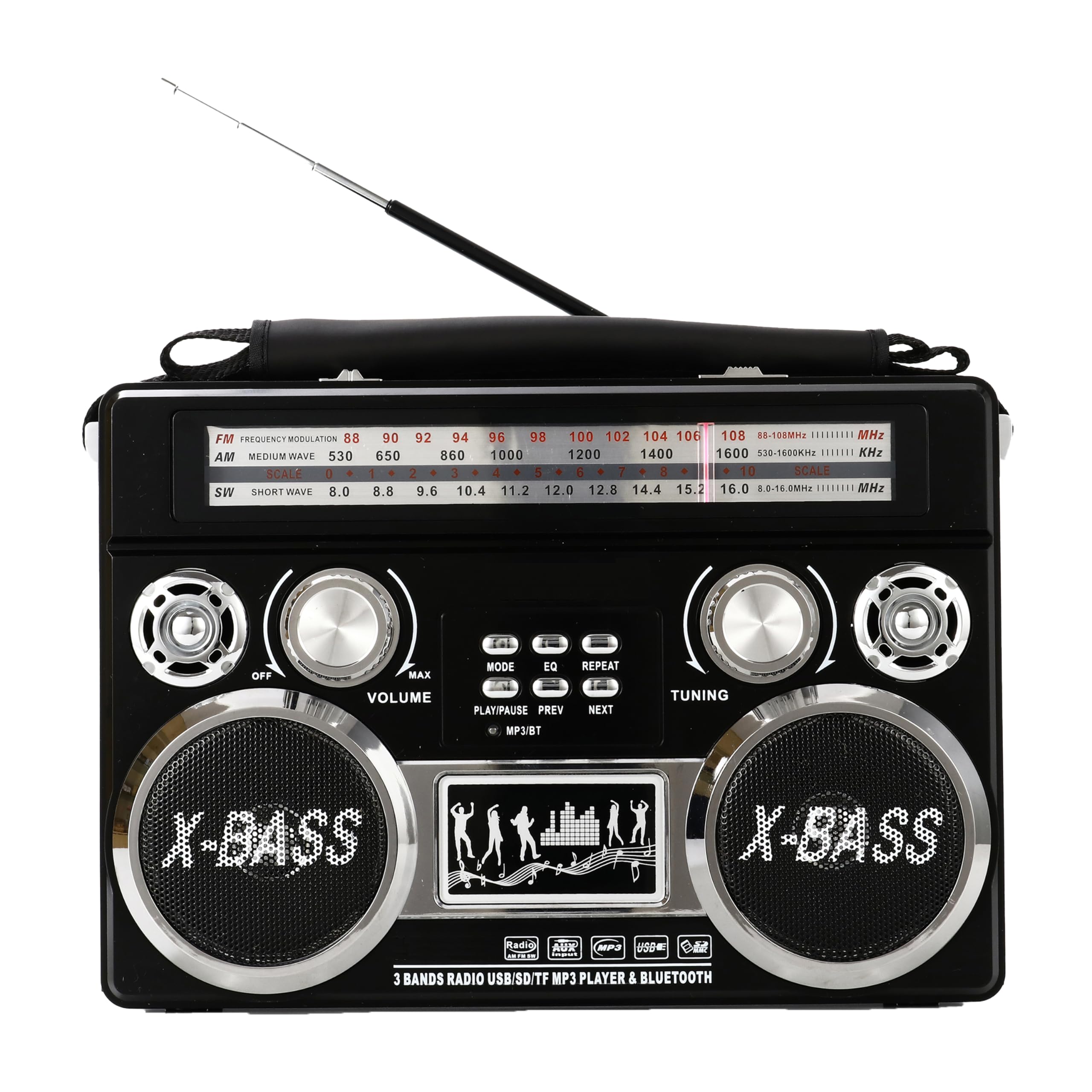
olusin 1: Iwaju View. Shows the main speaker grille, frequency display, volume knob, tuning knob, and band selection switches. The X-BASS branding is visible below the speaker.

olusin 2: Apa View. Features the built-in LED flashlight on the left side. Input ports for USB, SD card, Micro SD card, and AUX are located on the top right side, along with the volume and tuning controls.

olusin 3: Pada View. Displays the battery compartment cover, AC power input, and the telescopic antenna in its retracted position. Ventilation grilles are also visible.
Fidio Loriview ti Awọn iṣakoso
Video 1: Great Radio, Great Sound, Lots of Features. This video provides a visual demonstration of the radio's features, including its controls, sound quality, and various functions. It highlights the ease of use and the overall design of the unit.
5. Eto
5.1 Agbara Redio
The SC-1097BT can be powered in two ways:
- Batiri gbigba agbara: The radio comes with a built-in rechargeable battery. To charge, connect the provided USB cable to the radio's charging port and to a compatible USB power adapter (not included). The charging indicator will illuminate.
- Àwọn Bátìrì D-Sẹ́ẹ̀lì: For extended portable use, the radio can also operate on D-cell batteries (not included). Open the battery compartment on the back of the unit and insert the required number of D-cell batteries, ensuring correct polarity.
- Agbara AC: For continuous use indoors, connect the AC power cord (not included) to the AC input on the back of the radio and plug it into a wall outlet.
5.2 Eriali Oṣo
For optimal radio reception, extend the telescopic antenna fully. For Shortwave (SW) bands, adjusting the antenna's direction may improve signal clarity.
6. Awọn ilana Iṣiṣẹ
6.1 Turning On/Off & Volume Control
- To turn the radio ON, rotate the Iwọn didun koko agogo.
- To adjust the volume, rotate the Iwọn didun knob. Clockwise increases volume, counter-clockwise decreases it.
- To turn the radio OFF, rotate the Iwọn didun koko ni counter-clockwise titi ti o tẹ.
6.2 Iṣẹ́ Rédíò (AM/FM/SW)
- Select your desired band (FM, AM, SW) using the band selector switch.
- Yiyi awọn TUNTUN knob to scan for stations. The frequency display will show the current station.
- Adjust the telescopic antenna for best reception.
6.3 Sisopọ Bluetooth
- Switch the radio to Bluetooth mode (refer to the mode button if available, or it may automatically switch when a Bluetooth device is detected).
- On your external device (smartphone, tablet), enable Bluetooth and search for available devices.
- Select "SC-1097BT" from the list of devices to pair.
- Ni kete ti so pọ, o le san ohun lati ẹrọ rẹ si redio.
6.4 MP3 Playback (USB/SD/AUX)
- USB/SD/Micro SD: Insert a USB drive or SD/Micro SD card containing MP3 audio files into the corresponding port. The radio should automatically switch to MP3 playback mode. Use the playback controls (Play/Pause, Next, Previous) to manage your music.
- Iṣawọle AUX: Connect an external audio device (e.g., MP3 player, phone) to the AUX input jack using a 3.5mm audio cable (not included). Switch the radio to AUX mode if necessary.
6.5 Flashlight isẹ
To activate the built-in torch light, locate the flashlight switch on the side of the radio and slide it to the ON position. Slide it back to OFF to turn it off.
7. Laasigbotitusita
- Ko si Agbara: Check battery installation/charge level or ensure AC adapter is securely connected.
- Gbigba Redio ti ko dara: Tún eriali telescopic naa nà kí o sì ṣe àtúnṣe rẹ̀ pátápátá. Gbìyànjú láti gbé rédíò náà lọ sí ibòmíràn.
- No Sound from MP3/Bluetooth: Ensure volume is turned up on both the radio and the connected device. Check if the correct input mode (USB/SD/AUX/Bluetooth) is selected. For Bluetooth, ensure the device is properly paired.
- Bluetooth Ko Sopọ: Ensure the radio is in Bluetooth mode and your device's Bluetooth is enabled and discoverable. Try unpairing and re-pairing the device.
8. Itọju
- Ninu: Lo asọ ti o rọ, ti o gbẹ lati nu ita redio naa. Ma ṣe lo awọn olutọpa omi tabi awọn ohun elo abrasive.
- Itọju Batiri: If using D-cell batteries, remove them if the radio will not be used for an extended period to prevent leakage. For the rechargeable battery, charge it regularly to maintain its lifespan.
- Ibi ipamọ: Tọju redio ni itura, aye gbigbẹ kuro lati orun taara ati awọn iwọn otutu to gaju.
9. Awọn pato
| Ẹya ara ẹrọ | Ẹ̀kúnrẹ́rẹ́ |
|---|---|
| Ọja Mefa | 11.31 x 3.38 x 7.63 inches |
| Iwọn Nkan | 2.89 iwon |
| Nọmba awoṣe | SC-1097BT |
| Awọn ẹgbẹ Redio Atilẹyin | 3-Band (AM/FM/SW) |
| Asopọmọra Technology | Iranlọwọ, Bluetooth |
| Orisun agbara | Battery Powered (Rechargeable, D-Cell), AC Input |
| Pataki Ẹya | Portable, Built-in Flashlight |
| Awọn irinše to wa | Carrying Strap, Owner's Manual |
10. Atilẹyin ọja ati Support
For warranty information or technical support, please refer to the contact details provided with your purchase documentation or visit the official Supersonic webojula. Jeki ẹri rira rẹ fun eyikeyi awọn ibeere atilẹyin ọja.


