1. Ọja Ipariview
The Baseus W09 TWS Wireless Earphones (Model: Encok W09) are designed for convenient audio playback and communication. These in-ear earphones feature touch control and connect wirelessly via Bluetooth, offering a stereo bass sound experience.

Image 1: The Baseus W09 TWS Wireless Earphones securely placed within their charging case. The case is open, revealing both earbuds.
2. Eto
2.1 Ngba agbara si Awọn Agbekọri ati Ọran
Before initial use, ensure both the earphones and the charging case are fully charged. The charging case contains a built-in Lithium Ion battery.
- Gbe awọn agbekọri sinu apoti gbigba agbara.
- Connect the charging case to a power source using a compatible charging cable (not specified, assume USB).
- Gbigba agbara ni kikun maa n gba to wakati mẹta.
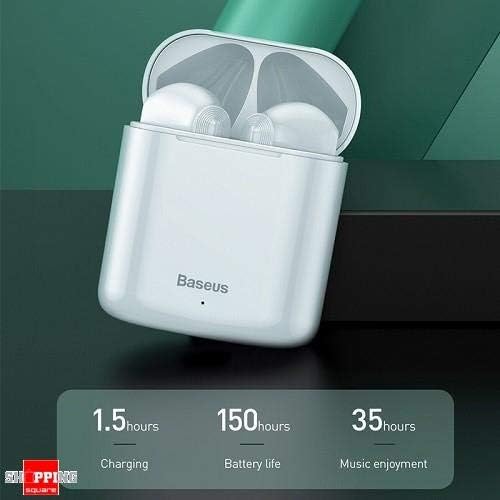
Image 2: The Baseus W09 charging case, illustrating its charging time of 1.5 hours, a standby battery life of 150 hours, and 35 hours of music enjoyment.
2.2 Sisopọ Bluetooth
The Baseus W09 earphones are designed for quick and instant connection.
- Rii daju pe awọn agbekọri ti gba agbara.
- Ṣii apoti gbigba agbara.
- Yọ awọn agbekọri kuro ninu apoti gbigba agbara. Wọn yoo tẹ ipo sisopọ wọle laifọwọyi.
- Lori ẹrọ rẹ (foonuiyara, tabulẹti, ati bẹbẹ lọ), mu Bluetooth ṣiṣẹ ki o wa awọn ẹrọ to wa.
- Select "Baseus Encok W09" or a similar name from the list to connect.
- Ni kete ti o ti sopọ, iwọ yoo gbọ itọsi ohun kan, ati pe awọn agbekọri yoo ṣetan fun lilo.
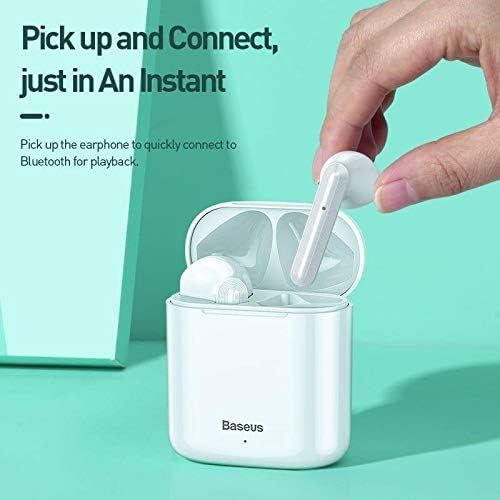
Image 3: A hand demonstrating the "Pick up and Connect" feature, showing an earphone being removed from its charging case, initiating quick Bluetooth connection.
3. Awọn ilana Iṣiṣẹ
3.1 Wọ Awọn Agbekọri
Gently insert each earphone into the corresponding ear canal (L for left, R for right). Adjust them for a comfortable and secure fit to ensure optimal sound quality and stability.
3.2 Fọwọkan Iṣakoso Awọn iṣẹ
The Baseus W09 earphones feature intelligent touch controls for various functions. Specific gestures may vary; please refer to the product packaging or the official Baseus website for detailed touch control instructions.
- Ṣiṣẹ/Daduro: Typically a single tap on either earphone.
- Idahun/Ipe Ipari: Usually a single tap during an incoming call.
- Itele / Tẹlẹ Orin: Often a double or triple tap on a specific earphone.
- Mu Oluranlọwọ Ohun ṣiṣẹ: May involve a long press or specific tap sequence.
3.3 batiri Life
The Baseus W09 earphones and charging case offer extended usage times:
- Music Enjoyment: Up to 35 hours (with charging case).
- Akoko Iduro: Titi di wakati 150.
4. Itọju
4.1 Ninu
- Lo asọ ti o gbẹ, asọ ti ko ni lint lati nu agbekọri ati apoti gbigba agbara.
- Maṣe lo awọn afọmọ abrasive, ọti-lile, tabi awọn nkan ti kemikali.
- Ensure no moisture enters the earphone speakers or charging ports.
4.2 Ibi ipamọ
- Nigbati o ko ba si ni lilo, tọju awọn agbekọri sinu apoti gbigba agbara wọn lati daabobo wọn ki o jẹ ki wọn gba agbara.
- Tọju ni itura, aye gbigbẹ kuro lati orun taara ati awọn iwọn otutu to gaju.
5. Laasigbotitusita
If you encounter issues with your Baseus W09 earphones, try the following steps:
- Ko si Ohun: Ensure earphones are charged, connected to your device, and volume is up on both the earphones and your device.
- Ko le So pọ: Make sure Bluetooth is enabled on your device and the earphones are in pairing mode. Try turning Bluetooth off and on again on your device.
- Asopọmọra Laarin: Ensure there are no obstructions between the earphones and your device. Try moving closer to your device.
- Awọn ọran gbigba agbara: Check the charging cable and power adapter. Ensure the charging contacts on the earphones and case are clean.
- Tun: If issues persist, try resetting the earphones. Refer to the official Baseus website or product packaging for specific reset instructions.
6. Awọn pato
| Ẹya ara ẹrọ | Ẹ̀kúnrẹ́rẹ́ |
|---|---|
| Brand | Baseus |
| Nọmba awoṣe | Encok W09 |
| Iru | Ninu Eti |
| Asopọmọra Technology | Ailokun (Bluetooth) |
| Ọna Iṣakoso | Fọwọkan |
| Gbohungbo To wa | Bẹẹni |
| Ifagile Ariwo | Rara |
| Batiri Iru | Lithium ion (pẹlu) |
| Akoko gbigba agbara | Isunmọ. wakati meji 1.5 |
| Music Enjoyment Time | Titi di wakati 35 (pẹlu ọran gbigba agbara) |
| Akoko Iduro | Titi di wakati 150 |
| Ni ibamu Pẹlu | Gbogbo awọn ẹrọ Bluetooth-ṣiṣẹ |
| Àwọ̀ | Funfun |
| Package Mefa | 14.6 x 11 x 4 cm |
| Iwọn Nkan | 170 g |
7. Atilẹyin ọja ati Support
For warranty information, technical support, or further assistance, please refer to the documentation included with your product or visit the official Baseus webojula. Jeki ẹri rira rẹ fun awọn iṣeduro atilẹyin ọja.


