1. Ifihan
O ṣeun fun riraasing the Power Dynamics PPA50 Public Address Amplifier. Eleyi wapọ amplifier is designed for a wide range of small to medium-sized installations, offering ease of use, excellent performance, and reliability. It features multiple input options, including microphone and line inputs, an integrated MP3 player with USB/SD card slots, and Bluetooth connectivity for wireless audio streaming. Please read this manual thoroughly before operating the unit to ensure proper use and to prevent damage.
2. Awọn ilana aabo
To reduce the risk of electric shock, do not remove the cover. No user-serviceable parts inside. Refer servicing to qualified service personnel. Read these instructions carefully before use and retain them for future reference.
- Orisun Agbara: Connect the unit only to a grounded mains outlet with the correct voltage (100-240V AC, 50/60Hz) or a 12V DC source as specified.
- Omi ati Ọrinrin: Ma ṣe fi ẹrọ naa han si ojo tabi ọrinrin. Ma ṣe gbe awọn nkan ti o kun fun awọn olomi, gẹgẹbi awọn vases, sori ẹyọ.
- Afẹfẹ: Rii daju pe fentilesonu to peye. Ma ṣe dina awọn ṣiṣi atẹgun.
- Ooru: Maṣe gbe ẹyọ naa si nitosi awọn orisun ooru gẹgẹbi awọn imooru, awọn iforukọsilẹ ooru, awọn adiro, tabi awọn ohun elo miiran (pẹlu ampliifiers) ti o gbe ooru jade.
- Ninu: Mọ pẹlu asọ gbigbẹ nikan.
- Ṣiṣẹ: Ma ṣe gbiyanju lati ṣe iṣẹ fun ẹyọkan funrararẹ. Tọkasi gbogbo iṣẹ si awọn oṣiṣẹ iṣẹ ti o peye.
- Awọn isopọ Agbọrọsọ: Ensure correct impedance matching for speakers (8 ohms, 70V, or 100V) to prevent damage to the amplifier.
3. Package Awọn akoonu
Daju pe gbogbo awọn nkan wa ati ni ipo ti o dara nigbati ṣiṣi package naa:
- Power Dynamics PPA50 Ampitanna
- Isakoṣo latọna jijin Iṣakoso
- Okun agbara
- Afowoyi Olumulo (iwe-ipamọ yii)
4. Ọja Ipariview
4.1 Igbimọ iwaju

The front panel provides access to all primary controls and indicators for the amplifier's operation.
- MIC 1 Iṣawọle: 6.3mm jack for microphone connection.
- MIC 1/2 Volume: Rotary controls for adjusting the volume of microphone inputs.
- LINE 1/2 Volume: Rotary controls for adjusting the volume of line inputs.
- MP3 Volume: Rotary control for adjusting the volume of the integrated MP3 player/Bluetooth.
- Awọn iṣakoso BASS/TREBLE: Tone controls for adjusting low and high frequencies.
- NIPA TITUNTO: Main volume control for overall output.
- MP3 Player Module: Features USB/SD card slots, LCD display, and control buttons (MODE, Play/Pause, Skip).
- Awọn itọkasi: Power ON, PROT (Protection), CLIP, and output level indicators (0, 10, 20).
- Agbara Yi pada: On/Off button for the amplifier.
4.2 ru Panel
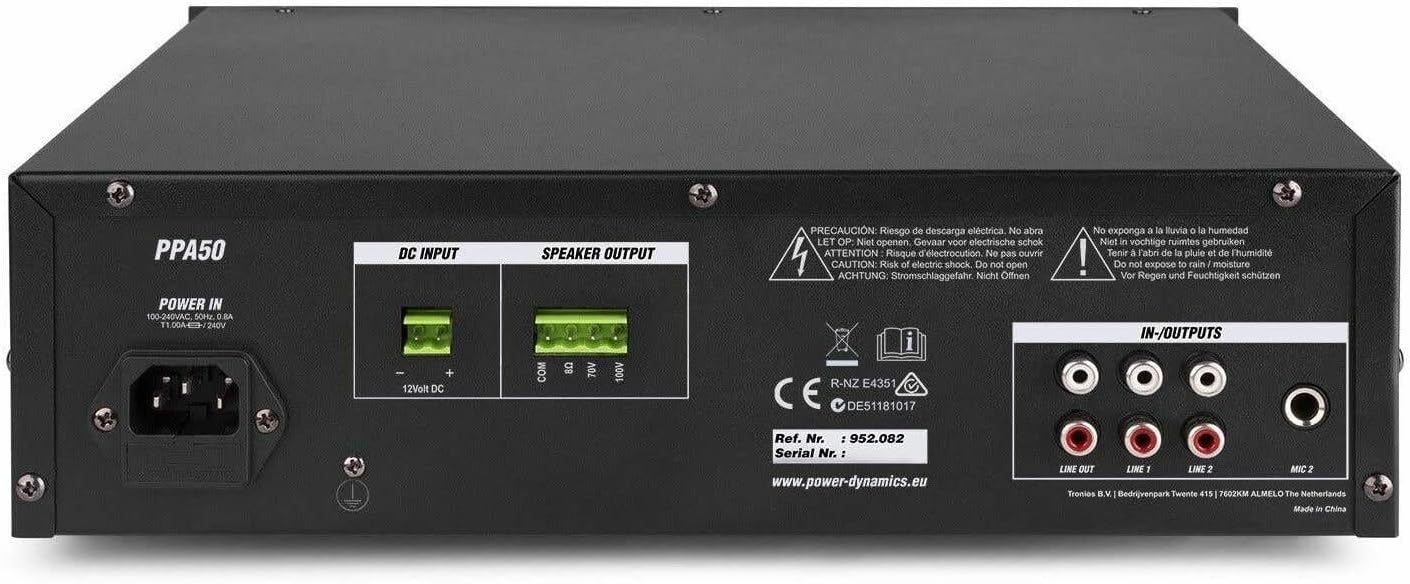
The rear panel houses all necessary connections for power, speakers, and external audio sources.
- AGBARA NINU: AC mains input (220-240V) and 12V DC input for flexible operation.
- IJADE OLOGBON: Screw terminals for connecting speakers (COM, 8Ω, 70V, 100V).
- IN-OUTPUTS: RCA stereo line inputs (LINE 1, LINE 2) and a stereo RCA line output (LINE OUT).
- MIC 2 Iṣawọle: RCA input for a second microphone.
4.3 Iṣakoso latọna jijin

The included infrared remote control allows for convenient operation of the MP3 player and other functions from a distance.
- SERE/SINMI: Ṣiṣẹ tabi da duro orin lọwọlọwọ.
- CH-/CH+: Navigate through channels or folders.
- VOL-/VOL+: Adjust volume of the MP3 player.
- EQ: Yiyipo nipasẹ tito tẹlẹ oluṣeto.
- PREV/TẸJẸ: Skip to previous or next track.
- Paadi Nọmba (0-9): Direct track selection.
- PICK SONG: Yan orin kan.
- RPT: Tun ipo ṣe.
- Ipo: Switch between USB, SD, and Bluetooth modes.
5. Eto
5.1 Nsopọ Agbọrọsọ
The PPA50 amplifier supports 8 ohm, 70V, and 100V speaker systems. Ensure your speakers match the ampìdènà ìjáde lifier.
- For 8 Ohm Speakers: Connect the speaker's positive (+) terminal to the 8Ω ebute lori awọn amplifier and the speaker's negative (-) terminal to the COM ebute.
- For 70V/100V Line Speakers: Connect the speaker's positive (+) terminal to the 70V or 100V terminal (depending on your speaker type) and the speaker's negative (-) terminal to the COM terminal. Ensure the total wattage of all connected 70V/100V speakers does not exceed the amplifier's output power (50W).
5.2 Nsopọ Microphones
Awọn amplifier has two microphone inputs.
- So gbohungbohun kan pọ si MIC 1 6.3mm jack on the front panel.
- Connect a second microphone to the MIC 2 RCA input on the rear panel.
5.3 Connecting Line Inputs
Connect external audio sources such as CD players, mixers, or other audio devices to the RCA ILA 1 or ILA 2 inputs on the rear panel.
5.4 Asopọ agbara
The PPA50 can be powered by AC mains or a 12V DC source.
- Agbara AC: So okun agbara ti a pese si awọn AGBARA IN socket on the rear panel and then to a suitable mains outlet.
- Agbara DC 12V: For flexible operation, connect a 12V DC power source (e.g., car battery) to the 12V DC INPUT terminals on the rear panel, ensuring correct polarity.
6. Awọn ilana Iṣiṣẹ
6.1 Titan / Pa a
Tẹ awọn AGBARA yipada lori iwaju nronu lati yi pada amplifier on or off. The 'ON' indicator will illuminate when the unit is powered.
6.2 Titunto iwọn didun Iṣakoso
Satunṣe awọn ìwò o wu iwọn didun lilo awọn NIPA TITUNTO knob on the front panel. Start with a low volume and gradually increase it to a comfortable listening level.
6.3 Gbohungbohun Lilo
After connecting microphones, adjust their individual volume levels using the MIC 1 ati MIC 2 volume knobs on the front panel.
6.4 Line Input Usage
Select the desired line input (LINE 1 or LINE 2) and adjust its volume using the corresponding ILA 1 or ILA 2 volume knobs.
6.5 MP3 Player (USB/SD) Operation
Insert a USB drive or SD card into the respective slot on the front panel. The amplifier will automatically switch to MP3 mode and begin playback. Use the control buttons (MODE, Play/Pause, Skip) or the remote control to manage playback. Adjust the MP3 volume using the MP3 bọtini iwọn didun.
6.6 Ìsopọ̀ Bluetooth àti Ìṣiṣẹ́padà
Lati lo Bluetooth:
- Tẹ awọn MODE button on the MP3 player module (or remote) until 'Bluetooth' or 'BT' is displayed.
- On your Bluetooth-enabled device (smartphone, tablet, etc.), search for available devices and select 'PPA50'.
- Ni kete ti so pọ, o le san ohun afetigbọ lailowa si awọn amplifier. Adjust volume using the MP3 volume knob on the amplifier or your connected device.
6.7 Bass/Treble Control
Lo awọn Bass ati TREK. knobs to adjust the low and high frequency response of the audio output to suit your preference.
7. Itọju
Itọju deede ṣe idaniloju gigun ati iṣẹ ṣiṣe ti o dara julọ ti rẹ amplifier.
- Ninu: Mu ese kuro pẹlu asọ ti o gbẹ. Ma ṣe lo abrasive ose tabi epo.
- Afẹfẹ: Jeki awọn ṣiṣi afẹfẹ kuro ninu eruku ati idoti.
- Ibi ipamọ: Ti o ba tọju ẹyọ naa fun akoko ti o gbooro sii, ge asopọ kuro ni agbara ki o tọju rẹ si ibi ti o tutu, ti o gbẹ.
8. Laasigbotitusita
If you encounter issues with your PPA50 amplifier, tọka si awọn iṣoro ti o wọpọ ati awọn ojutu wọnyi:
| Isoro | Owun to le Fa | Ojutu |
|---|---|---|
| Ko si agbara | Kò sí okùn agbára tí a so pọ̀; Agbára tí a ti pa; Kò sí agbára láti ibi tí a ti ń jáde. | Ṣàyẹ̀wò ìsopọ̀ okùn agbára; Rí i dájú pé ìyípadà agbára wà ní ON; dán ìjáde omi wò pẹ̀lú ẹ̀rọ mìíràn. |
| Ko si ohun jade | Master volume too low; Incorrect input selected; Speaker connections loose or incorrect; Protection mode activated. | Increase MASTER VOLUME; Select correct input source; Check speaker wiring and impedance; If PROT light is on, turn off unit, check connections, and restart. |
| Ohun ti o daru | Àmì ìṣíwọlé ga jù (gígé); Àìbáramu ìdènà agbọ́hùnsọ; Okùn tí ó ní àbùkù. | Reduce input volume; Verify speaker impedance; Replace cables. |
| Bluetooth ko sopọ | Amplifier not in Bluetooth mode; Device too far; Bluetooth not enabled on device. | Press MODE button to select BT; Move device closer; Enable Bluetooth on your device. |
| MP3 player ko ṣiṣẹ | Ti ko tọ file format; USB/SD card corrupted; MP3 volume too low. | Rii daju files are MP3 format; Try another USB/SD card; Increase MP3 volume. |
If the problem persists after trying these solutions, please contact your dealer or qualified service personnel.
9. Awọn pato
| Ẹya ara ẹrọ | Sipesifikesonu |
|---|---|
| Agbara Ijade (RMS) | 50 W |
| Awọn igbejade Agbọrọsọ | 8 Ohm, 70 V, 100 V |
| Idahun Igbohunsafẹfẹ | 50 Hz - 18,000 Hz |
| Signal-to-Noise Ratio (Line) | > 80dB |
| Signal-to-Noise Ratio (Microphone) | > 72dB |
| Awọn igbewọle Gbohungbohun | 2 (1x 6.3mm Jack, 1x RCA) |
| Awọn igbewọle ila | 2 (RCA Stereo) |
| Ijade Laini | 1 (RCA Stereo) |
| Media Player | USB, SD, Bluetooth, MP3 Equalizer |
| Awọn iṣakoso ohun orin | Bass, tirẹbu |
| Ibi ti ina elekitiriki ti nwa | 100-240 V AC, 50/60 Hz or 12 V DC |
| Awọn iwọn (L x W x H) | 270 x 320 x 86 mm |
| Iwọn | 3.3 kg |
10. Atilẹyin ọja ati Support
This product is covered by the standard warranty provided by your retailer. Please refer to your purchase documentation for specific warranty terms and conditions. For technical support, troubleshooting assistance beyond this manual, or warranty claims, please contact your point of purchase or the official Power Dynamics customer support channels.
You may find additional information and support on the manufacturer's webojula: www.power-dynamics.eu


