1. Ifihan
This manual provides detailed instructions for the installation, setup, and operation of your Flysky FS-BS4 4-channel receiver with integrated gyro stabilization. The FS-BS4 is designed to enhance the control stability of your remote-controlled vehicle, especially on challenging terrains or during high-speed maneuvers.
Please read this manual thoroughly before using the product to ensure proper function and safety.
2. Ọja Ipariview
The Flysky FS-BS4 is a 4-channel receiver featuring a built-in gyro stabilization system. This system, when paired with a compatible transmitter (such as Flysky FS-IT4S or FS-GT5) utilizing S.V.C. (Smart Vehicle Control) functionality, helps maintain the vehicle's intended direction. This is particularly beneficial on uneven or slippery surfaces and during cornering, providing a more stable and predictable driving experience.
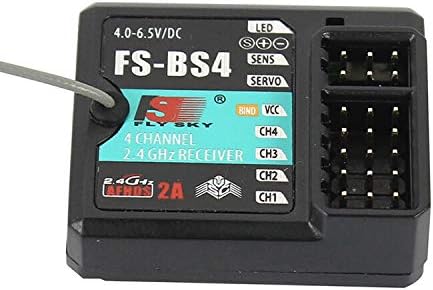
Aworan 2.1: Iwaju view of the Flysky FS-BS4 receiver, showing the LED indicator, SENS and SERVO adjustment ports, BIND/VCC port, and channels CH1-CH4.
3. Awọn pato
| Ẹya ara ẹrọ | Ẹ̀kúnrẹ́rẹ́ |
|---|---|
| Nọmba awoṣe | MC28053-4 |
| Awọn iwọn | 35.4 mm x 29.6 mm x 13 mm |
| Iwọn | 20 g |
| Awọn ikanni PWM | 4 Awọn ikanni |
| Alailowaya Igbohunsafẹfẹ | 2.4 GHz |
| Ilana Alailowaya | AFHDS 2A |
| Ground Range | 100 - 300 mita |
| Eriali Iru | Single antenna (150 mm) |
| Iṣagbewọle Voltage | 4.0 - 6.5 V |
| RSSI Support | Atilẹyin |
| Awọn ibudo data | PWM / PPM / i.bus / s.bus |
| Awọn iwọn otutu ti nṣiṣẹ | -10 ℃ si +60 ℃ |
| Ọriniinitutu ti nṣiṣẹ | 20% - 95% |
| Imudojuiwọn Ayelujara | Bẹẹni |
| Ijẹrisi | CE |
4. Setup: Binding the Receiver
Binding is the process of linking your FS-BS4 receiver to your Flysky transmitter. Follow these steps carefully:

Aworan 4.1: The Flysky FS-BS4 receiver shown with its antenna and a bind plug, which is used during the binding process.
- Mura Olugbeja: Turn on your transmitter. Verify its RF standard and, if necessary, change it to AFHDS 2A 2-ọna. Refer to your transmitter's specific manual for detailed instructions on this setting.
- Transmitter Bind Mode: Set your transmitter to bind mode. Consult your transmitter's manual for the exact procedure.
- Power Off Receiver: Ensure the FS-BS4 receiver is powered off before proceeding.
- Connect Bind Cable: Connect the provided bind cable to the BIND/VCC ibudo lori olugba.
- Fi agbara: Connect the power source (e.g., battery) to any other available port on the receiver (not the BIND/VCC port). The red indicator light on the receiver will begin to flash rapidly, indicating it is in bind mode.
- Complete Binding: Wait for the red indicator light to stop flashing. A solid light or no light (depending on the transmitter/receiver combination) typically signifies that the binding process is complete.
- Ge asopọ Awọn okun: Disconnect both the bind cable and the power source from the receiver.
- Tun agbara so pọ: Reconnect the power source to the BIND/VCC ibudo lori olugba.
- Iṣe idanwo: Verify that all connected servos and other components operate as expected. If any issues arise, restart the binding procedure from step 1.
Akiyesi: Always refer to your specific transmitter's manual for detailed instructions regarding its binding procedure and RF settings.
5. Operating the Gyro Stabilization System
The FS-BS4's integrated gyro stabilization system works in conjunction with compatible Flysky transmitters that support S.V.C. (Smart Vehicle Control). This system automatically detects and corrects unwanted vehicle movements, providing enhanced stability.
- Smart Vehicle Control (S.V.C.): When enabled on your transmitter, S.V.C. utilizes the receiver's gyro data to make real-time adjustments to steering, helping the vehicle maintain its intended path.
- Adjusting Gyro Sensitivity: The receiver features a SENS port, which can be used to adjust the sensitivity of the gyro. This adjustment is typically done via a channel on your transmitter, allowing you to fine-tune the level of stabilization to suit your driving style and terrain. Refer to your transmitter's manual for details on assigning and adjusting gyro sensitivity.
- Servo Output: Awọn SERVO port is used for connecting a servo that controls the gyro's operational mode or other related functions, depending on your transmitter's capabilities.
Ensure your transmitter is configured correctly to utilize the gyro stabilization features for optimal performance.
6. Itọju
To ensure the longevity and reliable performance of your Flysky FS-BS4 receiver, follow these general maintenance guidelines:
- Jeki mimọ: Regularly clean the receiver's exterior with a soft, dry cloth. Avoid using solvents or harsh chemicals.
- Dabobo lati Awọn eroja: Keep the receiver away from moisture, dust, and extreme temperatures. If operating in damp conditions, ensure the receiver is adequately protected (e.g., in a waterproof enclosure).
- Ṣayẹwo awọn isopọ: Periodically check all wire connections to ensure they are secure and free from damage. Loose connections can lead to intermittent operation.
- Itọju Antenna: Ensure the antenna is not kinked or damaged. A properly positioned and undamaged antenna is crucial for optimal signal reception.
- Ibi ipamọ: When not in use for extended periods, store the receiver in a dry, cool place.
7. Laasigbotitusita
If you encounter issues with your FS-BS4 receiver, consider the following troubleshooting steps:
- Kò sí iná amúlétutù/àmì:
- Check power source connection and battery charge.
- Ensure power polarity is correct.
- No Response from Servos/Motors:
- Verify successful binding (refer to Section 4).
- Check all servo/ESC connections to the receiver channels.
- Ensure the transmitter is powered on and functioning correctly.
- Confirm the correct channel assignments on your transmitter.
- Intermittent Signal/Loss of Range:
- Inspect the receiver antenna for damage or improper routing.
- Ensure there are no major obstructions between the transmitter and receiver.
- Check for potential sources of 2.4GHz interference in the operating environment.
- Verify transmitter battery level.
- Gyro Stabilization Issues:
- Ensure S.V.C. is enabled and configured correctly on your transmitter.
- Adjust gyro sensitivity (SENS port) to an appropriate level.
- Confirm the receiver is mounted securely and free from excessive vibration.
For further assistance, consult your transmitter's manual or contact Flysky customer support.
8. atilẹyin ọja Information
Flysky products are manufactured to high-quality standards. Specific warranty terms and conditions may vary by region and retailer. Please retain your proof of purchase for any warranty claims.
For detailed warranty information, please refer to the documentation included with your purchase or visit the official Flysky webojula.
9. Atilẹyin
Should you require technical assistance or have questions not covered in this manual, please contact Flysky customer support through their official webaaye tabi alagbata lati ọdọ ẹniti o ti ra ọja naa.
When contacting support, please have your product model (FS-BS4) and any relevant purchase information ready.


