1. Awọn ilana aabo
Jọwọ ka gbogbo awọn ilana aabo ni pẹkipẹki ṣaaju lilo ohun elo yii. Ikuna lati tẹle awọn ilana wọnyi le ja si mọnamọna, ina, tabi ipalara nla.
- This appliance is for indoor use only. Do not use outdoors or on wet surfaces.
- Do not allow children to operate the robot vacuum. Supervise children and pets when the robot is operating.
- Do not use the robot vacuum to pick up large debris, liquids, burning or smoking materials, or sharp objects.
- Ensure the charging base is placed against a wall on a level surface and that there are no obstacles within 1 meter (3 feet) in front of it and 0.5 meters (1.5 feet) on either side.
- Turn off the robot vacuum and unplug the charging base before cleaning or performing maintenance.
- Do not use the robot vacuum in areas with exposed electrical outlets or damaged power cords.
- Jeki irun, aṣọ alaimuṣinṣin, awọn ika ọwọ, ati gbogbo awọn ẹya ara kuro lati awọn ṣiṣi ati awọn ẹya gbigbe.
2. Package Awọn akoonu
Daju pe gbogbo awọn paati wa ati ni ipo ti o dara nigbati ṣiṣi silẹ.
- Lefant M200 Robot Vacuum Isenkanjade
- Gbigba agbara Mimọ
- Adapter agbara
- Awọn Brushes ẹgbẹ (meji meji)
- HEPA Filter (1 installed, 1 spare)
- Ọpa mimọ
- Itọsọna olumulo

Text Description: A person unboxes the Lefant M200 robot vacuum, revealing the main unit, charging base, power adapter, and user manual.
3. Ọja Ipariview
Awọn eroja
- Ẹ̀rọ Àkọ́kọ́ (Ẹ̀rọ ìgbàfẹ́ Rọ́bọ́ọ̀tì)
- Dustbin with HEPA Filter
- Awọn gbọnnu ẹgbẹ
- Gbigba agbara Awọn olubasọrọ
- Power Button/Indicator Light
- Awọn sensosi infurarẹẹdi
Awọn ẹya ara ẹrọ
- Apẹrẹ Tinrin: Allows the robot to clean under furniture.
- 2000Pa Ìfàmọ́ra: Powerful suction for pet hair, dust, and debris on hard floors and low-pile carpets.
- FreeMove Technology 2.0: Enhanced 360° detection to prevent getting stuck.
- Mọto ti ko fẹlẹ: Energy-efficient with long lifespan.
- Ngba agbara laifọwọyi: Robot returns to the charging base when battery is low.
- HEPA Double Filtration: Effectively blocks secondary pollution.
- Ohun elo Iṣakoso: Manage cleaning modes, schedule, and monitor the robot via the Lefant Life app.
- Iṣakoso ohun: Ni ibamu pẹlu Amazon Alexa.

Text Description: An illustration showing the Lefant M200 robot vacuum cleaning under furniture, highlighting its 360° detection and FreeMove Technology 2.0 to prevent it from getting stuck.

Text Description: Two robot vacuums are shown, one larger and one smaller (Lefant M200). The smaller body of the Lefant M200 allows for better passability and high coverage cleaning in tight spaces.
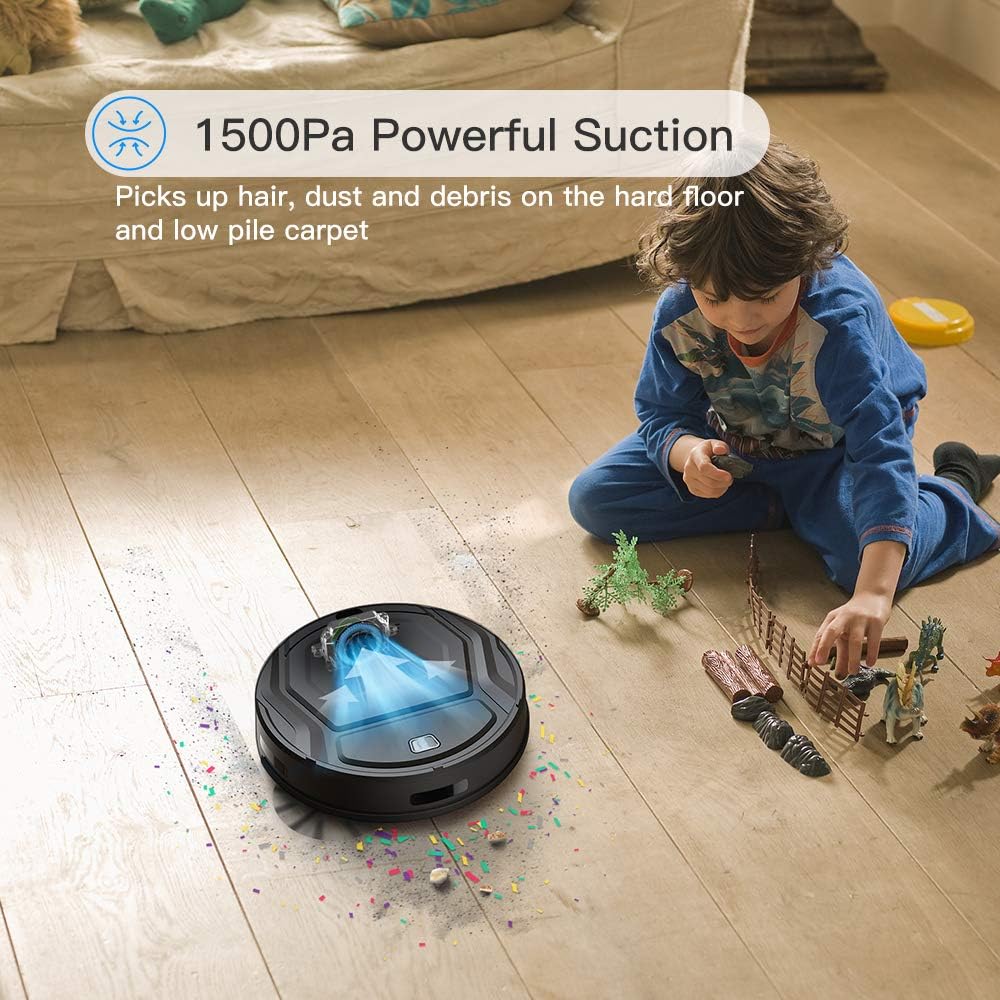
Text Description: The Lefant M200 robot vacuum is shown actively cleaning a floor with visible debris being sucked into its powerful suction port, demonstrating its 1500Pa suction capability.

Text Description: A split image showing the brushless motor on one side, emphasizing its energy efficiency and long life, and a graph illustrating the safety and long life of the M200's battery compared to other models.

Text Description: The Lefant M200 robot vacuum is shown automatically returning to its charging base, indicating its auto-charging feature when the battery is low.

Text Description: An image illustrating the suction advantages of the Lefant M200, specifically its direct suction port design that prevents hair tangling, unlike traditional roller brushes. It is suitable for all floor types.

Text Description: A cutaway diagram of the Lefant M200 showing its 500ML large dust box and HEPA double filter system, designed to effectively block secondary pollution.
4. Eto
4.1 Gbigba agbara akọkọ
- Place the charging base against a wall in an open area.
- Connect the power adapter to the charging base and a wall outlet.
- Place the robot vacuum on the charging base, ensuring the charging contacts align. The indicator light will show charging status.
- Fully charge the robot before first use (approximately 4-5 hours).
4.2 Fifi awọn gbọnnu ẹ̀gbẹ́ sori ẹrọ
- Yi roboti igbale lodindi.
- Align the side brushes with the corresponding posts (L for left, R for right) on the bottom of the robot.
- Press down firmly until they click into place.
Text Description: An official video from Lefant Home Robot demonstrating the correct procedure for installing and uninstalling the side brushes on the robot vacuum.
4.3 Nsopọ si Wi-Fi ati App
- Download the 'Lefant Life' app from your smartphone's app store.
- Forukọsilẹ tabi wọle si àkọọlẹ rẹ.
- Follow the in-app instructions to add your M200 robot vacuum. Ensure your phone is connected to a 2.4GHz Wi-Fi network.
- Press and hold the power button on the robot until the Wi-Fi indicator light flashes rapidly, indicating pairing mode.
4.4 Ìṣọ̀kan Alexa
- Ensure your M200 is successfully connected to the 'Lefant Life' app.
- Ṣii ohun elo Amazon Alexa lori foonuiyara rẹ.
- Navigate to 'Skills & Games' and search for 'Smart Life'.
- Enable the 'Smart Life' skill and link your 'Lefant Life' account.
- Discover devices in the Alexa app. Your M200 robot vacuum should appear.
- You can now control your robot vacuum using voice commands (e.g., "Alexa, turn on [robot name]").
Text Description: An official video from Lefant Home Robot providing a step-by-step guide on how to connect the robot vacuum to Amazon Alexa for voice control.
5. Awọn ilana Iṣiṣẹ
5.1 ninu awọn ipo
The Lefant M200 offers various cleaning modes to suit different needs:
- Isọmọ Aifọwọyi: The robot automatically navigates and cleans your home.
- Isọdọmọ Aami: Fojusi agbegbe kan pato fun mimọ to lekoko.
- Isọfọ eti: Fọ pẹlú Odi ati aga egbegbe.
- Iseto di mimọ: Set a cleaning schedule via the Lefant Life app.
5.2 Lilo isakoṣo latọna jijin
The remote control allows for convenient operation of your robot vacuum.
- Bẹrẹ / Sinmi: Press the play/pause button to start or pause cleaning.
- Awọn bọtini Itọnisọna: Manually steer the robot.
- Aṣayan Ipo: Yan awọn ipo mimọ ti o fẹ.
- Bọtini Ile: Send the robot back to its charging base.
- Schedule Button: Set or cancel cleaning schedules.
Text Description: An official video from Lefant Home Robot demonstrating how to cancel scheduled cleaning using the remote control.
6. Itọju
Itọju deede ṣe idaniloju iṣẹ ṣiṣe ti o dara julọ ati fa gigun igbesi aye ti igbale robot rẹ.
6.1 Ofo Dustbin
- Tẹ bọtini itusilẹ eruku ki o si fa erupẹ erupẹ jade.
- Open the dustbin cover and empty the contents into a trash bin.
- Clean the HEPA filter and dustbin with the provided cleaning tool or a soft brush. Do not wash the HEPA filter with water.
- Reinstall the filter and dustbin.
6.2 Ninu Roller fẹlẹ
The Lefant M200 features a direct suction port, minimizing hair tangles. If your model includes a roller brush, follow these steps:
- Yi roboti igbale lodindi.
- Remove the red cover over the roller brush.
- Lift out the roller brush.
- Use the cleaning tool to remove any hair or debris tangled around the brush.
- Reinstall the roller brush and its cover.
Text Description: An official video from Lefant Home Robot demonstrating how to clean and install the roller brush of the robot vacuum.
6.3 Cleaning Side gbọnnu
- Fi pẹ̀lẹ́pẹ̀lẹ́ fa àwọn búrọ́ọ̀ṣì ẹ̀gbẹ́ sókè láti yọ wọ́n kúrò.
- Remove any hair or debris from the brushes and their posts.
- Reinstall the side brushes, ensuring they click into place.
6.4 Awọn sensọ mimọ ati Awọn olubasọrọ gbigba agbara
Wipe the anti-drop sensors, infrared sensors, and charging contacts on both the robot and the charging base with a clean, dry cloth to ensure proper function.
7. Laasigbotitusita
| Isoro | Owun to le Fa | Ojutu |
|---|---|---|
| Robot ko ni tan | Batiri kekere; Pa a agbara | Gba agbára rọ́bọ́ọ̀tì náà; Rí i dájú pé sáyà agbára náà wà nílẹ̀. |
| Robot di nigbagbogbo | Obstacles (cables, rugs); Narrow spaces | Clear obstacles; Use boundary strips if available. |
| Iṣẹ ṣiṣe mimọ ti ko dara | Full dustbin; Clogged filter; Worn brushes | Empty dustbin; Clean/replace filter; Clean/replace brushes. |
| Kò le sopọ̀ mọ́ Wi-Fi/Àpù | Incorrect Wi-Fi password; 5GHz Wi-Fi network; Robot not in pairing mode | Verify password; Connect to 2.4GHz Wi-Fi; Reset robot to pairing mode. |
| Robot does not return to charging base | Charging base obstructed; Robot too far from base | Clear area around base; Manually place robot closer to base. |
8. Awọn pato
- Brand: Lefant
- Awoṣe: M200
- Ẹya Pataki: HEPA ase
- Àwọ̀: Dudu
- Orisun Agbara: Agbara Batiri
- Ọna Iṣakoso: Voice, App, Remote
- Awọn ẹrọ ibaramu: Amazon Echo (Alexa)
- Okunfa Fọọmu: Robotik
- Awọn iwọn idii: 15.07 x 13.35 x 4.69 inches
- Ìwọ̀n Nkan: 5.57 iwon
- Iṣeduro Ilẹ: Ipakà lile
9. Atilẹyin ọja ati Support
Lefant products come with a standard manufacturer's warranty. For specific warranty details, please refer to the warranty card included in your package or visit the official Lefant webojula.
For technical support, troubleshooting assistance, or to order replacement parts, please contact Lefant Customer Service:
- Webojula: Lefant Official Store
- Imeeli: Refer to your product documentation for the most current support email address.
- Foonu: Refer to your product documentation for the most current support phone number.
Please have your model number (M200) and purchase date ready when contacting support.


