1. Ifihan
This manual provides detailed instructions for the installation, operation, and maintenance of your OJ Microline UTN4-4999 (Model UDG-4999) Non-Programmable Thermostat. This thermostat is designed for electric radiant floor heating systems and features dual sensing (air and floor) and dual voltage capabilities (120V & 240V). It includes a built-in Class A GFCI for enhanced safety.
The OJ Microline UTN4-4999 offers straightforward temperature control without complex programming, making it ideal for users seeking a simple and effective solution for their floor heating needs.

olusin 1: Iwaju view of the OJ Microline UTN4-4999 Non-Programmable Thermostat, displaying time and temperature.
2. Alaye Aabo
Awọn Itọsọna Aabo pataki:
- Ewu Itanna: Installation must be performed by a qualified electrician in accordance with local and national electrical codes. Disconnect power at the circuit breaker before installation or servicing.
- Ayika Ayika Idilọwọ (GFCI): This thermostat includes a built-in Class A GFCI, which is required for all underfloor heating systems. Test the GFCI regularly as per local codes and manufacturer recommendations.
- Voltage ibamu: Rii daju pe thermostat naa jẹ iwọn diduntage (120V or 240V) matches your heating system's voltage.
- Sensọ ilẹ: The included floor sensor must be properly installed to prevent overheating and ensure accurate temperature control.
- Maṣe bọmi the thermostat or sensor in water.
- Maṣe ṣiṣẹ the thermostat with damaged wiring or if it has been dropped or damaged.

Figure 2: The OJ Microline thermostat installed in a bathroom, highlighting its sleek design and integration.
3. Eto & Fifi sori
Installation of the OJ Microline UTN4-4999 thermostat requires adherence to electrical safety standards. It is recommended that a qualified electrician performs the installation.
3.1 Akojọ aṣyn fifi sori ẹrọ tẹlẹ
- Verify that the power supply to the heating system is disconnected at the main circuit breaker.
- Jẹrisi voltage of your heating system (120V or 240V) matches the thermostat's capabilities.
- Ensure you have all necessary tools: screwdriver, wire strippers, electrical tape, etc.
- Locate a suitable wall box for mounting the thermostat.
3.2 Wiring aworan atọka
Refer to the wiring diagram below for proper connection. All connections must be secure and comply with local electrical codes.
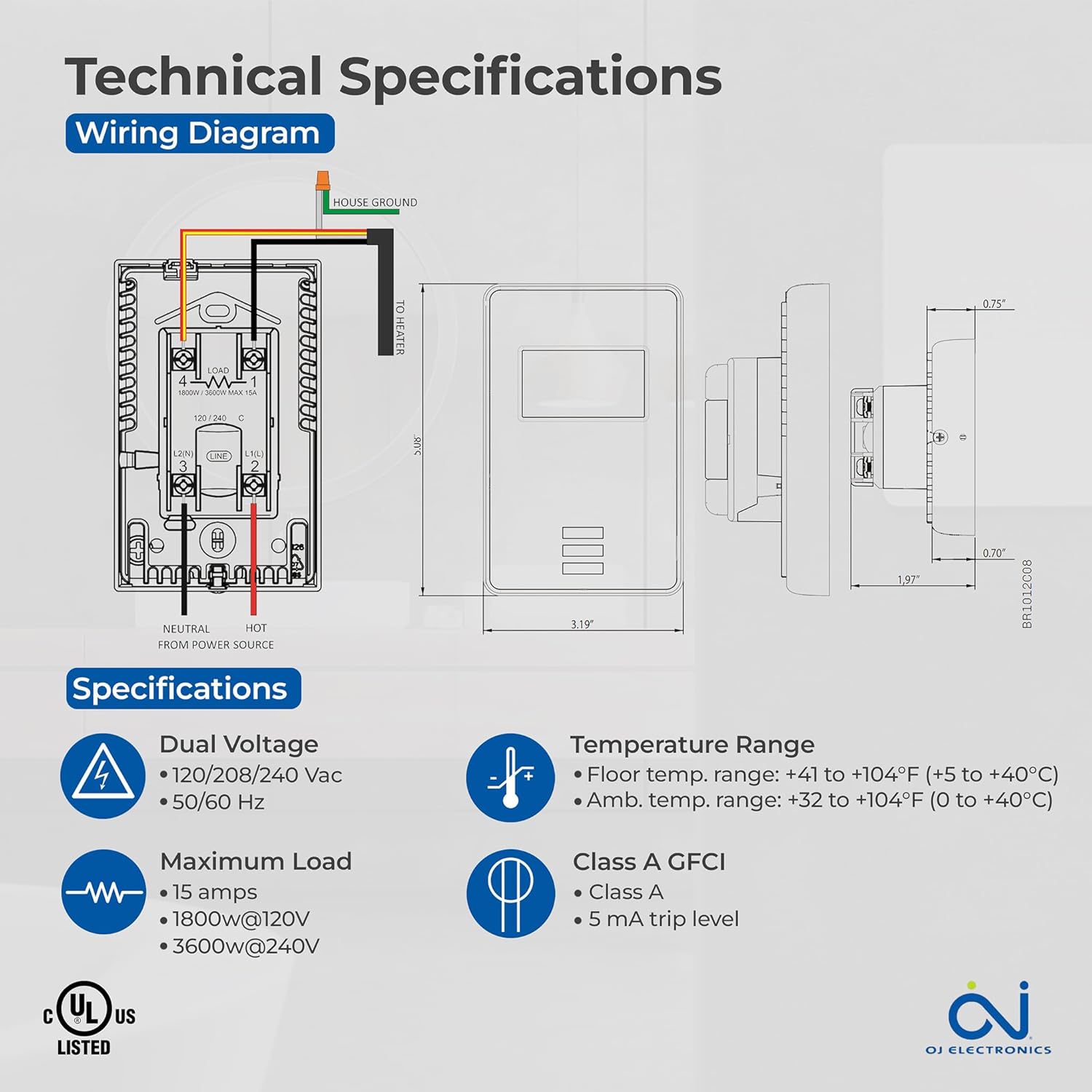
Figure 3: Detailed wiring diagram and technical specifications for the thermostat. Shows connections for House Ground, Neutral, Hot from Power Source, and To Heater.
3.3 Floor Sensor Installation
The 10Kohm floor sensor is included and essential for floor temperature control and protection. Install the sensor cable in a conduit or directly within the floor heating system, ensuring it is positioned centrally between heating elements for accurate readings. Do not cut or splice the sensor cable unless specifically instructed by the heating system manufacturer.

Figure 4: The included OJ Microline floor sensor, a black cable with a small probe at the end.
3.4 Iṣagbesori Thermostat
- After wiring, carefully push the thermostat into the wall box.
- Secure the thermostat to the wall box using the provided screws.
- So awọn oju awo.
- Mu pada agbara ni awọn Circuit fifọ.
4. Isẹ
The OJ Microline UTN4-4999 is a non-programmable thermostat designed for simple and direct temperature control.
4.1 Siṣàtúnṣe iwọn otutu
To adjust the desired temperature (setpoint), use the Up ati Isalẹ arrow buttons located below the display. The display will show the current temperature and the setpoint. The heating system will activate or deactivate to maintain the setpoint.

Figure 5: A hand interacting with the thermostat's buttons to adjust the temperature setting.
4.2 Awọn ọna Iṣakoso
The thermostat offers three control modes, selectable based on your heating requirements and floor type:
- (A) Ambient temperature with Floor protection: The thermostat controls based on the room's air temperature, but will limit the floor temperature to prevent overheating, especially important for sensitive floor coverings like laminate or engineered wood.
- (B) Floor temperature with Floor protection: The thermostat controls directly based on the floor sensor reading, also with an upper limit for floor protection. This mode is ideal for maintaining a consistent floor surface temperature.
- (C) Ambient temperature without Floor protection: The thermostat controls solely based on the room's air temperature, without an upper limit on floor temperature. Use this mode only if your floor covering can withstand high temperatures.
Consult your heating system installer or the thermostat's advanced settings (if available, refer to the full technical manual for details) to select the appropriate control mode.
5. Itọju
The OJ Microline UTN4-4999 thermostat is designed for minimal maintenance.
- Ninu: Nu oju thermostat naa pẹlu asọ rirọ, damp asọ. Ma ṣe lo abrasive ose, epo, tabi kemikali sprays, bi awọn wọnyi le ba ifihan tabi casing.
- Idanwo GFCI: Regularly test the built-in GFCI as per local electrical codes, typically monthly. Press the "TEST" button on the thermostat. The display should indicate a trip, and the heating will turn off. Press the "RESET" button to restore normal operation. If the GFCI does not trip or reset, contact a qualified electrician.
- Ayewo: Periodically inspect the thermostat and wiring for any signs of damage or loose connections. If any issues are found, disconnect power and consult a qualified electrician.
6. Laasigbotitusita
Ti o ba ni iriri awọn ọran pẹlu thermostat rẹ, tọka si awọn iṣoro ti o wọpọ ati awọn ojutu wọnyi:
| Isoro | Owun to le Fa | Ojutu |
|---|---|---|
| Iboju thermostat ti ṣofo. | Ko si agbara si thermostat. | Check the circuit breaker. Ensure all wiring connections are secure. |
| Alapapo eto ko titan. | Setpoint is below ambient/floor temperature; GFCI tripped; wiring issue. | Increase setpoint. Check and reset GFCI. Verify wiring connections. |
| GFCI trips frequently. | Ground fault in heating cable or wiring. | Immediately disconnect power and consult a qualified electrician to diagnose the ground fault. |
| Kika iwọn otutu ti ko pe. | Improper sensor placement; sensor damage; air drafts. | Ensure sensor is correctly placed. Inspect sensor for damage. Minimize drafts near the thermostat. |
Tí ìṣòro náà bá ń bá a lọ lẹ́yìn tí a bá ti gbìyànjú àwọn ìdáhùn wọ̀nyí, kan sí ìrànlọ́wọ́ àwọn oníbàárà tàbí onímọ̀ iná mànàmáná tó mọ̀ nípa rẹ̀.
7. Awọn pato
| Ẹya ara ẹrọ | Ẹ̀kúnrẹ́rẹ́ |
|---|---|
| Nọmba awoṣe | UDG-4999 |
| Brand | OJ Electronics |
| Adarí Iru | Awọn iwọn otutu |
| Ara | Ti kii ṣe Eto |
| Voltage | 120V, 208V, 240V AC (Dual Voltage) |
| O pọju fifuye | 15A (1800W @ 120V, 3600W @ 240V) |
| Igbohunsafẹfẹ | 50/60 Hz |
| GFCI | Built-in Class A (5 mA trip level) |
| Awọn sensọ | Built-in Air Sensor, 10Kohm Floor Sensor (included) |
| Floor Limit Range | +41 si +104°F (+5 si +40°C) |
| Ibaramu otutu Ibiti | +32 si +104°F (0 si +40°C) |
| Ifihan Iru | Digital pẹlu Backlight |
| Ọna Iṣakoso | Ìṣàkóso Bọ́tìnì (Fọwọ́kan) |
| Iṣagbesori Iru | Ògiri Ògiri |
| Ibamu | c UL us Listed for USA and Canada |
| Awọn iwọn | 6 x 3.5 x 2.75 inches (Apapọ) |
| Iwọn Nkan | 16 iwon (1 iwon) |

Figure 6: Key features of the thermostat including energy efficiency, simple operation, dual sensing, and built-in GFCI.
8. atilẹyin ọja Information
The OJ Microline UTN4-4999 Thermostat comes with a manufacturer's limited 3-odun atilẹyin ọja. Atilẹyin ọja yi ni wiwa awọn abawọn ninu awọn ohun elo ati iṣẹ ṣiṣe labẹ lilo deede ati iṣẹ. Jọwọ ṣe idaduro ẹri rira rẹ fun awọn iṣeduro atilẹyin ọja.
For detailed warranty terms and conditions, please refer to the documentation included with your product or visit the OJ Electronics official webojula.
9. Onibara Support
For technical assistance, troubleshooting beyond this manual, or warranty inquiries, please contact OJ Electronics customer support.
- Atilẹyin Ayelujara: Visit the official OJ Electronics webojú òpó wẹ́ẹ̀bù fún àwọn ìbéèrè tó ń gbà wá níyànjú, àwọn ohun èlò afikún, àti àwọn fọ́ọ̀mù ìfọwọ́sowọ́pọ̀.
- Imeeli Atilẹyin: Tọkasi apoti ọja rẹ tabi osise naa website for specific email addresses.
- Atilẹyin foonu: Tọkasi apoti ọja rẹ tabi osise naa webojula fun onibara iṣẹ awọn nọmba foonu.
When contacting support, please have your product model number (UDG-4999) and purchase date available.