1. Ifihan
The KAIWEETS HT106D Socket Tester is designed to quickly and accurately detect common wiring faults in standard electrical sockets and RCD (Residual Current Device) protected circuits. It features a clear LED display for voltage measurement and intuitive LED indicators for wiring status. This manual provides essential information for the safe and effective use of your device.
2. Alaye Aabo
Jọ̀wọ́ ka gbogbo ìkìlọ̀ àti ìtọ́ni ààbò kí o tó lo ọjà yìí dáadáa. Àìtẹ̀lé àwọn ìtọ́ni wọ̀nyí lè yọrí sí ìkọlù iná mànàmáná, iná, tàbí ìpalára ńlá.
- This device is rated CAT II 300V. Do not use it for measurements exceeding this rating.
- Do not use the tester if it appears damaged or is not functioning correctly.
- Do not use the tester in wet conditions or with wet hands.
- Always ensure the socket is de-energized before performing any wiring work. This tester is for verification only.
- The RCD test function may trip the circuit breaker. Ensure all sensitive equipment is saved or turned off before performing an RCD test.
- Important Note for 3x230V installations without neutral (common in Belgium): This tester may not function correctly or provide accurate readings in 3x230V installations without a neutral wire. It is primarily designed for systems with a neutral connection.
- Jeki kuro ni arọwọto awọn ọmọde.
3. Ọja Ipariview
The KAIWEETS HT106D Socket Tester is a compact and robust device designed for ease of use. It features a digital display for voltage and a series of LED indicators to show wiring status.

Nọmba 1: Iwaju view of the KAIWEETS HT106D Socket Tester, showing the digital voltage display, LED indicators, and RCD test button.
3.1 irinše
- Plug Pins: For insertion into the electrical socket.
- Awọn itọkasi LED: Red LEDs that illuminate in various patterns to indicate wiring status.
- Ifihan Digital: Shows the measured voltage.
- Bọ́tìnì ìdánwò RCD: Initiates the RCD trip test.
- Wiring Status Chart: Printed on the device for quick reference.
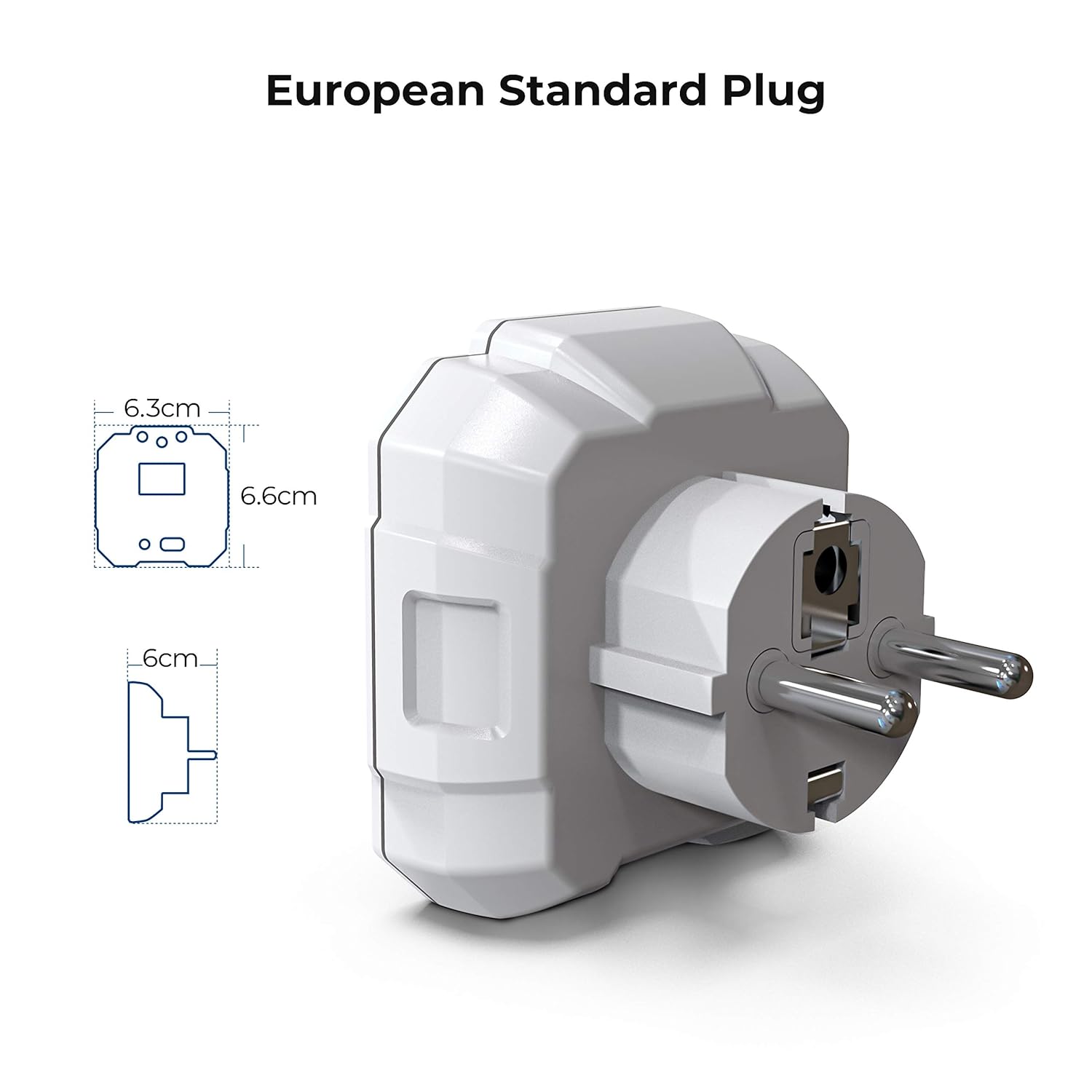
Nọmba 2: Diagram illustrating the dimensions of the KAIWEETS HT106D European standard plug.
4. Eto
The KAIWEETS HT106D Socket Tester comes with 2 AAA batteries included and pre-installed. No initial setup is required beyond ensuring the batteries are correctly seated if the device does not power on.
4.1 Batiri sori / Rirọpo
If battery replacement is needed, carefully open the battery compartment, insert 2 AAA batteries observing polarity, and close the compartment securely.

Nọmba 3: Ẹyìn view of the KAIWEETS HT106D Socket Tester, showing the battery compartment location.
5. Awọn ilana Iṣiṣẹ
The HT106D is designed for simple plug-and-play operation. Once plugged into a live socket, it automatically performs a wiring check and displays the voltage.
5.1 Idanwo Waya Ipilẹ
- Insert the KAIWEETS HT106D Socket Tester into the socket you wish to test.
- Observe the LED indicators on the front panel. The pattern of illuminated red LEDs will correspond to a specific wiring condition.
- Refer to the wiring status chart printed on the device or in Section 5.4 of this manual to interpret the results.

Nọmba 4: Visual representation of the 7 circuit conditions detected by the HT106D, with corresponding LED patterns.
Ọdun 5.2 Voltage Idiwon
Upon insertion into a live socket, the digital display on the HT106D will automatically show the measured voltage of the socket. This provides an immediate reading of the electrical supply.

Nọmba 5: Sun mo tipetipe view of the digital display showing the measured voltage.
Idanwo RCD 5.3
The RCD test function verifies the operation of Residual Current Devices (RCDs) by simulating an earth fault condition. This test should only be performed on RCD-protected circuits.
- Plug the HT106D into an RCD-protected socket.
- Ensure the wiring status indicates 'Correct' before proceeding.
- Tẹ awọn Bọtini idanwo RCD (located at the bottom of the device).
- If the RCD is functioning correctly, it should trip, cutting power to the circuit. The tester's lights will go out.
- If the RCD does not trip, it indicates a potential fault with the RCD device, and further investigation by a qualified electrician is recommended.
- To restore power, reset the RCD at your consumer unit.
Caution: Performing an RCD test will temporarily cut power to the circuit. Save any unsaved work on computers or other electronic devices before initiating the test.

Nọmba 6: The KAIWEETS HT106D plugged into a socket, ready for or performing an RCD test.
5.4 Oye LED Ifi
The HT106D uses a combination of three red LEDs to indicate the wiring status. Refer to the table below for interpretation:
| LED Àpẹẹrẹ | Ipo onirin | Apejuwe |
|---|---|---|
| ● ● ● (All three LEDs ON) | Atunse | The wiring is correct. |
| ● ○ ○ (Left LED ON) | Ṣi Ilẹ | The earth wire is not connected. |
| ○ ● ○ (Middle LED ON) | Ṣii Adurodeji | The neutral wire is not connected. |
| ○ ○ ● (Right LED ON) | Ṣii Live | The live wire is not connected. |
| ● ● ○ (Left & Middle LEDs ON) | Ìyípadà Láàyè/Ilẹ̀ | The live and earth wires are reversed. |
| ○ ● ● (Middle & Right LEDs ON) | Ìyípadà Láàyè/Dídúró | Awọn ifiwe ati didoju onirin ti wa ni ifasilẹ awọn. |
| ● ○ ● (Left & Right LEDs ON) | Live/Ground Reverse, Missing Ground | The live and earth wires are reversed, and the earth connection is missing. |
Akiyesi: '●' indicates an illuminated LED, '○' indicates an unlit LED.
6. Awọn pato
| Ẹya ara ẹrọ | Sipesifikesonu |
|---|---|
| Awoṣe | HT106D |
| Awọn ọna Voltage Ibiti | 48V - 250V AC |
| Iwọn Igbohunsafẹfẹ | 50Hz - 60Hz |
| RCD Test Current | >30mA |
| Aabo Rating | CAT II 300V, CE |
| Orisun agbara | 2 x Awọn batiri AAA (pẹlu) |
| Awọn iwọn | Isunmọ 7.9 x 7.5 x 7.5 cm |
| Iwọn | O fẹrẹ to giramu 80 |
| Pulọọgi Iru | European Standard 2-pin |
| Àwọ̀ | Funfun |
7. Itọju
- Ninu: Mu ẹrọ naa nu pẹlu gbẹ, asọ asọ. Ma ṣe lo abrasive ose tabi epo.
- Ibi ipamọ: Store the tester in a cool, dry place, away from direct sunlight and extreme temperatures. If storing for extended periods, remove the batteries to prevent leakage.
- Ayewo: Periodically inspect the device for any signs of damage, such as cracks in the casing tàbí àwọn pinni tí a tẹ̀. Má ṣe lò ó tí ó bá bàjẹ́.
8. Laasigbotitusita
- Ẹrọ ko ni agbara lori: Ṣàyẹ̀wò bóyá àwọn bátìrì náà wà ní ọ̀nà tó tọ́, kí wọ́n sì ní agbára tó láti fi ṣiṣẹ́. Rọpò bátìrì tí ó bá pọndandan.
- No LED indication or voltage ifihan: Ensure the socket is live and functioning. Test with a known working socket. If still no indication, the device may be faulty.
- RCD test does not trip the circuit: Ensure the socket is RCD-protected. If it is, and the RCD does not trip, the RCD itself may be faulty and requires inspection by a qualified electrician.
- Aipe voltage reading: Ensure the tester is fully inserted into the socket. If the reading is consistently off, compare with another calibrated voltage mita.
9. Atilẹyin ọja ati Support
KAIWEETS offers a 36-month service and technical support for the HT106D Socket Tester. If you encounter any issues or require assistance, please contact KAIWEETS customer support through their official webaaye tabi alagbata ti o ti ra ọja naa.
For technical support or warranty claims, please have your model number (HT106D) and proof of purchase ready.


