1. Ọja Ipariview
The Billboard BB425 Gaming Headset is designed for an immersive audio experience across various gaming platforms. It features a boom microphone for clear communication, enhanced bass for rich sound, and convenient in-line controls for volume adjustment and instant muting. The headset is lightweight and adjustable, ensuring a comfortable fit during extended use, and comes with a durable fabric cord.
- Gbohungbohun Ariwo: Fun ibaraẹnisọrọ ohùn ti o han gbangba.
- Bass ti o ni ilọsiwaju: Delivers a rich audio experience.
- Iṣakoso laini: Easily adjust volume and mute the microphone.
- Apẹrẹ ti o le ṣatunṣe: Lightweight and comfortable for prolonged gaming sessions.
- Durable Fabric Cord: Designed for longevity.
2. Awọn ilana iṣeto
Follow these steps to connect your Billboard BB425 Gaming Headset to your device.
- Ṣe idanimọ awọn Asopọmọra: The headset features a single 3.5mm TRRS jack for combined audio and microphone functionality. An included Y-splitter cable separates this into two 3.5mm TRS jacks: one for audio output (typically green) and one for microphone input (typically pink).
- For Devices with a Single 3.5mm Port (e.g., most laptops, gaming controllers, smartphones):
- Plug the headset's single 3.5mm TRRS jack directly into your device's combined audio/microphone port.
- For Devices with Separate Audio and Microphone Ports (e.g., most desktop PCs):
- Connect the headset's single 3.5mm TRRS jack into the female end of the Y-splitter cable.
- Plug the audio output jack (often green) of the Y-splitter into your device's audio output port.
- Plug the microphone input jack (often pink) of the Y-splitter into your device's microphone input port.
- Ṣatunṣe ibamu: Place the headset over your ears and adjust the headband for a comfortable and secure fit. Position the boom microphone near your mouth for optimal voice pickup.
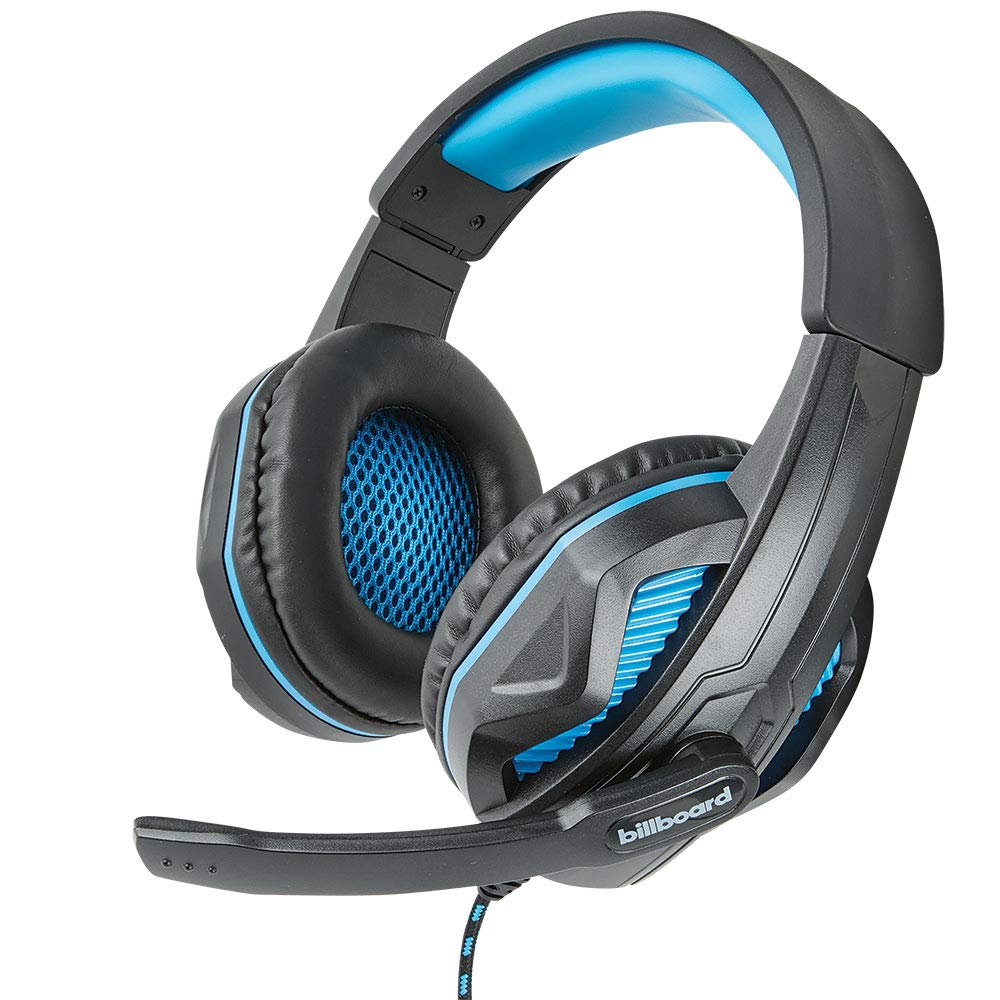
Image: The Billboard BB425 Gaming Headset's braided cable, in-line control unit, and the included Y-splitter cable with two 3.5mm TRS jacks for separate audio and microphone connections.
3. Awọn ilana Iṣiṣẹ
The in-line control unit provides easy access to essential audio functions.
- Iṣakoso iwọn didun: Use the scroll wheel on the in-line control unit to adjust the audio volume. Scroll up to increase volume and down to decrease it.
- Pa gbohungbohun: The in-line control unit features a switch to mute or unmute the microphone. Slide the switch to the "OFF" position to mute your microphone, and to the "ON" position to enable it.
- Boom Microphone Adjustment: The flexible boom microphone can be positioned closer or further from your mouth to optimize voice clarity.
4. Itọju ati Itọju
Ìtọ́jú tó tọ́ yóò mú kí agbekọri rẹ pẹ́ sí i.
- Ninu: Lo aṣọ rírọrùn tí ó gbẹ láti nu agbekọri naa. Fún awọn irọri etí, a gbọ́dọ̀ fi díẹ̀ rọ́ ẹ́.amp A le lo aṣọ pẹlu ọṣẹ kekere, ṣugbọn rii daju pe o gbẹ patapata ṣaaju lilo. Maṣe lo awọn kemikali lile tabi awọn afọmọ fifọ.
- Ibi ipamọ: Tọju agbekari ni ibi ti o mọ, ti o gbẹ kuro ni iwọn otutu ti o ga julọ ati imọlẹ orun taara. Yago fun tangling okun.
- Mimu: Do not pull on the cable to disconnect the headset. Always grasp the plug firmly. Avoid dropping or subjecting the headset to strong impacts.
5. Laasigbotitusita
If you encounter issues with your Billboard BB425 Gaming Headset, refer to the following common solutions.
- Ko si ohun tabi iwọn kekere:
- Ensure the headset's 3.5mm jack(s) are fully inserted into the correct port(s) on your device.
- Check the in-line volume control wheel and adjust it to an audible level.
- Verify your device's audio output settings. Ensure the headset is selected as the default playback device.
- Ṣe idanwo agbekari pẹlu ẹrọ miiran lati ṣe akoso ọran-ẹrọ kan pato.
- Gbohungbohun Ko Ṣiṣẹ:
- Ensure the microphone mute switch on the in-line control unit is in the "ON" position.
- If using the Y-splitter, ensure the microphone jack (typically pink) is correctly plugged into your device's microphone input port.
- Check your device's microphone input settings. Ensure the headset microphone is selected as the default recording device and that its input volume is not muted or set too low.
- Ṣe idanwo gbohungbohun pẹlu ohun elo miiran tabi ẹrọ.
- Ohùn tí kò dúró tàbí tí kò yípadà:
- Rí i dájú pé gbogbo àwọn ìsopọ̀mọ́ra wà ní ààbò àti pé wọn kò ní eruku tàbí ìdọ̀tí.
- Try connecting the headset to a different audio port or device to check if the issue persists.
- Yago fun gbigbe okun si sunmọ awọn orisun kikọlu itanna eletiriki.
6. Awọn pato
| Ẹya ara ẹrọ | Ẹ̀kúnrẹ́rẹ́ |
|---|---|
| Orukọ awoṣe | BB425 |
| Brand | Billboard |
| Asopọmọra Technology | Ti firanṣẹ |
| Jack agbekọri | 3.5 mm Jack |
| Gbigbe Eti | Lori Eti |
| Fọọmù ifosiwewe | Lori Eti |
| Awọn ẹrọ ibaramu | Gaming Consoles, Desktops, Laptops, Telephones |
| Pataki Awọn ẹya ara ẹrọ | Enhanced bass |
| Iṣakoso Iru | In-line control (Volume, Mute) |
| Cable Ẹya | Retractable, Durable Fabric Cord |
| Ohun elo | Ṣiṣu |
| Àwọ̀ | Dudu |
| Ọja Mefa | 25.15 x 22.86 x 8.89 cm |
| Iwọn Nkan | 386 g |
| Awọn batiri ti a beere | Rara |
7. atilẹyin ọja Information
This product is covered by a manufacturer's warranty. For specific details regarding warranty coverage, duration, and terms, please refer to the warranty card included with your product or visit the official Billboard webojula. Tọju iwe-ẹri rira rẹ bi ẹri rira fun eyikeyi awọn ibeere atilẹyin ọja.
8. Onibara Support
If you require further assistance or have questions not addressed in this manual, please contact Billboard customer support. Contact information can typically be found on the product packaging or the official Billboard webojula.
Olupese: Awọn ọran & Awọn ẹya ẹrọ ESI


