1. Ifihan
This instruction manual provides essential information for the safe and efficient operation, setup, maintenance, and troubleshooting of your Einhell TE-OS 18/150 Li-Solo Power X-Change Cordless Multi-Sander. Please read this manual thoroughly before using the tool and keep it for future reference. This product is part of the Einhell Power X-Change family, meaning it operates with any 18V Power X-Change battery.

Figure 1: Einhell TE-OS 18/150 Li-Solo Cordless Multi-Sander with included abrasive sheets.
2. Gbogbogbo Abo ilana
Always observe the following safety precautions when operating power tools to prevent electric shock, fire, and serious injury.
- Aabo Agbegbe Iṣẹ: Jeki agbegbe iṣẹ rẹ mọ ki o si tan daradara. Awọn agbegbe idamu tabi awọn agbegbe dudu n pe awọn ijamba. Ma ṣe ṣiṣẹ awọn irinṣẹ agbara ni awọn bugbamu bugbamu, gẹgẹbi niwaju awọn olomi ina, gaasi, tabi eruku.
- Aabo Itanna: Yago fun olubasọrọ ara pẹlu ilẹ tabi ilẹ roboto. Ma ṣe fi awọn irinṣẹ agbara han si ojo tabi awọn ipo tutu.
- Aabo ti ara ẹni: Always wear eye protection. Use hearing protection when operating for extended periods. Wear a dust mask in dusty conditions. Dress properly; avoid loose clothing or jewelry. Keep hair, clothing, and gloves away from moving parts.
- Lilo ati Itọju: Má ṣe fipá mú ohun èlò agbára náà. Lo ohun èlò agbára tó tọ́ fún ohun èlò rẹ. Yọ batiri náà kúrò lára ohun èlò agbára náà kí o tó ṣe àtúnṣe, yí àwọn ohun èlò míì padà, tàbí kí o fi àwọn ohun èlò agbára pamọ́. Tọ́jú àwọn ohun èlò agbára tí kò ṣiṣẹ́ níbi tí àwọn ọmọdé kò ti lè tẹ̀ ẹ́ lọ́wọ́, má sì jẹ́ kí àwọn tí kò mọ̀ nípa ohun èlò agbára náà tàbí àwọn ìtọ́ni wọ̀nyí ṣiṣẹ́.
- Lilo ati Itọju Ohun elo Batiri: Gba agbara nikan pẹlu ṣaja pato nipasẹ olupese. Lo awọn irinṣẹ agbara nikan pẹlu awọn idii batiri ti a pinnu pataki.
3. Ọja irinše
The Einhell TE-OS 18/150 Li-Solo multi-sander includes the following components:
- Cordless Multi-Sander Unit
- Dust Collection Box (with filter)
- Adapter for External Dust Extraction
- 6 Abrasive Sheets (3x P120, 3x P240)
Akiyesi: This product is supplied without a battery or charger. These are sold separately as part of the Power X-Change system.

Figure 2: Key features of the multi-sander, including Softgrip, dust extraction, delta sanding shoe, and large oscillating motion.

Figure 3: The Einhell TE-OS 18/150 Li-Solo is sold without a battery or charger.
4. Eto
4.1 Fifi sori batiri
- Ensure the sander's power switch is in the 'OFF' position.
- Slide a charged 18V Power X-Change battery pack into the battery receptacle on the rear of the sander until it clicks securely into place.
- Lati yọ batiri kuro, tẹ bọtini itusilẹ lori idii batiri naa ki o si rọra yọ jade.
4.2 Attaching Abrasive Paper
The sander features an 'Extreme Fix' hook-and-loop fastening system for quick and secure abrasive paper changes.
- Ensure the sander is switched off and the battery is removed.
- Align the holes on the abrasive sheet with the holes on the sanding plate.
- Press the abrasive sheet firmly onto the hook-and-loop surface of the sanding plate to secure it.
- To remove, simply peel the abrasive sheet off the sanding plate.

Figure 4: Attaching abrasive paper using the hook-and-loop system.

Figure 5: The sander comes with 6 abrasive sheets (3x P120, 3x P240).
4.3 eruku isediwon
The sander offers two options for dust extraction:
- Integrated Dust Collection Box: Attach the provided dust collection box to the designated port on the sander. This is suitable for most light to medium sanding tasks.
- External Dust Extraction: For prolonged use or when working with fine dust, attach the vacuum adapter to the dust extraction port and connect it to a suitable workshop vacuum cleaner.

Figure 6: Options for dust extraction: integrated dust collector or external vacuum connection.
5. Awọn ilana Iṣiṣẹ
5.1 Titan / Pa a
- Ensure a charged battery is installed and abrasive paper is securely attached.
- To start the sander, push the ON/OFF switch to the 'I' (ON) position.
- To stop the sander, push the ON/OFF switch to the 'O' (OFF) position.
5.2 Sanding imuposi
- Hold the sander firmly with one hand using the Softgrip surface.
- Place the sanding plate flat on the workpiece before switching the tool on.
- Apply light, even pressure. Do not press too hard, as this can reduce sanding efficiency and damage the workpiece or tool.
- Gbe sander naa ni awọn ọna ti o dan, ti o ni iyipo kọja oju naa.
- The delta-shaped sanding plate is ideal for sanding corners, edges, and smaller, intricate areas.
- Always switch off the sander and allow it to come to a complete stop before lifting it from the workpiece.

Figure 7: Demonstrating the use of the multi-sander for detailed work on a window frame.
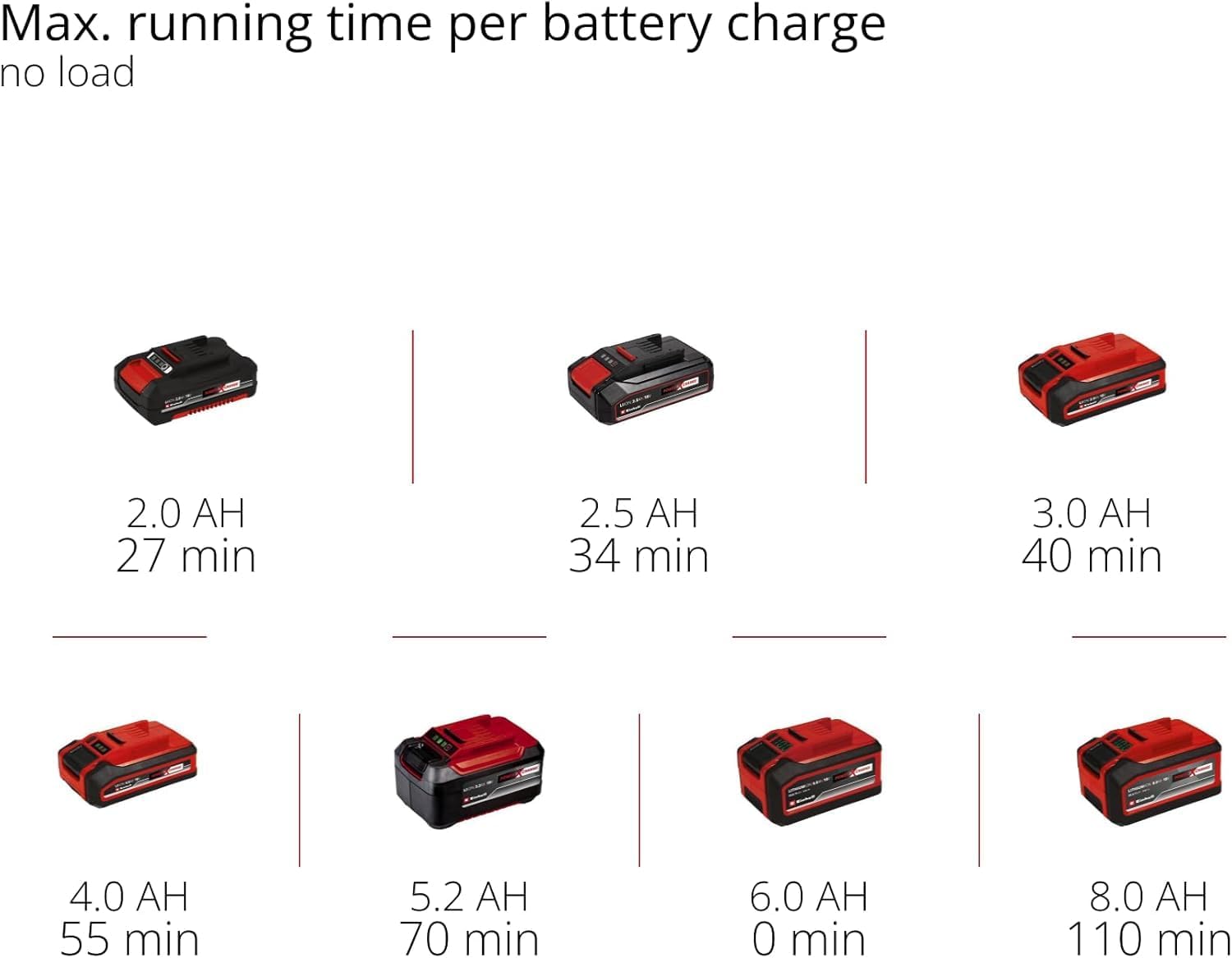
Figure 8: The compact design allows for optimal handling and one-handed control.
5.3 Battery Runtime (No Load)
The approximate maximum running time per battery charge (no load) for various Power X-Change battery capacities is as follows:
- 2.0 AH: 27 minutes
- 2.5 AH: 34 minutes
- 3.0 AH: 40 minutes
- 4.0 AH: 55 minutes
- 5.2 AH: 70 minutes
- 8.0 AH: 110 minutes

Figure 9: Battery runtime chart for various Power X-Change battery capacities.
6. Itọju
6.1 Cleaning the Dust Collection Box
- Regularly empty the dust collection box to maintain optimal dust extraction performance.
- Yọ apoti eruku lati sander.
- Open the dust box and dispose of the collected dust.
- Clean the filter inside the dust box by tapping it or using compressed air.
- Reattach the dust box securely to the sander.
6.2 Gbogbogbo Cleaning ati ayewo
- Always remove the battery before any cleaning or maintenance.
- Keep the ventilation slots clean to prevent overheating. Use a soft brush or compressed air.
- Nu ile irinṣẹ nu pẹlu asọ, damp asọ. Ma ṣe lo awọn aṣoju mimọ ti o lewu tabi awọn nkanmimu.
- Regularly inspect the sanding plate for wear or damage. Replace if necessary.
- Check the power switch for proper function.
7. Laasigbotitusita
If you encounter issues with your multi-sander, refer to the following common troubleshooting steps:
| Isoro | Owun to le Fa | Ojutu |
|---|---|---|
| Sander ko bẹrẹ | Batiri ko fi sii bi o ti tọ tabi tu silẹ. | Rii daju pe batiri ti fi sii ni kikun. Gba agbara si batiri ti o ba wulo. |
| Ko dara sanding išẹ | Worn or incorrect abrasive paper. Excessive pressure. | Replace abrasive paper. Use appropriate grit. Apply lighter, even pressure. |
| Ineffective dust extraction | Dust box full or filter clogged. Dust port blocked. | Empty dust box and clean filter. Clear any blockages in the dust port. |
| Gbigbọn pupọ/ariwo | Damaged sanding plate or abrasive paper. Loose components. | Inspect sanding plate and abrasive paper for damage. Ensure all components are securely fastened. |
Tí ìṣòro náà bá ń bá a lọ lẹ́yìn tí a bá ti gbìyànjú àwọn ìdáhùn wọ̀nyí, jọ̀wọ́ kan sí ìrànlọ́wọ́ oníbàárà Einhell.
8. Awọn pato
| Ẹya ara ẹrọ | Sipesifikesonu |
|---|---|
| Olupese | Einhell |
| Nọmba awoṣe | TE-OS 18/150 Li |
| Orisun agbara | Cordless (Power X-Change 18V) |
| Voltage | 18 Volts |
| Agbara | 18 Wattis |
| Max. Oscillation Speed | 24000 oscillations/min |
| Sanding Plate Type | Delta (Hook-and-loop fastening) |
| Included Abrasive Sheets | 6 sheets (3x P120, 3x P240) |
| Isediwon ekuru | Integrated dust collection box and external vacuum adapter |
| Awọn iwọn Ọja (L x W x H) | 22.4 x 10.1 x 14.9 cm |
| Iwọn | 860 giramu (laisi batiri) |
| Batiri / Ṣaja | Not included, required (Power X-Change 18V lithium-ion) |
9. Atilẹyin ọja ati Support
For warranty information, product registration, or technical support, please refer to the official Einhell website or contact your local Einhell service center. Keep your proof of purchase for any warranty claims.
Ko si awọn fidio ọja osise lati ọdọ olutaja ti a rii fun ifibọ ninu afọwọṣe yii.


