1. Ọja Ipariview
This RF Mini Wireless Remote Controller is designed for controlling single color 3528 and 5050 LED strip lights. It provides convenient wireless control over brightness and dynamic modes for 12V DC LED ribbons and shelf lights. The compact design and 11-key remote ensure ease of use and versatile application.

Image 1.1: The RF Mini Wireless Remote Controller (right) and its accompanying LED controller unit (left) with DC connectors.
2. Awọn ilana iṣeto
2.1. Idanimọ paati
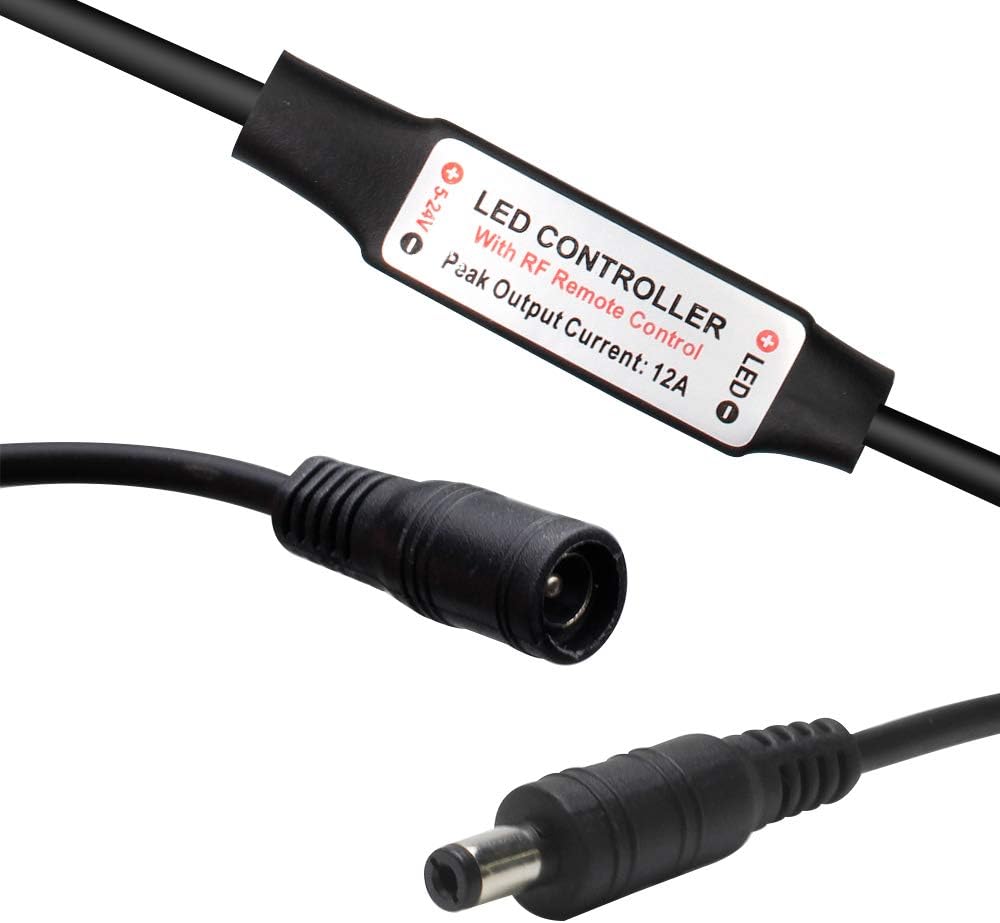
Aworan 2.1: Isunmọ view of the LED controller unit, showing the input (5-24V) and output (LED) connections, and the "LED CONTROLLER With RF Remote Control Peak Output Current: 12A" label.
The system consists of two main parts: the RF Mini Wireless Remote Control and the LED Controller unit. The LED controller unit has a DC input connector and a DC output connector for connecting to your LED strip lights.
2.2. Fifi sori batiri
The remote control requires one CR2025 or CR2032 battery, which is included. To install or replace the battery:
- Wa yara batiri ni ẹhin isakoṣo latọna jijin.
- Push the tab marked "PUSH" and slide the battery tray out.
- Insert the CR2025/CR2032 battery with the positive (+) side facing up.
- Gbe atẹ batiri pada sinu isakoṣo latọna jijin titi ti yoo fi tẹ sinu ipo rẹ.

Image 2.2: The back of the remote control, illustrating the battery compartment and the CR2025 battery being inserted.
2.3. Connecting the LED Controller
- Connect your 12V DC power adapter to the input side of the LED controller unit (labeled "5-24V").
- Connect your single color LED strip lights to the output side of the LED controller unit (labeled "LED"). Ensure correct polarity if applicable.
2.4. Sisopọ isakoṣo latọna jijin
The remote control and LED controller are typically pre-paired. If re-pairing is necessary or for multi-controller setups, follow these instructions:

Image 2.3: Visual guide for pairing the remote control, detailing both 1-to-many and 1-to-1 pairing methods.
- 1-to-Many Pairing: To pair one remote with multiple controllers, plug in the adapter for the LED controller. Within 5 seconds of powering on, press the green "LIGHT" button on the remote. The LED lights will flicker to indicate successful pairing. Repeat for other controllers.
- 1-to-1 Pairing: To pair one remote exclusively with a single controller, turn off the remote. Within 5 seconds of turning it back on, simultaneously press the "SPEED-" and "SPEED+" keys. The LED lights will flash, indicating a unique frequency pairing.
3. Awọn ilana Iṣiṣẹ
The 11-key RF remote control allows for easy adjustment of your single color LED strip lights.
- Bọtini agbara (⏻): Tan tabi pa awọn ina LED.
- LIGHT Button (Imọlẹ): Toggles the light on/off and is used for 1-to-many pairing.
- BRIGHT+ / BRIGHT- Buttons: Adjusts the brightness level of the LED lights. The controller offers a smooth dimmer effect.
- 100% / 50% / 25% Buttons: Quickly sets the brightness to preset levels (100%, 50%, or 25%).
- Bọ́tìnì MÓDÉ+ / MÓDÉ: Cycles through the available dynamic lighting modes. There are 8 dynamic modes.
- SPEED+ / SPEED- Buttons: Adjusts the speed of the current dynamic lighting mode. There are 10 speed levels. These buttons are also used for 1-to-1 pairing.
The controller features an autosave function, retaining the last setting even after power off.
4. Itọju
To ensure optimal performance and longevity of your RF Mini Wireless Remote Controller and LED Controller:
- Keep the remote control and LED controller dry. Avoid exposure to moisture or liquids.
- Nu awọn ẹrọ naa pẹlu asọ ti o gbẹ. Ma ṣe lo abrasive ose tabi epo.
- Replace the remote control battery (CR2025/CR2032) when the remote's range decreases or it becomes unresponsive. Refer to Section 2.2 for battery installation.
- Ensure proper ventilation around the LED controller unit to prevent overheating, especially during prolonged use.
5. Laasigbotitusita
If you encounter issues with your RF Mini Wireless Remote Controller, please refer to the following common solutions:
| Isoro | Owun to le Fa / Solusan |
|---|---|
| LED lights do not respond to the remote. |
|
| Awọn imọlẹ flicker tabi huwa aiṣedeede. |
|
| Isakoṣo latọna jijin ko dara. |
|
6. Awọn pato
Technical specifications for the RF Mini Wireless Remote Controller and LED Controller unit:

Image 6.1: Detailed specifications table for the RF Mini Wireless Remote Controller system.
| Ẹya ara ẹrọ | Ẹ̀kúnrẹ́rẹ́ |
|---|---|
| Ipo Yiyi | 8 awọn ipo |
| Ìmúdàgba Speed Ipele | 10 ipele |
| Ipele Imọlẹ Imọlẹ | 10 levels (256 PWM grades) |
| Dan Dimmer Ipa | Bẹẹni |
| Ṣiṣẹ Voltage | DC 12-24V |
| Ijade lọwọlọwọ | Iye ti o ga julọ ti 6A |
| Ipo Iṣakoso latọna jijin | Alailowaya RF |
| Igbohunsafẹfẹ Latọna jijin | 433.92MHz |
| Ijinna jijin | > 30m ni agbegbe ṣiṣi |
| Nọmba Awoṣe Nkan | DC-RF-RC-12V |
| Awọn batiri | 1 CR2025/CR2032 battery required (included) |
| Awọn ẹrọ ibaramu | LED Strip Lights, LED Ribbon, Shelf Lights |
7. Atilẹyin ọja ati Support
For warranty information and customer support, please refer to the documentation provided with your purchase or contact LEDLightsWorld directly through their official channels. Specific warranty terms and support contact details are not available in this manual.
Manufacturer: LEDLightsWorld


