Ọrọ Iṣaaju
Thank you for choosing the Tecno Minipod M1 True Wireless Stereo (TWS) Earbuds. This manual provides detailed instructions on how to set up, operate, and maintain your Minipod M1 earbuds to ensure optimal performance and longevity. The Minipod M1 offers a seamless audio experience with its portable charging case, long playback time, IPX4 water resistance, and smart touch controls.
Ohun ti o wa ninu Apoti
- 1 x Tecno Minipod M1 TWS Earphone (Left and Right)
- 1 x Ọran Gbigba agbara to šee gbe
- 1 x Okun Ngba agbara USB
- 1 x Itọsọna olumulo
- 2 x Awọn meji ti awọn eti eti (awọn iwọn oriṣiriṣi)
- 1 x Silicone Protective Cover
- 1 x Hook (Carabiner)

Image: Infographic highlighting key features of the Tecno Minipod M1, including 18 hours non-stop music, ENC Noise Reduction Technology, Bluetooth 5.0, cool touch controls, portable charging case, IPX4 water resistance, and 4.2gm ultra-light body.
Ọja Pariview
The Tecno Minipod M1 consists of two lightweight earbuds and a compact charging case. The case not only protects the earbuds but also provides additional battery life for extended listening.
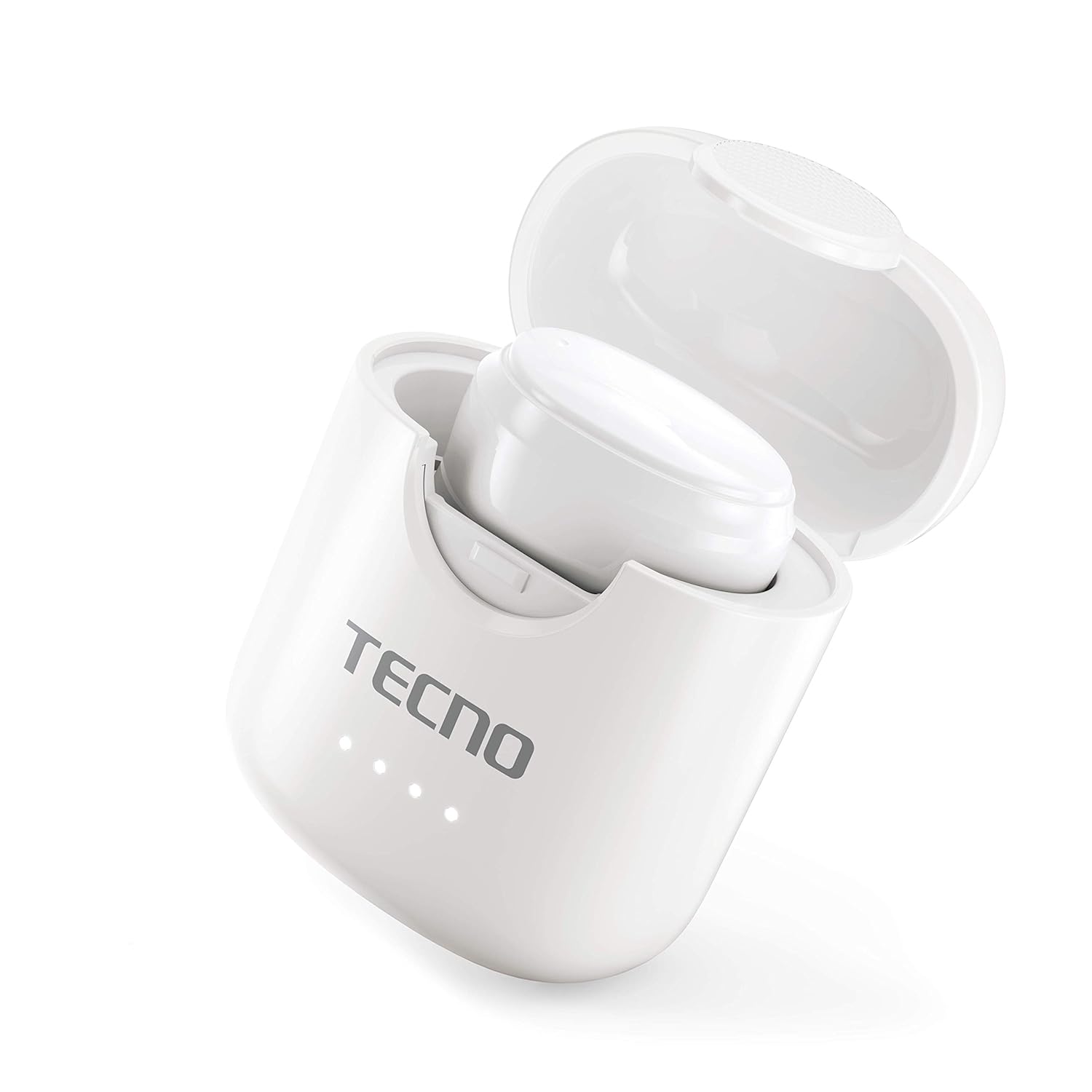
Image: The Tecno Minipod M1 earbud securely placed inside its open charging case, showing the compact design and charging indicators.

Image: A detailed close-up of a single Tecno Minipod M1 earbud, highlighting its ergonomic shape and touch-sensitive surface.
Awọn eroja:
- Awọn afetigbọ: Left and Right, each with touch controls and built-in microphone.
- Ngba agbara: Ó ń gbé àwọn ètí ìró tí ó wà lórí rẹ̀, pẹ̀lú àwọn àmì LED fún ipò bátírì.
- Ibudo Gbigba agbara USB: Ti wa lori apoti gbigba agbara fun titẹ agbara.
Ṣeto
1. Gbigba agbara akọkọ:
Before first use, fully charge the Tecno Minipod M1 earbuds and their charging case.
- Gbe awọn agbekọri mejeeji sinu apoti gbigba agbara. Rii daju pe wọn joko ni deede ni awọn iho wọn.
- Connect the provided USB charging cable to the charging port on the case and the other end to a USB power source (e.g., computer, wall adapter).
- The LED indicators on the charging case will illuminate to show charging status. Once fully charged, the indicators may change color or turn off.

Image: The Tecno Minipod M1 charging case in a closed position, showing the LED indicators on the front that display charging status.
2. So pọ pẹlu Ẹrọ Rẹ:
The Minipod M1 earbuds use Bluetooth 5.0 for a stable and quick connection.
- Ṣii apoti gbigba agbara. Awọn agbekọri yoo tẹ ipo isọpọ sii laifọwọyi.
- Lori foonuiyara tabi ẹrọ Bluetooth ti o ṣiṣẹ, lọ si awọn eto Bluetooth.
- Wa fun available devices and select "Tecno Minipod M1" from the list.
- Ni kete ti o ti sopọ, iwọ yoo gbọ ohun orin ijẹrisi, ati awọn ina atọka ti awọn afikọti yoo yipada.
- Fun awọn lilo atẹle, awọn agbekọri yoo sopọ laifọwọyi si ẹrọ ti o so pọ to kẹhin nigbati o ba jade ninu ọran naa.
Ṣiṣẹ
Awọn iṣakoso Fọwọkan Smart:
The Tecno Minipod M1 features intuitive touch controls on each earbud.
| Iṣe | Iṣakoso |
|---|---|
| Mu ṣiṣẹ/Danu Orin duro | Fọwọ ba ẹyọkan lori boya agbekọri |
| Next Track | Fọwọ́ kan etí ọ̀tún lẹ́ẹ̀mejì |
| Ti tẹlẹ Track | Fọwọ́ kan etí òsì lẹ́ẹ̀mejì |
| Idahun/Pari Ipe | Fọwọ ba ẹyọkan lori boya agbekọri |
| Kọ Ipe | Tẹ mọlẹ boya agbekọri fun iṣẹju meji 2 |
| Mu Oluranlọwọ Ohun ṣiṣẹ | Fọwọ ba meteta lori boya agbekọri |
Wọ Awọn Agbekọti:
Choose the correct size of eartips for a comfortable and secure fit. Insert the earbuds gently into your ear canal and twist slightly to ensure a snug fit. A proper fit enhances sound quality and noise cancellation.
Itoju
Ninu:
- Mọ awọn afikọti nigbagbogbo ati apoti gbigba agbara pẹlu asọ ti o gbẹ, asọ ti ko ni lint.
- Maṣe lo awọn afọmọ abrasive, ọti-lile, tabi awọn nkan ti kemikali.
- Fi pẹ̀lẹ́pẹ̀lẹ́ yọ gbogbo ìdọ̀tí etí tàbí ìdọ̀tí kúrò nínú etí àti àwọ̀n ohùn tí a fi ń sọ̀rọ̀ nípa lílo búrọ́ọ̀ṣì kékeré tàbí swab owú.
Ibi ipamọ:
- Nigbati ko ba si ni lilo, tọju awọn afikọti nigbagbogbo sinu apoti gbigba agbara wọn lati daabobo wọn ati jẹ ki wọn gba agbara.
- Tọju ẹrọ naa ni itura, aye gbigbẹ, kuro lati awọn iwọn otutu ti o ga julọ ati oorun taara.
Omi Resistance (IPX4):
The Tecno Minipod M1 earbuds are IPX4 water resistant, meaning they are protected against splashing water from any direction. This makes them suitable for workouts and light rain. However, they are not designed for swimming or submersion in water. Do not charge the earbuds or case if they are wet.

Image: The Tecno Minipod M1 charging case shown with various colorful silicone protective covers, emphasizing the included accessory for better protection and portability.
Laasigbotitusita
| Isoro | Owun to le Solusan |
|---|---|
| Earbuds ko gba agbara | Rí i dájú pé okùn gbigba agbara náà so pọ̀ dáadáa. Ṣàyẹ̀wò bóyá àpótí gbigba agbara náà ní agbára. Nu àwọn olùbáṣepọ̀ gbigba agbara lórí àwọn agbekọri àti àpótí náà. |
| Ko le so pọ pẹlu ẹrọ | Make sure Bluetooth is enabled on your device. Ensure earbuds are in pairing mode (open case). Forget "Tecno Minipod M1" from your device's Bluetooth list and try pairing again. Move closer to your device. |
| Ohun agbekọri kan ṣoṣo ti n dun | Place both earbuds back into the charging case, close the lid, wait a few seconds, then open the lid and try again. Ensure both earbuds are charged. |
| Iwọn kekere tabi didara ohun ko dara | Adjust the volume on your device. Ensure earbuds are properly seated in your ears. Clean any debris from the speaker mesh and eartips. |
| Microphone not working during calls | Ensure the earbuds are connected as a "headset" profile in your device's Bluetooth settings. Check for any obstructions on the microphone opening. |
Awọn pato
| Ẹya ara ẹrọ | Ẹ̀kúnrẹ́rẹ́ |
|---|---|
| Orukọ awoṣe | Tecno Minipod M1 |
| Ẹya Bluetooth | 5.0 |
| Total Sisisẹsẹhin Time | Up to 18 hours (6 hours on earbuds + 12 hours with charging case) |
| Omi Resistance | IPX4 (Lan ati asesejade sooro) |
| Ifagile Ariwo | Ifagile Noise ayika (ENC) |
| Awọn iṣakoso | Smart Fọwọkan idari |
| Iwuwo Earbud | Isunmọ. 4.2g fun agbekọri |
| Iwọn (Ọja) | 2.4 x 1.7 x 2.7 cm |
| Ohun elo | Polycarbonate (PC), Acrylonitrile Butadiene Styrene (ABS) |
| Ibamu System isẹ | iOS, Android |
Atilẹyin ọja ati Support
The Tecno Minipod M1 comes with a 6-osu atilẹyin ọja lati ọjọ ti o ra. Atilẹyin ọja yi ni wiwa awọn abawọn iṣelọpọ. Jọwọ ṣe idaduro ẹri rira rẹ fun awọn iṣeduro atilẹyin ọja.
For technical support, warranty claims, or any other inquiries, please contact Tecno customer service through their official webojú òpó wẹ́ẹ̀bù tàbí ìwífún ìbánisọ̀rọ̀ tí a pèsè pẹ̀lú ìwé ìrajà rẹ. O tún le ṣèbẹ̀wò sí ojú òpó wẹ́ẹ̀bù náà. Ile itaja Tecno lori Amazon fun alaye siwaju sii.


