1. Ọja Ipariview
The EXCEL Tankless Gas Water Heater is designed to provide instant hot water for various applications, including small apartments, lofts, flats, RVs, and mobile homes. This unit operates on Propane (LPG) and features exclusive low water pressure startup technology, requiring only 2 PSI of water pressure to activate. Its vent-free design eliminates the need for complex and costly flue installations, making it a convenient and energy-efficient solution for on-demand hot water.

Nọmba 1.1: Iwaju ati ẹgbẹ view of the EXCEL Tankless Gas Water Heater, showcasing apẹrẹ kekere ati awọn bọtini iṣakoso rẹ.
Awọn ẹya pataki:
- Propane Gas (LPG) Unit: Designed for use with liquid propane gas.
- Low Water Pressure Startup: Activates with as little as 2 PSI of water pressure, ideal for areas with fluctuating water supply. This is achieved through a magnetic water flow sensor, unlike older units that rely on rubber diaphragms requiring higher pressure.
- Vent-Free Technology: Does not require a traditional flue or ductwork for exhaust. Equipped with an Oxygen Depletion Safety (ODS) shutoff and an exclusive 20-minute safety shutoff feature for indoor installation with proper ventilation.
- Iwọn Iwapọ: Dimensions are approximately 12.8 inches (front width) x 8 inches (depth) x 18.75 inches (height), allowing for flexible installation.
- Imudanu aladaaṣe: Powered by 2 D-size batteries (included) for automatic ignition upon water flow.
- Energy and Water Saving: Delivers hot water instantly, reducing waste.
2. Alaye Aabo
Read and understand all safety warnings and instructions before installing, operating, or performing maintenance on this appliance. Failure to follow these instructions could result in property damage, personal injury, or death.
Awọn iṣọra Aabo Gbogbogbo:
- Ohun elo yii gbọdọ fi sori ẹrọ nipasẹ alamọja ti o pe ni ibamu pẹlu gbogbo awọn koodu agbegbe ati ilana.
- Ensure adequate ventilation when installing the unit indoors due to its vent-free design.
- Ma ṣe tọju tabi lo epo petirolu tabi awọn ina ina miiran ati awọn olomi ni agbegbe eyi tabi eyikeyi ohun elo miiran.
- Check for gas leaks using a soapy water solution after installation and during maintenance. Never use an open flame.
- The unit is equipped with an Oxygen Depletion Safety (ODS) shutoff system and a 20-minute safety shutoff feature. Do not bypass or tamper pẹlu awọn ẹrọ ailewu.
- Ensure proper battery installation for automatic ignition. Use new, high-quality D-size alkaline batteries.
- Protect the unit from freezing temperatures. Drain the unit if it will be exposed to freezing conditions (see Maintenance section).
- Ọja yii ni awọn kemikali ti a mọ si Ipinle California lati fa akàn ati awọn abawọn ibimọ tabi ipalara ibisi miiran (Ikilọ 65 Ilana).
3. Eto ati fifi sori
Proper installation is critical for the safe and efficient operation of your EXCEL Tankless Gas Water Heater. Refer to the diagrams below for connection points.
Idanimọ eroja:

Figure 3.1: Connection points at the bottom of the unit.

Figure 3.2: Location of the Winter Drain and Battery Box.
Awọn igbesẹ fifi sori ẹrọ:
- Iṣagbesori: Securely mount the unit to a wall using appropriate hardware. Ensure the mounting surface can support the weight of the unit when filled with water.
- Awọn isopọ omi:
- So okùn ipese omi tutu pọ mọ Omi Inlet Tutu.
- Connect the hot water output line to the Gbona Omi iṣan.
- Ensure all water connections are tight and leak-free. Use appropriate sealing tape or compound.
- Isopọ gaasi:
- Connect the Propane (LPG) gas supply line to the Awọleke Gaasi. The unit includes an LPG Brass Fitting for a ⅜" Flare connection.
- Verify all gas connections are secure and test for leaks using a soapy water solution.
- Fifi sori batiri: Open the battery box and insert two D-size batteries. Ensure correct polarity. These batteries power the automatic ignition system.
- Afẹfẹ: For indoor installations, ensure the area has adequate ventilation as this is a vent-free appliance.

olusin 3.3: Ti abẹnu view highlighting the magnetic water flow sensor, which enables low water pressure startup.
4. Awọn ilana Iṣiṣẹ
Follow these steps to operate your EXCEL Tankless Gas Water Heater.
Ibẹrẹ Ibẹrẹ:
- Ensure all water and gas connections are properly made and leak-free.
- Ṣii akọkọ gaasi ipese àtọwọdá.
- Open a hot water faucet in your system. The unit will detect water flow (as low as 2 PSI) and automatically ignite.
- Allow water to run for a few moments to purge any air from the lines.
Isẹ ojoojumọ:
- To get hot water, simply open any hot water faucet connected to the unit. The heater will automatically ignite and begin heating water as it flows through.
- The unit is designed for a temperature rise of approximately 45°F, delivering 1.6 Gallons Per Minute (GPM).
- While suitable for multiple points of use, it is recommended to use no more than one point of use at a time for optimal performance.
- For incoming cold water temperatures below 50°F (down to 40°F), you may need to reduce the water flow rate using the control knob to achieve desired hot water temperature.
- The unit features a 20-minute safety shutoff. If hot water is continuously drawn for more than 20 minutes, the unit will automatically shut off. To restart, close the hot water faucet and then reopen it.
5. Itọju
Itọju deede ṣe idaniloju gigun ati iṣẹ ṣiṣe ti ẹrọ igbona omi rẹ.
Awọn iṣayẹwo deede:
- Rirọpo Batiri: Replace the two D-size batteries annually, or if the ignition becomes inconsistent. Use high-quality alkaline batteries.
- Ayẹwo ti o jo: Periodically check all water and gas connections for leaks. For gas leaks, use a soapy water solution.
- Ode Ninu: Nu ode ti ẹyọ kuro pẹlu asọ, damp asọ. Ma ṣe lo abrasive ose tabi epo.
Winterization (Freezing Protection):
If the unit will be exposed to freezing temperatures, it is crucial to drain all water from the system to prevent damage.
- Pa ipese gaasi si ẹrọ naa.
- Turn off the cold water supply to the unit.
- Open a hot water faucet in your system to relieve pressure.
- Wa awọn Winter Drain valve at the bottom of the unit (refer to Figure 3.2). Open this valve to drain the water from the heat exchanger.
- Once drained, close the drain valve.

olusin 5.1: Ti abẹnu view of the copper heat exchanger, which should be drained to prevent freezing damage.
6. Laasigbotitusita
This section provides solutions to common issues you might encounter with your water heater.
| Isoro | Owun to le Fa | Ojutu |
|---|---|---|
| No hot water / Unit does not ignite | No water flow or insufficient water pressure | Ensure water supply is on and water pressure is at least 2 PSI. Check for kinks in water lines. |
| Awọn batiri ti o ku tabi kekere | Replace both D-size batteries with new alkaline batteries. | |
| Ko si ipese gaasi | Ensure gas tank is not empty and gas supply valve is fully open. | |
| ODS or 20-minute safety shutoff activated | Ensure adequate ventilation. If unit ran for 20 minutes, close and reopen hot water faucet to reset. | |
| Omi ko gbona to | High water flow rate for incoming temperature | Reduce water flow rate using the control knob on the unit. |
| Iwọn omi kekere ti nwọle | The unit adds approximately 45°F to incoming water. If incoming water is very cold, the output temperature will be lower. Reduce flow rate. | |
| Gas or water leaks | Awọn isopọ alaimuṣinṣin tabi awọn paati ti bajẹ | Tighten all connections. If leaks persist, contact a qualified professional for inspection and repair. Do not attempt to repair gas leaks yourself. |
Tí ìṣòro náà bá ń bá a lọ lẹ́yìn tí a ti gbìyànjú àwọn ìdáhùn wọ̀nyí, kan sí onímọ̀ iṣẹ́ tó mọ̀ nípa rẹ̀.
7. Awọn pato
Technical specifications for the EXCEL Tankless Gas Water Heater.
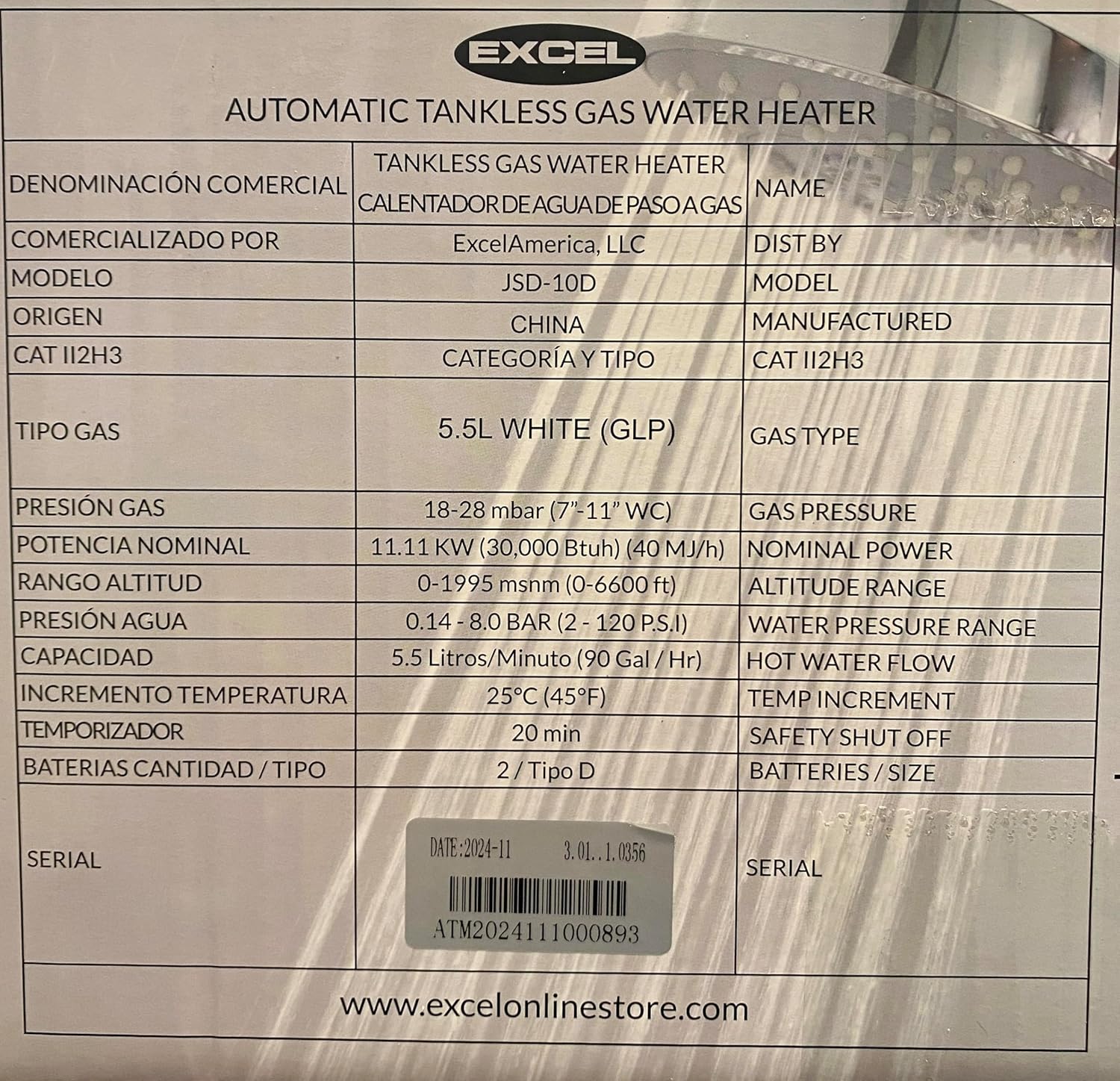
Àwòrán 7.1: Àmì ọjà pẹ̀lú àwọn ìlànà pàtó.
| Sipesifikesonu | Iye |
|---|---|
| Brand | EXCEL |
| Nọmba awoṣe | 850020757060 |
| Awọn iwọn Ọja (W x D x H) | 12.8" x 8" x 18.75" (isunmọ.) |
| Iwọn Nkan | 8.6 iwon |
| Epo Iru | Propane (LPG) |
| Voltage | 3 Volts (for ignition) |
| Awọn batiri ti a beere | 2 D-size batteries |
| Oṣuwọn Sisan ti o pọju | 1.6 Galonu fun iseju kan (GPM) |
| Ooru Jade | 40,000 Awọn ẹya Gbona Ilu Gẹẹsi (BTU) |
| Iwọn otutu Dide | Adds approximately 45°F to cold water |
| Minimum Water Pressure Startup | 2 PSI |
| Iwọn Iṣiṣẹ ti o pọju | 120 PSI |
| Aabo Awọn ẹya ara ẹrọ | Oxygen Depletion Safety (ODS) shutoff, 20-minute safety shutoff |
| Iṣagbesori Iru | Ògiri Ògiri |
| Awọn irinše to wa | 2 Size D Batteries, Exhaust diffuser Plate, LPG Brass Fitting for ⅜" Flare connection |
8. Atilẹyin ọja ati Support
For warranty information and technical support, please refer to the documentation included with your purchase or contact the seller directly. The seller for this product is typically Energy-Store.
For additional resources and product information, you may visit the official EXCEL webojula: www.excelonlinestore.com


