Ọrọ Iṣaaju
This manual provides essential information for the safe and efficient use of your Lenovo ThinkPad X1 Extreme Gen 3 laptop. Please read this manual thoroughly before operating your device to ensure optimal performance and longevity. Keep this manual for future reference.
Ṣeto
Unpacking ati Ibẹrẹ Ayewo
Carefully remove all components from the packaging. Verify that all items listed in the packing list are present and undamaged. If any items are missing or damaged, contact your retailer immediately.

olusin 1: Iwaju view of the Lenovo ThinkPad X1 Extreme Gen 3 laptop.
Nsopọ Agbara
Connect the power adapter to the laptop's power input port and then to a wall outlet. The battery will begin charging automatically. It is recommended to fully charge the battery before initial use.
Bata akọkọ ati Eto Eto Ṣiṣẹ
Press the power button to turn on the laptop. Follow the on-screen instructions to complete the Windows 10 Pro setup, including language selection, network connection, and user account creation.
Ṣiṣẹ Kọǹpútà alágbèéká Rẹ
Keyboard ati TrackPoint
The ThinkPad X1 Extreme Gen 3 features a full-size keyboard and a TrackPoint pointing device for precise cursor control. The TrackPoint is located in the center of the keyboard, with corresponding buttons below the spacebar.
Touchpad Lilo
Bọtini ifọwọkan olona-fọwọkan ṣe atilẹyin ọpọlọpọ awọn afarajuwe fun lilọ kiri, pẹlu yiyi, sun-un, ati awọn ohun elo yi pada. Tọkasi awọn eto Windows fun isọdi awọn iṣesi ifọwọkan paadi.
Nsopọ Awọn ẹrọ ita
Your laptop is equipped with multiple ports for connecting peripherals. These include USB ports, an HDMI port, and a headphone/microphone combo jack. Refer to the specifications section for a complete list of ports.
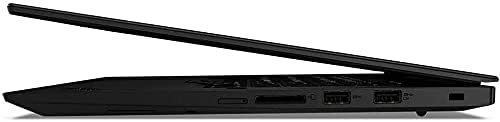
olusin 2: Apa view illustrating the connectivity ports of the laptop.
Itoju
Ninu Kọǹpútà alágbèéká
Lo asọ asọ, ti ko ni lint die-die dampened with water or a screen cleaner to clean the display. For the keyboard and chassis, use a soft cloth. Avoid harsh chemicals or abrasive materials.
Itọju Batiri
To maximize battery life, avoid extreme temperatures and store the laptop with a partial charge if not used for extended periods. Periodically discharge and recharge the battery fully.
Awọn imudojuiwọn Software
Ṣayẹwo nigbagbogbo fun ati fi ẹrọ ṣiṣe sori ẹrọ ati awọn imudojuiwọn awakọ lati rii daju iṣẹ ṣiṣe to dara julọ, aabo, ati ibaramu.
Laasigbotitusita
Wọpọ Oran ati Solusan
- Kọǹpútà alágbèéká ko ṣiṣẹ lori: Ensure the power adapter is securely connected and the battery is charged. Try holding the power button for 10-15 seconds to perform a hard reset.
- Iboju ti ṣofo: Check if the laptop is in sleep mode. Press any key or the power button to wake it up. Verify external display connections if applicable.
- Iṣẹ ṣiṣe ti o lọra: Close unnecessary applications. Check for background processes consuming high resources. Ensure sufficient free disk space.
- Awọn oran Asopọmọra Wi-Fi: Restart your router and modem. Check network settings on the laptop. Ensure Wi-Fi drivers are up to date.
Fun awọn ọran eka diẹ sii, tọka si atilẹyin Lenovo webojula tabi olubasọrọ onibara iṣẹ.
Awọn pato
| Ẹya ara ẹrọ | Ẹ̀kúnrẹ́rẹ́ |
|---|---|
| Orukọ awoṣe | ThinkPad X1 iwọn Gen 3 |
| isise | Intel Core i5-10210U Quad Core (1.6GHz-4.2GHz) |
| Eto isesise | Windows 10 Pro 64bit English |
| Kaadi eya aworan | NVIDIA GeForce GTX 1650 Ti |
| Ifihan | 15.6" Full HD IPS 250nits Anti-Glare (1920 x 1080) |
| Àgbo | 32 GB DDR4 |
| Dirafu lile | 1 GB SSD |
| Ailokun | 802.11 AC Wireless with Bluetooth 5.0 |
| Keyboard | Single Pointing Non-backlit Keyboard, English |
| Iwọn Nkan | 4.24 iwon |
| Ọja Mefa | 14.2 x 9.7 x 0.7 inches |
| Àwọ̀ | Dudu |
| Pataki Ẹya | Fingerprint Reader |
Atilẹyin ọja ati Support
Fun alaye atilẹyin ọja, jọwọ tọkasi kaadi atilẹyin ọja ti o wa pẹlu ọja rẹ tabi ṣabẹwo si atilẹyin osise Lenovo webAaye ayelujara. Atilẹyin imọ-ẹrọ ati awọn aṣayan iṣẹ wa nipasẹ awọn ikanni iṣẹ alabara Lenovo.
Lenovo Atilẹyin Webojula: atilẹyin.lenovo.com


