Ọrọ Iṣaaju
The Victrix Gambit Dual Core Tournament Controller is designed for competitive gaming across Xbox One, Xbox Series X|S, and Windows 10/11 PC. It features advanced technology for responsive input and extensive customization options to adapt to various play styles.
Awọn ẹya pataki:
- Dual Core Technology: Dedicated processing for ultra-fast input and clear audio.
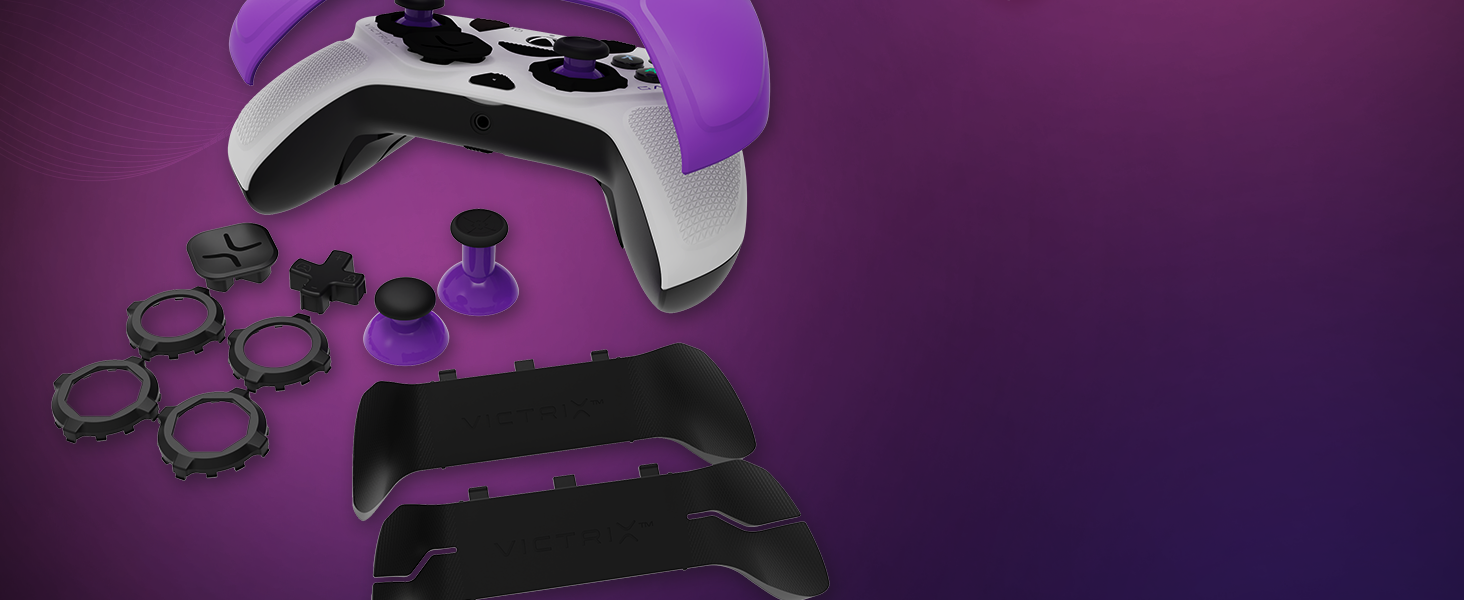
- Swappable Components: Includes interchangeable thumbsticks, D-pads, and faceplates for personalized ergonomics and aesthetics.
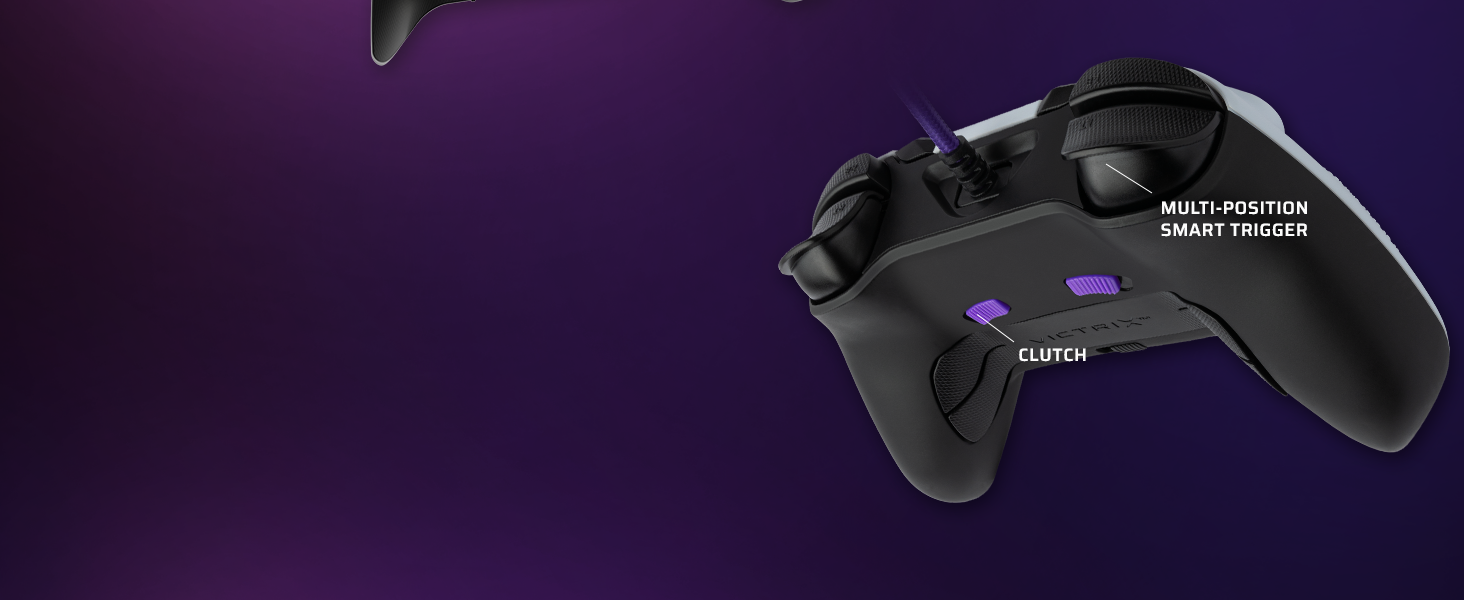
- Customizable Paddles & Triggers: Remappable buttons, bumpers, and paddles, along with adjustable hair triggers with five positional stops.
- Dolby Atmos Integration: Built-in support for immersive surround sound via the 3.5mm audio jack with compatible headsets.
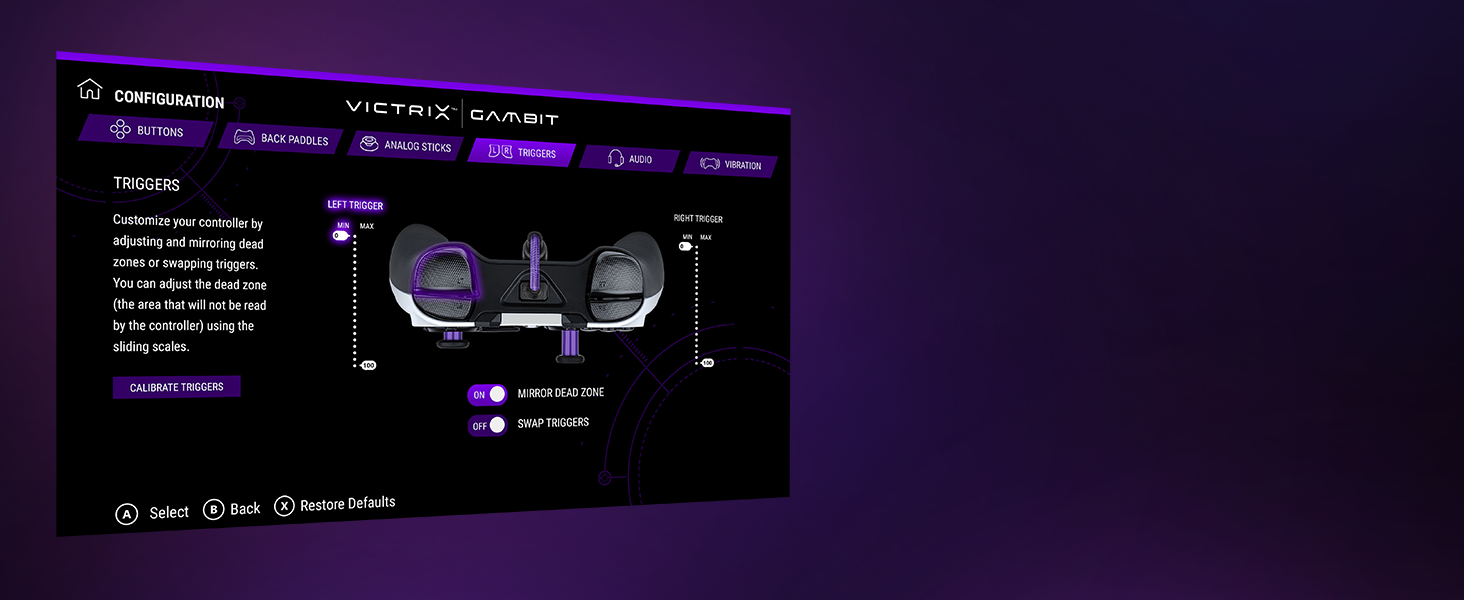
- Victrix Control Hub App: Software for fine-tuning controller settings, including button remapping, dead zones, audio profiles, and vibration strength.
- Apẹrẹ ti o tọ: Comes with a hard-shell carrying case for protection and portability.
Ṣeto
Connecting Your Controller:
- Ensure your Xbox console or PC is powered on.
- Connect the braided USB-C cable to the USB-C port on the top of the Victrix Gambit controller.
- Connect the other end of the USB-C cable to an available USB port on your Xbox console or PC.
- The controller's Xbox button will illuminate, indicating a successful connection.
Installing the Victrix Control Hub App:
- For Xbox: Download the 'Victrix Control Hub' app from the Xbox Store.
- For PC: Download the 'Victrix Control Hub' app from the Microsoft Store or Victrix's official webojula.
- Launch the app to access customization options and firmware updates.
Ṣiṣẹ Alakoso
Swapping Components:
The Victrix Gambit controller features magnetic, swappable components for personalized comfort and control.
- Awọn oju oju: Gently lift the existing faceplate from the controller to remove it. Align the new faceplate with the controller's body and press down until it snaps into place.
- Awọn ọpá atanpako: Pull the existing thumbstick straight up to remove it. Insert the desired thumbstick into the base and push down until it is securely seated.
- D-Pads: The D-pad is also magnetically attached. Simply pull it off and replace it with your preferred style.
- Back Paddles: The back paddle module can be removed by sliding it off. Replace it with the 2-button or 4-button module as desired.
Adjusting Trigger Stops:
The controller features patented five-position trigger stops, allowing you to reduce the travel distance of the triggers for faster response times in games. Locate the small switches on the underside of the controller, near the triggers. Slide these switches to adjust the trigger travel to your preferred setting.
Customizing with the Control Hub App:
The Victrix Control Hub app provides extensive customization options:
- Bọtini Iyipada: Assign any button function to another button or paddle.
- Analog Stick Adjustment: Test and calibrate analog sticks, adjust dead zones, and invert X/Y axes.
- Eto okunfa: Calibrate triggers, adjust dead zones, and swap trigger functions.
- Ohun Profiles: Fine-tune volume, game/chat balance, mic mute, and mic monitoring. Create custom EQ profiles.
- Gbigbọn: Adjust the strength of the controller's vibration or turn it off completely.
Fidio: Oṣiṣẹ kan ti pariview of the Victrix Gambit Dual Core Tournament Controller, demonstrating its features and customization options through the Victrix Control Hub app.
Itoju
Cleaning Your Controller:
- Use a soft, dry cloth to wipe down the controller's surface regularly.
- Fun idoti alagidi, die-die dampen asọ pẹlu omi tabi a ìwọnba, ti kii-abrasive regede. Yago fun ọrinrin pupọ.
- Do not use harsh chemicals or solvents, as these can damage the controller's finish.
- Ensure the controller is disconnected from its power source before cleaning.
Ibi ipamọ:
- Store the controller in its included hard-shell carrying case when not in use to protect it from dust, spills, and physical damage.
- Avoid storing the controller in extreme temperatures or direct sunlight.
Laasigbotitusita
Awọn oran ti o wọpọ ati Awọn ojutu:
- Alakoso Ko Dahun:
- Ensure the USB-C cable is securely connected to both the controller and the console/PC.
- Gbiyanju lati so oludari naa pọ mọ ibudo USB miiran.
- Tun console rẹ tabi PC bẹrẹ.
- Check for any firmware updates via the Victrix Control Hub app.
- Stick Drift or Inaccurate Input:
- Open the Victrix Control Hub app and navigate to the 'Analog Sticks' section. Perform a stick calibration.
- Clean around the base of the thumbsticks to remove any debris.
- Adjust dead zone settings in the Control Hub app if minor drift persists.
- Buttons Not Registering or Malfunctioning:
- Rí i dájú pé kò sí ìdọ̀tí kankan lábẹ́ àwọn bọ́tìnì náà.
- Check button remapping settings in the Victrix Control Hub app to ensure correct assignments.
- If using trigger stops, ensure they are not set too aggressively, preventing full button press.
- Awọn ọrọ ohun:
- Verify your headset is properly connected to the 3.5mm jack.
- Check audio settings within the Victrix Control Hub app and your console/PC's system settings.
- Ensure Dolby Atmos is correctly configured if you are using it.
Awọn pato
| Ẹya ara ẹrọ | Ẹ̀kúnrẹ́rẹ́ |
|---|---|
| Nọmba awoṣe | 049-006-NA |
| Ibamu | Xbox One, Xbox Series X|S, Windows 10/11 PC |
| Asopọmọra | Ti firanṣẹ (USB-C) |
| Atilẹyin ohun | 3.5mm audio jack with Dolby Atmos (lifetime access included) |
| Isọdi | Swappable faceplates, thumbsticks, D-pads, back paddles; adjustable trigger stops; software remapping |
| Awọn iwọn | 3.74 x 8.27 x 8.27 inches |
| Iwọn | 1.18 iwon |
| Olupese | Victrix |
| Ojo ifisile | Oṣu Kẹwa Ọjọ 4, Ọdun 2021 |
Atilẹyin ọja ati Support
For warranty information, technical support, or service inquiries, please refer to the official Victrix webaaye tabi kan si atilẹyin alabara wọn taara. Jeki ẹri rira rẹ fun eyikeyi awọn ibeere atilẹyin ọja.
Online resources, including FAQs and additional guides, may be available on the Victrix support page.


