1. Ọja Ipariview
The BuTure BR600 is a powerful and versatile portable car jump starter designed to provide emergency starting power for 12V vehicles. It also functions as a portable power bank with wireless charging capabilities and a multi-mode LED flashlight. This manual provides essential information for safe and effective use of your device.
Awọn ẹya pataki:
- Powerful Jump Starting: Delivers 2500A peak current to start all gasoline engines and up to 8.0L diesel engines.
- Batiri Agbara giga: 27000mAh lithium battery for multiple jump starts and device charging.
- Gbigba agbara Alailowaya: Paadi gbigba agbara alailowaya 10W ti a ṣe sinu rẹ fun awọn fonutologbolori ibaramu.
- Banki Agbara to gbe: Equipped with USB 1 (Quick Charge 3.0: 5V 3A / 9V 2A / 12V 1.5A), USB 2 (5V 2.4A), and USB-C (5V 3A) outputs for charging various electronic devices.
- Smart Protection Clamps: Features intelligent protection against short circuits, overheating, over-voltage, over-charge, deep discharge, over-current, and reverse polarity.
- Multi-mode LED Flashlight: Includes Flashlight, Strobe, SOS, and Warning Light modes for emergencies.
- Apẹrẹ ti o tọ: Operates effectively in extreme temperatures, including cold winter conditions.
2. Package Awọn akoonu
Jọ̀wọ́ ṣàyẹ̀wò ohun tó wà nínú àpò náà nígbà tí o bá ṣí i. Tí àwọn nǹkan kan bá sọnù tàbí tí wọ́n bá bàjẹ́, kàn sí ìrànlọ́wọ́ àwọn oníbàárà.

Image: Contents of the BuTure BR600 package.
- 1 x BuTure BR600 Jump Starter
- 1 x Smart Jumper Cables
- 1 x Okun USB-C
- 1 x EC5 Cigarette Lighter Adapter
- 1 x Itọsọna olumulo
- 1 x Ọran Ifipamọ
3. Alaye Aabo pataki
Read all safety warnings and instructions before using this product. Failure to follow these instructions may result in electric shock, fire, and/or serious injury.
- Do not immerse the product in water or expose it to rain.
- Do not open or disassemble the product. There are no user-serviceable parts inside.
- Jeki kuro ni arọwọto awọn ọmọde.
- Use only the provided smart jumper cables.
- Maṣe bẹrẹ bẹrẹ batiri tio tutunini.
- Rí i dájú pé ìsopọ̀ polarity tó tọ́ (púpù clamp si rere, dudu clamp si odi).
- Maa ko so rere ati odi clamps papọ.
- If the product becomes excessively hot during use, discontinue use immediately.
- Tọju ọja naa ni itura, aye gbigbẹ kuro lati orun taara.
- Wear eye protection and gloves when jump starting a vehicle.
- Consult your vehicle's owner's manual for specific jump-starting procedures.

Image: The BuTure BR600 features multiple protection modes for safe operation, including error detection and intelligent indicators.
4. Charging the BuTure BR600
Before first use, fully charge the jump starter. It is recommended to recharge the device every 3-6 months to maintain battery health, even if not in use.
4.1. Charging via USB-C Input
- Connect the provided USB-C cable to the USB-C input port on the jump starter.
- So opin keji okun USB-C pọ mọ adapter odi USB (ko si ninu rẹ) tabi ṣaja ọkọ ayọkẹlẹ kan.
- The LED indicator lights will illuminate and flash to show the charging status. All four lights will be solid when fully charged.
4.2. Atọka Ipele Batiri
The LED indicator lights on the device show the remaining battery capacity:
- 4 lights: 75% - 100%
- 3 lights: 50% - 75%
- 2 lights: 25% - 50%
- 1 light: 0% - 25% (Recharge immediately)

Image: The BuTure BR600 features a 27000mAh battery designed for long standby times, up to 12 months.
5. Fo Bibẹrẹ Ọkọ
Ensure the jump starter is at least 50% charged (2 LED lights) before attempting to jump start a vehicle.
- Ṣeto Ọkọ naa: Turn off the vehicle's ignition and all accessories (headlights, radio, air conditioning, etc.). Engage the parking brake.
- Àwọn okùn ìfàmọ́ra sopọ̀ mọ́ ara wọn:
- Insert the blue plug of the smart jumper cables into the 12V jump start port on the BuTure BR600. Ensure a firm connection.
- Sopọ awọn PUPA rere (+) clamp sí ibi tí ọkọ̀ náà ti ń lo batiri tó dára (+).
- Sopọ awọn DUDU odi (-) clamp sí ibi tí ọkọ̀ náà ti ń lo batiri òdì (-).
- Awọn ọlọgbọn clamp indicator light will show the connection status. Refer to the smart clamp manual for specific light indications.
- Bẹrẹ Ọkọ naa: Once the smart clamp indicator shows a safe connection, start your vehicle's engine. If the vehicle does not start immediately, wait 20-30 seconds before trying again. Do not crank the engine for more than 3 seconds per attempt.
- Yọ awọn okùn jumper kuro: As soon as the vehicle starts, disconnect the DUDU odi (-) clamp akọkọ, lẹhinna awọn PUPA rere (+) clamp from the vehicle battery. Finally, unplug the smart jumper cables from the BuTure BR600.
Pataki: Tí ó bá jẹ́ pé olóye clamp indicates an error (e.g., reverse polarity), correct the connection before attempting to start the vehicle.

Image: Illustration of connecting the BuTure BR600 to a car battery for jump starting.
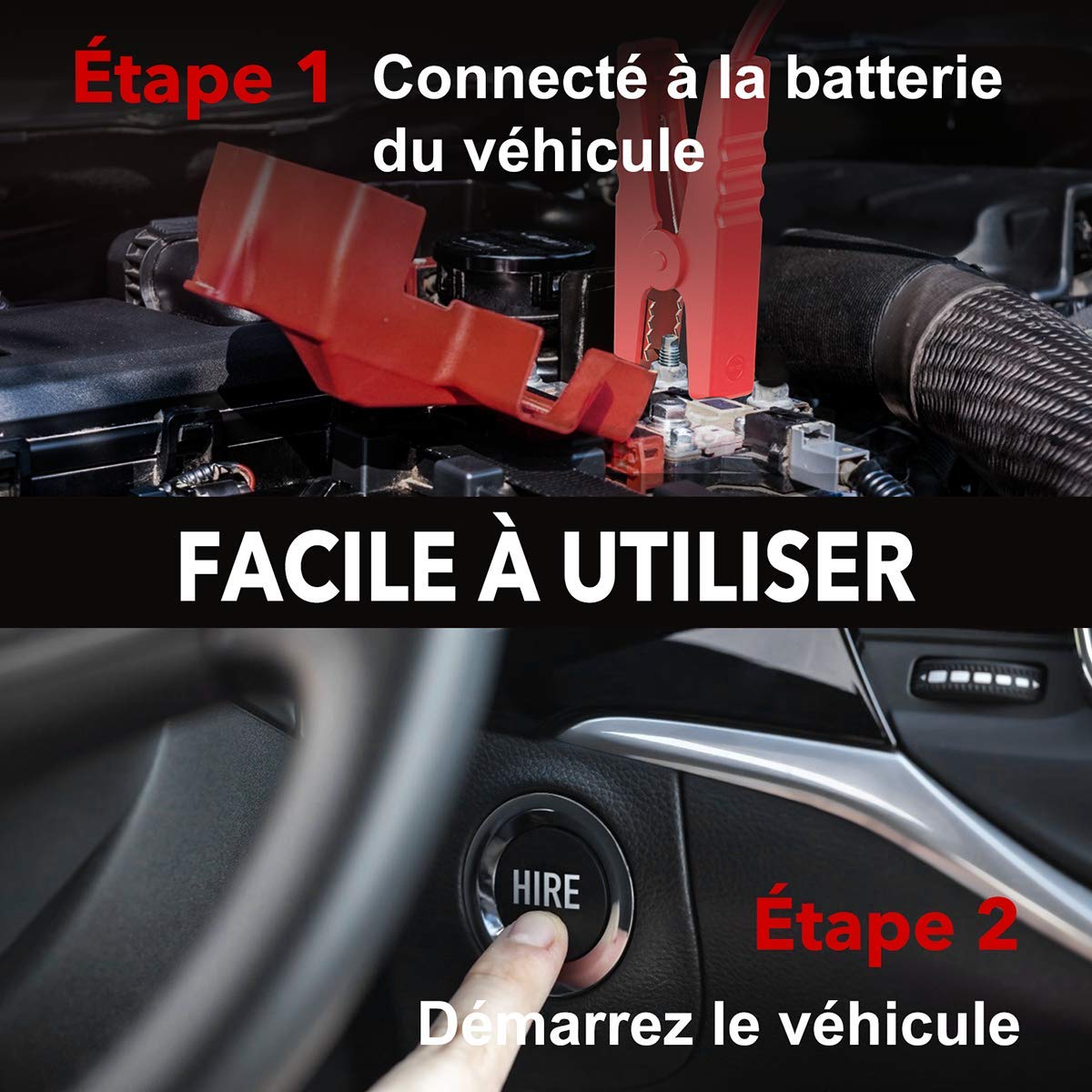
Image: Step-by-step guide showing how to connect the jump starter to the vehicle battery and then start the vehicle.

Image: The BuTure BR600 is designed to perform reliably even in cold winter temperatures down to -20°C.
6. Operating Other Functions
6.1. Using as a Power Bank (USB Output)
The BuTure BR600 can charge various electronic devices via its USB output ports.
- Connect your device's USB charging cable to either the USB 1 (Quick Charge 3.0) or USB 2 port on the jump starter.
- Ibẹrẹ fo yoo bẹrẹ laifọwọyi gbigba agbara ẹrọ rẹ.
6.2. Alailowaya Ngba agbara
For devices compatible with 10W wireless charging:
- Place your wireless charging compatible device (e.g., smartphone) on the wireless charging pad located on the top surface of the jump starter.
- Rii daju pe ẹrọ naa dojukọ lori paadi fun gbigba agbara to dara julọ.
- The wireless charging indicator light will illuminate to confirm charging is active.

Image: The BuTure BR600 offers both 10W wireless charging and Quick Charge 3.0 USB output for multiple devices.
6.3. Tọṣi LED
The built-in LED flashlight has multiple modes for different situations.
- Press and hold the power button for 3 seconds to turn on the flashlight (steady light mode).
- Press the power button again to cycle through modes: Strobe → SOS → Warning Light → Off.
- Press and hold the power button again for 3 seconds to turn off the flashlight from any mode.

Image: The BuTure BR600 features an ultra-bright LED flashlight with Flash, SOS, Strobe, and Warning light modes for various emergencies.
7. Itọju
- Ninu: Lo asọ asọ ti o gbẹ lati nu ẹrọ naa. Ma ṣe lo abrasive ose tabi epo.
- Ibi ipamọ: Store the jump starter in a cool, dry place between 0°C and 45°C (32°F and 113°F). Avoid direct sunlight and high humidity.
- Ngba agbara: Recharge the device every 3-6 months to prevent battery degradation, even if not in use.
- Igbesi aye batiri: The internal lithium battery is designed for long life, but like all rechargeable batteries, its capacity will decrease over time.
8. Laasigbotitusita
| Isoro | Owun to le Fa | Ojutu |
|---|---|---|
| Jump Starter ko ni tan. | Batiri naa ti jade patapata. | Charge the jump starter for several hours. |
| Ọkọ ayọkẹlẹ ko bẹrẹ. |
|
|
| Smart clamp indicator shows error. | Reverse polarity, short circuit, or other fault. | Ge asopọ clamps, check connections, and reconnect ensuring correct polarity (Red to +, Black to -). Refer to smart clamp manual for specific error codes. |
| Gbigba agbara alailowaya ko ṣiṣẹ. |
|
|
9. Awọn pato
| Awoṣe | BR600 |
| Oke Lọwọlọwọ | 2500A |
| Agbara Batiri | 27000mAh |
| Bẹrẹ Voltage | 12V |
| Ijade USB 1 (QC3.0) | 5V/3A, 9V/2A, 12V/1.5A |
| Ṣiṣejade USB 2 | 5V/2.4A |
| USB-C Input / o wu | 5V/3A |
| O wu Ngba agbara Alailowaya | 10W |
| Awọn iwọn otutu ti nṣiṣẹ | -20°C si 60°C (-4°F si 140°F) |
| Awọn iwọn (L x W x H) | 24.5 x 15.4 x 9.6 cm |
| Iwọn | 1.21 kg |
| Batiri Tiwqn | Lithium Metallic |
10. Atilẹyin ọja ati Onibara Support
BuTure products are designed and manufactured to the highest quality standards. This product comes with a standard manufacturer's warranty. For detailed warranty information, product support, or technical assistance, please refer to the warranty card included in your package or visit the official BuTure webojula.
If you encounter any issues or have questions regarding your BuTure BR600, please contact our customer support team. Provide your model number (BR600) and purchase details for faster service.


