1. Ifihan
The Shot Navi W1 Evolve is a state-of-the-art golf GPS watch designed to provide comprehensive course information and enhance your game. It features a high-definition reflective color LCD, ensuring excellent visibility outdoors, and integrates a wide array of functions previously found only in handheld models.

The Shot Navi W1 Evolve Golf GPS watch, showcasing its vibrant reflective color display with detailed golf course mapping and distance information.
Awọn ẹya pataki pẹlu:
- High-Definition Reflective Color LCD: Optimized for outdoor visibility, providing clear and detailed course layouts.
- Fairway Navigation: Patented technology that provides accurate distances to the green from your current position on the fairway.
- Real Distance Function: Calculates the actual distance you need to hit, considering the fairway's contours, not just straight-line distance.
- Aifọwọyi View Yipada: Automatically adjusts the display view based on your remaining distance to the green, providing relevant information instantly.
- Comprehensive Course Data: Pre-loaded with over 59,000 courses across 122 countries and regions worldwide.
- Michibiki L1S Support: Utilizes Japan's high-precision satellite positioning system for enhanced accuracy, capable of positioning within 1 meter.

An illustrative image highlighting the Shot Navi W1 Evolve's blend of traditional quality and advanced features, embodying "Legacy and Evolution."
2. Ohun ti o wa ninu Apoti
Jọwọ ṣayẹwo pe gbogbo awọn nkan wọnyi wa ninu package rẹ:
- Shot Navi W1 Evolve Main Unit
- Charger / Communication USB Cable
- Ilana itọnisọna ati Kaadi atilẹyin ọja
Note: An AC adapter is sold separately and is not included in the package.

Orisirisi views of the Shot Navi W1 Evolve, illustrating its design, button placement, and charging contacts on the rear.
3. Eto
3.1 Ngba agbara si Ẹrọ
Before first use, fully charge your Shot Navi W1 Evolve. Use the included USB cable to connect the device to a computer's USB port or a compatible USB AC adapter (sold separately).
- Akoko gbigba agbara: Approximately 2 hours via PC.
- A charging indicator will typically appear on the screen.
3.2 Titan / Pa a
- Lati Fi agbara: Press and hold the POWER button (usually located on the side) until the screen illuminates.
- Lati Paarẹ: Press and hold the POWER button until a power-off prompt appears, then confirm.
3.3 Initial Course Data Download (for Overseas Courses)
While the device comes pre-loaded with extensive course data, overseas course layout data may require an additional download. Connect your device to a computer and visit the Shot Navi website for instructions on how to download and update course data via USB storage mode.
Supported operating systems for data updates: Windows / Mac.
4. Awọn ilana Iṣiṣẹ
4.1 Ipilẹ Lilọ kiri ati Awọn iṣakoso
The Shot Navi W1 Evolve features several buttons for navigation and function selection. Refer to the device's physical layout to identify the "LIGHT", "MENU/BACK", "UP", and "DOWN" buttons.
- Imọlẹ: Activates backlight or adjusts brightness.
- MENU/BACK: Accesses menus or returns to the previous screen.
- UP / isalẹ: Lilọ kiri nipasẹ awọn aṣayan akojọ aṣayan tabi ṣatunṣe eto.
- OK/SELECT (often integrated with a button press): Jẹrisi awọn aṣayan.
4.2 Golf Course Navigation
Once powered on and GPS signal acquired, the device will automatically search for nearby golf courses. Select your course to begin play.
- Fairway Navigation: Provides precise distances from your current position on the fairway to the green.
- Real Distance Function: Calculates the actual distance you need to hit, taking into account elevation changes and terrain.
- Aifọwọyi View Yipada: The display automatically switches to the most relevant view (e.g., green view, hazard view) as you approach different areas of the course.
- Alawọ ewe View: Displays the shape of the green and allows for pin position adjustment.
- Hazard Display: Shows distances to various hazards on the course.
4.3 Worldwide Course Support
The Shot Navi W1 Evolve is pre-loaded with an extensive database of golf courses, covering both domestic and international locations.
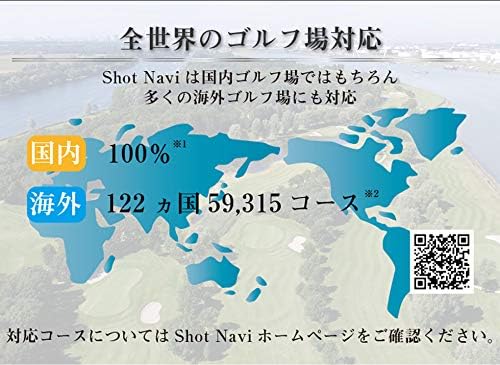
The Shot Navi W1 Evolve supports 100% of domestic golf courses and 59,315 courses across 122 countries worldwide. For the most up-to-date list of supported courses, please visit the official Shot Navi webojula: https://shotnavi.jp/world
4.4 Idije Ipo
The device includes a dedicated Competition Mode. When activated, certain functions, such as elevation difference calculations, are restricted to comply with competition rules.

The device features a Competition Mode. Activating this mode will restrict certain functions, such as elevation difference, to adhere to competition regulations. Please confirm with the competition secretariat regarding the use of the device in actual tournaments.
4.5 High-Precision Positioning (Michibiki L1S)
The Shot Navi W1 Evolve supports Michibiki L1S, Japan's high-precision satellite positioning system. This technology utilizes sub-meter level positioning augmentation information to significantly reduce errors caused by factors like ionospheric delay, orbit, and clock inaccuracies.
While standard GPS typically has an error of several meters, the L1S signal reinforcement allows for positioning accuracy within 1 meter, providing highly precise location data on the course.

An illustration detailing the Michibiki L1S high-precision positioning capability, which enhances accuracy to less than 1 meter by correcting various signal errors.
4.6 Miiran Awọn iṣẹ
The W1 Evolve is equipped with a variety of other useful features:
- Course Layout: Detailed visual representation of each hole.
- Aim Function: Assists in aiming your shots.
- Awọn iyika Concentric: Visual aids for distance planning.
- Driving Circle / Layup Circle: Helps visualize driving and layup distances.
- Elevation Difference / Elevation Difference Map: Provides crucial information about terrain changes.
- Ijinna Ti a Tiro: Quick reference for distances.
- Recommended Club: Suggests the appropriate club based on distance and conditions.
- Point Registration: Mark specific points on the course.
- Shot Distance Measurement: Measure the distance of your shots.
- Akọsilẹ: Keep track of your score directly on the device.
- Pin Position Display: Shows the current pin location on the green.
- Bluetooth: For connectivity with other devices or apps.
- App Linkage: Connects with a companion application for enhanced features.
- Pedometer: Tracks your steps during your round.

Ipariview of the extensive functions and features available on the Shot Navi W1 Evolve, including course layout, navigation, distance measurement, and more.
5. Itọju
- Ninu: Nu ẹrọ naa pẹlu asọ, damp asọ. Ma ṣe lo abrasive ose tabi epo.
- Ibi ipamọ: Tọju ẹrọ naa ni itura, aye gbigbẹ kuro lati orun taara ati awọn iwọn otutu to gaju.
- Itọju Batiri: Lati pẹ aye batiri, yago fun gbigba agbara si batiri ni kikun nigbagbogbo. Gba agbara si ẹrọ nigbagbogbo, paapaa ti ko ba wa ni lilo fun awọn akoko ti o gbooro sii.
- Omi Resistance: The device is IPX7 / 3 ATM waterproof (life waterproof level). Avoid submerging it in water for extended periods or exposing it to high-pressure water jets.
6. Laasigbotitusita
- Ẹrọ ko ṣiṣẹ lori:
Rí i dájú pé ẹ̀rọ náà ti gba agbára tán pátápátá. So ó pọ̀ mọ́ orísun agbára kí o sì dúró díẹ̀ kí o tó gbìyànjú láti tún tan agbára náà.
- A ko gba ifihan agbara GPS:
Rii daju pe o wa ni agbegbe ti o ṣii pẹlu mimọ view of the sky. It may take a few minutes for the device to acquire a strong GPS signal, especially on first use or after a long period of inactivity.
- Inaccurate distances:
Verify that the correct course and hole are selected. Ensure the device has a strong GPS signal. Update course data if necessary via the Shot Navi webojula.
- Screen difficult to read outdoors:
Adjust the screen brightness using the LIGHT button. The reflective LCD is designed for outdoor visibility, but extreme glare can still affect readability.
- Ẹrọ ti ko dahun:
Attempt a soft reset by holding down the power button for an extended period (e.g., 10-15 seconds) until the device restarts. If the issue persists, contact customer support.
7. Awọn pato
| Orukọ awoṣe | W1 Evolve |
| Nọmba Awoṣe Nkan | SN-EV-B |
| Ita Mefa | Ø 47.5 x 16.2 mm (excluding belt) / 1.87 x 1.87 x 0.65 inches |
| Iwọn | 74g / 2.61 iwon |
| Ifihan | 240x240 Reflective Color LCD |
| Batiri | Lithium Polymer Battery (1 CR2 batteries included) |
| Mabomire Rating | IPX7 / 3 ATM (Life Waterproof Level) |
| Akoko gbigba agbara ni kikun | Approx. 2 hours (via PC) |
| Lemọlemọfún Lilo Aago | Max 10 hours (GPS use) / Max 30 days (Clock mode) / Max 10 days (Pedometer use) |
| Data Update Method | Via USB storage mode (Windows / Mac compatible) |
| Asopọmọra Technology | GPS, Bluetooth |
| Oriṣi maapu | Ni agbaye |
| Idaraya | Golfu |
| Olupese | Shot Navi |
| Release Year/Model Year | 2020 |

A detailed table outlining the main unit specifications of the Shot Navi W1 Evolve, including dimensions, weight, display type, battery, and waterproof rating.
8. Atilẹyin ọja ati Support
The Shot Navi W1 Evolve comes with a manufacturer's warranty. Please refer to the included Warranty Card for specific terms and conditions, including the warranty period and coverage details.
For technical support, troubleshooting assistance, or warranty claims, please contact Shot Navi customer service. Contact information can typically be found on the official Shot Navi webojula tabi lori kaadi atilẹyin ọja.
A gba ọ niyanju lati forukọsilẹ ọja rẹ lori ile-iṣẹ olupese webaaye lati gba awọn imudojuiwọn ati atilẹyin.


