1. Ẹrọ Loriview
The OPPO A93 (CPH2121) is a smartphone designed for efficient mobile communication and multimedia use. It features an ultra-thin design, a 6.43-inch AMOLED display, and a versatile camera system.

Aworan: Iwaju ati sẹhin view of the OPPO A93 Smartphone, showcasing awọn oniwe-aso oniru ati kamẹra module.
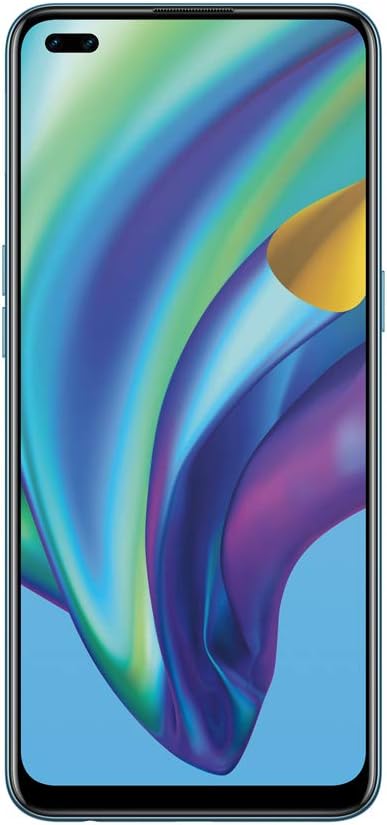
Aworan: Iwaju view of the OPPO A93 Smartphone, highlighting the dual punch-hole display.

Aworan: Pada view of the OPPO A93 Smartphone, showing the quad-camera setup and OPPO branding.
2. Eto Itọsọna
2.1 Inserting SIM Cards and SD Card
- Wa atẹ kaadi SIM ni ẹgbẹ ẹrọ rẹ.
- Lo ohun elo ejector SIM ti a pese lati ṣii atẹ.
- Carefully place your Nano-SIM cards and/or microSD card into the designated slots on the tray. Ensure correct orientation.
- Rọra Titari atẹ naa pada sinu ẹrọ naa titi ti yoo fi fọ pẹlu ẹgbẹ.
2.2 Agbara akọkọ Lori ati iṣeto ni
- Tẹ bọtini agbara (ti o wa ni apa ọtun) ki o si di mu titi ti aami OPPO yoo fi han.
- Tẹle awọn ilana loju iboju lati yan ede rẹ, agbegbe, ati sopọ si nẹtiwọki Wi-Fi kan.
- Wọle pẹlu akọọlẹ Google rẹ tabi ṣẹda tuntun lati wọle si awọn iṣẹ Google ati Play itaja.
- Set up your preferred screen lock method (PIN, pattern, password, fingerprint, or facial recognition).
2.3 Ngba agbara si Ẹrọ
Connect the USB Type-C cable to the charging port at the bottom of the phone and the other end to the power adapter. Plug the adapter into a power outlet. The device will indicate charging status on the screen.
3. Awọn ilana Iṣiṣẹ
3.1 Ipilẹ Lilọ kiri
- Fọwọkan: Fọwọ ba aami kan lati ṣii ohun elo kan tabi yan ohun kan.
- Ra: Move your finger across the screen to scroll through pages, lists, or switch between home screens.
- Fun pọ: Lo ika meji lati sun sinu tabi ita lori awọn fọto ati web awọn oju-iwe.
- Long Tẹ: Tẹ mọlẹ ohun kan fun awọn aṣayan diẹ ẹ sii tabi lati gbe.
3.2 kamẹra Awọn ẹya ara ẹrọ
The OPPO A93 features a 6 AI Portrait Camera system, enhancing photography capabilities:
- AI Super Night Portrait: Captures clear night selfies using HDR, facial recognition, and highlight suppression.
- AI Night Flare Portrait: Transforms low-light portraits into stunning images by adding artistic flare to city lights.
- AI Color Portrait: Isolates the subject in color while artistically fading the background.
- AI Super Clear Portrait: Utilizes AI deep learning to reconstruct facial features for enhanced clarity, even in challenging lighting.
Ifihan ati Oniru 3.3
- Mini Dual Punch-Holes: Maximizes screen real estate on the FHD+ 2400 x 1080 pixel display.
- Shiny Matte Color: Provides a luxurious, fingerprint-resistant finish.
- Apẹrẹ tinrin: Offers a smooth, rounded feel for comfortable handling.
4. Itọju
4.1 batiri Itọju
- Yago fun ṣiṣafihan ẹrọ naa si awọn iwọn otutu to gaju.
- Ma ṣe jẹ ki batiri naa ṣan patapata nigbagbogbo.
- Lo awọn ṣaja ati awọn okun waya ti OPPO fọwọsi nikan.
4.2 Software imudojuiwọn
Ṣayẹwo nigbagbogbo fun ati fi awọn imudojuiwọn sọfitiwia sori ẹrọ lati rii daju iṣẹ ṣiṣe to dara julọ, aabo, ati iraye si awọn ẹya tuntun. Lilö kiri si Ètò > Ìmúdàgbàsókè Sọ́fítíwè.
4.3 Ninu ẹrọ rẹ
Use a soft, lint-free cloth to gently wipe the screen and back of the phone. Avoid using harsh chemicals or abrasive materials.
5. Laasigbotitusita
5.1 Ẹrọ Ko Nṣiṣẹ Tan-an
- Rii daju pe batiri ti gba agbara. So ṣaja pọ ki o duro fun iṣẹju diẹ ṣaaju ki o to gbiyanju lati tan-an.
- Tẹ bọtini agbara ki o si mu fun o kere ju awọn aaya 10-15 lati fi agbara mu lati tun bẹrẹ.
5.2 Iboju ko dahun
- Force restart the device (see above).
- If the issue persists, consider performing a factory reset (data will be erased).
5.3 Network Asopọmọra Oran
- Ṣàyẹ̀wò bóyá Ipò Òfurufú ti ṣiṣẹ́.
- Tun ẹrọ rẹ bẹrẹ.
- Reset network settings via Settings > System settings > Backup and reset > Reset phone > Reset network settings.
5.4 Ṣiṣe Atunto Factory
A factory reset will erase all data on your phone. Back up important data before proceeding. Go to Settings > System settings > Backup and reset > Reset phone > Erase all data.
6. Awọn pato
| Ẹya ara ẹrọ | Sipesifikesonu |
|---|---|
| Brand | OPPO |
| Orukọ awoṣe | CPH2121 |
| Eto isesise | Android 10.0 |
| Iwọn Iranti Ramu ti a fi sori ẹrọ | 8 GB |
| Sipiyu Awoṣe | Snapdragon |
| Sipiyu Iyara | 2.2 GHz |
| Agbara Ibi ipamọ Iranti | 128 GB |
| Iwon iboju | 6.43 inches |
| Ipinnu | 1080 x 2400 |
| Oṣuwọn sọtun | 90 Hz |
7. Atilẹyin ọja ati Support
For warranty information and technical support, please refer to the warranty card included with your product or visit the official OPPO support website. You can also contact OPPO customer service for assistance with any issues not covered in this manual.


