1. Ifihan
This manual provides essential information for the safe and efficient operation of your Cecotec Ready Warm 800 Thermal Connected 600W Digital Heater. Please read these instructions carefully before using the appliance and retain them for future reference. This heater is designed to provide supplementary heating for indoor spaces and features Wi-Fi connectivity for remote control.
2. Awọn ilana aabo
IKILO: Ikuna lati tele awọn ilana aabo wọnyi le ja si ina, mọnamọna, tabi ipalara.
- Rii daju voltage tí a fi hàn lórí àmì ìdíyelé bá àwọn ìdìpọ̀ pàtàkì rẹ mutage ṣaaju ki o to so ẹrọ naa pọ.
- Do not cover the heater. Overheating can occur if the heater is covered or obstructed.
- Keep flammable materials such as furniture, curtains, and bedding at least 1 meter (3 feet) away from the heater.
- Má ṣe lo ohun èlò ìgbóná pẹ̀lú okùn tàbí plug tó ti bàjẹ́, tàbí lẹ́yìn tí ẹ̀rọ náà bá ti bàjẹ́ tàbí tí ó ti jábọ́ tàbí tí ó ti bàjẹ́ lọ́nàkọnà.
- Ohun elo yii kii ṣe ipinnu fun lilo nipasẹ awọn eniyan (pẹlu awọn ọmọde) pẹlu idinku ti ara, imọlara tabi awọn agbara ọpọlọ, tabi aini iriri ati imọ, ayafi ti wọn ba ti fun wọn ni abojuto tabi itọnisọna nipa lilo ohun elo nipasẹ eniyan ti o ni iduro fun aabo wọn.
- Awọn ọmọde yẹ ki o wa ni abojuto lati rii daju pe wọn ko ṣere pẹlu ohun elo naa.
- Ma ṣe lo ẹrọ igbona ni agbegbe lẹsẹkẹsẹ ti iwẹ, iwẹ tabi adagun odo kan.
- Yọọ ẹrọ igbona nigbagbogbo nigbati o ko ba wa ni lilo tabi ṣaaju ṣiṣe mimọ.
- Do not insert any objects into the ventilation or exhaust openings as this may cause electric shock, fire, or damage to the heater.
3. Ọja Ipariview
Familiarize yourself with the components of your Cecotec Ready Warm 800 Digital Heater.

This image shows the Cecotec Ready Warm 800 Digital Heater from a side angle, highlighting its slim profile and the integrated control panel on the right side. The heater is white with black vents at the top and stands on two white feet.

The heater is shown in a home environment, positioned on a wooden floor next to a person seated on a black armchair, illustrating its compact size and how it fits into a living space.
Ibi iwaju alabujuto ati Ifihan
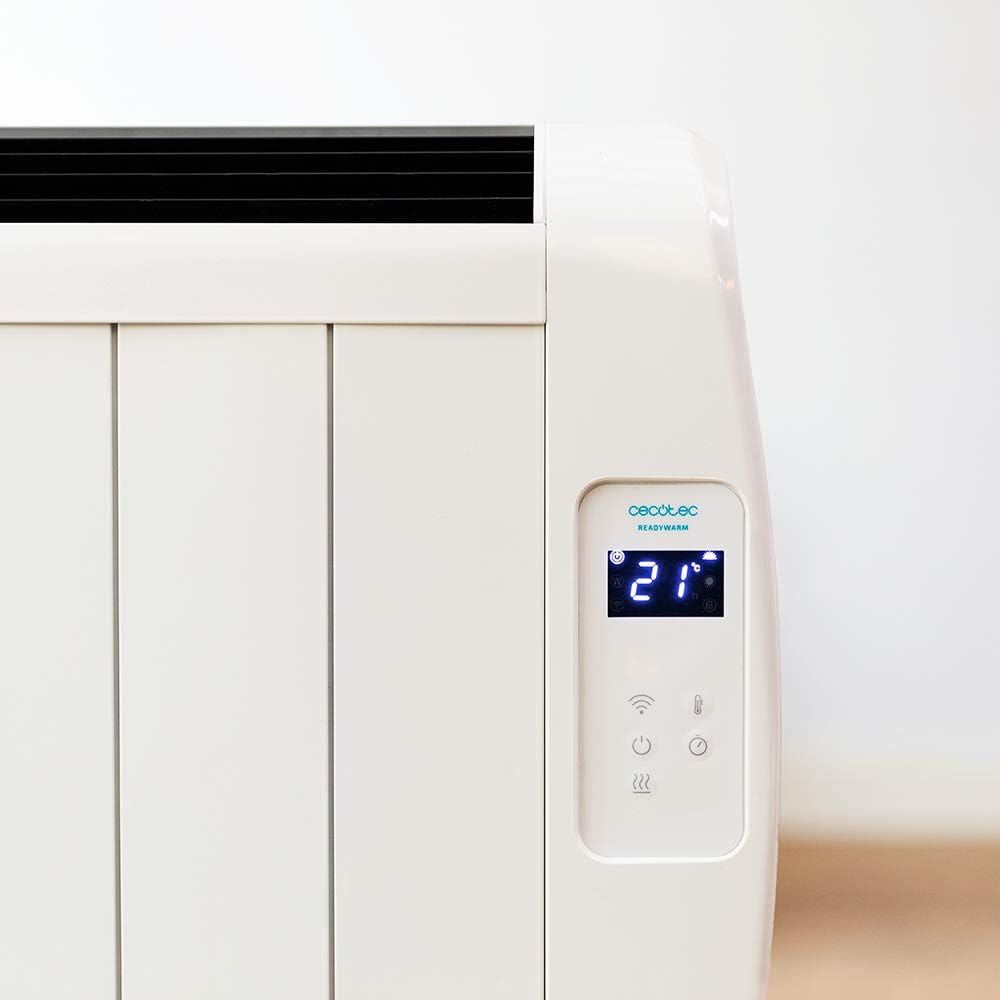
A alaye view of the heater's digital control panel, featuring a clear LCD screen showing '21' degrees Celsius, indicating the current temperature setting. Below the screen are touch-sensitive buttons for power, Wi-Fi, mode selection, and temperature adjustment.

This image focuses on the digital control panel, showing the LCD screen set to a timer function, displaying '04' hours. This indicates the heater is programmed to operate for a specific duration.
The digital display shows the current temperature, timer settings, and Wi-Fi status. The touch-sensitive buttons allow for easy control of the heater's functions.
Agbara Yipada

A close-up shot of the heater's base, revealing the physical on/off power switch. This switch provides a direct way to cut power to the unit.
A physical power switch is located at the base of the unit for complete power disconnection.
4. Eto
- Ṣii silẹ: Fi ìṣọ́ra yọ ohun èlò ìgbóná kúrò nínú àpótí rẹ̀. Pa àpò mọ́ fún ìtọ́jú tàbí gbígbé.
- Ibi: Place the heater on a firm, level surface. Ensure there is at least 1 meter (3 feet) of clear space around the heater from walls, furniture, and other objects. Do not place it directly under a power outlet.
- Asopọ agbara: Plug the power cord into a suitable 230V AC power outlet. Ensure the main power switch at the base of the unit is in the 'OFF' position before plugging in.
- Agbara Ibẹrẹ Tan: Flip the main power switch at the base of the unit to the 'ON' position. The digital display on the control panel should illuminate.
Dimensions for Placement

This image provides a clear diagram of the heater's physical dimensions: 63 cm in width, 10.5 cm in depth, and 53.5 cm in height, useful for planning placement.
5. Awọn ilana Iṣiṣẹ
Isẹ ipilẹ
- Titan/Apapa: Tẹ bọtini agbara (U) lórí pánẹ́ẹ̀lì ìṣàkóso láti tan tàbí pa ẹ̀rọ ìgbóná.
- Atunṣe iwọn otutu: Use the temperature up (+) ati isalẹ (-) buttons to set your desired room temperature. The display will show the set temperature.
- Aṣayan Ipo: Press the mode button to cycle through available heating modes (e.g., Low, Medium, High, or Eco, depending on the model's specific programming).
- Iṣẹ Aago: Press the timer button to set an operating duration. Use the temperature adjustment buttons to set the desired hours (e.g., 0-24 hours). The heater will automatically turn off after the set time.
Asopọmọra Wi-Fi ati Iṣakoso Ohun elo
The Cecotec Ready Warm 800 features Wi-Fi connectivity, allowing you to control the heater remotely via a smartphone application.

A hand holding a smartphone with the Cecotec Ready Warm mobile application open. The app interface shows a large dial indicating '33°C' and various control options, demonstrating remote control capabilities.
- Ṣe igbasilẹ ohun elo naa: Wa fun the 'Cecotec Ready Warm' app in your smartphone's app store (iOS or Android).
- Forukọsilẹ/Wọle: Ṣẹda akọọlẹ kan tabi wọle ti o ba ti ni ọkan tẹlẹ.
- Fi ẹrọ kun: Follow the in-app instructions to add your Ready Warm 800 heater. This typically involves putting the heater into pairing mode (often by pressing and holding the Wi-Fi button on the control panel) and connecting it to your home Wi-Fi network.
- Isakoṣo latọna jijin: Once connected, you can control the heater's power, temperature, modes, and timer functions from your smartphone.
6. Itọju
Itọju deede ṣe idaniloju iṣẹ ṣiṣe ti o dara julọ ati gigun gigun ti ẹrọ igbona rẹ.
- Ninu: Yọọ ẹrọ ti ngbona nigbagbogbo ki o jẹ ki o tutu patapata ṣaaju ṣiṣe mimọ. Lo asọ, damp asọ lati pa awọn ita ita. Ma ṣe lo abrasive ose tabi epo.
- Yiyọ eruku kuro: Periodically use a vacuum cleaner with a brush attachment to remove dust from the air intake and exhaust vents.
- Ibi ipamọ: If storing the heater for an extended period, unplug it, clean it thoroughly, and store it in a cool, dry place, preferably in its original packaging.
- Ko si Awọn apakan Iṣẹ Olumulo: Do not attempt to open or repair the heater yourself. Refer all servicing to qualified personnel.
7. Laasigbotitusita
Ti o ba pade awọn ọran pẹlu ẹrọ igbona rẹ, tọka si tabili atẹle fun awọn iṣoro ati awọn solusan ti o wọpọ.
| Isoro | Owun to le Fa | Ojutu |
|---|---|---|
| Alagbona ko ni tan-an. | No power supply. Main power switch off. | Check if the power cord is securely plugged in. Ensure the main power switch at the base is ON. Check the wall outlet. |
| Ko si igbejade ooru. | Temperature setting too low. Overheat protection activated. | Increase the desired temperature setting. Unplug the heater, let it cool for 30 minutes, then plug it back in. Ensure vents are not blocked. |
| Wi-Fi asopọ kuna. | Incorrect Wi-Fi password. Heater too far from router. App issues. | Verify Wi-Fi password. Move heater closer to the router. Restart the app and heater. Ensure your router is 2.4GHz compatible. |
| Alagbona wa ni pipa airotẹlẹ. | Timer function activated. Overheat protection. | Check if the timer is set. If not, unplug the heater, let it cool, and check for obstructions. |
8. Awọn pato
| Ẹya ara ẹrọ | Ẹ̀kúnrẹ́rẹ́ |
|---|---|
| Brand | Cecotec |
| Nọmba awoṣe | 05372 |
| Agbara / Wattage | 600W |
| Voltage | 230 Volts |
| Ọja Mefa | 63 x 10.5 x 53.5 cm |
| Iwọn | 3.4 kg |
| Pataki Awọn ẹya ara ẹrọ | Portable, Wireless (Wi-Fi Control), LCD Screen |
| Alapapo Ọna | Radiant |
| inu ile / ita gbangba Lilo | Ninu ile |
| Iṣagbesori Iru | Wall Mount (optional, accessories not included) / Freestanding |
9. Atilẹyin ọja ati Support
Your Cecotec Ready Warm 800 Digital Heater is covered by a manufacturer's warranty. Please refer to the warranty card included with your purchase for specific terms and conditions, including the warranty period and coverage details.
For technical support, troubleshooting assistance beyond this manual, or warranty claims, please contact Cecotec customer service. Contact information can typically be found on the Cecotec official webaaye tabi lori apoti ọja rẹ.
Nigbati o ba kan si atilẹyin, jọwọ ni nọmba awoṣe ọja rẹ (05372) ati ẹri rira ni imurasilẹ wa.


