Ọrọ Iṣaaju
Thank you for choosing the FLINQ Premium Cordless Handheld Vacuum Cleaner. This manual provides important information regarding the safe operation, maintenance, and troubleshooting of your device. Please read it thoroughly before use and keep it for future reference.
This compact and powerful handheld vacuum cleaner is designed for quick and efficient cleaning of small spaces, such as car interiors, furniture, and other hard-to-reach areas. Its cordless design and lightweight construction offer maximum convenience and portability.
Package Awọn akoonu
Jẹrisi pe gbogbo awọn ohun kan wa ninu package:
- FLINQ Premium Cordless Handheld Vacuum Cleaner
- 2-ni-1 fẹlẹ Nozzle
- Okun Ngba agbara USB
- Itọsọna olumulo

Image: Contents of the FLINQ handheld vacuum cleaner package, showing the main unit, a 2-in-1 brush attachment, a USB charging cable, and the user manual.
Ọja Pariview
Familiarize yourself with the components of your FLINQ handheld vacuum cleaner.
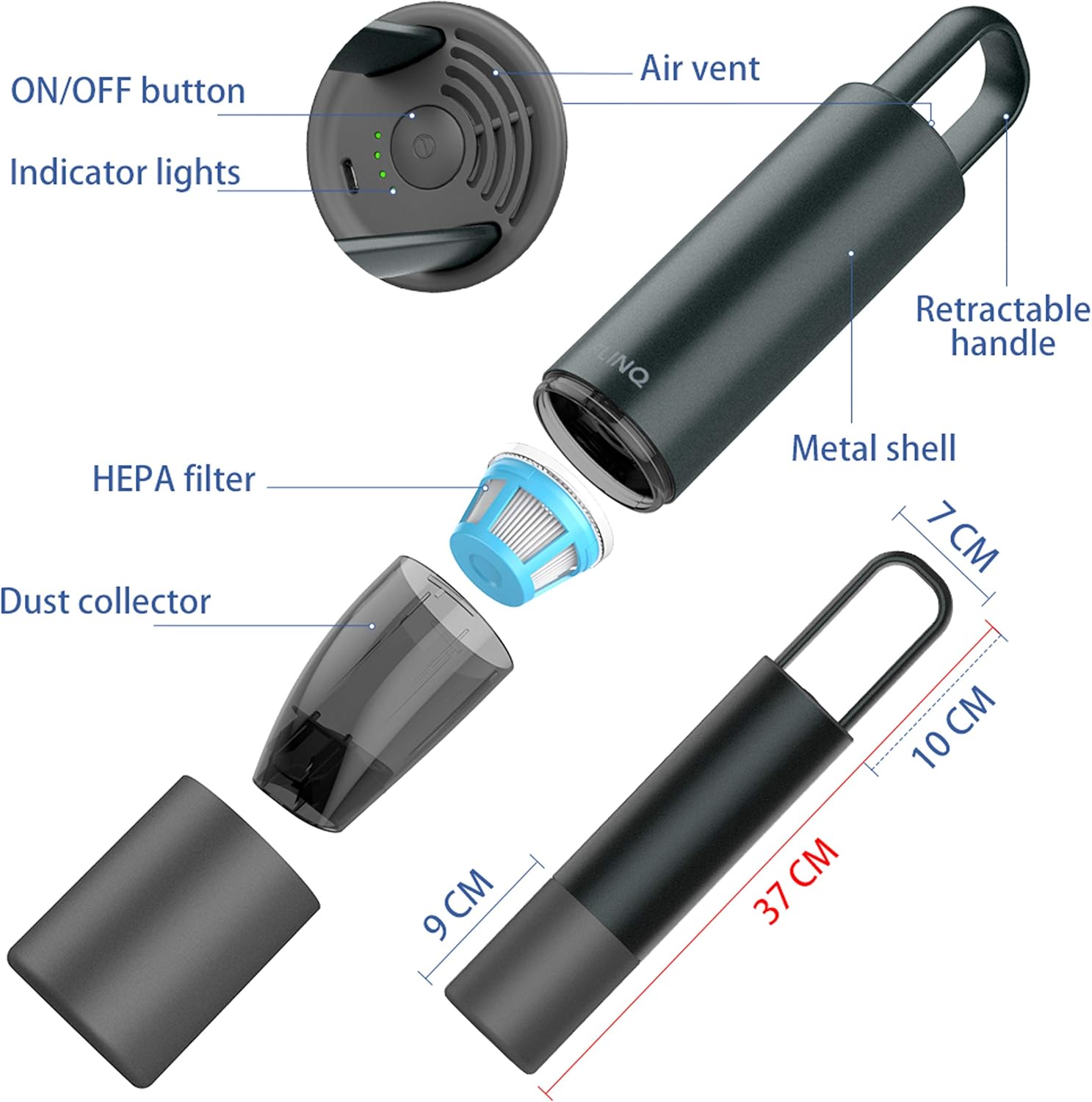
Image: An exploded diagram illustrating the various parts of the FLINQ handheld vacuum cleaner, including the ON/OFF button, LED indicator lights, air vent, retractable handle, metal casing, removable HEPA filter, and dust collector. Key dimensions are also shown.
- Bọtini TAN/PA: Ṣe agbara ẹrọ naa tan ati pa.
- Awọn imọlẹ Atọka: Display charging status and battery level.
- Afẹfẹ afẹfẹ: Exhausts air during operation.
- Imudani Amupadabọ: For easy carrying and storage.
- Metal Shell: Aluminiomu ti o lagbara casing.
- Ajọ HEPA: Traps fine dust particles.
- Akojo eruku: Collects vacuumed debris.
Ṣeto
Ngba agbara si Batiri naa
Before first use, fully charge the vacuum cleaner. Use the provided USB charging cable.
- Connect the USB charging cable to the charging port on the vacuum cleaner.
- Connect the other end of the USB cable to a compatible USB power adapter (not included) or a USB port.
- The indicator lights will flash slowly green during normal charging.
- Once fully charged, the indicator lights will remain solid green.

Image: A diagram showing the FLINQ handheld vacuum cleaner connected to a power source via a USB cable for charging. The indicator lights are shown, with text explaining that a slowly flashing green light indicates normal charging, and a solid green light indicates a full charge.
A full charge provides up to 18 minutes of strong suction power. Recharge using USB Quick Charge for faster charging.
Attaching the 2-in-1 Brush Nozzle
The vacuum cleaner comes with a versatile 2-in-1 brush nozzle for different cleaning needs.
- Align the nozzle with the suction opening of the vacuum cleaner.
- Titari ṣinṣin titi yoo fi tẹ si aaye.
- To switch between brush and crevice tool, slide the brush part forward or backward on the nozzle.

Image: The FLINQ handheld vacuum cleaner shown alongside its 2-in-1 brush attachment, ready for assembly.
Awọn ilana Iṣiṣẹ
Titan / Pipa agbara
Press the ON/OFF button located on the top of the vacuum cleaner to turn it on. Press it again to turn it off.
Igbale
Use the appropriate nozzle for your cleaning task:
- Irinṣẹ Crevice: Ideal for narrow gaps, corners, and hard-to-reach areas in your car or home.
- Asomọ Fẹlẹ: Suitable for upholstery, car seats, dashboards, and surfaces requiring gentle cleaning or to dislodge stubborn dirt like pet hair and crumbs.
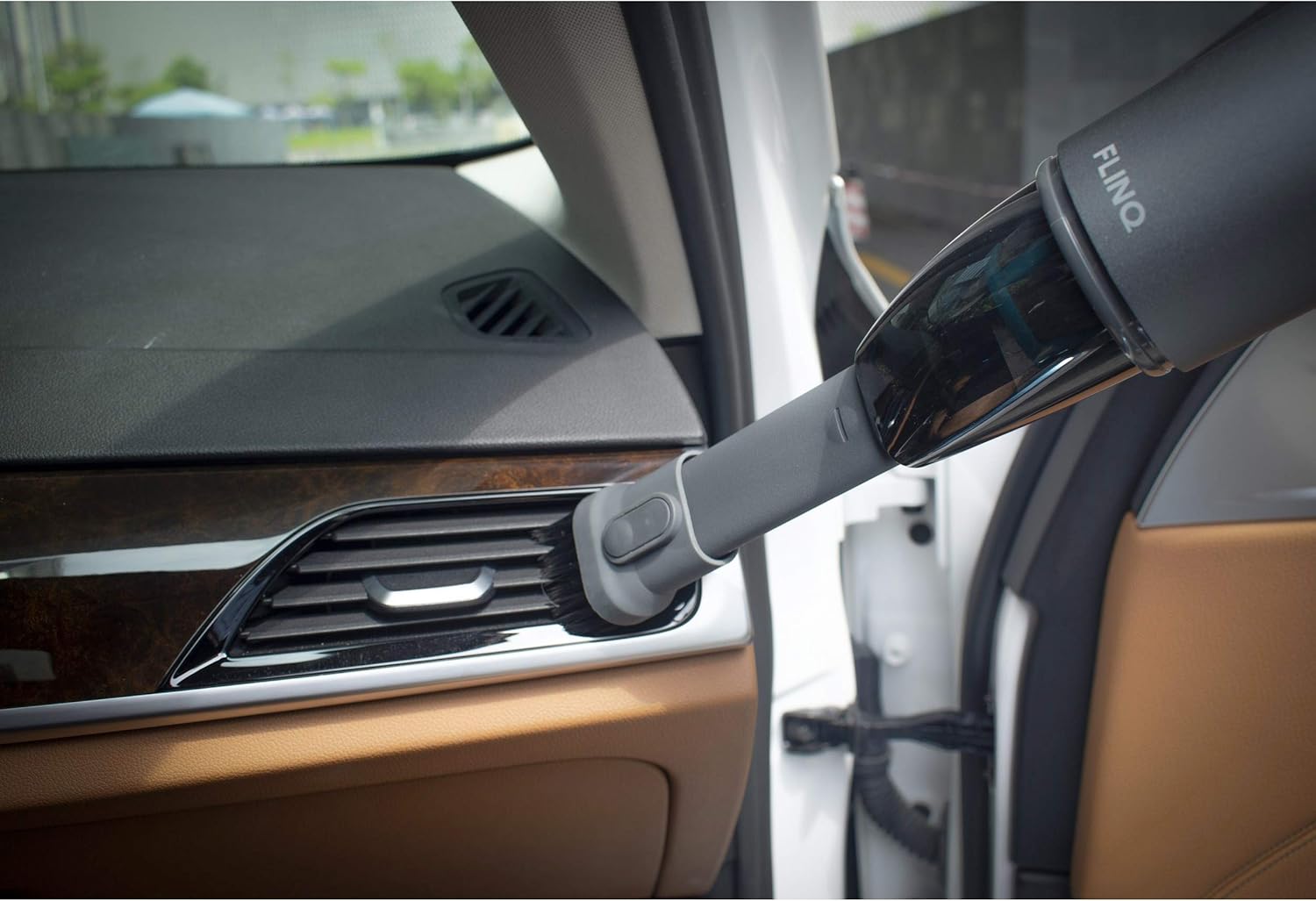
Image: The FLINQ handheld vacuum cleaner with the brush attachment actively cleaning a car's air vent, demonstrating its use for detailed interior cleaning.
The vacuum provides a strong suction power of 5 to 6 kPa, effective for various dry debris.
Itoju
Ofo Eruku Alakojo
Empty the dust collector regularly to maintain optimal suction performance. The dust capacity is 100 milliliters.
- Rii daju pe ẹrọ igbale ti wa ni pipa.
- Twist and detach the dust collector from the main body of the vacuum cleaner.
- Da awọn idoti ti a kó jọ sinu apoti idọti kan.
- Reattach the dust collector by twisting it back onto the main body until secure.
Ninu Ajọ HEPA
The HEPA filter should be cleaned periodically to ensure efficient filtration and suction.
- After detaching the dust collector, carefully remove the HEPA filter.
- Tap the filter gently to dislodge dust and debris.
- If necessary, rinse the filter under running water. Ensure it is completely dry before reinserting it into the vacuum cleaner. Do not use the vacuum cleaner with a wet filter.
- Reinsert the clean, dry HEPA filter into the dust collector, then reattach the dust collector to the vacuum cleaner.
Laasigbotitusita
| Isoro | Owun to le Fa | Ojutu |
|---|---|---|
| Igbale ko ni tan. | Batiri ti dinku. | Gba agbara fun afọmọ ẹrọ naa patapata. |
| Agbara afamora ti ko lagbara. | Dust collector is full. | Ṣofo alakojo eruku. |
| Agbara afamora ti ko lagbara. | Àlẹ̀mọ́ HEPA ti dí. | Nu tabi ropo HEPA àlẹmọ. |
| Agbara afamora ti ko lagbara. | Nozzle or suction opening is blocked. | Check and clear any blockages in the nozzle or suction path. |
| Charging indicator lights not working. | Okùn gbigba agbara tabi adapter naa ni aṣiṣe. | Ensure the USB cable is properly connected. Try a different USB power adapter or port. |
Awọn pato
| Brand | FLINQ |
| Awoṣe | Premium Cordless Handheld Vacuum Cleaner |
| Àwọ̀ | Grẹy |
| Awọn iwọn (L x W x H) | 36 x 12 x 7 cm |
| Iwọn | 900 g |
| Ekuru Alakojo Agbara | 100 milimita |
| Agbara / Wattage | 120 Wattis |
| Voltage | 220 Volts |
| Batiri Iru | Li-ion (6000 PA) |
| Akoko ṣiṣe | Titi di iṣẹju 18 |
| Àlẹmọ Iru | Àlẹmọ HEPA |
| Pataki Awọn ẹya ara ẹrọ | Gbigbe, Ailokun |
| Awọn irinše to wa | 2-in-1 Brush Nozzle, USB Charging Cable |
Alaye Aabo
- Do not use the vacuum cleaner to pick up liquids, hot ashes, burning cigarettes, or sharp objects.
- Keep the vacuum cleaner away from water and high humidity.
- Má ṣe lo ẹ̀rọ ìfọṣọ tí ó bá bàjẹ́ tàbí tí kò bá ṣiṣẹ́ dáadáa.
- Jeki irun, aṣọ alaimuṣinṣin, awọn ika ọwọ, ati gbogbo awọn ẹya ara kuro lati awọn ṣiṣi ati awọn ẹya gbigbe.
- Lo okun gbigba agbara USB ti a pese nikan.
- Ohun elo yii kii ṣe ipinnu fun lilo nipasẹ awọn eniyan (pẹlu awọn ọmọde) pẹlu idinku ti ara, imọlara tabi awọn agbara ọpọlọ, tabi aini iriri ati imọ, ayafi ti wọn ba ti fun wọn ni abojuto tabi itọnisọna nipa lilo ohun elo nipasẹ eniyan ti o ni iduro fun aabo wọn.
Atilẹyin ọja ati Support
For warranty information or technical support, please refer to the contact details provided on the product packaging or the official FLINQ webojula. Tọju iwe-ẹri rira rẹ bi ẹri rira.


