1. Ifihan
This manual provides essential information for the safe and efficient installation, operation, and maintenance of your Onforu 100W 14000lm LED Shop Lights. Please read this manual thoroughly before use and retain it for future reference.
2. Alaye Aabo
Nigbagbogbo tẹle awọn iṣọra aabo ipilẹ lati dinku eewu ina, mọnamọna, ati ipalara ti ara ẹni.
- Ensure the power is disconnected before installation or maintenance.
- Do not look directly into the LED light when it is on, as it may cause eye damage.
- Jeki ọja naa kuro ni awọn ohun elo ti o jo.
- This product is IP66 waterproof, suitable for outdoor use, but avoid submerging it in water.
- Fifi sori yẹ ki o ṣe nipasẹ oṣiṣẹ ina mọnamọna ti o ko ba ni idaniloju.
- Rii daju wipe awọn iṣagbesori dada le ni atilẹyin awọn àdánù ti awọn imuduro.
3. Package Awọn akoonu
Daju pe gbogbo awọn paati wa ati pe ko bajẹ lori ṣiṣi package naa:
- LED Shop Light (2 units)
- Lamp Brackets (2 pairs)
- M6 Hex Screw Key (1 unit)
- M6 Screws (2 units)
- Plastic Expansion Nails (2 units)
- Screws for Mounting (2 units)
- Additional connectors for linking (as shown in assembly video)

4. Eto ati fifi sori
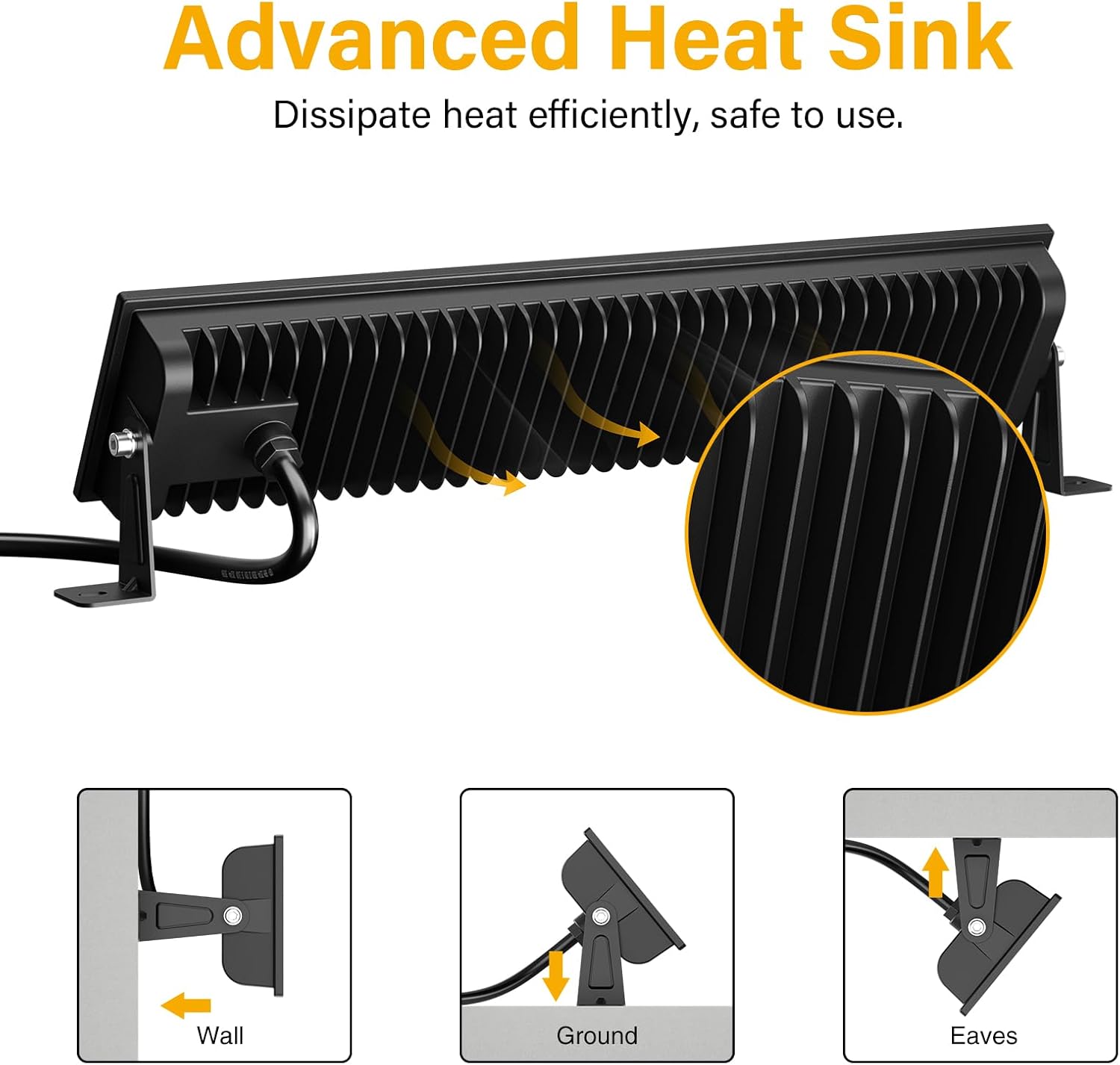
The Onforu LED Shop Lights are designed for easy installation and can be mounted in various configurations (wall, ground, or ceiling) and can also be linked horizontally or vertically.
4.1 Single Unit Installation
- So awọn akọmọ: Ṣe aabo lamp brackets to the sides of the LED light fixture using the provided M6 screws and hex key. Do not overtighten initially to allow for angle adjustment.
- Gbe Imuduro: Choose your desired mounting location (wall, ground, or ceiling). Use the plastic expansion nails and mounting screws to firmly attach the brackets to the surface.
- Ṣatunṣe Igun: Once mounted, adjust the angle of the light fixture to direct illumination as needed. The fixture allows for 180° adjustment. Tighten the M6 screws on the brackets to secure the angle.
- So agbara: Plug the power cord into a standard 120V AC outlet. The light features an in-line switch for convenient power control.

Fidio 1: A kukuru ṣaajuview demonstrating the installation process and adjustable features of the Onforu LED Flood Light.
4.2 Linking Multiple Units
The lights can be connected horizontally or vertically to create a longer or wider lighting solution. Use the provided connectors and hex key to secure the units together.
- Ìsopọ̀ Pẹtẹlẹ̀: Align two light units side-by-side. Use the small connecting brackets and screws to join them securely. Ensure the power cables are routed appropriately.
- Vertical Connection: Align two light units one above the other. Use the small connecting brackets and screws to join them securely.
Video 2: An official product video from Onforu demonstrating the various installation methods, including linking multiple units horizontally and vertically, and showcasing the included hardware.
5. Awọn ilana Iṣiṣẹ
Operating your Onforu LED Shop Light is straightforward:
- Once installed and plugged into a power outlet, locate the in-line switch on the power cord.
- Press the switch to turn the light ON.
- Press the switch again to turn the light OFF.

6. Itọju
To ensure optimal performance and longevity of your LED Shop Lights:
- Ninu: Periodically clean the glass cover with a soft, damp asọ. Yago fun abrasive ose tabi olomi ti o le ba awọn dada.
- Ayewo: Regularly check the power cord and plug for any signs of damage. Ensure all mounting screws remain tight.
- Pipade Ooru: The fixture is designed with a fin-type heat sink. Ensure it is not obstructed to allow for efficient heat dissipation.
7. Laasigbotitusita
If you encounter issues with your LED Shop Light, refer to the following common solutions:
| Isoro | Owun to le Fa | Ojutu |
|---|---|---|
| Imọlẹ ko tan. | No power supply; faulty switch; loose connection. | Check if the plug is securely inserted and the power outlet is functional. Ensure the in-line switch is ON. Inspect the power cord for damage. |
| Ina flickers. | Ipese agbara ti ko duro ṣinṣin; asopọ ti ko ni agbara. | Ensure the power supply is stable. Check all connections for tightness. |
| Imọlẹ ti o dinku. | Dirt or debris on the glass cover. | Clean the glass cover with a soft, damp asọ. |
8. Awọn pato
| Ẹya ara ẹrọ | Ẹ̀kúnrẹ́rẹ́ |
|---|---|
| Brand | Onforu |
| Nọmba awoṣe | CT08 |
| Wattage | 100 watt |
| Imọlẹ | 14000 Lumen |
| Iwọn otutu awọ | 6500 Kelvin (Funfun Oju-ọjọ) |
| Ohun elo | Aluminiomu, Gilasi tempered |
| Omi Resistance Ipele | IP66 mabomire |
| Ọja Mefa | 15.27"L x 3.46"W x 1.37"H |
| Igun tan ina | 120° |
| Pataki Ẹya | With Plug, Thick die-cast aluminum, Waterproof, Not Dimmable |
9. Atilẹyin ọja ati Support
Onforu products come with a limited warranty. For specific warranty details or technical support, please refer to the official Onforu webojula tabi olubasọrọ onibara iṣẹ.
Awọn ero aabo iyan wa fun rira lọtọ:
- 3-odun Idaabobo Eto
- 4-odun Idaabobo Eto
- Idaabobo pipe ( ṣiṣe alabapin oṣooṣu)
Fun iranlọwọ siwaju sii, ṣabẹwo si Onforu Store on Amazon.


