Ọrọ Iṣaaju
This manual provides essential information for the safe and effective operation, maintenance, and troubleshooting of your DEWALT XR 18V 5.0Ah Hammer Drill Driver, model DCD796P3. Please read these instructions carefully before using the tool and keep them for future reference.
The DCD796P3 is a versatile cordless hammer drill driver designed for drilling into wood, metal, and masonry, as well as for screwdriving applications. It features a brushless motor for extended runtime and durability, and comes equipped with 5.0Ah XR Lithium-Ion batteries.
Awọn Itọsọna Aabo
Always follow basic safety precautions to reduce the risk of fire, electric shock, and personal injury. Keep your work area clean and well-lit. Do not operate power tools in explosive atmospheres, such as in the presence of flammable liquids, gases, or dust.
- Wear appropriate personal protective equipment (PPE) including eye protection, hearing protection, and gloves.
- Ṣe aabo ohun elo iṣẹ. Lo clamps tabi a vise lati mu awọn workpiece ìdúróṣinṣin.
- Ensure the drill bit or accessory is correctly installed and tightened in the chuck before operation.
- Avoid accidental starting. Ensure the switch is in the off-position before connecting to a battery pack, picking up or carrying the tool.
- Do not force the tool. Let the tool do the work at the correct speed.
- Ge asopọ batiri ṣaaju ṣiṣe eyikeyi awọn atunṣe, yiyipada awọn ẹya ẹrọ, tabi titoju ohun elo naa.
- Use only DEWALT recommended accessories and battery packs.
- Ṣe abojuto awọn irinṣẹ pẹlu itọju. Jeki awọn irinṣẹ gige ni didasilẹ ati mimọ.
Irinše Loriview
Familiarize yourself with the main components of your DEWALT DCD796P3 Hammer Drill Driver.

Nọmba 1: Lapapọ view of the DEWALT DCD796P3 Hammer Drill Driver with an attached 5.0Ah battery pack. This image displays the main body, chuck, clutch settings, mode selector, trigger, and battery interface.
- ẹyọ: Keyless chuck for quick bit changes.
- Kola Atunse Torque: Adjusts the torque setting for screwdriving applications.
- Aṣayan Ipo: Switches between screwdriving, drilling, and hammer drilling modes.
- Yiyan Iyara: Two-speed gearbox for high-speed drilling or high-torque screwdriving.
- Nfa Yipada: Ayípadà iyara Iṣakoso.
- Bọtini Siwaju/ Yipada: Awọn iyipada itọsọna iyipo.
- Imọlẹ iṣẹ LED: Ṣe itanna agbegbe iṣẹ.
- Bọtini itusilẹ batiri: Fun yiyọ idii batiri kuro.
- Agekuru igbanu: Fun irọrun gbigbe.
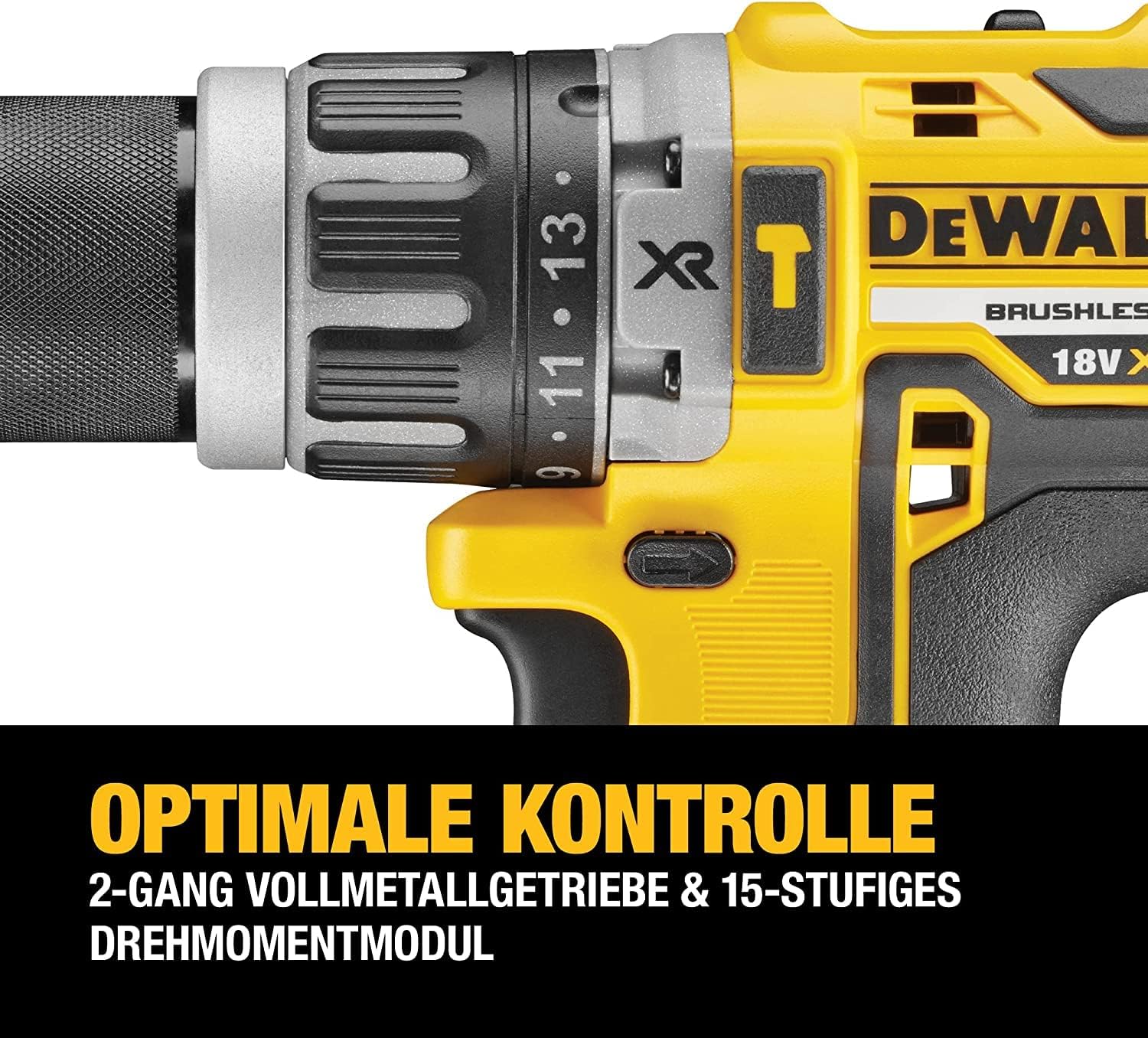
Nọmba 2: A alaye view of the drill's chuck, torque adjustment collar, and mode selector. The numbers on the collar indicate different torque settings, and the icons represent screwdriving, drilling, and hammer drilling modes.
Ṣeto
Fifi sori Batiri ati Gbigba agbara
The DCD796P3 uses DEWALT 18V XR Lithium-Ion battery packs. Ensure the battery is fully charged before first use.
- To install the battery: Align the battery pack with the tool's handle and slide it in until it clicks securely into place.
- Láti yọ batiri náà kúrò: Tẹ bọ́tìnì ìtújáde batiri náà kí o sì fa àpò batiri náà jáde kúrò nínú irinṣẹ́ náà.
- To charge the battery: Insert the battery pack into the DEWALT charger (included). Refer to the charger's instruction manual for specific charging procedures and indicators.
Installing and Removing Drill Bits/Accessories
The drill features a keyless chuck for easy accessory changes.
- Rotate the front collar of the chuck counter-clockwise until the chuck jaws are open wide enough to accept the bit.
- Fi nkan lu tabi ẹya ẹrọ ni kikun sinu Chuck.
- Rotate the front collar clockwise to tighten the chuck jaws securely around the bit. Ensure the bit is centered and firmly gripped.
- Lati yọ bit naa kuro, yi ilana imuduro naa pada.
Awọn ilana Iṣiṣẹ
Yiyan Ipo Ṣiṣẹ
The mode selector allows you to choose between three operating modes:
- Ipo Screwdriving (⚙ icon): For driving screws. Use the torque adjustment collar to set the desired clutch setting. The clutch will disengage once the set torque is reached, preventing overtightening or stripping.
- Ipo liluho (★ icon): For drilling into wood and metal. The clutch is bypassed in this mode, providing maximum torque.
- Ipo Liluho Hammer (⚒ icon): For drilling into masonry and concrete. This mode combines rotary action with a hammering action.
Rotate the mode selector collar to align the desired icon with the indicator mark on the drill body.
Setting Torque (Screwdriving Mode Only)
The torque adjustment collar has settings from 1 to 15, plus a drill icon. Select a lower number for smaller screws or softer materials, and a higher number for larger screws or harder materials. Experiment on scrap material to find the appropriate setting.
Yiyan Iyara
The speed selector switch is located on top of the drill. It has two settings:
- Iyara 1 (Iyara Kekere): Provides higher torque for heavy-duty screwdriving and large diameter drilling. (0-550 RPM)
- Iyara 2 (Iyara giga): Provides higher speed for fast drilling with smaller bits. (0-2000 RPM)
Ensure the tool is stopped before changing speed settings.
Operating the Trigger Switch and Forward/Reverse Control
- Nfa Yipada: Squeeze the trigger to start the tool. The speed is variable; press further for higher speed.
- Bọtini Siwaju/ Yipada: Push the button from the left side for forward rotation (drilling/driving). Push from the right side for reverse rotation (removing screws/bits). Center position locks the trigger to prevent accidental starting.

Nọmba 3: The DEWALT DCD796P3 Hammer Drill Driver being used to drive a screw into a wooden beam, demonstrating a typical application. The user is holding the tool firmly, and a magnetic bit holder is visible.
Itoju
Itọju deede ṣe idaniloju iṣẹ ṣiṣe ti o dara julọ ati fa igbesi aye ọpa rẹ pọ si.
- Ninu: Keep the ventilation slots clear of dust and debris. Use a soft brush or compressed air to clean the tool. Do not use water or chemical cleaners.
- Itọju Chuck: Lorekore nu awọn ẹrẹkẹ Chuck lati rii daju pe mimu awọn ege to dara.
- Itọju Batiri: Tọju awọn batiri ni itura, aye gbigbẹ kuro lati orun taara. Ma ṣe fipamọ awọn batiri ti o ti gba agbara ni kikun fun awọn akoko gigun.
- Ayewo: Regularly inspect the power tool, battery pack, and charger for any damage. Do not use damaged components.
- Lubrication: Ọpa yii jẹ lubricated factory ati pe ko nilo afikun lubrication.
Laasigbotitusita
If your DEWALT DCD796P3 is not operating correctly, refer to the following common issues and solutions:
| Isoro | Owun to le Fa | Ojutu |
|---|---|---|
| Irinṣẹ ko bẹrẹ. | Batiri ko gba agbara tabi fi sori ẹrọ ni aibojumu. Titiipa okunfa ṣiṣẹ. | Charge battery and ensure it is fully seated. Disengage trigger lock by pushing the forward/reverse button to either side. |
| Dinku agbara tabi iyara. | Low battery charge. Tool overheating. | Batiri gbigba agbara. Gba ọpa laaye lati tutu. |
| Bit yo ni Chuck. | Chuck ko tightened to. Bit shank jẹ idọti tabi ti bajẹ. | Retighten Chuck ìdúróṣinṣin. Mọ tabi ropo bit. |
| Hammer action not engaging. | Mode selector not set to hammer drilling. | Rotate mode selector to the hammer drilling icon. |
For issues not covered here, contact DEWALT customer service or an authorized service center.
Awọn pato
| Ẹya ara ẹrọ | Sipesifikesonu |
|---|---|
| Nọmba awoṣe | DCD796P3 |
| Voltage | 18 V |
| Batiri Iru | XR Lithium-Ion |
| Agbara Batiri | 5.0 Ah |
| Max Maxi | 70 Nm |
| Ijade agbara ti o pọju | 460 W |
| No Load Speed (Speed 1) | 0-550 RPM |
| No Load Speed (Speed 2) | 0-2000 RPM |
| Chuck Agbara | 1.5 - 13 milimita |
| Agbara Liluho ti o pọju (Igi) | 40 mm |
| Agbara Liluho ti o pọju (Irin) | 13 mm |
| Max Drilling Capacity (Masonry) | 13 mm |
| Ìwúwo (Ọpa nikan) | Approximately 1.7 kg (without battery) |
| Awọn iwọn (Ipari x Giga x Ìbú) | 190 mm x 203 mm x 67 mm |
Akiyesi: Awọn alaye ni o wa labẹ iyipada laisi akiyesi.
Atilẹyin ọja ati Support
DEWALT pese atilẹyin ọja to lopin fun awọn ọja rẹ. Fun alaye atilẹyin ọja, pẹlu awọn ofin ati ipo, jọwọ tọka si kaadi atilẹyin ọja ti o wa pẹlu ọja rẹ tabi ṣabẹwo si DEWALT osise webojula. Jeki ẹri rira rẹ fun awọn iṣeduro atilẹyin ọja.
For technical assistance, service, or to locate an authorized service center, please contact DEWALT customer support. Contact information can typically be found on the DEWALT webaaye tabi ni iwe ti a pese pẹlu ọpa rẹ.
Awọn orisun Ayelujara: For additional support, product registration, and access to the latest manuals and parts diagrams, visit www.dewalt.com.


