1. Awọn Ilana Aabo pataki
IKILO: Lati dinku eewu ijona, ina, mọnamọna, tabi ipalara si awọn eniyan:
- Ka gbogbo awọn itọnisọna ṣaaju lilo ohun elo yii.
- Jeki awọn ọmọde ati awọn ohun ọsin kuro ni ibi-tẹtẹ nigba iṣẹ.
- Always use the safety key. The treadmill will not operate without it.
- Ensure adequate clearance around the treadmill (7 feet from the back, 4 feet from front and sides).
- Maṣe ṣiṣẹ labẹ ibora tabi irọri. Alapapo pupọ le waye ati fa ina, mọnamọna, tabi ipalara si awọn eniyan.
- Maṣe ju silẹ tabi fi ohunkan sinu ṣiṣi eyikeyi.
- Maṣe lo ni ita.
- Lati yago fun ipalara, duro lori awọn iṣinipopada ẹgbẹ ṣaaju ki o to bẹrẹ ẹyọ.
2. Package Awọn akoonu
Verify all components are present before assembly:
- LifePro Compact Foldable Treadmill (Main Unit)
- Itọsọna olumulo
- Bọtini Aabo
- Multi-tool (Hex key, Screwdriver)
- Socket Head Screws with Washers (for handrails)
- Nuts and Bolts (for wheel brackets)
3. Apejọ Awọn ilana
Follow these steps to assemble your LifePro Compact Foldable Treadmill. It is recommended to have assistance for certain steps.
3.1 Unboxing ati Placement
Carefully remove the treadmill from its packaging. Ensure you have sufficient clear space for assembly and operation: 7 feet behind the treadmill, and 4 feet on the front and sides. If placing on a slick surface, use a mat measuring at least 60x36 inches underneath.
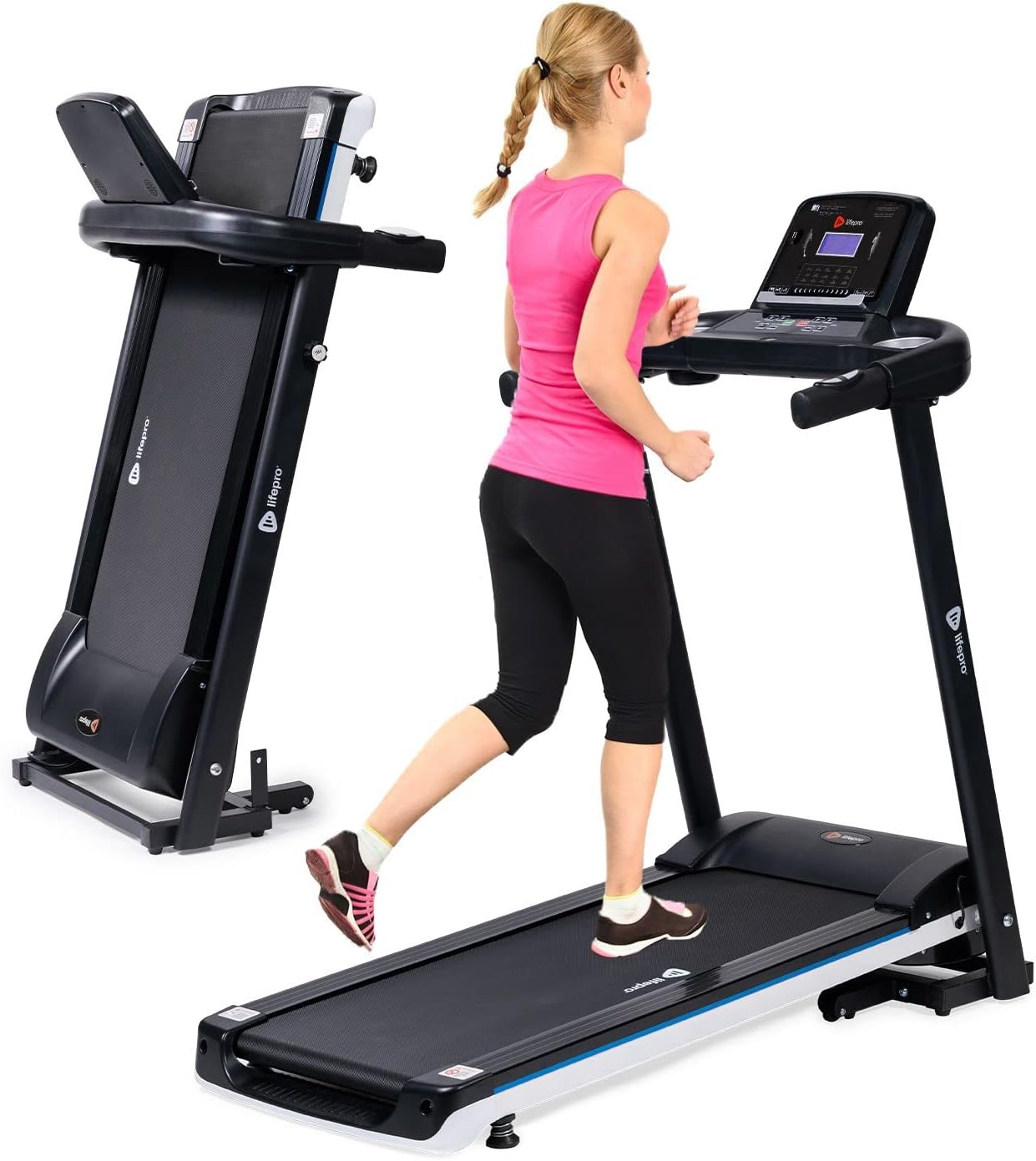
Image: The LifePro Compact Foldable Treadmill shown both in an unfolded, operational state with a user, and in a folded, compact state for storage.
3.2 Installing Wheel Brackets
With the treadmill lying flat, locate the pre-drilled holes at the base. Align the wheel brackets and secure them using the provided nuts and bolts. Do not fully tighten until both sides are in place to allow for minor adjustments.
Video Description: This video demonstrates the process of installing the wheel brackets. It shows how to carefully position the treadmill and secure the brackets using the provided hardware.
3.3 Unfolding Treadmill
Carefully lift the treadmill into an upright position, ensuring the wheels are properly aligned on the floor. Locate the security knob on the side of the main frame. Pull it out and slowly lower the running deck until it rests flat on the floor. Re-insert and rotate the security knob to lock the treadmill in the unfolded position.
3.4 Securing the Handrails
Tilt the handrails downward. Use the provided socket head screws with washers and the hex head of the multi-tool to secure the handrails. Insert one set of screws into the inside of each handrail, ensuring they are tightened securely.
3.5 Installing the Display Panel
Connect all wires from the main frame to the corresponding ports on the back of the display panel. Ensure each connection clicks into place. Carefully tuck the wires into the designated space. Align the display panel with the top of the handrail assembly and secure it from underneath using the three 40mm screws and the multi-tool. Ensure the control panel is tilted upward during this process.

Aworan: A sunmọ-soke view of the LifePro Compact Foldable Treadmill's control panel, featuring an LCD display, various control buttons for speed and programs, heart rate sensors on the handrails, and cup holders.
4. Awọn ilana Iṣiṣẹ
Familiarize yourself with the control panel and safety features before beginning your workout.
4.1 Agbara Tan / Pa
Plug the treadmill into a grounded electrical outlet. Attach the safety key to the designated magnetic area on the console and clip the other end to your clothing. Press the BERE button to begin operation. To stop, press the DURO button or pull the safety key.
4.2 console Awọn iṣẹ
The LCD display shows time, distance, speed, calories burned, and pulse. Use the Iyara +/- buttons to adjust the speed. Quick speed buttons (4, 6, 8 MPH) are available for instant adjustments. The ETO button allows selection from 15+ pre-set training programs. The MODE button cycles through different display modes.
Heart rate sensors are integrated into the handrails. Grip them firmly to monitor your pulse during exercise.
The console also features a USB port for charging devices and built-in Bluetooth speakers for audio playback. Connect your smartphone or tablet to enjoy music or videos during your workout.

Image: A user is shown interacting with the LifePro Compact Foldable Treadmill's console, which includes a tablet holder, Bluetooth speakers, and a USB charging port.
5. Itọju
Regular maintenance ensures optimal performance and longevity of your treadmill.
5.1 Lubrication
The running belt requires periodic lubrication. Refer to the "Lubricating Your Running Belt" section in the operations video for detailed instructions. This should be done before the first use and every few months depending on usage.
5.2 Ninu
Pa awọn ibi-itẹ-titẹ mọlẹ pẹlu ipolowoamp cloth after each use. Avoid using abrasive cleaners or solvents. Regularly vacuum underneath the treadmill to prevent dust buildup.
6. Laasigbotitusita
If you encounter issues, consult this section before contacting support.
| Isoro | Owun to le Fa | Ojutu |
|---|---|---|
| Treadmill ko bẹrẹ | Safety key not in place; Power cord unplugged; Power switch off. | Ensure safety key is correctly placed; Check power connection; Turn power switch ON. |
| Awọn isokuso ti n ṣiṣe | Belt tension too loose; Belt needs lubrication. | Adjust belt tension (refer to manual); Lubricate belt (refer to maintenance section). |
| Ariwo dani nigbati isẹ | Loose components; Belt misalignment. | Check all assembly bolts and tighten if necessary; Adjust belt alignment (refer to manual). |
7. Awọn pato
| Brand: | LifePro |
| Awoṣe: | LP-SWFT-BLK |
| Awọn iwọn Ọja (Ṣiṣiṣi): | 49.6"D x 26"W x 48.8"H |
| Iwon Dipo: | 21.3"D x 26"W x 48.8"H |
| Ìwọ̀n Nkan: | 64 iwon |
| Iyara ti o pọju: | 10 km fun Wakati |
| Agbara Ẹṣin ti o pọju: | 0.75 Agbara ẹṣin |
| Iṣeduro iwuwo ti o pọju: | 285 iwon |
| Gigun Deki: | 39 inches |
| Ìbú Deki: | 15 inches |
| Iru ifihan: | LCD |
| Imọ-ẹrọ Asopọmọra: | Bluetooth |
| Ẹya Pataki: | Ti o le ṣe pọ |
8. Atilẹyin ọja ati Support
LifePro offers a s'aiye atilẹyin ọja and dedicated customer support for this product. For any questions, assistance, or warranty claims, please contact LifePro customer service.
Ṣabẹwo si LifePro itaja lori Amazon fun alaye siwaju sii ati support oro.


