Ọrọ Iṣaaju
The iRobot Roomba i4+ EVO robot vacuum is designed to provide automated floor cleaning with advanced features. This model includes a Clean Base Automatic Dirt Disposal system, allowing the robot to empty its own bin for extended periods without user intervention. Equipped with iRobot OS and Imprint Smart Mapping technology, it learns your home layout to clean specific rooms on demand and adapts to your cleaning habits. Its powerful 3-Stage Cleaning System and Dual Multi-Surface Rubber Brushes are effective on various floor types and for managing pet hair.
Ohun ti o wa ninu Apoti
- iRobot Roomba i4+ EVO Robot Vacuum
- Mimọ mimọ Dọti Aifọwọyi Laifọwọyi
- Àpò Ìsọnù Ẹ̀gbin 1 (tí a ti fi sínú Ìpìlẹ̀ Mímọ́ tẹ́lẹ̀)
- 1 High-Efficiency Filter (pre-installed in robot)
- Okun ila

Image: The Roomba i4+ EVO robot vacuum docked with its Clean Base Automatic Dirt Disposal unit. An iRobot app icon is visible on a smartphone screen next to the unit.

Image: The Roomba i4+ EVO robot vacuum and its Clean Base Automatic Dirt Disposal unit are shown separately, highlighting the two main components.
Ṣeto
- Choose a Location for the Clean Base: Place the Clean Base on a level surface against a wall, ensuring there are no obstacles within 1.5 feet (0.5 meters) on either side and 4 feet (1.2 meters) in front. Ensure it is near a power outlet.
- Plug in the Clean Base: Connect the line cord to the Clean Base and then to a wall outlet.
- Gba agbara si Robot: Place the Roomba robot onto the Clean Base charging contacts. The light ring on the robot will pulse white to indicate charging. Allow at least 3 hours for a full charge before first use.
- Ṣe igbasilẹ ohun elo ile iRobot: Wa fun "iRobot Home" in your device's app store. The app is essential for setting up, controlling, and monitoring your Roomba.
- Sopọ si Wi-Fi: Follow the in-app instructions to connect your Roomba to your home Wi-Fi network. This enables smart features like mapping, scheduling, and voice control.
- Initial Mapping Run: The app will guide you through an initial mapping run. This allows the robot to learn your home's layout and create a Smart Map, which is crucial for room-by-room cleaning.
Operating the Roomba i4+ EVO
Bíbẹ̀rẹ̀ Iṣẹ́ Ìmọ́tótó
- Lati Robot: Tẹ awọn MỌ button on the robot to start or pause a cleaning cycle.
- From the iRobot Home App: Use the app to start a cleaning job, select specific rooms to clean, or set up cleaning schedules.
- Iṣakoso ohun: If connected to Amazon Alexa or Google Assistant, use voice commands such as "Alexa, tell Roomba to start vacuuming."

Image: The Roomba i4+ EVO robot vacuum is shown next to its Clean Base, with an Amazon Echo Dot nearby. A speech bubble indicates a voice command: "Alexa, tell Roomba to start vacuuming."
Smart Mapping and Navigation
The Roomba i4+ EVO uses Imprint Smart Mapping to learn and adapt to your home's layout. It cleans in neat, efficient rows and can resume cleaning from where it left off after recharging. The robot can be directed to clean specific rooms or areas through the iRobot Home App.

Aworan: eriali view of a room showing the Roomba i4+ EVO robot vacuum navigating in straight lines, illustrating its smart mapping and cleaning path capabilities.

Image: The Roomba i4+ EVO robot vacuum is cleaning a living room floor. A smartphone screen overlay shows "Cleaning Time Estimates" for the living room, indicating approximately 29 minutes.

Image: The Roomba i4+ EVO robot vacuum is shown cleaning under a sofa, demonstrating its ability to reach difficult areas. A person is sitting on the sofa with a dog.
Idasonu Idọti Aifọwọyi
The Clean Base automatically empties the robot's bin into an enclosed bag, holding up to 60 days of debris. This feature significantly reduces the frequency of manual bin emptying.

Image: A diagram illustrating the automatic dirt disposal process, showing debris being suctioned from the Roomba i4+ EVO robot vacuum into the Clean Base's disposal bag.
Itoju
Regular maintenance ensures optimal performance of your Roomba i4+ EVO. Refer to the iRobot Home App for detailed instructions and video tutorials.
Clean Base Dirt Disposal Bag
- The Clean Base bag holds up to 60 days of debris. Replace the bag when the indicator light on the Clean Base illuminates or when prompted by the app.
- To replace, lift the lid of the Clean Base, pull up on the bag tab to remove, and insert a new bag.
Robot irinše
- Eruku Bin ati Ajọ: Empty the robot's dust bin after each cleaning cycle. The filter should be cleaned weekly and replaced every 2-3 months, or as needed.
- Dual Multi-Surface Rubber Brushes: Clean the brushes weekly, removing any hair or debris tangled around them. These brushes are designed to prevent tangles, especially with pet hair.
- Fọ́ṣì gbígbẹ etí: Check and clean the side brush regularly, removing any hair or debris. Replace if bristles are worn.
- Awọn sensọ: Wipe the Cliff Sensors (located on the bottom of the robot) and Dirt Detect Sensors (on the front) with a clean, dry cloth monthly to ensure proper navigation and cleaning.
- Awọn olubasọrọ gbigba agbara: Clean the charging contacts on both the robot and the Clean Base periodically with a dry cloth.
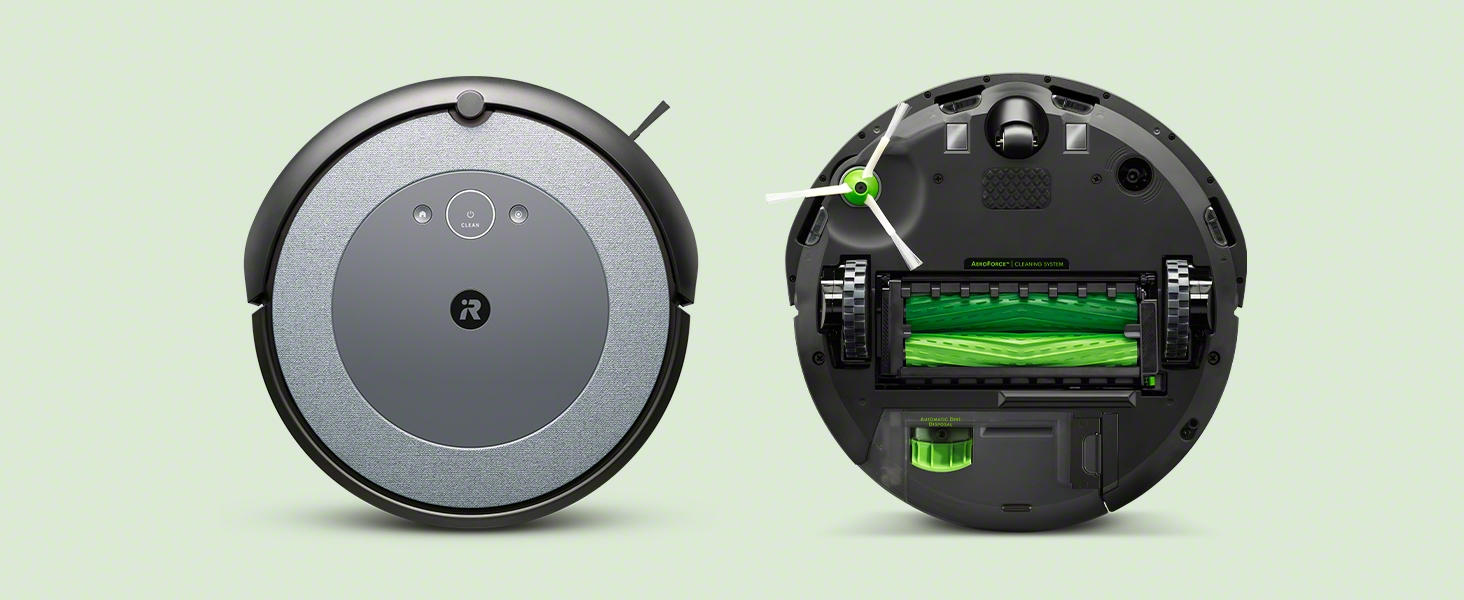
Aworan: Ohun exploded view of the Roomba i4+ EVO robot vacuum highlighting its key cleaning components: Dirt Detect Sensors, Cliff Detect sensors, Edge-Sweeping Brush, Dual Multi-Surface Rubber Brushes, and Auto-Adjusting Cleaning Head.
Laasigbotitusita
If your Roomba i4+ EVO encounters an issue, the robot will often provide an audible alert and the light ring will change color. Consult the iRobot Home App for specific error messages and troubleshooting steps.
- Robot Stuck or Error: If the robot stops unexpectedly, check for obstructions around the wheels, brushes, or sensors. Clear any debris.
- Iṣe Isọdi ti ko dara: Ensure the dust bin is empty, the filter is clean, and the brushes are free of hair and debris.
- Not Returning to Clean Base: Verify the Clean Base is plugged in and has clear space around it. Clean the charging contacts on both the robot and the base.
- Awọn oran Asopọmọra: Ensure your Wi-Fi network is stable and the robot is within range. Restarting your router, the robot, and the app can often resolve connectivity problems.
For more detailed troubleshooting, refer to the comprehensive help section within the iRobot Home App or visit the iRobot support webojula.
Awọn pato
| Ẹya ara ẹrọ | Ẹ̀kúnrẹ́rẹ́ |
|---|---|
| Brand | iRobot |
| Orukọ awoṣe | iRobot Roomba i4+ Wi-Fi Connected Robot Vacuum with Automatic Dirt Disposal |
| Nọmba awoṣe | i455220 |
| Pataki Awọn ẹya ara ẹrọ | Dirt Detection Sensor, Edge Cleaning, Logical Navigation, Motorized Brush Roll, Pet Hair Pick Up, Room-By-Room Navigation, Scheduling, Self-Emptying, Smart Mapping |
| Àwọ̀ | Itura |
| Ọja Mefa | 13.34"L x 13.26"W x 3.63"H |
| Awọn irinše to wa | Clean Base, Dirt Disposal Bag, Filter, Robot |
| Àlẹmọ Iru | Katiriji |
| Igbesi aye batiri | 75 iṣẹju |
| Orisun agbara | Agbara Batiri |
| Ọna Iṣakoso | Ohùn |
| Awọn ẹrọ ibaramu | Amazon Echo, Google Home, Smartphones, Tablets |
| Iwọn Nkan | 7.44 iwon |
| UPC | 885155030016 |
Atilẹyin ọja ati Support
For detailed warranty information and customer support, please refer to the official documents provided with your product or visit the iRobot webojula.
- Ilana olumulo (PDF): Ṣe igbasilẹ Afowoyi olumulo
- Atilẹyin ọja (PDF): Ṣe igbasilẹ Alaye Atilẹyin ọja
- Atilẹyin Ayelujara: Visit the official iRobot support page for FAQs, troubleshooting guides, and contact information.
iRobot does not certify the quality or authenticity of products purchased from non-authorized resellers on Amazon, and will only cover warranty claims, provide service or offer replacements for products purchased from authorized sellers.


