1. Ọja Ipariview
The CHIONE 4,500 Sq. Ft. Smart Control Dehumidifier with Pump is designed to efficiently remove up to 50 pints of moisture per day, maintaining a healthy humidity range of 30%-50% in large areas up to 4,500 square feet. This Energy Star certified unit is suitable for homes, basements, bathrooms, bedrooms, and garages. It features smart control via a mobile app, a 24-hour timer, auto defrost, and multiple drainage options including a built-in pump.
2. Package Awọn akoonu
Upon unpacking your CHIONE Dehumidifier, please ensure all items listed below are present:
- CHIONE Dehumidifier Unit
- Ìwé Ìtọ́sọ́nà àti Ìwé Ìtọ́sọ́nà fún Ẹni tó ni ẹ́
- App Installation & Setup Guide
- Power Cable Management Bracket
- Drain Hose for Pump (1/4 inch outside diameter)
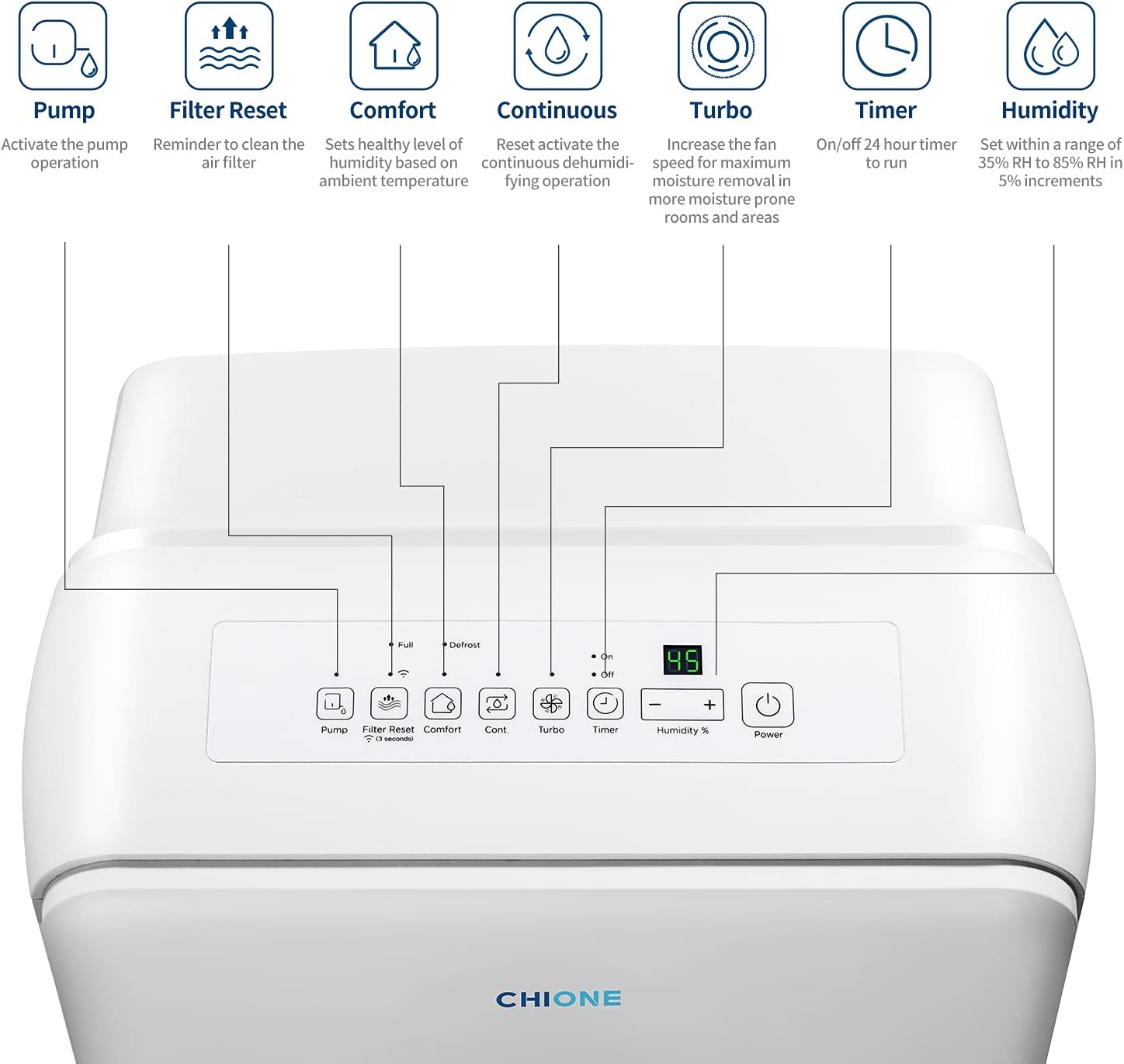
Image: The CHIONE Dehumidifier unit with its included accessories laid out on a table, including the user manuals, drain hose, and power cable management bracket.
3. Ọja Awọn ẹya ara ẹrọ ati irinše
Familiarize yourself with the key features and components of your dehumidifier:
- Ibi iwaju alabujuto: Top-mounted panel with buttons for Power, Humidity adjustment, Timer, Turbo mode, Continuous mode, Comfort mode, Filter Reset, and Pump activation. Indicator lights show Full bucket, Defrost, On/Off status, and Wi-Fi connectivity.
- Ibi ipamọ omi yiyọ kuro: Front-loading 1.6-gallon tank with a visible water level indicator. Features a handle for easy removal and emptying.
- Itẹlẹsọna Isanjade Imugbẹ: Located at the rear for gravity drainage using a standard garden hose (not included).
- Built-in Pump Outlet: Located at the rear for automatic drainage using the included 1/4 inch drain hose, allowing water to be pumped upwards or to a distant drain.
- Àlẹ̀mọ́ Afẹ́fẹ́ Tí A Lè Fọ: Rear-mounted, easily removable for cleaning to maintain efficiency.
- 360° Rotatable Wheels & Handles: For easy mobility and placement of the unit.
- Agbara Irawọ Agbara: Ensures energy-efficient operation.
- Iṣakoso Smart: Compatible with the Net Home Plus App for remote control and scheduling via Wi-Fi (2.4GHz networks only).

Image: The top control panel of the dehumidifier, showing buttons for Pump, Filter Reset, Comfort, Continuous, Turbo, Timer, Humidity adjustment, and Power, along with indicator lights for Full, Defrost, and Wi-Fi.

Image: A hand demonstrating the removal of the 1.6-gallon water tank from the front of the dehumidifier.

Image: A close-up of one of the 360-degree rotatable wheels, highlighting the unit's easy mobility.
4. Eto
- Ṣii silẹ: Ni ifarabalẹ yọ iyọkuro ati gbogbo awọn ẹya ẹrọ kuro ninu apoti.
- Ibi: Place the unit on a level surface in the desired location. Ensure there is at least 8 inches of space around the unit for proper airflow. The 360° rotatable wheels allow for easy positioning.
- Power Cable Management: Locate the power cable management bracket inside the water bucket. Snap it into place on the back of the unit to neatly wrap the power cord.
- Asopọ agbara: Pulọọgi dehumidifier sinu iṣan itanna ti ilẹ.
- Fifi sori ẹrọ ohun elo (Aṣayan): Download the "Net Home Plus" app from your device's app store (available for Android and iOS). Create an account and follow the in-app instructions to connect your dehumidifier to your 2.4GHz Wi-Fi network. This involves holding the "Filter Reset" button for 3 seconds until "AP" appears on the display, then joining the device's Wi-Fi network via your phone's settings, and finally entering your home Wi-Fi credentials in the app.
Video: An official CHIONE video demonstrating the unboxing, physical features, control panel, and app setup process for the dehumidifier.
5. Awọn ilana Iṣiṣẹ
Iṣakoso Panel isẹ
The control panel on top of the unit allows for direct control:
- Bọtini agbara: Ó ń tan tàbí pa ẹ̀rọ náà.
- Humidity Adjustment (+/-): Adjusts the desired humidity level from 35% to 85% RH in 5% increments.
- Bọtini Aago: Sets an on/off timer for up to 24 hours. Press to cycle through time increments.
- Ipò Turbo: Increases fan speed for maximum moisture removal in high-humidity areas.
- Continuous Mode (Cont.): Runs the dehumidifier continuously regardless of the set humidity level.
- Ipo Itunu: Automatically sets the healthy humidity level based on ambient temperature. Humidity adjustment is disabled in this mode.
- Bọtini atunto àlẹmọ: Press and hold for 3 seconds to reset the filter cleaning notification after cleaning the air filter. Also used for Wi-Fi setup.
- Bọtini fifa: Activates the built-in pump for continuous drainage when the water tank is full.
Mobile App Iṣakoso
The Net Home Plus app provides comprehensive remote control:
- Titan/Apapa: Control the unit's power status.
- Eto ọriniinitutu: Adjust the target humidity level.
- Iyara Olufẹ: Switch between low and high fan speeds.
- Awọn ọna ṣiṣe: Select Smart, Continuous, or Comfort modes.
- Ṣiṣẹ fifa fifa ṣiṣẹ: Initiate the pump function.
- Iṣeto: Set custom schedules for the unit to turn on/off at specific times and days.
- Abojuto ipo: View current room humidity and unit status.
6. Àwọn Àṣàyàn Ìṣàn Omi
The CHIONE Dehumidifier offers three methods for water drainage:
- Sofo afọwọṣe: When the water reservoir is full, the unit will stop operating and display a "Full" indicator. Carefully pull out the water tank using its handle, empty the collected water, and reinsert the tank.
- Isan Walẹ: For continuous drainage without manual emptying, connect a standard garden hose (not included) to the continuous drain outlet at the rear of the unit. Ensure the hose is sloped downwards to a floor drain or suitable receptacle.
- Iṣàn omi fifa inu: For drainage to a higher location or a distant drain, connect the included 1/4 inch drain hose to the pump outlet at the rear. Press the "Pump" button on the control panel or in the app to activate the pump. The pump will automatically activate when the tank is full, pumping out a portion of the water.

Image: The back of the dehumidifier, illustrating the continuous drain outlet and the pump outlet with the drain hose connected.
7. Itọju ati Itọju
- Fifọ́ àlẹ̀: The unit will display a filter cleaning notification after 250 hours of use. Remove the air filter from the rear of the unit, wash it with warm, soapy water, rinse thoroughly, and allow it to air dry completely before reinserting. Press and hold the "Filter Reset" button for 3 seconds to clear the notification.
- Ninu Ẹka: Mu ese ita kuro pẹlu asọ, damp asọ. Maṣe lo awọn kẹmika ti o lewu tabi awọn afọmọ abrasive.
- Ibi ipamọ: If storing the unit for an extended period, ensure the water tank is empty and the unit is clean and dry. Store in an upright position in a cool, dry place.

Image: A hand cleaning the washable air filter under running water, demonstrating the maintenance process.
8. Laasigbotitusita
If you encounter issues with your dehumidifier, refer to the following common troubleshooting tips:
- Ẹka Ko Tii: Ensure the power cord is securely plugged into a grounded outlet. Check if there's a power outage.
- "Full" Indicator On / Unit Not Dehumidifying: The water tank may be full. Empty the tank and reinsert it. If using continuous drainage, check for kinks or blockages in the drain hose.
- Poor Dehumidification: Ensure the air filter is clean. Check that windows and doors in the operating area are closed. Verify the humidity setting is lower than the current room humidity.
- Defrost Indicator On: The unit is performing an auto-defrost cycle. This is normal and will clear automatically.
- Awọn ọran Asopọmọra Wi-Fi: Ensure your router is broadcasting a 2.4GHz network. Keep the unit close to the router during setup. Refer to the App Installation & Setup Guide for detailed steps.
- Pump Ko Ṣiṣẹ: Ensure the pump hose is correctly connected and not kinked. The pump activates when the water tank is full.
9. Awọn pato
| Sipesifikesonu | Iye |
|---|---|
| Brand | CHIONE |
| Awoṣe | B08X2RM8SC |
| Pakà Area Ideri | 4500 Square Ẹsẹ |
| Agbara Yiyọ Ọrinrin | 50 pints / ọjọ |
| Ibiti Atunṣe Irọriniinitutu | 35% si 85% RH |
| Omi ojò Agbara | 1.6 galonu |
| Pataki Awọn ẹya ara ẹrọ | Timer, Smart Control, Built-in Pump, Auto Defrost, Turbo Mode, Comfort Mode, Filter Cleaning Notification, Auto Restart |
| Lilo Agbara | Ifọwọsi Agbara Star |
| Àwọ̀ | Funfun |
| Iwọn Nkan | 48.4 iwon |
| Package Mefa | 26.5 x 18.3 x 13.5 inches |
10. Atilẹyin ọja ati Support
This CHIONE Dehumidifier includes a 1 Odun Parts & Labor atilẹyin ọja. For any support inquiries, troubleshooting assistance, or warranty claims, please refer to the contact information provided in your Owner's Manual or visit the official CHIONE webojula.