Ọrọ Iṣaaju
This manual provides detailed instructions for the setup, operation, maintenance, and troubleshooting of your Perixx PERIDUO-606 Wireless Mini Ergonomic Keyboard and Vertical Mouse combo. Please read this manual thoroughly before use to ensure optimal performance and longevity of your devices.
Package Awọn akoonu
- 1 x Perixx PERIDUO-606 Wireless Mini Ergonomic Keyboard
- 1 x Perixx Asin Ailokun Inaro
- 1 x Adjustable Palm Rest Stand
- 1 x Magnet tó ṣeé gbé kiri (fún àtúnṣe gíga)
- 1 x Nano USB Receiver (located in the keyboard's battery compartment)
- 1 x Itọsọna olumulo

Ọja Pariview
The Perixx PERIDUO-606 is a compact wireless ergonomic keyboard and vertical mouse combination designed for comfort and efficiency. It features a split-key design and a vertical mouse to promote natural wrist and hand positions.
Awọn ẹya ara Keyboard:
- Apẹrẹ Pín-Kọ́kọ́rọ́: Separates keys into two groups to reduce wrist deviation.
- Iwọn Iwapọ: Measures approximately 13.82 x 8.94 x 2.56 inches, suitable for smaller workspaces.
- Adjustable Palm Rest: Integrated palm rest with an adjustable stand for varied wrist positions.
- Membrane Low Profile Awọn bọtini: Ó fúnni ní ìrírí ìtẹ̀wé tó rọrùn.
- Lilọ kiri Yika Ọna 4: Integrated scroll wheel for enhanced navigation.


Awọn ẹya ara ẹrọ Asin:
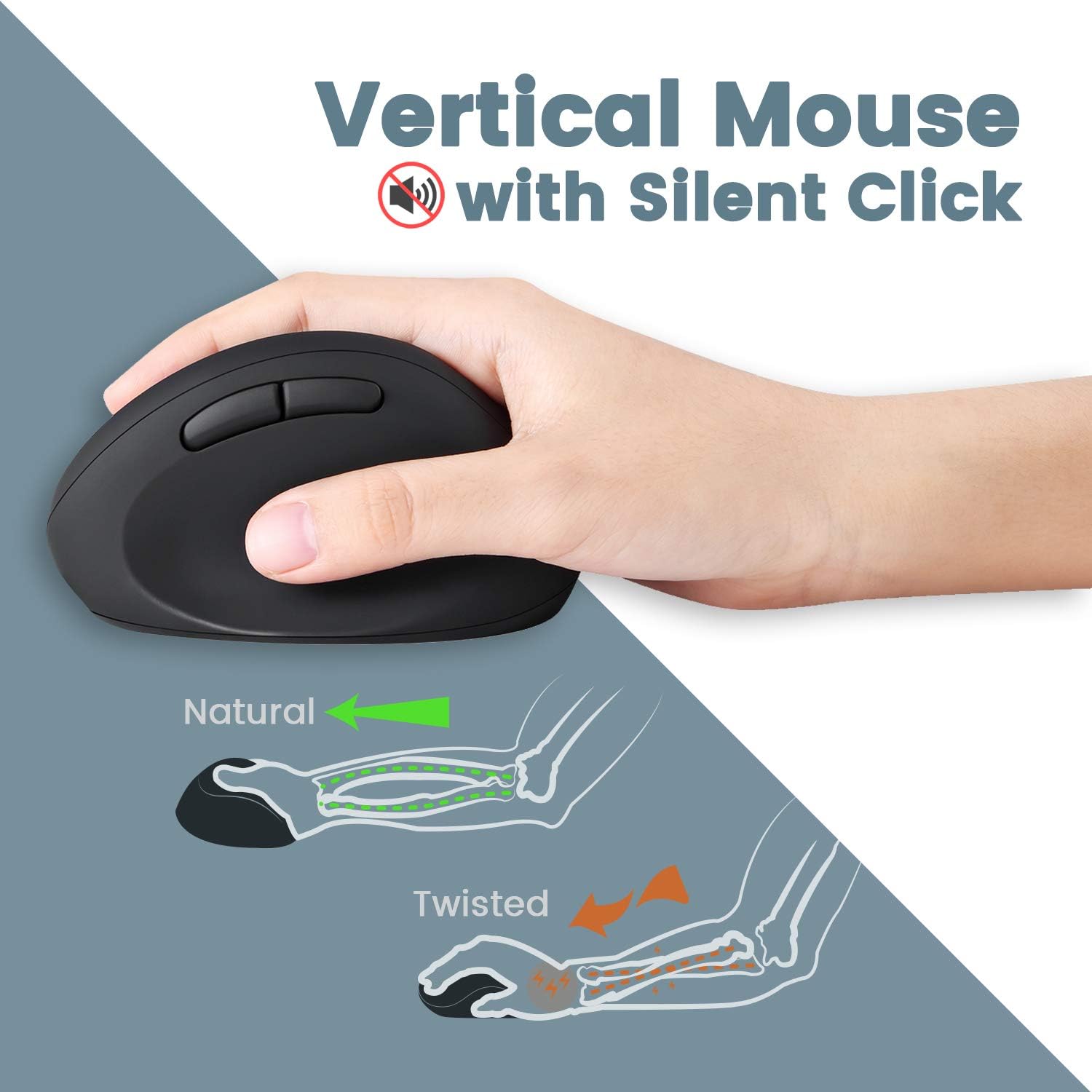
- Apẹrẹ Ergonomic inaro: Positions the hand in a natural handshake posture to reduce wrist strain.
- Tẹ ipalọlọ: Dinku ariwo iṣẹ.
- DPI ti o le ṣatunṣe: Offers 800 / 1200 / 1600 DPI settings for customizable cursor speed.
- Apẹrẹ Bọ́tìnì 5: Standard left/right click, scroll wheel, and two thumb buttons.
Asopọ Alailowaya:
- 2.4 GHz Wireless Technology: Provides a stable connection up to 33 feet (10 meters).
- Single Nano USB Receiver: One receiver connects both the keyboard and mouse.
Awọn ilana iṣeto
- Fi Awọn batiri sii:
- For the keyboard: Open the battery compartment on the underside of the keyboard and insert two AAA batteries (not included).
- For the mouse: Open the battery compartment on the underside of the mouse and insert one AA battery (not included).
- Wa olugba USB: The Nano USB receiver is stored in a dedicated compartment on the backside of the keyboard. Carefully remove it.
- Olugba Sopọ: Plug the Nano USB receiver into an available USB port on your computer.
- Agbara Tan: Ensure both the keyboard and mouse are powered on (check for an ON/OFF switch, usually on the underside). The devices should connect automatically via Plug and Play.
- So Isimi Ọpẹ mọ (Aṣayan): The adjustable palm rest stand attaches magnetically to the front of the keyboard. Use the movable magnet for height adjustment as desired.

Awọn ilana Iṣiṣẹ
Lilo Keyboard:
- Titẹ: Position your hands naturally over the split-key layout. The design is intended to reduce wrist bending.
- Awọn bọtini iṣẹ: Use the F1-F12 keys for standard functions. Some keys may have secondary functions accessible via the 'Fn' key (refer to keycap legends).
- Yi lọ Kẹkẹ: Utilize the central scroll wheel for vertical and horizontal scrolling in compatible applications.
Lilo Asin:
- Dimu: Hold the mouse in a natural handshake position.
- Atunse DPI: Press the DPI button (usually located near the scroll wheel or on the top) to cycle through 800, 1200, and 1600 DPI settings. Select the sensitivity that best suits your preference.
- Awọn titẹ ipalọlọ: The main left and right click buttons are designed for quiet operation.
Itoju
- Ninu: Lo asọ ti o tutu, ti o gbẹ lati nu awọn oju-ilẹ ti keyboard ati Asin. Fun idoti alagidi, die-die damp asọ pẹlu ọṣẹ kekere le ṣee lo, ni idaniloju pe ko si omi ti o wọ awọn ẹrọ naa.
- Rirọpo Batiri: Replace batteries when performance degrades or devices stop responding. Ensure correct polarity when inserting new batteries.
- Ibi ipamọ: When not in use for extended periods, turn off the devices to conserve battery life. Store the USB receiver in the keyboard's compartment to prevent loss.
Laasigbotitusita
| Isoro | Ojutu |
|---|---|
| Keyboard/Asin ko dahun |
|
| Keys are sticky or not registering consistently |
|
| Mouse cursor freezes or moves erratically |
|
| Ailokun asopọ silẹ nigbagbogbo |
|
Awọn pato
| Ẹya ara ẹrọ | Ẹ̀kúnrẹ́rẹ́ |
|---|---|
| Nọmba awoṣe | 11660 |
| Asopọmọra | Alailowaya 2.4 GHz (Olugba USB Nano) |
| Ijinna iṣẹ | Titi de 33 ẹsẹ (10 mita) |
| Awọn iwọn Keyboard (LxWxH) | 13.82 x 8.94 x 2.56 inches |
| Awọn iwọn Asin (LxWxH) | 4.5 x 2.64 x 2.28 inches |
| Àdánù Keyboard | Ni isunmọ 1.6 poun |
| Asin DPI Eto | 800/1200/1600 |
| Batiri Keyboard | 2 x AAA (ko si) |
| Batiri Asin | 1 x AA (ko si) |
| Ibamu Awọn ọna ṣiṣe | Windows 7, 8, 10, 11 |
Atilẹyin ọja ati Support
Your Perixx PERIDUO-606 comes with a 12-osu lopin atilẹyin ọja lati ọjọ ti o ra. Atilẹyin ọja yi ni wiwa awọn abawọn iṣelọpọ ati idaniloju awọn iṣẹ ọja bi a ti pinnu labẹ lilo deede.
For technical support, warranty claims, or further assistance, please visit the official Perixx website or contact their customer service department. Contact information can typically be found on the Perixx brand store page or included documentation.
Awọn orisun Ayelujara: Perixx Brand Store on Amazon


