Ọrọ Iṣaaju
This manual provides essential information for the safe and proper assembly, operation, maintenance, and troubleshooting of your Arcade1Up Outrun Stand Up Edition arcade game. Please read this manual thoroughly before assembly and retain it for future reference.
The Arcade1Up Outrun cabinet includes four classic racing games: Jade, Turbo Outrun, Outrunners, ati Power Drift. It features a steering wheel, gas pedal, and brake pedal for an authentic arcade experience.
Alaye Aabo
Always follow basic safety precautions when assembling and operating this product to reduce the risk of fire, electric shock, or injury.
- Jeki kuro lati omi ati ọrinrin.
- Ma ṣe gbiyanju lati ṣajọpọ tabi yi ẹyọ naa pada.
- Rii daju pe a gbe ẹyọ naa sori iduro, ipele ipele.
- Unplug the unit from the power outlet before cleaning or maintenance.
- Ọja yii jẹ ipinnu fun lilo inu ile nikan.
Package Awọn akoonu
Verify that all components are present before beginning assembly. If any parts are missing or damaged, contact Arcade1Up customer support.
- Arcade Cabinet Panels
- Control Panel Assembly (Steering Wheel, Buttons)
- Gas and Brake Pedal Assembly
- Light-Up Marquee
- Atẹle
- Adapter agbara
- Hardware Pack (Screws, Bolts, etc.)
- Ilana itọnisọna
Eto ati Apejọ
Assembly typically requires two adults. Follow the numbered steps carefully. Tools required (not included): Phillips head screwdriver.
- Yọ awọn ohun elo kuro: Fi iṣọra yọ gbogbo awọn ẹya kuro ninu apoti ki o si gbe wọn si ori mimọ, dada rirọ lati ṣe idiwọ awọn itọ.
- Ṣepọ Awọn Paneli ẹgbẹ: Attach the base and back panels to the main side panels using the provided hardware. Ensure all connections are secure.
- Install Monitor: Mount the monitor into the designated slot within the cabinet structure. Connect the necessary video and power cables.
- So Panel Iṣakoso: Secure the control panel, including the steering wheel and buttons, to the front of the cabinet. Connect the control panel wiring to the main board.
- Install Pedal Assembly: Place the gas and brake pedal assembly at the base of the cabinet and connect its cable to the main board.
- Mount Light-Up Marquee: Attach the light-up marquee to the top of the cabinet and connect its power cable.
- Awọn ayẹwo Ipari: Before powering on, double-check all connections and ensure all screws are tightened.

Figure 1: Fully assembled Arcade1Up Outrun cabinet.

Figure 2: Close-up of the control panel and screen displaying game options.
Awọn ilana Iṣiṣẹ
Once assembled and plugged in, the unit is ready for operation.
- Agbara Tan: Locate the power switch, typically on the back or side of the cabinet, and switch it to the 'ON' position. The marquee will light up and the screen will display the game selection menu.
- Yan Ere: Use the steering wheel or directional buttons (if present) and the 'SELECT' or 'ENTER' button to navigate through the available games: Jade, Turbo Outrun, Outrunners, ati Power Drift.
- Bẹ̀rẹ̀ eré: Press the 'START' button to begin playing the selected game.
- Gameplay Controls:
- Kẹkẹ irin-ajo: Turn left or right to control your vehicle's direction.
- Pẹda Gaasi: Tẹ isalẹ lati yara.
- Efatelese Brake: Press down to decelerate or stop.
- Shift Lever (if applicable): Use to change gears (High/Low).
- Njade kuro ninu ere kan: To return to the main game selection menu, press and hold the 'PLAYER 1 START' button for approximately 5 seconds.
- Agbara Pa: When finished playing, switch the power button to the 'OFF' position.
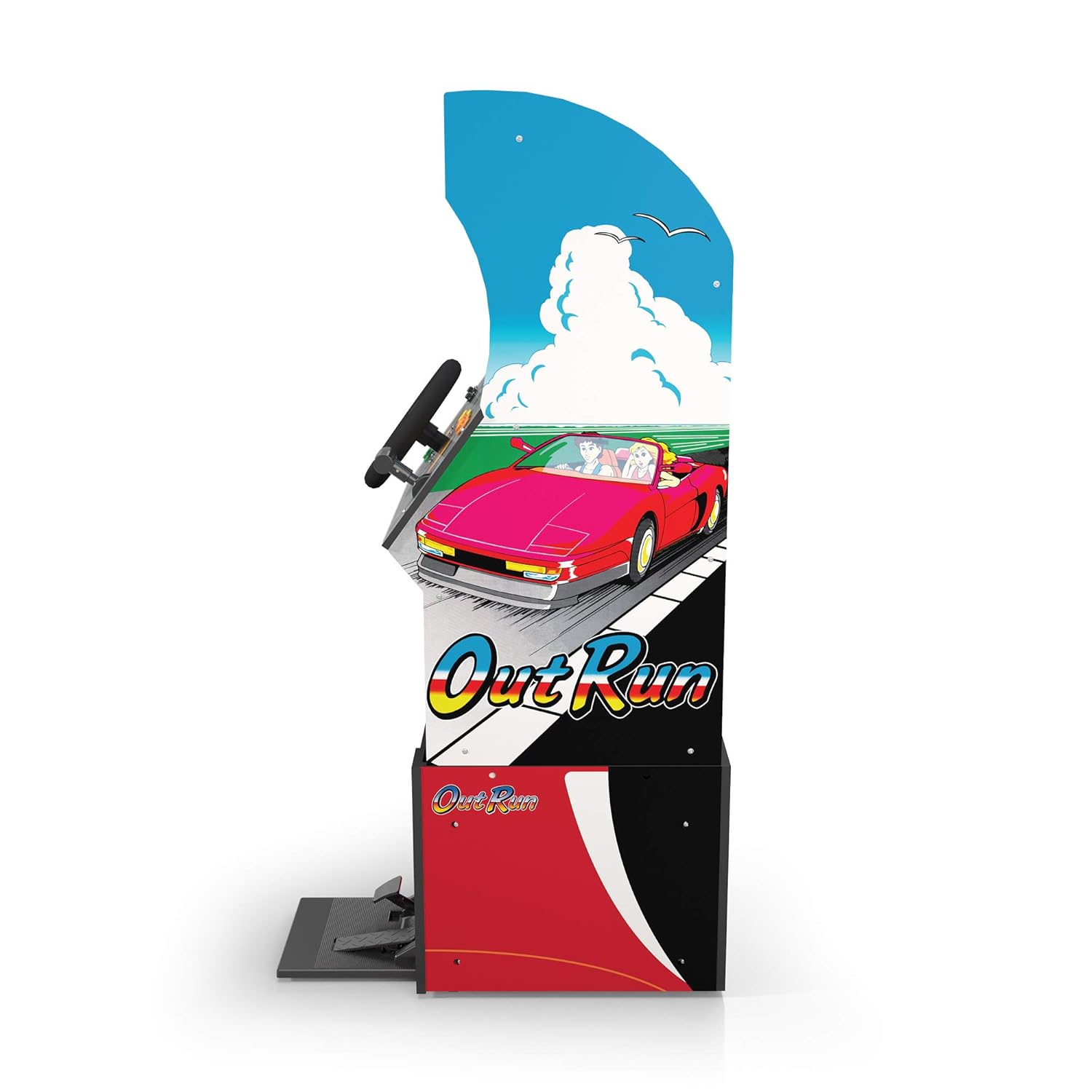
olusin 3: Ẹgbẹ profile of the arcade cabinet, illustrating the driving controls.
Itoju
Regular maintenance ensures the longevity and optimal performance of your arcade cabinet.
- Ninu: Use a soft, dry cloth to wipe down the cabinet surfaces. For stubborn marks, a slightly damp cloth with mild soap can be used, followed by drying. Avoid abrasive cleaners or excessive moisture.
- Itọju iboju: Clean the monitor screen with a microfiber cloth specifically designed for electronics. Do not spray liquid directly onto the screen.
- Itoju Efatelese: Periodically check the gas and brake pedals for any debris or obstructions that might hinder their movement. Keep the area around the pedals clean.
- Iṣakoso USB: Ensure all cables are neatly tucked away and not pinched or exposed, which could lead to damage.
Laasigbotitusita
Wo abala yii fun awọn ọran ti o wọpọ ati awọn ojutu wọn. Ti iṣoro naa ba tẹsiwaju, kan si atilẹyin alabara.
| Isoro | Owun to le Fa | Ojutu |
|---|---|---|
| Ẹka ko ni agbara lori. | Power cable not connected; Power outlet issue; Power switch off. | Ensure power cable is securely plugged into the unit and a working outlet. Check power switch is 'ON'. |
| Ko si aworan lori iboju. | Monitor cable loose; Monitor not powered. | Check monitor's power and video cables are securely connected. |
| Controls (steering wheel/pedals) unresponsive. | Control panel/pedal cables loose; Software glitch. | Verify all control panel and pedal cables are firmly connected to the main board. Try restarting the unit. |
| Game freezes or crashes. | Ibùgbé software oro. | Power off the unit, wait 10 seconds, then power back on. |
Awọn pato
- Nọmba awoṣe: 195570000861
- Awọn iwọn (Ti kojọpọ): 47.75 x 23.75 x 10.5 inches (Giga x Fífẹ̀ x Jíjìn)
- Ìwúwo: 89.5 iwon
- Awọn ere ti a fi kun: Outrun, Turbo Outrun, Outrunners, Power Drift
- Awọn iṣakoso: Steering Wheel, Gas Pedal, Brake Pedal, Game Selection Buttons
- Agbara: AC Adapter (Input: 100-240V ~ 50/60Hz, Output: Specific to adapter, refer to label)
- Olupese: Arcade 1Up
- Ojo ifisile: Oṣu Kẹrin Ọjọ 7, Ọdun 2021
Atilẹyin ọja ati Support
Arcade1Up products typically come with a limited manufacturer's warranty. For specific warranty terms and conditions, please refer to the warranty card included with your product or visit the official Arcade1Up webojula.
For technical support, missing parts, or warranty claims, please contact Arcade1Up Customer Support:
- Webojula: arcade1up.com/pages/contact-us
- Foonu: Tọkasi osise webAaye fun agbegbe awọn nọmba olubasọrọ.
Nígbà tí o bá ń kàn sí olùrànlọ́wọ́, jọ̀wọ́ mú nọ́mbà àwòṣe rẹ (195570000861) àti ẹ̀rí ríra rẹ̀ wà nílẹ̀.


