1. Ifihan
Thank you for choosing the Cecotec EnergySilence Aero 480 Ceiling Fan. This manual provides essential information for the safe installation, operation, and maintenance of your new ceiling fan. Please read this manual thoroughly before installation and keep it for future reference.
The EnergySilence Aero 480 is designed to provide efficient air circulation and integrated lighting for your living space. It features a powerful 65W copper motor, a 106 cm diameter for wide coverage, three reversible blades for year-round use, and three speed settings, all controllable via a convenient remote.
2. Awọn ilana aabo
Nigbagbogbo tẹle awọn iṣọra aabo ipilẹ nigba lilo awọn ohun elo itanna lati dinku eewu ina, mọnamọna, ati ipalara ti ara ẹni.
- Read all instructions before installing or using the fan.
- Rii daju pe ipese agbara ti ge-asopo ni ẹrọ fifọ akọkọ ṣaaju fifi sori ẹrọ tabi itọju.
- Onímọ̀ ẹ̀rọ iná mànàmáná tó mọ̀ nípa rẹ̀ gbọ́dọ̀ fi sori ẹ̀rọ náà ní ìbámu pẹ̀lú àwọn ìlànà iná mànàmáná àdúgbò.
- The mounting structure must be capable of supporting a minimum of 4.6 kg (the weight of the fan).
- Ma ṣe fi awọn ika ọwọ tabi awọn ohun elo eyikeyi sinu awọn abẹfẹfẹ afẹfẹ nigba ti afẹfẹ n ṣiṣẹ.
- Ensure the fan blades are at least 2.3 meters (7.5 feet) from the floor and 0.5 meters (1.6 feet) from any wall or obstruction.
- Ma ṣe ṣiṣẹ afẹfẹ pẹlu okun agbara ti bajẹ tabi plug.
- Ohun elo yii kii ṣe ipinnu fun lilo nipasẹ awọn eniyan (pẹlu awọn ọmọde) pẹlu idinku ti ara, imọlara tabi awọn agbara ọpọlọ, tabi aini iriri ati imọ, ayafi ti wọn ba ti fun wọn ni abojuto tabi itọnisọna nipa lilo ohun elo nipasẹ eniyan ti o ni iduro fun aabo wọn.
- Awọn ọmọde yẹ ki o wa ni abojuto lati rii daju pe wọn ko ṣere pẹlu ohun elo naa.
3. Package Awọn akoonu
Carefully unpack your ceiling fan and check that all items are included. If any parts are missing or damaged, contact Cecotec customer service.
- Apejọ Motor Motor
- Awọn abẹfẹfẹ Fan (3)
- Àwọn Ohun Èlò/Braketi
- Downrod ati ibori
- Oke Atẹgun
- Light Kit with Diffuser
- Isakoṣo latọna jijin pẹlu Odi Oke
- Pack hardware (skru, washers, waya eso)
- Itọsọna olumulo
4. Eto ati fifi sori
Tẹle awọn igbesẹ wọnyi fun fifi sori ẹrọ to dara. A ṣe iṣeduro fifi sori ẹrọ ọjọgbọn.
4.1 Pre-Fifi sọwedowo
- Pa a agbara ni Circuit fifọ.
- Ensure the ceiling joist or support structure can hold the fan's weight.
- Verify that the electrical box is suitable for fan support.
4.2 Iṣagbesori akọmọ
Secure the mounting bracket to the ceiling electrical box using the provided screws. Ensure it is firmly attached and level.
4.3 Assembling the Motor and Downrod
Insert the downrod through the canopy and coupling cover. Feed the motor wires through the downrod. Secure the downrod to the motor assembly with the provided pin and screw.
4.4 Gbigbe Fan
Carefully connect the fan's electrical wires to the household wiring according to the wiring diagram in the full manual. Use the provided wire nuts. Ensure all connections are secure.
4.5 Síso Àwọn Abẹ́ Mọ́
Attach each blade to its blade holder using the blade screws. Then, attach the blade holders to the motor housing. Ensure all screws are tightened securely.

Aworan: Isunmọ view of a fan blade, illustrating its design and how it connects to the fan's central unit. This shows the smooth, curved shape of the blade, designed for efficient air movement.
4.6 Fifi Ohun elo Imọlẹ sii
Connect the light kit wires to the fan motor's light wires. Secure the light kit to the bottom of the fan motor assembly. Install the light bulb (if not pre-installed) and attach the diffuser.
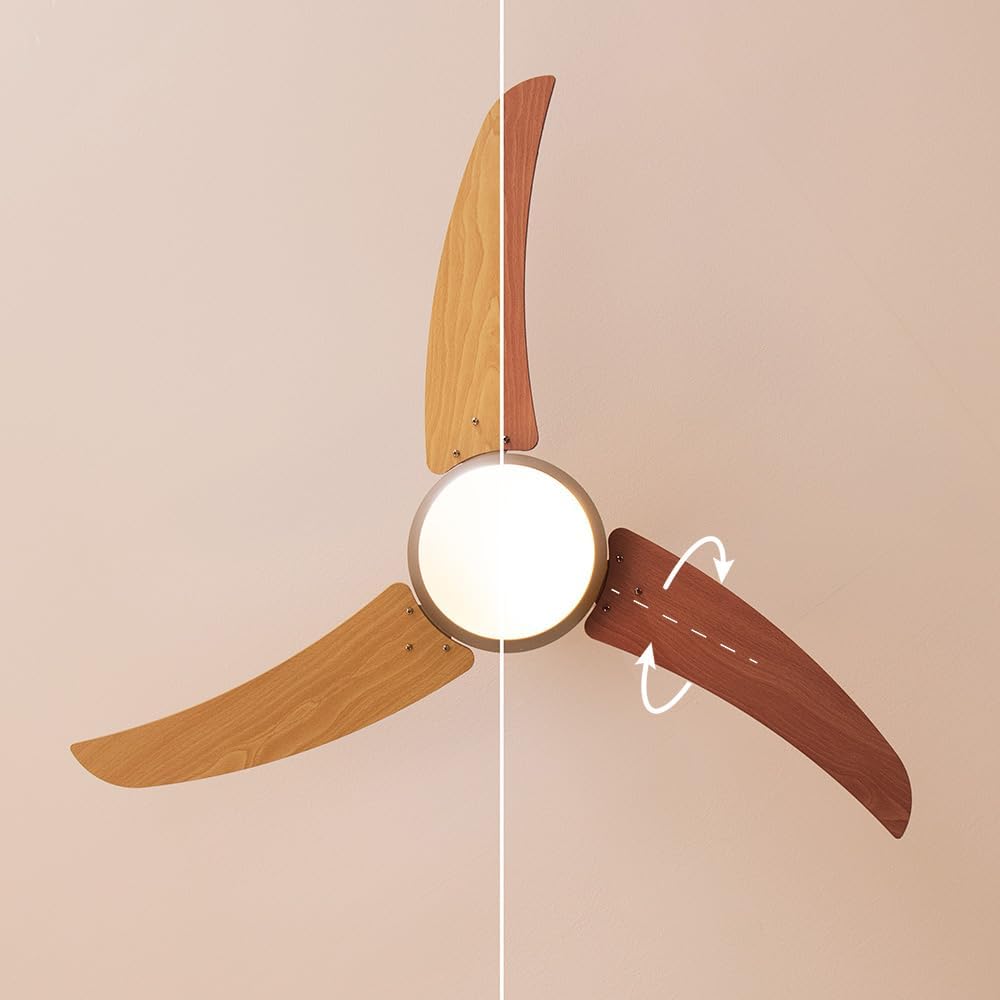
Aworan: A alaye view of the fan's central body, showcasing the integrated light fixture. The light globe is clearly visible, indicating the fan's dual functionality as both an air circulator and a light source.
4.7 Ṣíṣe ààbò ibori naa
Slide the canopy up against the ceiling and secure it to the mounting bracket with the provided screws. Ensure all wires are tucked neatly inside the canopy.

Image: The Cecotec EnergySilence Aero 480 ceiling fan elegantly installed in a modern bedroom. The fan is mounted centrally on the ceiling, providing both air circulation and ambient lighting to the room.
5. Awọn ilana Iṣiṣẹ
Your Cecotec EnergySilence Aero 480 ceiling fan is operated using the included remote control.
5.1 Latọna Iṣakoso Awọn iṣẹ

Aworan: A alaye view of the remote control for the Cecotec EnergySilence Aero 480 ceiling fan. The buttons for power, speed, mode, timer, and oscillation are clearly visible, indicating intuitive control over the fan's functions.
- Bọtini TAN/PA: Titan afẹfẹ tabi pa.
- Bọtini iyara: Awọn iyipo nipasẹ awọn iyara àìpẹ: Kekere, Alabọde, Ga.
- Bọtini MODE: Toggles between different operational modes (e.g., normal, sleep).
- TIMER Buttons (1H, 3H, 6H): Ó ń ṣètò afẹ́fẹ́ láti pa láìfọwọ́sí lẹ́yìn wákàtí 1, 3, tàbí 6.
- Bọtini Imọlẹ: Turns the integrated light on or off.
- OSC/REVERSE Button: Activates oscillation (if applicable) or reverses blade direction.
5.2 Reversible Blade Function (Summer/Winter Mode)
The fan features reversible blades to optimize air circulation for different seasons. A switch on the fan motor housing (or a button on the remote, if available) controls this function.
- Ipò Ooru (Yíyípo lọ́nà aago): Creates a downward airflow, producing a cooling effect.
- Ipo Igba otutu (Yipo aago): Creates an upward airflow, circulating warm air trapped near the ceiling.
Always ensure the fan is completely stopped before changing the blade direction.

Image: A clear diagram demonstrating the two operational modes of the ceiling fan: summer mode (left) and winter mode (right). The arrows indicate the direction of airflow for cooling in summer and circulating warm air in winter, highlighting the reversible blade function.
6. Itọju
Itọju deede ṣe idaniloju igbesi aye gigun ati iṣẹ ti o dara julọ ti olufẹ rẹ.
- Ninu: Dẹ erupẹ afẹfẹ ati ile mọto nigbagbogbo pẹlu asọ, damp asọ. Ma ṣe lo abrasive ose tabi epo.
- Itọju abẹfẹlẹ: Check blades for any cracks or damage. Ensure all blade screws are tight.
- Awọn ayẹwo gbogbogbo: Lojoojumọ ṣayẹwo gbogbo awọn asopọ ati ohun elo fifi sori ẹrọ fun wiwọ.
- Iyipada Imọlẹ Imọlẹ: Ensure power is off before replacing the light bulb. Use the specified bulb type and wattage.
Nigbagbogbo ge asopọ agbara ṣaaju ṣiṣe eyikeyi ninu tabi itọju.
7. Laasigbotitusita
Ti o ba pade awọn ọran pẹlu olufẹ rẹ, tọka si awọn iṣoro ati awọn ojutu ti o wọpọ wọnyi:
| Isoro | Owun to le Fa | Ojutu |
|---|---|---|
| Fan ko bẹrẹ | No power; Loose wiring; Remote control battery dead. | Check circuit breaker; Verify wiring connections; Replace remote battery. |
| Fan wobbles | Loose blades/screws; Unbalanced blades; Loose mounting bracket. | Tighten all screws; Use balancing kit (not included); Secure mounting bracket. |
| Imọlẹ ko ṣiṣẹ | Bulb faulty; Loose wiring; Light switch off. | Replace bulb; Check light kit wiring; Ensure light is turned on via remote. |
| Iṣẹ ṣiṣe ariwo | Loose parts; Motor issue; Blades hitting obstruction. | Check all connections; Contact customer service if motor noise persists; Ensure clear path for blades. |
Tí ìṣòro náà bá ń bá a lọ lẹ́yìn tí a bá ti gbìyànjú àwọn ìdáhùn wọ̀nyí, jọ̀wọ́ kan sí ìrànlọ́wọ́ oníbàárà Cecotec.
8. Awọn pato
- Brand: Cecotec
- Nọmba awoṣe: 05944
- Àwọ̀: Wood | Metallic
- Awọn iwọn Ọja (L x W x H): 21 x 26.1 x 53.5 cm
- Ìwúwo: 4.6 kilo
- Agbara: 65 Wattis
- Voltage: 220 Volt (AC)
- Ohun elo: Ṣiṣu
- Nọmba Awọn Iyara: 3
- Ẹya Pataki: Isakoṣo latọna jijin
- Apẹrẹ Fẹ́ẹ́fù: Aja Fan
- Orisun Agbara: Okun Itanna
- Awọn lilo ti a ṣe iṣeduro: Itutu, Air Circulation
- Iru fifi sori: Oke Oke
- ASIN: B0913KJB6N
9. Atilẹyin ọja ati Support
Cecotec products come with a standard manufacturer's warranty. For detailed warranty information, please refer to the warranty card included with your product or visit the official Cecotec webojula.
For technical support, troubleshooting assistance, or to inquire about spare parts, please contact Cecotec customer service through their official channels. Spare parts availability is listed as 10 years.
Ko si awọn fidio ọja osise ti o wa fun awoṣe yii ni akoko yii.