1. Ifihan
The SonicWall NSa3700 Gen7 Firewall is an enterprise-class security appliance designed for mid-sized to large organizations requiring high-performance network security. This manual provides essential information for the proper installation, configuration, operation, and maintenance of your NSa3700 firewall.
Key features include multi-gigabit throughput, advanced threat defense, and comprehensive protection against zero-day threats, ransomware, and encrypted attacks.
2. Alaye Aabo
Jọ̀wọ́ ka gbogbo ìlànà ààbò kí o sì lóye rẹ̀ kí o tó fi ẹ̀rọ náà sí i tàbí kí o ṣiṣẹ́ rẹ̀. Àìṣe bẹ́ẹ̀ lè fa ìpalára tàbí ìbàjẹ́ sí ẹ̀rọ náà.
- Aabo Itanna: Rii daju pe ẹrọ naa ti sopọ si iṣan agbara ti ilẹ. Ma ṣe apọju awọn ila agbara tabi awọn okun itẹsiwaju.
- Afẹfẹ: Maintain adequate airflow around the device to prevent overheating. Do not block ventilation openings.
- Ibi: Install the device in a stable, dry environment, away from direct sunlight, heat sources, and moisture.
- Ṣiṣẹ: Tọkasi gbogbo iṣẹ si awọn oṣiṣẹ iṣẹ ti o peye. Ma ṣe gbiyanju lati ṣii tabi tun ẹrọ naa funrararẹ.
3. Eto
This section outlines the basic steps for setting up your SonicWall NSa3700 firewall.
3.1 Unpacking ati ayewo
Carefully unpack the firewall and its accessories. Inspect all components for any signs of damage. If any items are missing or damaged, contact your vendor immediately.
3.2 Fifi sori ti ara
The NSa3700 is designed for rack-mounting. Secure the device in a standard 19-inch equipment rack using the provided rack-mount kit. Ensure proper ventilation and cable management.
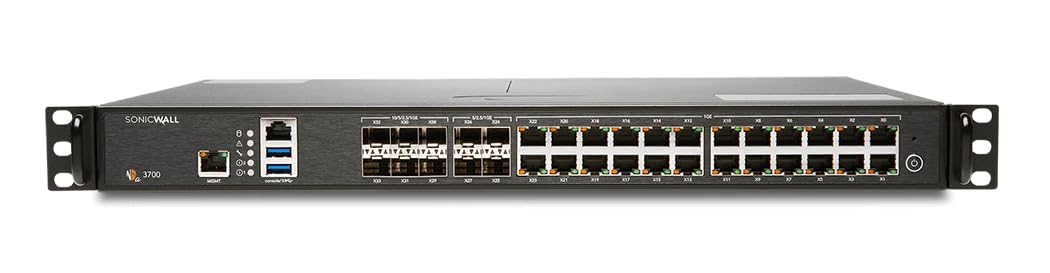
Aworan: Iwaju view of the SonicWall NSa3700 Gen7 Firewall, showing various network ports, USB ports, and status indicators.
3.3 Awọn isopọ akọkọ
- Asopọ agbara: Connect the power cable to the firewall and a grounded power outlet.
- Àwòrán Ìṣàkóso: Connect a computer to the management port (often labeled 'X0' or 'MGMT') using an Ethernet cable for initial configuration.
- Awọn isopọ Nẹtiwọọki: Connect your WAN (Internet) and LAN (internal network) cables to the appropriate Ethernet or SFP+ interfaces. The NSa3700 features a high port density with a mix of 1 GbE and 10 GbE SFP+ interfaces.
3.4 Iṣeto ni ibẹrẹ
Access the firewall's web management interface via a web browser on the connected computer. Follow the on-screen wizard for initial setup, including setting up network zones, basic security policies, and administrative credentials. Refer to the SonicWall documentation portal for detailed configuration guides.
4. Awọn ilana Iṣiṣẹ
The SonicWall NSa3700 provides robust security features to protect your network. This section covers general operational aspects.
4.1 Threat Prevention
The firewall actively defends against various cyber threats using:
- Gateway Anti-Virus: Scans incoming and outgoing traffic for malware.
- Intrusion Prevention System (IPS): Detects and blocks network intrusions and exploits.
- Capture ATP with RTDMI: Utilizes cloud-based sandboxing and Real-Time Deep Memory Inspection for zero-day threat detection.
- DPI-SSL: Inspects encrypted SSL/TLS traffic for hidden threats.
4.2 Application Control and Content Filtering
Manage and control network application usage and filter web content to enforce organizational policies and enhance productivity.
4.3 Secure Connectivity (VPN)
The NSa3700 supports thousands of VPN tunnels and large pools of SSL VPN users, enabling secure remote access and site-to-site connectivity for distributed enterprises and hybrid workforces.
4.4 Isakoso Aarin
For large deployments, NSM (Network Security Manager) integration ensures centralized management, visibility, and compliance reporting across multiple SonicWall devices.
5. Itọju
Regular maintenance ensures optimal performance and security of your SonicWall NSa3700 firewall.
- Awọn imudojuiwọn famuwia: Regularly check for and apply the latest firmware updates to ensure your device has the most current security patches and features.
- Awọn Afẹyinti Iṣeto: Periodically back up your firewall configuration settings.
- Àbójútó Àkọsílẹ̀: Monitor system logs and security reports for unusual activity or potential threats.
- Ayewo ti ara: Ensure the device's physical environment remains clean, well-ventilated, and free from obstructions.
6. Laasigbotitusita
Abala yii n pese awọn igbesẹ laasigbotitusita ipilẹ fun awọn ọran ti o wọpọ.
- Ko si Agbara: Verify the power cable is securely connected and the power outlet is functional. Check the power LED on the device.
- Awọn ọran Asopọmọra Nẹtiwọọki: Check all Ethernet and SFP+ cable connections. Verify network interface status LEDs. Confirm IP address configurations and routing settings.
- Ko le wọle si oju opo wẹẹbu iṣakoso: Ensure your computer's IP address is in the same subnet as the management interface. Try a different web aṣàwákiri tàbí ìpamọ́ ẹ̀rọ aṣàwárí.
- Ibajẹ Iṣe: Review system logs for high resource utilization or active attacks. Check network traffic statistics.
- Àwọn Ìkìlọ̀ Ààbò: Investigate security alerts in the logs. Adjust security policies if legitimate traffic is being blocked.
For advanced troubleshooting, consult the SonicWall support documentation or contact technical support.
7. Awọn pato
| Ẹya ara ẹrọ | Sipesifikesonu |
|---|---|
| Nọmba awoṣe | 02-SSC-8207 |
| Ogiriina Nipasẹ | 5.5 Gbps |
| Threat Prevention Throughput | 3.5 Gbps |
| Awọn isopọ igbakanna | Titi di miliọnu 2 |
| Port iwuwo | Mix of 1 GbE and 10 GbE SFP+ interfaces (14 ports total) |
| Ọja Mefa | 12.8 x 16.9 x 1.8 inches |
| Iwọn Nkan | 14.74 iwon |
| Olupese | SonicWall |
| Awọn ẹrọ ibaramu | Laptop, Personal Computer, Router, Server, Switch |
| USB Iru | Àjọlò |
8. Atilẹyin ọja ati Support
The SonicWall NSa3700 typically comes with comprehensive support services, including 24x7 support and firmware updates, often bundled as part of an Essential Protection Service Suite (EPSS).
Awọn SonicWall Secure Upgrade Plus program allows eligible organizations to replace qualifying firewalls with a current Gen7 model and a service subscription. Proof of ownership of a valid device is required for participation.
For detailed warranty information, service agreements, and technical support, please refer to the official SonicWall website or contact your authorized SonicWall partner.
Awọn orisun Ayelujara: SonicWall Support Portal


