1. Ifihan
Thank you for choosing the Yeticool TX50 Dual Zone Compressor Electric Cooler. This manual provides essential information for the safe and efficient operation, maintenance, and troubleshooting of your device. Please read it thoroughly before use and retain it for future reference.
2. Awọn ilana aabo
- Rii daju pe ipese agbara ibaamu voltage specified on the cooler's rating label.
- Do not operate the cooler if the power cord is damaged. Contact qualified service personnel for repairs.
- Keep the cooler away from direct heat sources and ensure adequate ventilation around the unit.
- Avoid placing the cooler in direct sunlight for extended periods.
- Do not immerse the cooler in water or expose it to heavy rain.
- Nigbagbogbo ge asopọ ipese agbara ṣaaju ṣiṣe mimọ tabi ṣiṣe itọju.
- Ohun elo yii kii ṣe ipinnu fun lilo nipasẹ awọn eniyan (pẹlu awọn ọmọde) pẹlu idinku ti ara, imọlara tabi awọn agbara ọpọlọ, tabi aini iriri ati imọ, ayafi ti wọn ba ti fun wọn ni abojuto tabi itọnisọna nipa lilo ohun elo nipasẹ eniyan ti o ni iduro fun aabo wọn.
- Awọn ọmọde yẹ ki o wa ni abojuto lati rii daju pe wọn ko ṣere pẹlu ohun elo naa.
- Ma ṣe fi awọn nkan ibẹjadi pamọ gẹgẹbi awọn agolo aerosol pẹlu itọka ina ninu ohun elo yii.
3. Package Awọn akoonu
Jẹrisi pe gbogbo awọn ohun kan wa ninu package:
- Yeticool TX50 Portable Cooling Box
- Agbọ̀n inú
- 12/24V DC Connection Cable (3.5 m long)
- AC/DC Adapter with 100-240V Connection Cable (EU/UK plug)
- Itọsọna olumulo
4. Ọja Ipariview
The Yeticool TX50 is a versatile dual-zone compressor electric cooler designed for portable use in various environments, including cars, trucks, boats, and camping. It features robust insulation and a powerful compressor for rapid cooling and freezing.
Awọn ẹya pataki:
- Iṣẹ́ Agbègbè Méjì: Two independent cooling compartments with separate temperature control. The adjustable partition can be removed to create a single large compartment.
- Ibi iwọn otutu ti o tobi: Capable of maintaining temperatures from -20°C to +20°C.
- Rọrun Agbara Input: Operates on 12V/24V DC (vehicle power) and 100-240V AC (household power).
- Ohun elo Bluetooth Iṣakoso: Remote control via a dedicated mobile application (Android/iOS) for convenient temperature adjustment and monitoring.
- Idaabobo Batiri: Multi-level system to prevent vehicle battery discharge.
- Gbigbe: Equipped with ergonomic carrying handles, telescopic handle, and durable wheels for easy transport.
- Imọlẹ inu: LED lighting inside the cooling chamber for visibility.
- Ibudo Gbigba agbara USB: Integrated USB socket for charging external devices like smartphones or tablets.
- Ṣii igo: Conveniently located for ease of use.

Figure 1: Yeticool TX50 Electric Cooler - Main View

Figure 2: Temperature Range and Insulation Features

olusin 3: inu ilohunsoke View with Dual Compartments and Lighting
5. Eto
5.1 Ṣiṣii silẹ
- Fara yọ kula kuro ninu apoti rẹ.
- Inspect the unit for any signs of damage. If damaged, do not use and contact your retailer.
- Remove all internal packaging materials and accessories.
5.2 Ibi
- Gbe itutu naa si ori ilẹ ti o rọgbọ, ti o si duro ṣinṣin.
- Ensure there is at least 10 cm of clear space around all sides of the cooler for proper ventilation.
- Yẹra fún gbígbé itutu tutu sí ibi tí ó wà nítòsí àwọn orísun ooru tàbí sí ibi tí oòrùn bá tàn tààrà.
5.3 Asopọ agbara

Figure 4: Power Connection Cables
- For 12V/24V DC (Vehicle Use): Connect the 12/24V DC cable to the cooler's DC input port and then to your vehicle's cigarette lighter socket or 12V/24V power outlet.
- For 100-240V AC (Household Use): Connect the AC/DC adapter to the cooler's AC input port, then plug the AC cable into a standard wall outlet.
- Ensure connections are secure before powering on the unit.
6. Awọn ilana Iṣiṣẹ
6.1 Iṣakoso igbimo
The control panel is located on the top of the cooler. It typically includes a power button, temperature adjustment buttons, and a display for current temperatures.
6.2 Agbara Tan / Pa
Press and hold the power button for a few seconds to turn the cooler on or off. The display will illuminate when the unit is active.
6.3 Temperature Adjustment (Dual Zone)
- The TX50 features two cooling zones. Each zone can be set to a different temperature.
- Use the dedicated temperature buttons (usually '+' and '-') for each zone to set your desired temperature.
- The display will show the current temperature of each zone.
- To combine the zones into a single large compartment, remove the internal partition. The cooler will then operate as a single zone unit, typically controlled by one set of temperature settings.
6.4 Iṣakoso Ohun elo Bluetooth

Figure 5: Bluetooth App Interface
- Download the Yeticool mobile application from your device's app store (Android/iOS).
- Rii daju pe Bluetooth ti ṣiṣẹ lori foonuiyara rẹ.
- Open the Yeticool app and follow the on-screen instructions to pair with your TX50 cooler.
- Once connected, you can monitor temperatures, adjust settings, and control power remotely via the app.
6.5 Ipo Idaabobo Batiri
The cooler is equipped with a multi-level battery protection system to prevent excessive discharge of your vehicle's battery. You can typically select between different protection levels (e.g., High, Medium, Low) via the control panel or the mobile app. Refer to the specific instructions on the control panel or app for details on adjusting this setting.
7. Itọju
7.1 Ninu
- Nigbagbogbo ge asopọ agbara ṣaaju ṣiṣe mimọ.
- Mu ese inu ati ita pẹlu damp asọ ati ìwọnba detergent.
- Ma ṣe lo awọn olutọpa abrasive tabi awọn kemikali simi.
- Ensure the cooler is completely dry before reconnecting power.
7.2 Fentilesonu
Regularly check that the ventilation openings are clear of dust and debris to ensure efficient operation and prevent overheating.
7.3 Ibi ipamọ
When not in use for extended periods, clean the cooler thoroughly, leave the lid slightly ajar to prevent odors, and store it in a dry, well-ventilated area.
8. Laasigbotitusita
If you encounter issues with your Yeticool TX50, consult the following table:
| Isoro | Owun to le Fa | Ojutu |
|---|---|---|
| Cooler does not power on. | No power supply; damaged cable; vehicle battery low. | Check power connections; replace damaged cable; charge vehicle battery or adjust battery protection setting. |
| Iṣẹ́ ìtútù kò dára. | Poor ventilation; excessive ambient temperature; lid not sealed properly; too much content. | Ensure adequate ventilation; avoid direct sunlight; check lid seal; do not overfill. |
| Ariwo dani nigbati isẹ. | Cooler not on a flat surface; fan obstruction. | Place on a flat surface; clear any obstructions from the fan. |
| Bluetooth app not connecting. | Bluetooth off; app not updated; cooler not powered on. | Ensure Bluetooth is on; update app; power on cooler. |
Ti iṣoro naa ba wa lẹhin igbiyanju awọn iṣeduro wọnyi, jọwọ kan si atilẹyin alabara.
9. Awọn pato
| Ẹya ara ẹrọ | Sipesifikesonu |
|---|---|
| Awoṣe | TX50 |
| Brand | YetiCool |
| Agbara | 50 liters |
| Awọn iwọn (L x W x H) | 72.3 cm x 45.8 cm x 40.3 cm |
| Iwọn | 15.5 kilo |
| Iwọn otutu | -20°C si +20°C |
| Agbara Input | DC 12V / 24V, AC 100-240V |
| Ohun elo idabobo | Polyurethane |
| Ohun elo akọkọ | Ṣiṣu |
| Ariwo Ipele | 38 dB |
| Agbara Agbara Kilasi | F |
| Kilasi afefe | SN/N/ST/T |
| Max ibaramu otutu | 43°C |

Figure 6: Cooler Dimensions (Isometric View)
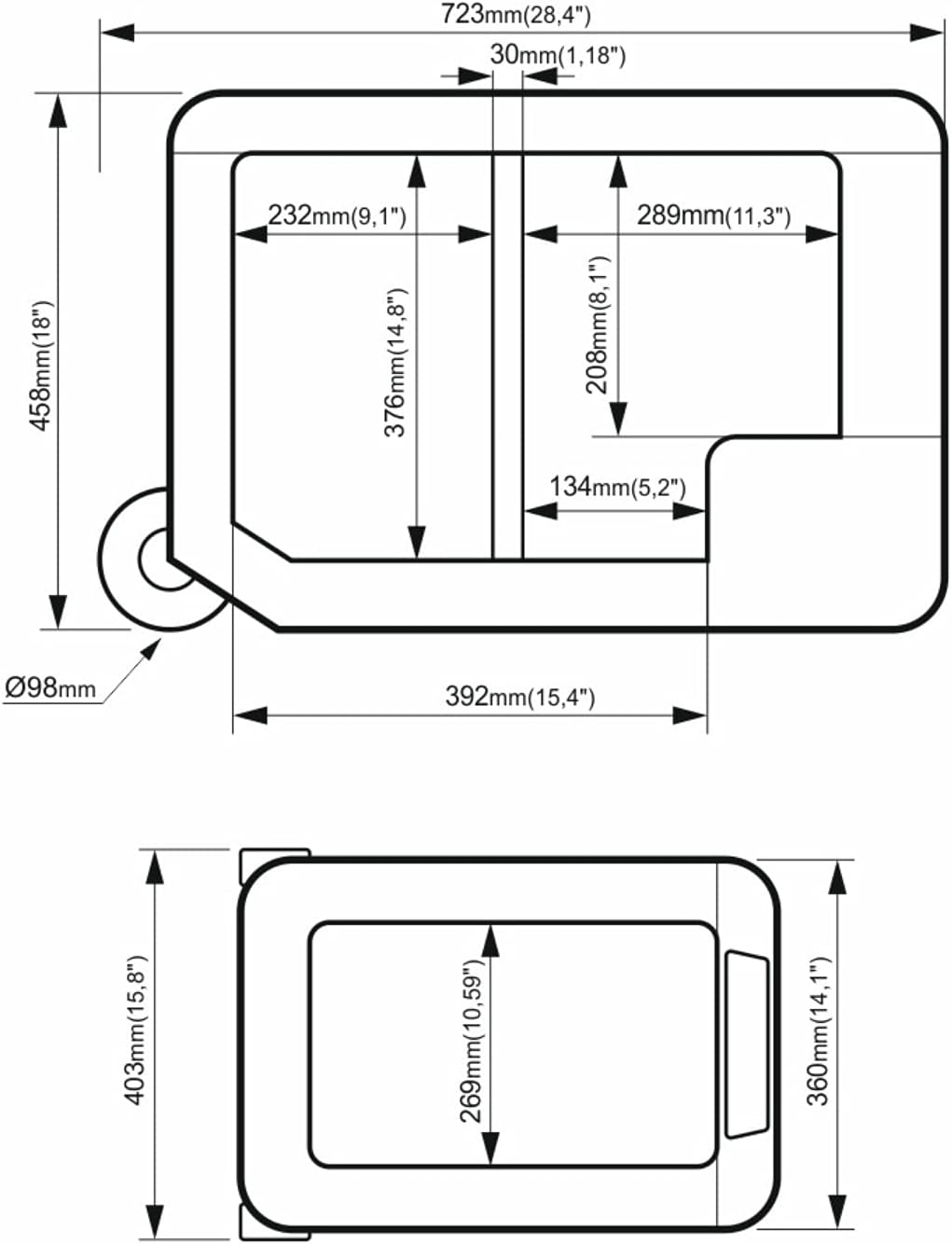
Figure 7: Cooler Dimensions (Top and Front Views)
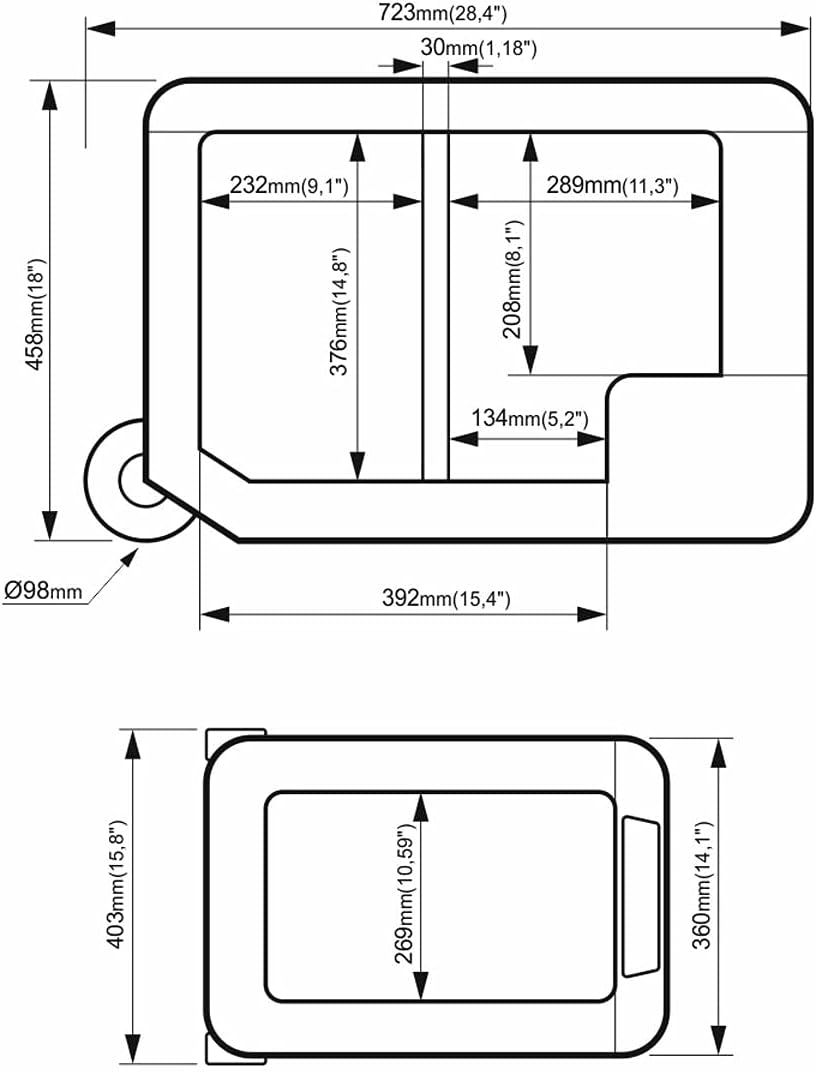
Figure 8: EU Energy Label for Yeticool TX50
For more details, refer to the official EU EPREL database: https://eprel.ec.europa.eu/qr/422251

Àwòrán 9: Ìwé Dátà Ọjà
10. Atilẹyin ọja ati Support
10.1 atilẹyin ọja Alaye
The Yeticool TX50 Electric Cooler comes with a Atilẹyin ọja olupilẹṣẹ oṣu mejila from the date of purchase. This warranty covers defects in materials and workmanship under normal use. It does not cover damage caused by misuse, accidents, unauthorized modifications, or improper maintenance.
Jọwọ ṣe idaduro ẹri rira rẹ fun awọn iṣeduro atilẹyin ọja.
10.2 Onibara Support
For technical assistance, warranty claims, or general inquiries, please contact the manufacturer:
- Olupese: Arkas Sp. z o.o.
- Adirẹsi: KuŹnicza 4, 59-400 Jawor, PL
- Webojula: www.arkas.pl


