Ọja Pariview
The YetiCool TX36 is a high-quality dual-zone portable compressor cooler designed for travelers and outdoor enthusiasts. It offers both refrigeration and freezing capabilities, with a wide temperature range from -20°C to +20°C. Equipped with a powerful compressor and the option for external battery connection, it can maintain temperatures for extended periods. The cooler features Bluetooth 5.0 connectivity for remote control via a mobile app (Android/iOS), an intuitive LCD control panel, and multiple power input options (12/24V DC and 100-240V AC). Its robust design includes a telescopic handle, durable wheels, and solid side handles for easy transport. Additional features like an internal light, integrated USB charging port, and a bottle opener enhance its utility for various applications, from camping and picnics to medical transport.

Image: The YetiCool TX36 portable compressor cooler, showcasing its grey and black design with wheels and handle.
Awọn Itọsọna Aabo
- Ka gbogbo awọn ilana ni pẹkipẹki ṣaaju lilo.
- Rii daju pe fentilesonu to dara ni ayika kula lati ṣe idiwọ igbona.
- Ma ṣe dina awọn ṣiṣi atẹgun.
- Keep the cooler away from direct heat sources and moisture.
- Lo awọn okùn agbara ati awọn adapter ti a pese nikan.
- Avoid placing liquids directly on the control panel.
- Do not immerse the cooler in water.
- Unplug the cooler before cleaning or maintenance.
- Jeki kuro ni arọwọto awọn ọmọde.
Package Awọn akoonu
Ni ṣiṣi package, jọwọ rii daju pe gbogbo awọn paati wa ati pe ko bajẹ:
- YetiCool TX36 Portable Compressor Cooler (Grey/Black)
- Fi sii agbọn
- 12/24V DC Connection Cable (3.5 meters long)
- AC/DC Adapter with 100-240V Connection Cable (EU/UK plug)
- Itọsọna olumulo

Image: The included 12/24V DC cable for car/truck use and the 100-240V AC adapter with various plug types for household use.
Ṣeto
1. Asopọ agbara
- Agbara DC (12V/24V): Connect the 12/24V DC cable to the cooler's DC input port and then to your vehicle's cigarette lighter socket or a compatible 12V/24V power source.
- Agbara AC (100-240V): Connect the AC/DC adapter to the cooler's AC input port. Then, plug the AC power cable into the adapter and a standard wall outlet (100-240V).
- Ensure the power source matches the cooler's voltage ibeere.
2. Ibi Ibẹrẹ
Place the cooler on a flat, stable surface. Ensure there is adequate space around the ventilation grilles for proper airflow (at least 10 cm on all sides).
3. Dual Zone Configuration
The TX36 features two cooling chambers with independent temperature control. An adjustable divider separates these zones. If you wish to use the cooler as a single large zone, you can remove this divider to increase the overall useful capacity.
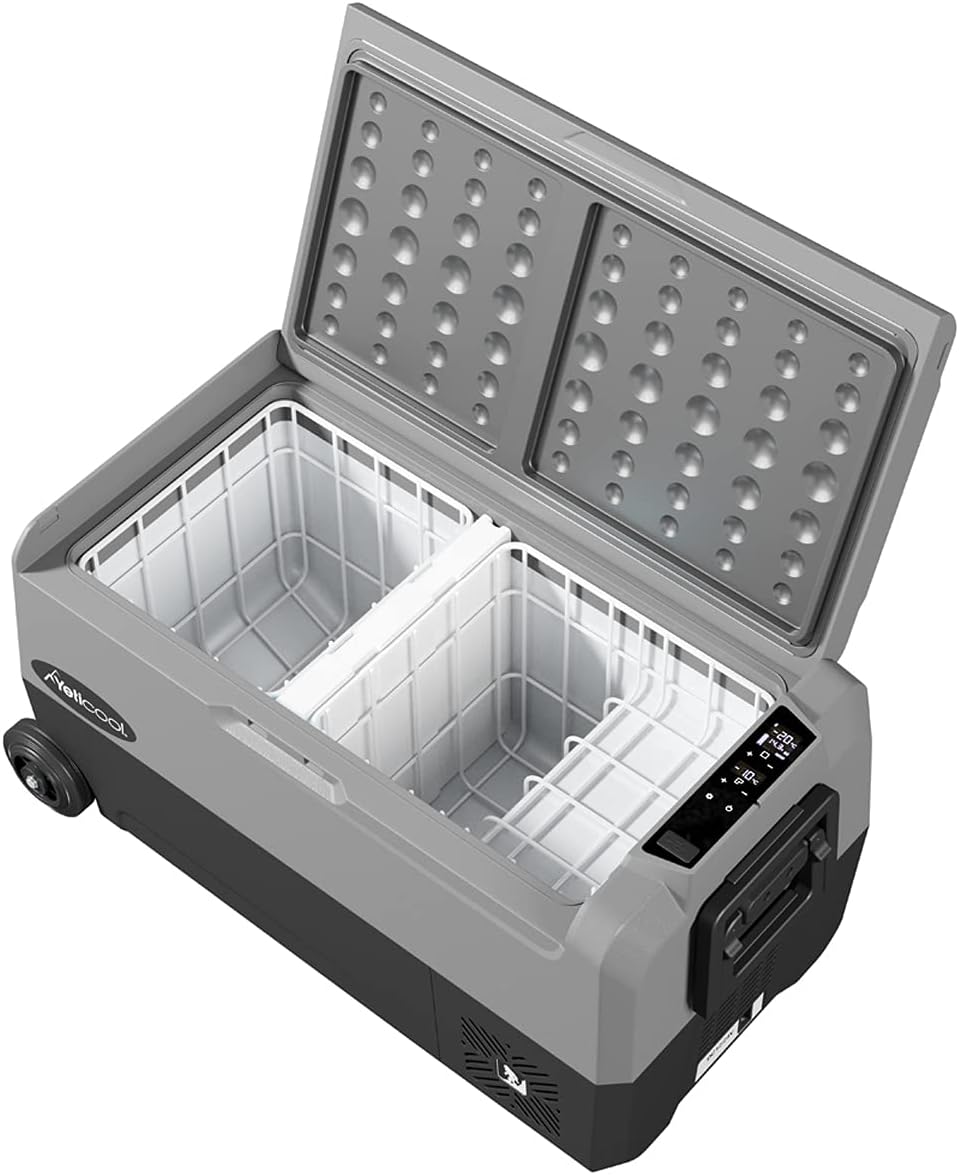
Image: The interior of the YetiCool TX36, showing the two separate cooling compartments and the removable divider.
4. Asopọ Ohun elo Bluetooth
- Download the official YetiCool app from your mobile device's app store (available for Android and iOS).
- Mu Bluetooth ṣiṣẹ lori ẹrọ alagbeka rẹ.
- Open the YetiCool app and follow the on-screen instructions to pair with your TX36 cooler.
- Once paired, you can monitor and control the cooler's settings remotely.
Awọn ilana Iṣiṣẹ
1. Iṣakoso igbimo Loriview
The cooler features an intuitive LCD control panel for easy operation. The display shows the current temperature of each zone and operational status. Buttons allow for power on/off, temperature adjustment, and mode selection.
2. Agbara lori / Paa
Tẹ mọlẹ bọtini agbara lori ibi iṣakoso lati tan-alatuta tabi pa.
3. Atunṣe iwọn otutu
- Use the '+' and '-' buttons on the control panel to set the desired temperature for each zone.
- The temperature range is from -20°C to +20°C.
- For dual-zone models, ensure you select the correct zone before adjusting the temperature.
- Alternatively, use the YetiCool mobile app for precise temperature control.
4. Ètò Ààbò Bátírì
The cooler is equipped with multi-stage battery discharge protection to prevent your vehicle's battery from draining. You can typically select between High, Medium, and Low protection levels via the control panel or app. Refer to the detailed in-app instructions for specific settings.
5. USB Ngba agbara Port
An integrated USB socket is available on the cooler to charge external devices such as smartphones or tablets. Simply connect your device's USB cable to the port.
Itoju
1. Ninu
- Máa yọ páìpù ìtútù náà kúrò kí o tó sọ ọ́ di mímọ́.
- Mu ese inu ati ita pẹlu damp asọ ati ìwọnba detergent.
- Ma ṣe lo abrasive ose tabi epo.
- Ensure the cooler is completely dry before reconnecting power.
2. Iyọkuro
If ice builds up inside the freezer compartment, turn off the cooler and allow the ice to melt naturally. Wipe away excess water with a cloth. Do not use sharp objects to remove ice.
3. Ibi ipamọ
When storing the cooler for extended periods, ensure it is clean, dry, and unplugged. Store in a cool, dry place with the lid slightly ajar to prevent odors and mold growth.
Laasigbotitusita
| Isoro | Owun to le Fa | Ojutu |
|---|---|---|
| Itutu ko titan | No power, loose connection, blown fuse, low battery voltage. | Check power cable connection. Ensure power source is active. Check vehicle's fuse. Adjust battery protection setting to 'Low' or charge vehicle battery. |
| Iwọn otutu ko de ipele ti o fẹ | Poor ventilation, ambient temperature too high, lid not sealed properly, too much content. | Ensure adequate airflow around the cooler. Avoid direct sunlight. Check lid seal. Do not overfill. |
| Error code on LCD display | Internal fault, sensor error, voltage oro. | Note the error code and refer to the full user manual or contact customer support for specific error code meanings. Try restarting the unit. |
| Awọn oran asopọ Bluetooth | Bluetooth off, app not updated, interference. | Ensure Bluetooth is enabled on your device. Restart the app and cooler. Move closer to the cooler. |
Awọn pato
| Ẹya ara ẹrọ | Ẹ̀kúnrẹ́rẹ́ |
|---|---|
| Awoṣe | TX36 Grey |
| Brand | YetiCool |
| Agbara | 36 liters |
| Iwọn otutu | -20°C si +20°C (-4°F si +68°F) |
| Agbara Input | DC 12V / 24V, AC 100-240V |
| Awọn iwọn (L x W x H) | 72.3 x 40.3 x 36.8 cm (28.4 x 15.8 x 14.4 inches) |
| Iwọn | 18.31 kg (40.37 lbs) |
| Ohun elo | Ṣiṣu |
| Asopọmọra | Bluetooth 5.0 (App Control for Android/iOS) |
| Pataki Awọn ẹya ara ẹrọ | Dual Zone, LCD Display, USB Charging Port, Telescopic Handle, Durable Wheels, Internal Light, Bottle Opener, Multi-stage Batiri Idaabobo |

Image: Technical drawing illustrating the external dimensions of the YetiCool TX36 cooler.

Image: Diagram showing the internal dimensions and layout of the YetiCool TX36's dual compartments.
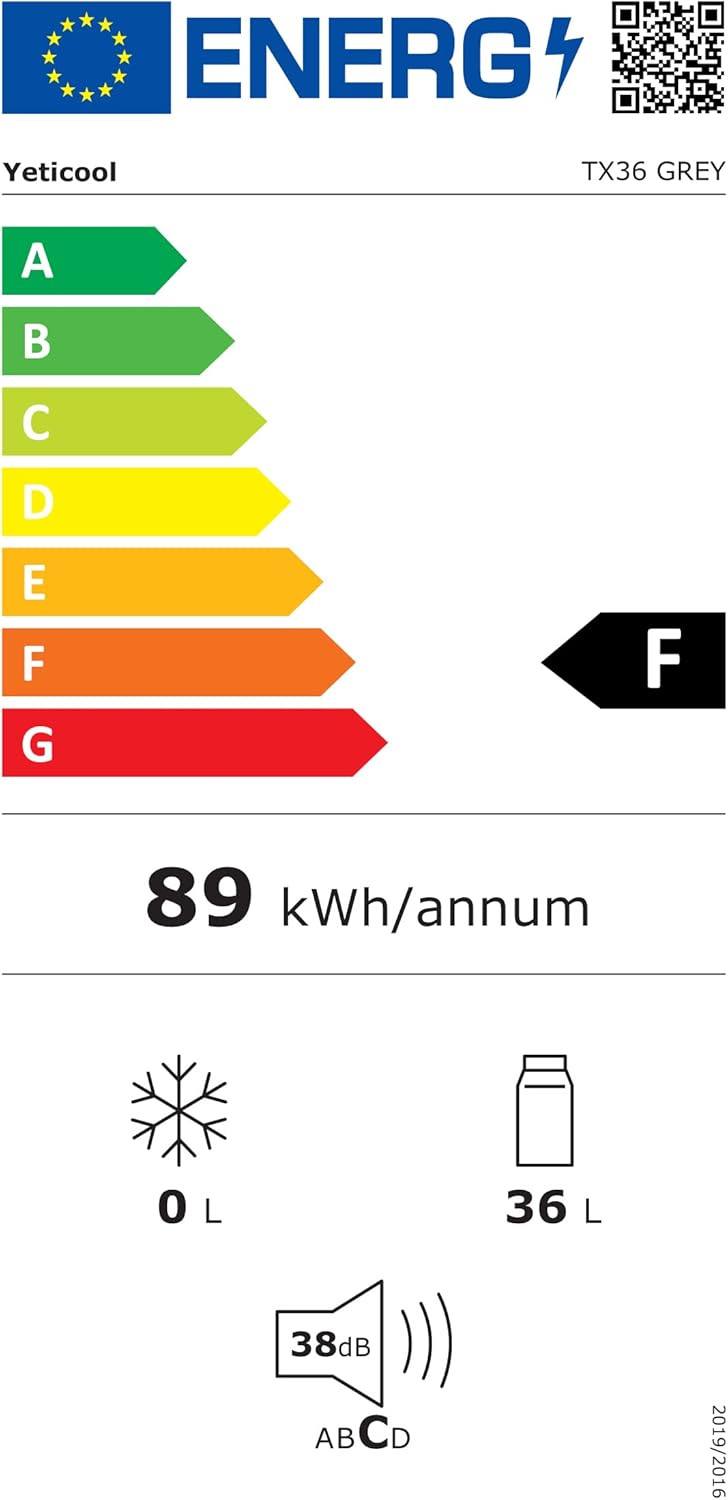
Image: The energy efficiency label for the YetiCool TX36, indicating its energy consumption and capacity. For more details, visit the official Database database EPREL.
Atilẹyin ọja ati Support
For warranty information, technical support, or service inquiries, please contact YetiCool customer service. Refer to the contact details provided in the full user manual included with your product or visit the official YetiCool webojula.
Olupese: ARKAS SP. Z O.O.
