1. Ifihan
This manual provides comprehensive instructions for the installation, programming, and operation of the Finder 12.A4.8.230.0010 NFC Weekly Time Clock. This electronic astronomical time switch features a weekly program, an analog output, and can be programmed via a joystick or an NFC-enabled smartphone using the Finder Toolbox app.
2. Alaye Aabo
Please read these safety instructions carefully before installation and operation. Failure to follow these instructions may result in electric shock, fire, or damage to the device.
- Fifi sori gbọdọ jẹ ṣiṣe nipasẹ onisẹ ina mọnamọna ni ibamu pẹlu awọn ilana wiwọ agbegbe.
- Rí i dájú pé a ti ge ina agbara kuro ṣaaju fifi sori ẹrọ tabi iṣẹ itọju eyikeyi.
- Ma ṣe fi ẹrọ naa han si ọrinrin, awọn iwọn otutu to gaju, tabi awọn agbegbe ibajẹ.
- Ẹrọ naa jẹ apẹrẹ fun lilo inu ile nikan.
3. Ọja Ipariview
The Finder 12.A4.8.230.0010 is an electronic time switch designed for DIN rail mounting. It offers precise time control with a weekly program and astronomical function.

olusin 1: Iwaju view of the Finder 12.A4.8.230.0010 Time Clock, showing the LCD display, joystick, and NFC symbol.
Awọn ẹya pataki:
- Weekly program for flexible scheduling.
- 1 analog output: 0-10 V or PWM.
- 1 changeover contact for 16 A / 250 V AC (AC1).
- Ipese voltage: 110-230 V AC/DC.
- LCD display for clear information.
- Programming via joystick or NFC-enabled smartphone with Finder Toolbox app (Android and iOS).
- Astronomical time control: automatic switching at sunrise and sunset based on postcode or coordinates.
- Adjustable time offset for sunrise/sunset.
4. Eto ati fifi sori
This device is designed for DIN rail mounting. Follow these steps for proper installation:
- Ge asopọ agbara: Rí i dájú pé agbára ìpèsè agbára àkọ́kọ́ sí agbègbè ìfisíṣẹ́ náà ti gé kúrò pátápátá kí o tó tẹ̀síwájú.
- Iṣagbesori: Mount the time switch securely onto a standard DIN rail.
- Asopọmọra: Connect the power supply (110-230 V AC/DC) to terminals A1 and A2. Connect the load to the changeover contact terminals (NO, NC, COM) and the analog output (W, O, Y) as required. Refer to the wiring diagram below.
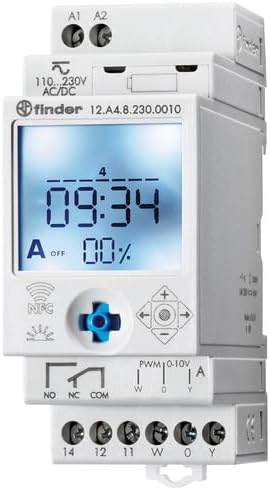
Nọmba 2: Alaye view of the wiring terminals for power input (A1, A2), relay output (NO, NC, COM), and analog output (W, O, Y).
Akiyesi: The device features safe separation between the power supply and contacts.
5. Awọn ilana Iṣiṣẹ
5.1 Ibẹrẹ Agbara-soke
Once wired, restore power. The LCD display will illuminate. You may need to set the current date and time if it's the first use or after a prolonged power outage.
5.2 Programming via Joystick
The integrated joystick allows for direct programming on the device:
- Lilọ kiri: Use the joystick to move through menu options (up, down, left, right).
- Selection/Confirmation: Press the joystick inwards to select an option or confirm a setting.
- Follow the on-screen prompts to set the current time, date, weekly program, and astronomical functions.
5.3 Programming via NFC (Finder Toolbox App)
For maximum flexibility, program the time switch using an NFC-enabled smartphone and the Finder Toolbox app:
- Ṣe igbasilẹ Ohun elo: Download the "Finder Toolbox" app from the Google Play Store (Android) or Apple App Store (iOS).
- Create/Load Program: Open the app and create a new program or load an existing one. The app allows for detailed configuration of weekly schedules, astronomical settings, and special functions.
- Gbigbe Data: To transfer the program, hold your smartphone close to the NFC symbol on the time switch. The app will guide you through the data transfer process.
- Read Program: You can also read an existing program from the time switch to your smartphone for editing or backup.
5.4 Astronomical Time Control
The device can automatically switch based on sunrise and sunset times:
- Eto ibi: Set your location by entering a postcode or geographical coordinates in the programming menu (via joystick or app).
- Aiṣedeede: You can set a selectable time offset for both sunrise and sunset times to adjust switching points.
- Astro ON/OFF: Configure specific ON/OFF times during the astronomical ON period if needed.
6. Itọju
The Finder 12.A4.8.230.0010 is designed for maintenance-free operation. However, periodic checks are recommended:
- Ninu: Clean the device with a dry, soft cloth. Do not use abrasive cleaners or solvents.
- Awọn isopọ: Periodically check terminal connections to ensure they are secure.
- Awọn imudojuiwọn famuwia: Ṣàyẹ̀wò Olùwá website or app for any available firmware updates for improved functionality or bug fixes.
7. Laasigbotitusita
| Isoro | Owun to le Fa | Ojutu |
|---|---|---|
| Ẹrọ ti ko ni agbara lori. | Ko si ipese agbara tabi awọn okun waya ti ko tọ. | Check power connections (A1, A2) and ensure power is supplied. Verify wiring against the diagram. |
| Program not executing. | Incorrect program settings or manual override active. | Review program settings via joystick or app. Check for any active manual override functions. Ensure current date/time is correct. |
| NFC transfer fails. | Smartphone not NFC-enabled, app not open, or poor contact. | Ensure your smartphone has NFC enabled. Open the Finder Toolbox app. Hold the phone directly over the NFC symbol on the device. |
| Astronomical function inaccurate. | Incorrect location (postcode/coordinates) or time zone setting. | Verify the entered postcode or coordinates. Check the time zone setting. |
If the problem persists, please contact Finder technical support.
8. Imọ ni pato
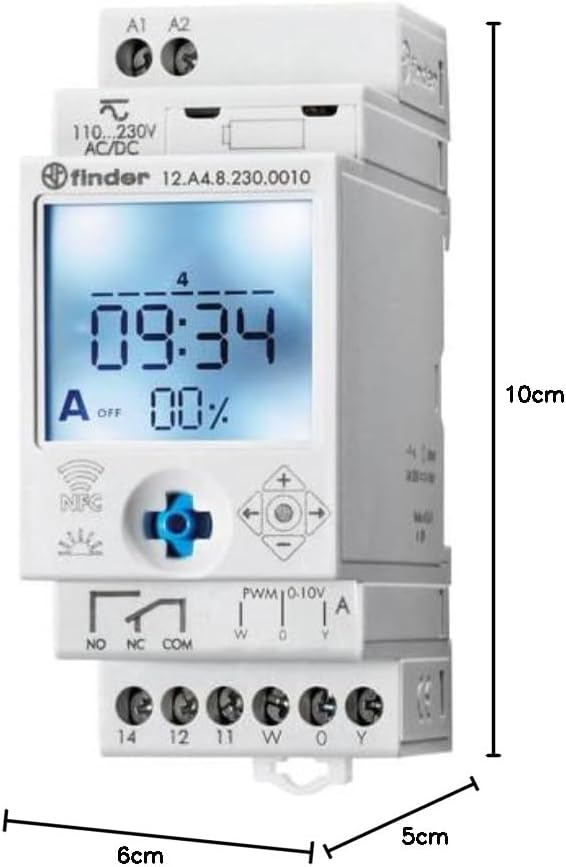
Figure 3: Dimensions of the Finder 12.A4.8.230.0010 Time Clock, showing approximate measurements of 10cm height, 6cm width, and 5cm depth.
| Ẹya ara ẹrọ | Ẹ̀kúnrẹ́rẹ́ |
|---|---|
| Brand | Oluwari |
| Nọmba awoṣe | 12.A4.8.230.0010 |
| Awọn iwọn (H x W x D) | 10 x 6 x 5 cm |
| Iwọn | 70 g |
| Ipese Voltage | 110-230 V AC / DC |
| Olubasọrọ o wu | 1 changeover contact, 16 A / 250 V AC (AC1) |
| Afọwọṣe Ijade | 0-10 V or PWM |
| Ohun elo olubasọrọ | AgSnO2 |
| O pọju. Inrush Lọwọlọwọ | 120 A fun 5 ms |
| Min. Switching Time | 1 iseju |
| Max. Switching Power (230 V AC1) | 4000 VA |
| Human Interface Input | Buttons (Joystick) |
| Awọn batiri ti a beere | Rara |
| Ni ibamu pẹlu | Power supplies/ballasts with 0-10 V or PWM inputs, or Slave dimmers Type 15.11 |
9. Atilẹyin ọja ati Support
Fun alaye atilẹyin ọja ati atilẹyin imọ-ẹrọ, jọwọ tọka si Oluwari osise webaaye tabi kan si olupin agbegbe rẹ. Tọju iwe-ẹri rira rẹ bi ẹri rira.
Olupese: Oluwari
Product on Amazon.es since: Oṣu Karun ọjọ 24, Ọdun 2021


