1. Ifihan
The Waveshare A7670E LTE Cat-1 HAT is an expansion board designed for Raspberry Pi series boards, providing LTE Cat-1 and 2G communication capabilities, along with LBS (Location-Based Service) positioning. This HAT integrates the A7670E module, supporting various communication protocols and features essential for IoT applications, remote monitoring, and data transmission.

Figure 1: Waveshare A7670E LTE Cat-1 HAT module. This image displays the compact design of the A7670E HAT, highlighting its various components including the SIM card slot, USB port, audio jack, and GPIO pins.
2. Awọn ẹya ara ẹrọ
- Standard Raspberry Pi 40PIN GPIO extension header, compatible with Raspberry Pi series boards.
- Supports communication protocols including TCP/IP, HTTP(s), MQTT(s), FTP(s), and SSL.
- Supports dial-up networking, telephone calls, and SMS functionality.
- LBS base station positioning for approximate location information via mobile network.
- TTS (Text To Speech) feature, converting Chinese/English texts into spoken words.
- Onboard USB interface for AT Commands testing and network communication.
- Integrated audio jack for sound recording, telephone calls, and listening to TTS output.
- Breakout common A7670X module control pins for easy connection with host boards like Arduino/STM32.
- SIM card slot supporting 1.8V/3V SIM cards.
- Two LED indicators for monitoring operating status.
- Lori ọkọ voltage translator, allowing operating voltage configuration to 3.3V or 5V via jumper.

Olusin 2: Pariview of A7670E HAT features. This graphic summarizes the key functionalities such as multi-band support, Cat-1/GSM/GPRS, LBS positioning, dial-up, cloud platform compatibility, and phone call/SMS support.
3. Akoonu Package
Daju pe gbogbo awọn nkan ti a ṣe akojọ rẹ si isalẹ wa ninu package rẹ:
- A7670E LTE Cat-1 HAT module
- LTE Eriali
- USB Iru A to Iru C USB
- Screws and standoffs for mounting

Figure 3: Contents of the A7670E HAT package. This image shows the A7670E module, an LTE antenna, a USB-C cable, and mounting hardware (screws and standoffs).
4. Eto
4.1 Physical Connection to Raspberry Pi
- Align the 40-pin GPIO header of the A7670E HAT with the GPIO pins on your Raspberry Pi board.
- Gently press the HAT onto the Raspberry Pi's GPIO header until it is securely seated.
- Use the provided standoffs and screws to secure the HAT to the Raspberry Pi for stability.

Figure 4: A7670E HAT connected to a Raspberry Pi. This image illustrates the HAT mounted directly onto the Raspberry Pi's 40-pin GPIO header, showing a compact and integrated setup.
4.2 Fifi sori kaadi SIM
- Locate the SIM card slot on the A7670E HAT.
- Insert a 1.8V or 3V SIM card into the slot, ensuring correct orientation as indicated on the module.
- Gently push the SIM card until it clicks into place. To remove, push again to release.
4.3 Eriali Asopọ
- Connect the provided LTE antenna to the IPEX1 connector on the A7670E HAT.
- Ensure the connection is secure for optimal signal reception.
Ọdun 4.4 Voltage Iṣeto ni
Awọn ọna voltage can be configured to 3.3V or 5V using the onboard jumper. Refer to the module's silkscreen for jumper positions. Ensure the correct voltage is selected to match your Raspberry Pi model or other host board requirements.
5. Awọn ilana Iṣiṣẹ
5.1 Dial-Up on Windows/Linux
The A7670E HAT supports dial-up networking. For detailed instructions on setting up dial-up on Windows or Linux operating systems, refer to the comprehensive development resources provided by Waveshare. This typically involves installing drivers and configuring network settings to establish a connection.
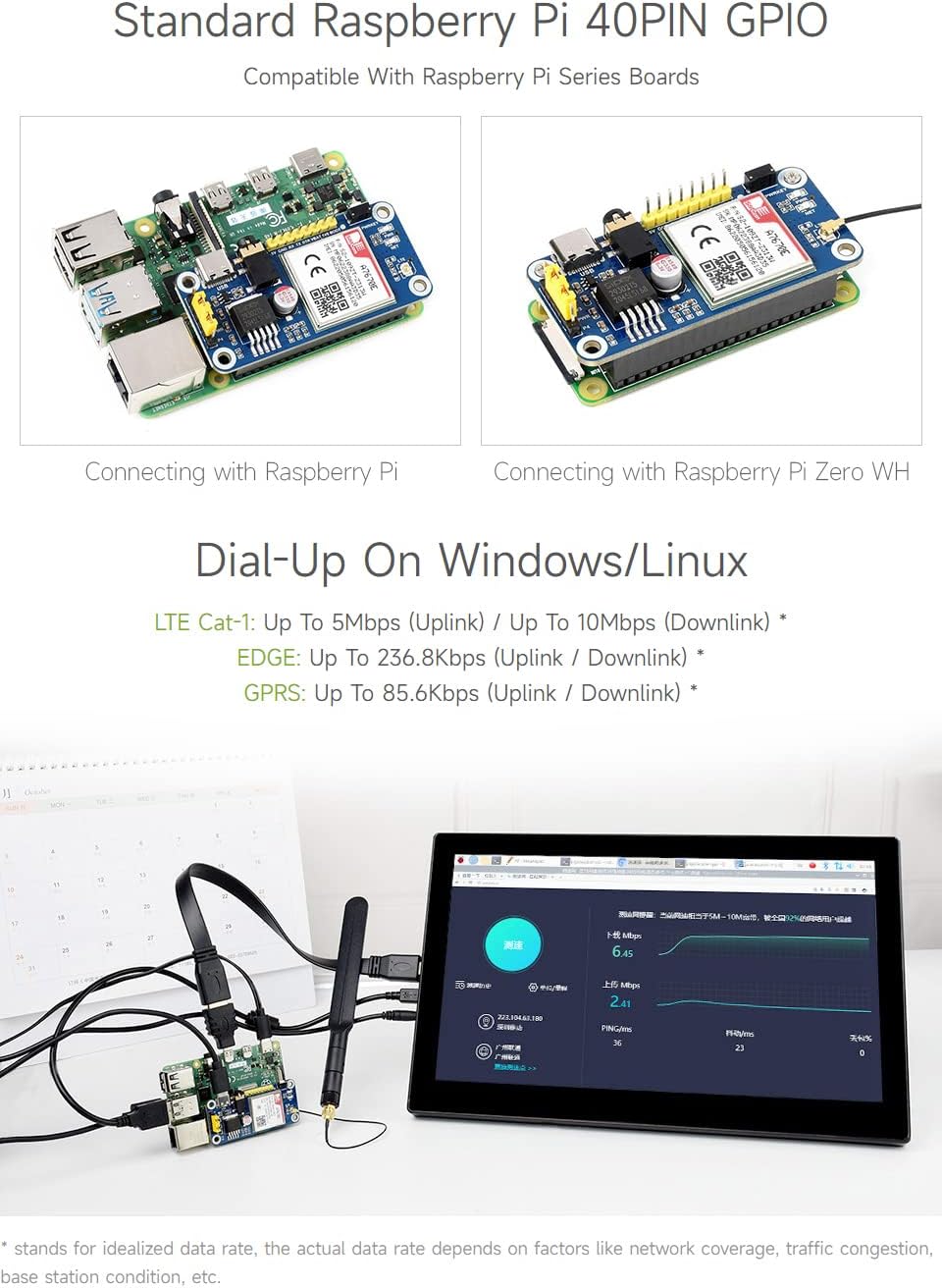
Olusin 5: Example of dial-up connection on a Windows/Linux device using the A7670E HAT. This image shows a Raspberry Pi connected to a display, demonstrating network connectivity via the HAT.
5.2 Cloud Communication
The module supports various cloud communication protocols including TCP/IP, HTTP(s), MQTT(s), FTP(s), and SSL. This enables the Raspberry Pi to send and receive data from cloud platforms for IoT applications. Communication can be established via USB or UART using AT commands.

Figure 6: Diagram illustrating cloud communication pathways. This graphic depicts how the Raspberry Pi (or other MCU) communicates with the A7670E module via USB or UART, which then connects to the internet using Cat-1/2G protocols for cloud services.
5.3 Telephone Call & SMS Support
The A7670E HAT can be used for making telephone calls and sending/receiving SMS messages. This functionality is typically controlled via AT commands sent to the module. The onboard audio jack allows for connecting a headset for voice communication.

Figure 7: Demonstration of telephone call and SMS functionality. This image shows a mobile phone interface for calls and messages, alongside a terminal window displaying AT commands for module control.
5.4 AT Àsẹ
The A7670E module is controlled primarily through AT commands. These commands are sent via the USB interface or UART. Refer to the A7670E module's AT Command Set documentation for a complete list of commands and their usage. Examples for Raspberry Pi, Arduino, and STM32 are available in the provided development resources.
6. Awọn pato
| Ẹya ara ẹrọ | Apejuwe |
|---|---|
| Frequency Band (LTE Cat-1) | LTE-FDD: B1, B3, B5, B7, B8, B20 |
| Frequency Band (2G) | GSM/GPRS/EDGE: 900/1800 MHz |
| SMS Support | MT, MO, CB, Text, PDU |
| Audio Ẹya | Standard 3.5mm audio jack for audio input/output |
| Ibi ti ina elekitiriki ti nwa | 5V |
| Awọn ọna Voltage | 5V / 3.3V (configurable via jumper) |
| Awọn iwọn otutu ti nṣiṣẹ | -30°C ~ 80°C |
| Ibi ipamọ otutu | -45°C ~ 90°C |
| Awọn iwọn | 65× 30.5mm |
| Asopọmọra | GPIO, USB |
| Awọn ọna System Support | Windows, Lainos |
| Iho kaadi SIM | Supports 1.8V and 3V SIM card |
| UART | Supports AT commands through UART, compatible with 3.3V/5V operating voltage |
| Ibudo USB | Supports AT commands testing, network communication, firmware upgrading, etc. |
| Asopọ Eriali | LTE eriali akọkọ |
7. Ìtumọ̀ Pinout
The A7670E HAT utilizes the Raspberry Pi's 40-pin GPIO header. Understanding the pinout is crucial for advanced integration and custom applications.

Figure 8: Pinout diagram for the A7670E HAT. This diagram details the function of each pin on the 40-pin GPIO header, including power, ground, UART (RXD, TXD), and control pins like P4 (module on/off control).
8. Outline Dimensions
The physical dimensions of the A7670E HAT are important for enclosure design and integration into projects.
Figure 9: Outline dimensions of the A7670E HAT. This image, also showing the pinout, includes measurements in millimeters for the module's length, width, and component placement.
9. Aṣayan Itọsọna
Waveshare offers various LTE HATs. The following table provides a comparison to help in selecting the appropriate module for specific regional and application requirements.

Figure 10: Comparison table for Waveshare LTE HATs. This guide outlines different models (A7670E, A7600C1, A7600E, SIM7600E) with their applicable regions, supported bands, data rates, software features, and hardware interfaces.
10. Itọju
To ensure the longevity and optimal performance of your A7670E LTE Cat-1 HAT, consider the following:
- Jeki module ni mimọ, agbegbe gbigbẹ, kuro lati eruku ati ọrinrin.
- Avoid exposing the HAT to extreme temperatures or direct sunlight.
- Ensure proper ventilation when integrated into an enclosure to prevent overheating.
- Periodically check for firmware updates from Waveshare to benefit from performance improvements and bug fixes.
11. Laasigbotitusita
If you encounter issues with your A7670E LTE Cat-1 HAT, consider the following common troubleshooting steps:
- Ko si Agbara/Awọn LED Pipa: Verify the power supply to your Raspberry Pi and ensure the HAT is correctly seated on the GPIO pins. Check the voltage jumper eto.
- Ko si Isopọ Nẹtiwọọki:
- Ensure the SIM card is correctly inserted and active with a valid data plan.
- Ṣayẹwo asopọ eriali.
- Ṣe idaniloju agbegbe nẹtiwọki ni agbegbe rẹ.
- Confirm correct APN settings in your software configuration.
- AT Commands Not Responding:
- Ensure the USB cable is connected or UART pins are correctly wired.
- Verify the serial port settings (baud rate, parity, data bits, stop bits).
- Check if the module is powered on (PWRKEY pin control).
- LBS Positioning Inaccurate: LBS positioning relies on cellular network base stations and may provide approximate location data, not precise GPS coordinates. Accuracy can vary significantly based on network density.
For more detailed troubleshooting or specific technical issues, refer to the official Waveshare documentation and support resources.
12. Atilẹyin ọja ati Support
Waveshare products typically come with a standard manufacturer's warranty. For specific warranty terms and conditions, please refer to the official Waveshare webaaye tabi kan si atilẹyin alabara wọn taara.
Oluranlowo lati tun nkan se: Waveshare provides comprehensive development resources, including documentation, example code for Raspberry Pi/Arduino/STM32, and technical support. These resources are essential for successful integration and operation of the A7670E HAT.
Fun iranlọwọ siwaju sii, ṣabẹwo si Waveshare Official Webojula or their dedicated product support pages.


