Ọrọ Iṣaaju
Thank you for choosing the Continu.us R230D2 Master TV Remote. This remote control is specifically designed to provide comprehensive control over RCA and Continu.us brand televisions, including access to commercial menus. Its intuitive layout ensures ease of use for all essential TV functions.

olusin 1: Iwaju view of the R230D2 Master TV Remote, showing all buttons.
Ṣeto
Before using your new remote, you will need to install batteries.
Fifi sori batiri
- Wa yara batiri ni ẹhin isakoṣo latọna jijin.
- Gbe ideri apo batiri naa si isalẹ ki o si gbe e kuro.
- Fi awọn batiri AA meji (2) sii, ki o rii daju pe awọn ebute rere (+) ati odi (-) ba awọn ami inu yara naa mu.
- Rọpo ideri iyẹwu batiri nipa gbigbe pada si aaye titi yoo fi tẹ ni aabo.

olusin 2: Pada view of the R230D2 Master TV Remote, illustrating the battery compartment.
Lilo akọkọ
The R230D2 Master TV Remote is pre-programmed for RCA and Continu.us televisions and typically requires no code entry or complex synchronization. Simply point the remote at your television and press the AGBARA button. If the TV responds, the remote is ready for use.
Awọn ilana Iṣiṣẹ
This section details the functions of the buttons on your R230D2 remote control.
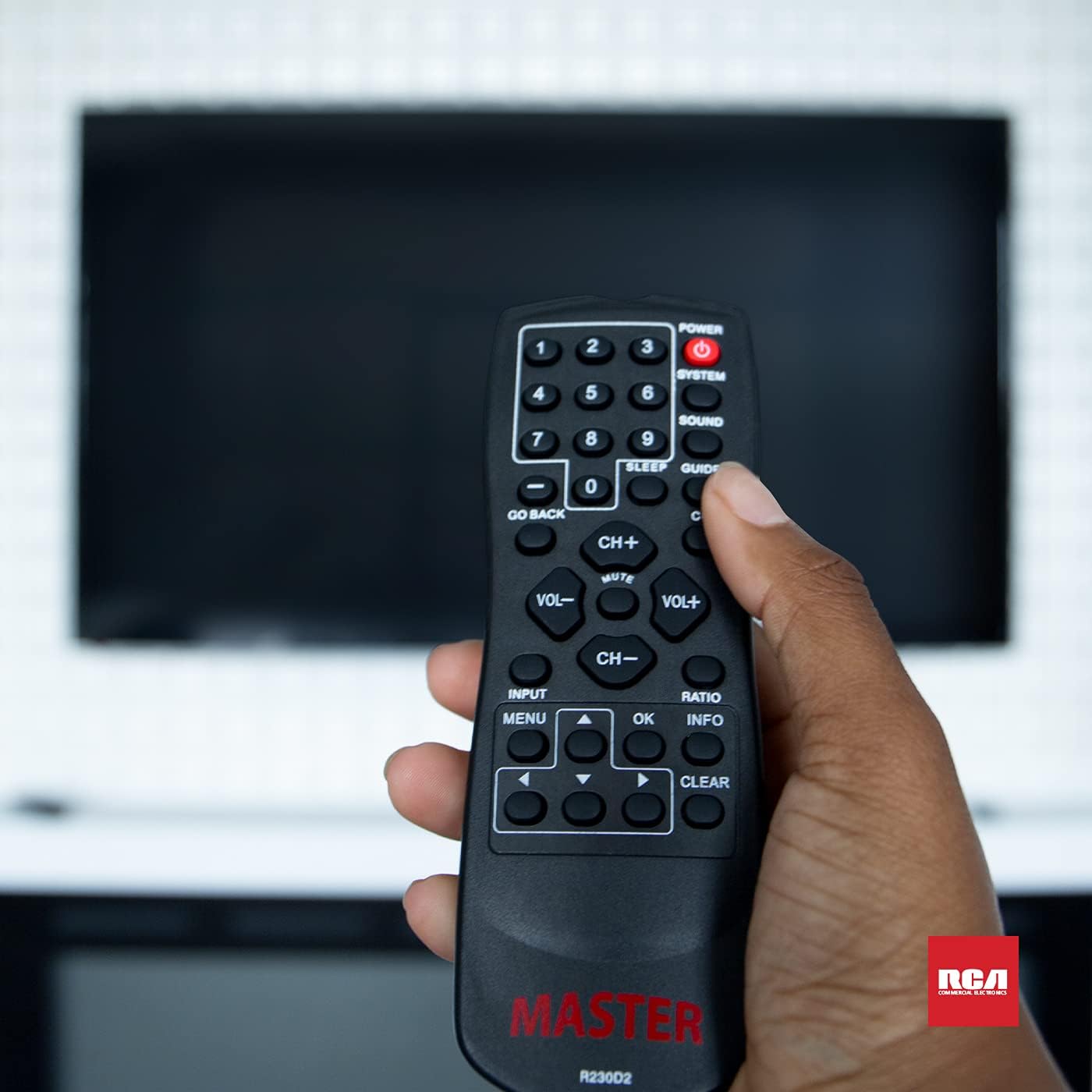
Figure 3: Using the R230D2 Master TV Remote with a television.
- AGBARA: Ó ń tan tẹlifíṣọ̀n tàbí ó ń pa á.
- ETO: Accesses system-specific functions or menus.
- OHUN: Adjusts sound modes or settings.
- ITOJU: Displays the electronic program guide (EPG).
- ORUN: Sets a timer for the TV to automatically turn off.
- CC (Akọsilẹ pipade): Ó máa ń tan tàbí pa àwọn àkọlé tí a ti pa.
- PADA: Returns to the previous channel or menu screen.
- Awọn bọtini nọmba (0-9): Directly input channel numbers.
- CH+/CH-: Yí àwọn ikanni padà sókè tàbí sísàlẹ̀.
- VOL + / VOL-: Increases or decreases volume.
- IKU: Ó pa ohùn tẹlifíṣọ̀n náà rẹ́ tàbí ó yọ ohùn náà kúrò.
- ÀWỌN Ọ̀RỌ̀: Selects the input source (e.g., HDMI 1, AV).
- Akojọ: Opens the television's main menu.
- OK: Confirms a selection or enters a submenu.
- ALAYE: Ṣe afihan alaye nipa eto lọwọlọwọ tabi titẹ sii.
- IPIN: Ó ń ṣe àtúnṣe ìpíndọ́gba ìbòjú.
- KỌRỌ: Clears input or exits certain functions.
- Awọn itọka lilọ kiri (Soke, Isalẹ, Osi, ọtun): Lilọ kiri nipasẹ awọn akojọ aṣayan ati awọn aṣayan.
Accessing Commercial Menus
The R230D2 remote is designed to access commercial menus on compatible RCA and Continu.us televisions. The specific button or sequence to access these menus may vary by TV model. Typically, this function is integrated within the ETO or Akojọ buttons, or a combination thereof. Refer to your television's specific user manual for detailed instructions on accessing its commercial menu features.
Itoju
Láti rí i dájú pé ìṣàkóso latọna jijin rẹ pẹ́ títí àti pé ó ń ṣiṣẹ́ dáadáa, tẹ̀lé àwọn ìlànà ìtọ́jú tó rọrùn wọ̀nyí:
- Ninu: Mu ese latọna jijin kuro pẹlu asọ ti o gbẹ. Fun idoti alagidi, die-die dampen asọ pẹlu omi tabi a ìwọnba, ti kii-abrasive regede. Maṣe lo awọn kẹmika lile tabi fi isakoṣo latọna jijin bọ inu omi.
- Rirọpo Batiri: Replace batteries when the remote's response becomes sluggish or stops working. Always replace both batteries at the same time with new AA batteries. Do not mix old and new batteries, or different types of batteries.
- Ibi ipamọ: Tọju isakoṣo latọna jijin ni itura, aaye gbigbẹ kuro lati orun taara, awọn iwọn otutu ti o ga, ati ọriniinitutu giga.
- Yago fun awọn isọ silẹ: Daabobo latọna jijin lati ipa ti ara, bi awọn silė le ba awọn paati inu jẹ.
Laasigbotitusita
If you encounter issues with your R230D2 remote, try the following solutions:
- Latọna jijin Ko Dahun:
- Ṣayẹwo boya awọn batiri ti wa ni fi sii bi o ti tọ pẹlu polarity to tọ.
- Ropo awọn batiri pẹlu alabapade.
- Rí i dájú pé kò sí ìdènà láàárín remote àti sensọ infrared ti TV.
- Rii daju pe o wa laarin iwọn to munadoko ti olugba IR ti TV.
- TV ko tan/pa:
- Confirm the TV is plugged into a working power outlet.
- Try turning the TV on/off using its physical power button.
- Awọn iṣẹ kan pato ti ko ṣiṣẹ:
- Some functions may require the TV's menu to be open or a specific input selected.
- Rii daju pe isakoṣo latọna jijin ti tọka taara ni TV.
- Remote Still Not Working:
- Tí wọ́n bá ṣẹ̀ṣẹ̀ já àkójọ àwọn ohun èlò ìṣiṣẹ́ aláàbò náà sílẹ̀ tàbí tí wọ́n fi ọ̀rinrin hàn, ó ṣeé ṣe kí inú ilé ti bàjẹ́.
- Kan si atilẹyin alabara fun iranlọwọ siwaju.
Awọn pato
| Ẹya ara ẹrọ | Ẹ̀kúnrẹ́rẹ́ |
|---|---|
| Brand | Tesiwaju.us |
| Nọmba awoṣe | R230D2 |
| Awọn ẹrọ ibaramu | RCA and Continu.us Televisions |
| Asopọmọra Technology | Infurarẹẹdi |
| Orisun agbara | Awọn batiri AA 2 (kii ṣe pẹlu) |
| Iwọn Nkan | 1.76 iwon |
| Ọja Mefa | 6 x 2 x 1 inches |
| Nọmba ti o pọju Awọn ẹrọ Atilẹyin | 1 |
Atilẹyin ọja ati Support
Continu.us products are designed and tested to high standards. We pride ourselves on offering excellent customer support.
Onibara Support
If you require assistance with your R230D2 Master TV Remote, our support and technical team are available to help. Please reach out via phone or email for any pressing issues or questions.
For the most up-to-date contact information, please visit the official Continu.us webaaye tabi tọka si apoti ọja.
Alaye atilẹyin ọja
Specific warranty details for the R230D2 remote are typically provided with the product packaging or can be found on the Continu.us official webojula. Jọwọ ṣe idaduro ẹri rira rẹ fun awọn iṣeduro atilẹyin ọja.