1. Ifihan
Thank you for choosing the Cherub WST-680 Rechargeable Clip-on Guitar Tuner. This compact and versatile tuner is designed to provide accurate tuning for a variety of string instruments, including guitar, bass, and ukulele. Its rechargeable battery and clear LCD display make it an essential tool for musicians. Please read this manual carefully to ensure proper use and optimal performance of your new tuner.

olusin 1: Iwaju view of the Cherub WST-680 Tuner, showing the display and clip mechanism.
2. Key Awọn ẹya ara ẹrọ
- Awọn ọna Iyipada: Chromatic, Guitar, Bass, Ukulele.
- Intuitive Power Control: Simply flip the tuner up to power it on, and push it down to turn it off.
- Batiri gbigba agbara: Equipped with a Li-ion battery, providing up to 10 hours of continuous use.
- Yiye giga: Built-in high-sensitivity piezo sensors ensure ±1 cent accuracy.
- Large Colored LCD Display: Offers clear and easy-to-read tuning information.
3. Package Awọn akoonu
The Cherub WST-680 package includes:
- 1 x Cherub WST-680 Clip-on Tuner
- 1 x Okun Ngba agbara USB-C
- 1 x Itọsọna olumulo (iwe yii)
4. Eto
4.1 Síso Atúnṣe pọ̀ mọ́ra
The WST-680 features a robust clip designed for secure attachment to your instrument's headstock. Open the clip by pressing the levers, then position it firmly on the headstock. Ensure the tuner is stable and the display is visible from your playing position.
4.2 Titan / Pa a
The tuner utilizes a convenient flip mechanism for power control:
- Si agbara ON, simply flip the display unit upwards.
- Si agbara PAA, push the display unit downwards.
4.3 Ṣatunṣe awọn Viewigun igun
The tuner's display head can rotate 360 degrees and pivot forwards and backwards, allowing you to adjust the viewing angle for optimal visibility. Gently rotate or pivot the display to your preferred position.
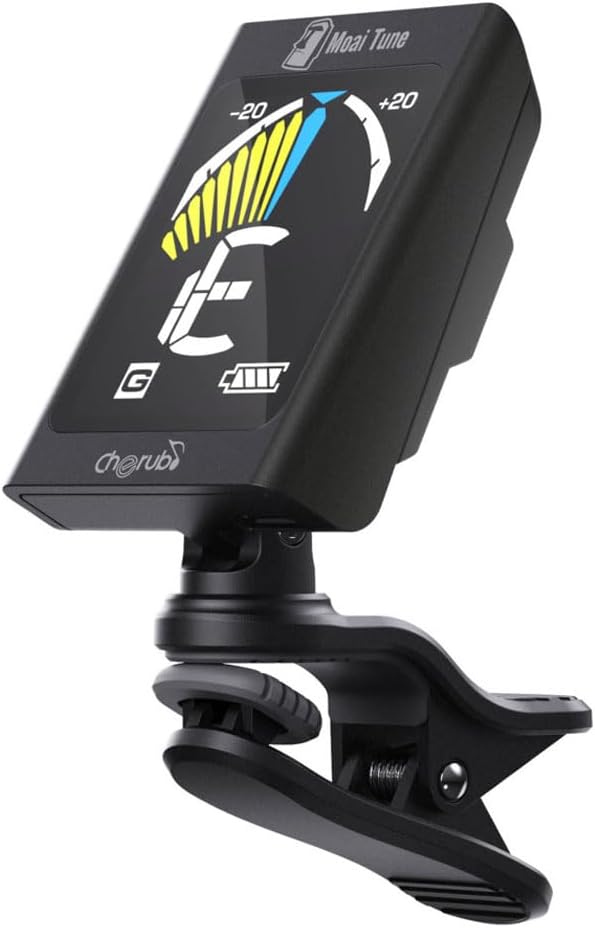
Figure 2: The tuner attached to a guitar headstock, demonstrating its compact size and adjustable angle.
5. Isẹ
5.1 Yíyan Ipò Àtúnṣe
After powering on the tuner, press the 'M' (Mode) button to cycle through the available tuning modes:
- C (Chromatic): Tunes all notes.
- G (Guitar): Standard guitar tuning.
- B (Bass): Ṣíṣe àtúnṣe gítà bass déédéé.
- U (Ukulele): Ṣíṣe àtúnṣe ukulele boṣewa.
5.2 Yiyi rẹ Irinse
Once the desired mode is selected:
- Pluck a single string on your instrument.
- The tuner's display will show the detected note and a needle/bar indicator.
- Adjust the tuning peg of the string until the needle/bar is centered and the display turns green. If the needle is to the left (red), the note is flat; if it's to the right (yellow), the note is sharp.
- Repeat for all strings.

Figure 3: The tuner display indicating a note being tuned, with the needle centered for accurate pitch.
6. Ngba agbara si Batiri naa
The Cherub WST-680 is equipped with a rechargeable Li-ion battery. To charge the tuner:
- Locate the USB-C charging port on the side of the tuner.
- Connect the provided USB-C cable to the tuner and the other end to a standard USB power source (e.g., computer, USB wall adapter).
- Àmì bátìrì tó wà lórí ìbòjú náà yóò fi ipò agbára hàn.
- Gbigba agbara ni kikun pese isunmọ awọn wakati 10 ti lilo.

Figure 4: Close-up of the USB-C charging port on the tuner.
7. Itọju
To ensure the longevity and performance of your Cherub WST-680 Tuner:
- Clean the tuner with a soft, dry cloth. Avoid using abrasive cleaners or solvents.
- Tọju tuner ni itura, aye gbigbẹ kuro lati orun taara ati awọn iwọn otutu to gaju.
- Avoid dropping the tuner or subjecting it to strong impacts.
8. Laasigbotitusita
8.1 Tuner Not Powering On
- Ensure the tuner is flipped upwards to the ON position.
- Check the battery level. If low, charge the tuner using the provided USB-C cable.
8.2 Inaccurate Tuning
- Rí i dájú pé a so àtúnṣe náà mọ́ orí ohun èlò náà dáadáa.
- Verify that the correct tuning mode (Chromatic, Guitar, Bass, Ukulele) is selected for your instrument.
- Tune in a quiet environment to minimize external vibrations.
8.3 Resetting the Tuner
If the tuner is unresponsive or behaving erratically, a reset may resolve the issue. Locate the small 'RESET' button on the back of the tuner (often a pinhole) and gently press it with a thin object like a paperclip.

Figure 5: Close-up of the back of the tuner, highlighting the 'RESET' button.
9. Awọn pato
| Ẹya ara ẹrọ | Sipesifikesonu |
|---|---|
| Nọmba awoṣe | WST-680 |
| Awọn ipo Tuning | Chromatic, Gita, Bass, Ukulele |
| Yiye | Cent 1 senti |
| Batiri Iru | Atunṣe Lithium Ion |
| Igbesi aye batiri | Titi di wakati 10 (isunmọ.) |
| Gbigba agbara Port | USB-C |
| Iwọn Nkan | 1.17 iwon |
| Ọja Mefa | 2.05 x 1.46 x 1.38 inches |
10. Atilẹyin ọja ati Support
Cherub products are designed for reliability and performance. For warranty information, technical support, or any inquiries regarding your WST-680 tuner, please refer to the official Cherub webAaye ayelujara tabi kan si oniṣowo agbegbe rẹ. Pa iwe-ẹri rira rẹ mọ gẹgẹbi ẹri rira fun awọn ẹtọ atilẹyin ọja.


