1. Ifihan
Thank you for choosing the EDIS 40W Speakers, Model EA014. This manual provides essential information for the safe and efficient use of your new speaker system. Please read this manual thoroughly before installation and operation, and retain it for future reference.
2. Alaye Aabo
Lati rii daju iṣẹ ailewu ati yago fun ibajẹ, jọwọ ṣe akiyesi awọn iṣọra wọnyi:
- Do not expose the speakers to water or moisture.
- Maṣe ṣe idiwọ awọn ṣiṣi eefin.
- Place the speakers on a stable surface to prevent falling.
- Lo oluyipada agbara nikan ti a pese pẹlu ẹyọkan.
- Jeki kuro ni arọwọto awọn ọmọde.
- Ge asopọ agbara lakoko iji monomono tabi nigbati a ko lo fun igba pipẹ.
3. Package Awọn akoonu
Jọwọ ṣayẹwo pe gbogbo awọn ohun kan wa ninu apo rẹ:
- EDIS 40W Speakers (2 units)
- Isakoṣo latọna jijin Iṣakoso
- Okun agbara
- Awọn Asopọ Ohun Audio
- Afowoyi Olumulo (iwe-ipamọ yii)
4. Ọja Ipariview
The EDIS 40W Speakers are designed to deliver clear audio. They feature a robust design with a steel grille for protection and offer multiple input options.
4.1 Speaker Units

olusin 1: Iwaju view of the EDIS 40W Speakers. Each speaker unit features two drivers and a protective steel grille.
4.2 Iṣakoso latọna jijin
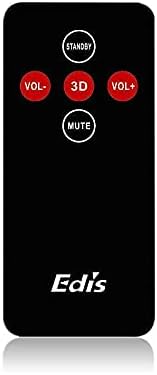
Figure 2: The infrared remote control for the EDIS 40W Speakers. It includes buttons for power, volume adjustment, 3D audio mode, and mute.
4.3 Media Player Panel

Figure 3: The integrated USB and SD Card Media Player panel. This panel allows direct playback from USB drives and SD/MMC memory cards.
5. Eto
Follow these steps to set up your EDIS 40W Speakers:
- Ibi: Position the speakers on a flat, stable surface or mount them securely to a wall. Ensure adequate space for ventilation.
- So Orisun Audio pọ: Connect your audio source (e.g., computer, TV, interactive whiteboard) to the speaker system using the appropriate audio cables.
- Asopọ agbara: Connect the power cable to the main speaker unit and then plug it into a standard electrical outlet.
- Agbara Tan: Press the power button on the main speaker unit or the 'STANDBY' button on the remote control to turn on the speakers.
6. Awọn ilana Iṣiṣẹ
Your EDIS 40W Speakers can be operated using the integrated controls or the infrared remote control.
6.1 Lilo isakoṣo latọna jijin
- DURO DIE: Press to turn the speakers on or off (standby mode).
- VOL+: Mu iwọn didun pọ si.
- VOL- Din iwọn didun silẹ.
- DÁKÚN: Pa ẹnu-ọna tabi mu iṣẹjade ohun silẹ.
- Ọdun 3: Activate or deactivate the 3D audio effect.
6.2 Using the Media Player Panel
Insert a USB drive or SD/MMC card into the respective slot on the media player panel.
- Ipo: Press to switch between input sources (e.g., AUX, USB, SD Card).
- PREVIOUS (◀◀): Rekọja si orin iṣaaju.
- PLAY/PAUSE (►▌▌): Ṣiṣẹ tabi daduro orin ti isiyi.
- NEXT (►►): Rekọja si orin atẹle.
- LED: Indicates power status or playback activity.
7. Itọju
Proper maintenance ensures the longevity of your speakers:
- Ninu: Lo aṣọ rírọrùn tí ó gbẹ láti nu ojú agbọ́rọ̀ náà. Má ṣe lo àwọn ohun èlò ìfọmọ́ omi tàbí àwọn ohun èlò ìpara.
- Ibi ipamọ: Ti o ba tọju awọn agbohunsoke fun akoko ti o gbooro sii, ge asopọ wọn lati agbara ati fi wọn pamọ si ibi ti o tutu, ti o gbẹ.
- Afẹfẹ: Ensure that the speaker's ventilation openings are not obstructed to prevent overheating.
8. Laasigbotitusita
If you encounter issues with your EDIS 40W Speakers, refer to the following common problems and solutions:
| Isoro | Owun to le Fa | Ojutu |
|---|---|---|
| Ko si agbara | Power cable not connected; power outlet not working | Ṣayẹwo asopọ okun agbara; gbiyanju kan ti o yatọ iṣan. |
| Ko si ohun | Volume too low; incorrect input source; audio cable loose/faulty | Increase volume; press MODE to select correct input; check audio cable connections. |
| Isakoṣo latọna jijin ko ṣiṣẹ | Batteries depleted; obstruction between remote and speaker; remote not pointed correctly | Replace remote batteries; remove obstructions; point remote directly at the speaker's IR receiver. |
| USB/SD kaadi ko dun | Ti ko tọ file format; card/drive not inserted correctly; corrupted media | Rii daju files are compatible (e.g., MP3); reinsert media; try a different USB drive/SD card. |
9. Awọn pato
| Ẹya ara ẹrọ | Sipesifikesonu |
|---|---|
| Brand | EDIS |
| Nọmba awoṣe | EA014 |
| Max Agbọrọsọ o wu Power | 40 Wattis |
| Àwọ̀ | Grẹy |
| Iwọn Nkan | 8 kg |
| Ọna Iṣakoso | Latọna jijin |
| Asopọmọra Technology | Ti firanṣẹ |
| Orisun agbara | Okun Itanna |
| Ipo Ijade Ohun | Ayika |
| Iṣagbesori Iru | Iduro Floor |
| Ohun elo | Igi |
| Agbọrọsọ Iru | Ita gbangba |
| Pataki Awọn ẹya ara ẹrọ | Ampitanna |
| Awọn ẹrọ ibaramu | Gbogbo awọn ẹrọ |
| Kakiri Ohun ikanni iṣeto ni | 2 |
10. Atilẹyin ọja ati Support
Fún ìwífún nípa àtìlẹ́yìn àti ìrànlọ́wọ́ àwọn oníbàárà, jọ̀wọ́ tọ́ka sí àwọn ìwé tí a pèsè ní àkókò tí o ń rà á tàbí kí o kan sí olùtajà rẹ. Pa ẹ̀rí ìrà rẹ mọ́ fún èyíkéyìí ẹ̀tọ́ àtìlẹ́yìn.


