1. Ifihan
Thank you for choosing the ZEBRONICS Zeb-Sound Bomb 1 TWS Earbuds. This manual provides detailed instructions for the proper use, setup, and maintenance of your new earbuds. Please read this manual carefully before using the product to ensure optimal performance and longevity.
2. Package Awọn akoonu
- ZEBRONICS Zeb-Sound Bomb 1 TWS Earbuds (Left and Right)
- Ọran Gbigba agbara to šee gbe
- Iru-C Ngba agbara USB
- Awọn imọran Eti Afikun (awọn titobi oriṣiriṣi)
- Itọsọna olumulo
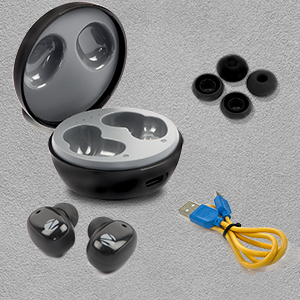
This image shows the complete package contents for the ZEBRONICS Zeb-Sound Bomb 1, including the earbuds, charging case, a Type-C charging cable, and various sizes of ear tips.
3. Ọja Ipariview
The Zeb-Sound Bomb 1 TWS Earbuds feature a compact design with touch controls and a portable charging case. Each earbud is equipped with a 6mm driver for clear audio.

This image shows the ZEBRONICS Zeb-Sound Bomb 1 TWS Earbuds securely placed within their charging case, viewed from the top. The case is open, revealing both earbuds and the charging indicator lights.

An angled view of the ZEBRONICS Zeb-Sound Bomb 1 TWS Earbuds inside their open charging case, highlighting the ergonomic design of the earbuds and the compact nature of the case.
4. Eto
4.1 Gbigba agbara akọkọ
Before first use, ensure the earbuds and charging case are fully charged. Remove the protective stickers from the charging contacts on the earbuds.

A close-up of a ZEBRONICS Zeb-Sound Bomb 1 earbud, illustrating the protective sticker on the charging contacts that must be removed before initial use.
Place both earbuds into the charging case. Connect the Type-C charging cable to the case and a USB power source. The indicator lights on the case will show charging status. A full charge takes approximately 4 hours.

The ZEBRONICS Zeb-Sound Bomb 1 charging case with a Type-C charging cable connected, demonstrating the charging port location.
4.2 Sisopọ Bluetooth
- Rii daju pe awọn agbekọri ti gba agbara ati gbe sinu apoti gbigba agbara.
- Ṣí ìdènà àpò ìgbóná. Àwọn ètígbọ́ náà yóò wọ inú ipò ìsopọ̀ láìfọwọ́sí, tí a fi ìmọ́lẹ̀ LED tí ń tàn lórí ètígbọ́ náà hàn.
- Lori ẹrọ alagbeka rẹ, mu Bluetooth ṣiṣẹ.
- Wa fun available devices and select "Zeb-Sound Bomb 1" from the list.
- Ni kete ti a ti sopọ, Awọn LED agbekọri yoo da didan didan duro, nfihan sisopọ aṣeyọri.
5. Awọn ilana Iṣiṣẹ
5.1 Agbara Tan / Pa
- Agbara Tan: Open the charging case lid, and the earbuds will power on automatically. Alternatively, long-press the touch area on both earbuds for 3 seconds.
- Agbara Pa: Place the earbuds back into the charging case and close the lid. They will power off automatically. Alternatively, long-press the touch area on both earbuds for 5 seconds.
5.2 Iṣakoso Orin
- Ṣiṣẹ/Daduro: Fọwọ ba ẹyọkan lori boya agbekọri.
- Orin t’okan: Fọwọ ba agbekọri ọtun lẹẹmeji.
- Tẹlẹ Orin: Fọwọ ba agbekọri osi lẹẹmeji.
5.3 Iṣakoso ipe
- Idahun/Ipe Ipari: Fọwọ ba ẹyọkan lori boya agbekọri.
- Kọ Ipe: Long press on either earbud for 2 seconds.
5.4 Iranlọwọ ohun
Triple tap on either earbud to activate your device's voice assistant (e.g., Google Assistant, Siri).
6. Gbigba agbara
The earbuds charge automatically when placed inside the charging case. The case itself is charged via a Type-C cable. The LED indicators on the case will show the charging status and battery level.
- Ngba agbara agbekọri: Place earbuds in the case. LEDs on earbuds will indicate charging.
- Ngba agbara ọran: Connect the Type-C cable to the case and a power adapter. The case LEDs will indicate charging progress.
7. Itọju
To ensure the longevity and optimal performance of your Zeb-Sound Bomb 1 TWS Earbuds, follow these maintenance guidelines:
- Ninu: Lo asọ gbigbẹ, asọ ti o gbẹ lati nu awọn agbekọri ati apoti gbigba agbara. Maṣe lo awọn kẹmika lile tabi awọn ohun elo abrasive.
- Ibi ipamọ: Tọju awọn afikọti naa sinu apoti gbigba agbara wọn nigbati ko si ni lilo lati daabobo wọn lọwọ eruku ati ibajẹ.
- Omi Resistance: The earbuds are splash-proof. Avoid submerging them in water or exposing them to heavy rain. Dry them thoroughly if they get wet.

An image depicting the ZEBRONICS Zeb-Sound Bomb 1 earbuds with water droplets, visually representing their splash-proof design.
8. Laasigbotitusita
Ti o ba pade awọn ọran pẹlu awọn agbekọri rẹ, tọka si awọn solusan ti o wọpọ wọnyi:
| Isoro | Owun to le Solusan |
|---|---|
| Earbuds ko so pọ | Ensure earbuds are charged. Turn off and on Bluetooth on your device. Forget "Zeb-Sound Bomb 1" from your device's Bluetooth list and re-pair. |
| Agbekọri agbekọri kan ṣoṣo ti n ṣiṣẹ | Place both earbuds back in the case, close the lid, then open again. Ensure both earbuds are charged. Try re-pairing. |
| Earbuds ko gba agbara | Ensure protective stickers are removed from earbud contacts. Check Type-C cable and power source. Ensure case is charged. |
| Iwọn kekere tabi didara ohun ko dara | Adjust volume on your device. Ensure ear tips fit snugly in your ears. Clean any debris from earbud speakers. |
9. Awọn pato
| Ẹya ara ẹrọ | Sipesifikesonu |
|---|---|
| Orukọ awoṣe | BOMB-OHUN ZEB 1 |
| Asopọmọra Technology | Bluetooth 5.0 |
| Awakọ Iwon | 6mm |
| Akoko Sisisẹsẹhin | Titi di awọn wakati 12 (ni iwọn 50%) |
| Akoko gbigba agbara | Isunmọ. Awọn wakati 4 (fun ọran) |
| Ngba agbara Interface | Iru-C |
| Iṣakoso Iru | Iṣakoso Ifọwọkan, Iṣakoso Ohun |
| Omi Resistance Ipele | Ohun tí kò ní omi (Ẹ̀tọ́ síta) |
| Iwọn Nkan | 35 giramu |
| Gbigbe Eti | Ninu Eti |
| Ipalara | 16 ohm |
10. Alaye Aabo
- Ma ṣe fi ọja han si awọn iwọn otutu to gaju tabi orun taara.
- Avoid using the earbuds at excessively high volumes for prolonged periods to prevent hearing damage.
- Jeki ọja naa kuro lọdọ awọn ọmọde ati awọn ohun ọsin.
- Do not attempt to disassemble or modify the earbuds or charging case. This will void the warranty and may cause damage.
- Sọ ọja naa ni ifojusọna ni ibamu si awọn ilana agbegbe.
11. Atilẹyin ọja ati Support
Your ZEBRONICS Zeb-Sound Bomb 1 TWS Earbuds come with a standard manufacturer's warranty. For detailed warranty terms, service, or technical support, please refer to the warranty card included in your package or visit the official ZEBRONICS website. You may also contact ZEBRONICS customer service directly for assistance.


