Ọrọ Iṣaaju
O ṣeun fun riraasing the HOMCOM L-Shaped Desk with Hutch. This manual provides essential information for the safe assembly, operation, and maintenance of your new desk. Please read these instructions carefully before beginning assembly and retain them for future reference.

Image: The HOMCOM L-Shaped Desk with Hutch, featuring its grey wood grain finish, hutch with shelves and cabinets, and an L-shaped desktop, positioned in a corner of a room.
Alaye Aabo
- Máa kó tábìlì náà jọ sórí ilẹ̀ tó mọ́ tónítóní láti dènà ìfọ́.
- Ensure all parts are present and undamaged before assembly. Contact customer support immediately if any parts are missing or broken.
- Tighten all fasteners securely, but do not overtighten to avoid damaging the material.
- Pa awọn ẹya kekere ati awọn ohun elo apoti kuro lọdọ awọn ọmọde ati awọn ohun ọsin.
- For certain assembly steps, two adults are recommended to ensure stability and safety.
- Maṣe duro tabi joko lori tabili.
- Distribute weight evenly across the desk surfaces and shelves.
Package Awọn akoonu
The HOMCOM L-Shaped Desk with Hutch is typically shipped in multiple boxes. Please check all packages upon arrival to ensure no boxes are missing. While a detailed parts list is usually included in the physical instruction manual provided with the product, general components include:
- Desk panels (desktop, side panels, back panels)
- Hutch panels (shelves, cabinet doors, back panels)
- Drawer components (drawer front, sides, back, bottom)
- Hardware pack (screws, dowels, cam locks, drawer slides, handles, cable grommet)
Refer to the specific parts list included in your product packaging for exact quantities and identification.
Eto ati Apejọ
Assembly of this L-shaped desk requires careful attention to detail. It is highly recommended to have two people for assembly, especially when attaching the hutch to the desk base.
Awọn irinṣẹ ti a beere (Ko si):
- Phillips ori screwdriver
- Hammer (fún àwọn ìbòrí)
Awọn Igbesẹ Apejọ Gbogbogbo:
- Yọọ kuro ki o ṣe idanimọ: Carefully unpack all components and lay them out on a protected surface. Identify each part using the labels and diagrams in your included manual.
- Assemble Base Sections: Begin by assembling the main desk sections, including the L-shaped desktop and supporting panels. Ensure all connections are secure.
- Fi Drawer ati Kabinet sori ẹrọ: Assemble the drawer and the lower cabinet according to the instructions. Install drawer slides and hinges correctly for smooth operation.
- Assemble Hutch: Construct the hutch unit, including the open shelves and glass-front cabinets.
- Attach Hutch to Desk: This step requires two people. Carefully lift the assembled hutch and align it with the pre-drilled holes on the desk base. Secure it firmly with the provided hardware.
- Awọn Fifọwọkan Ipari: Install handles, knobs, and the cable grommet. Ensure all screws are tightened and the desk is stable.
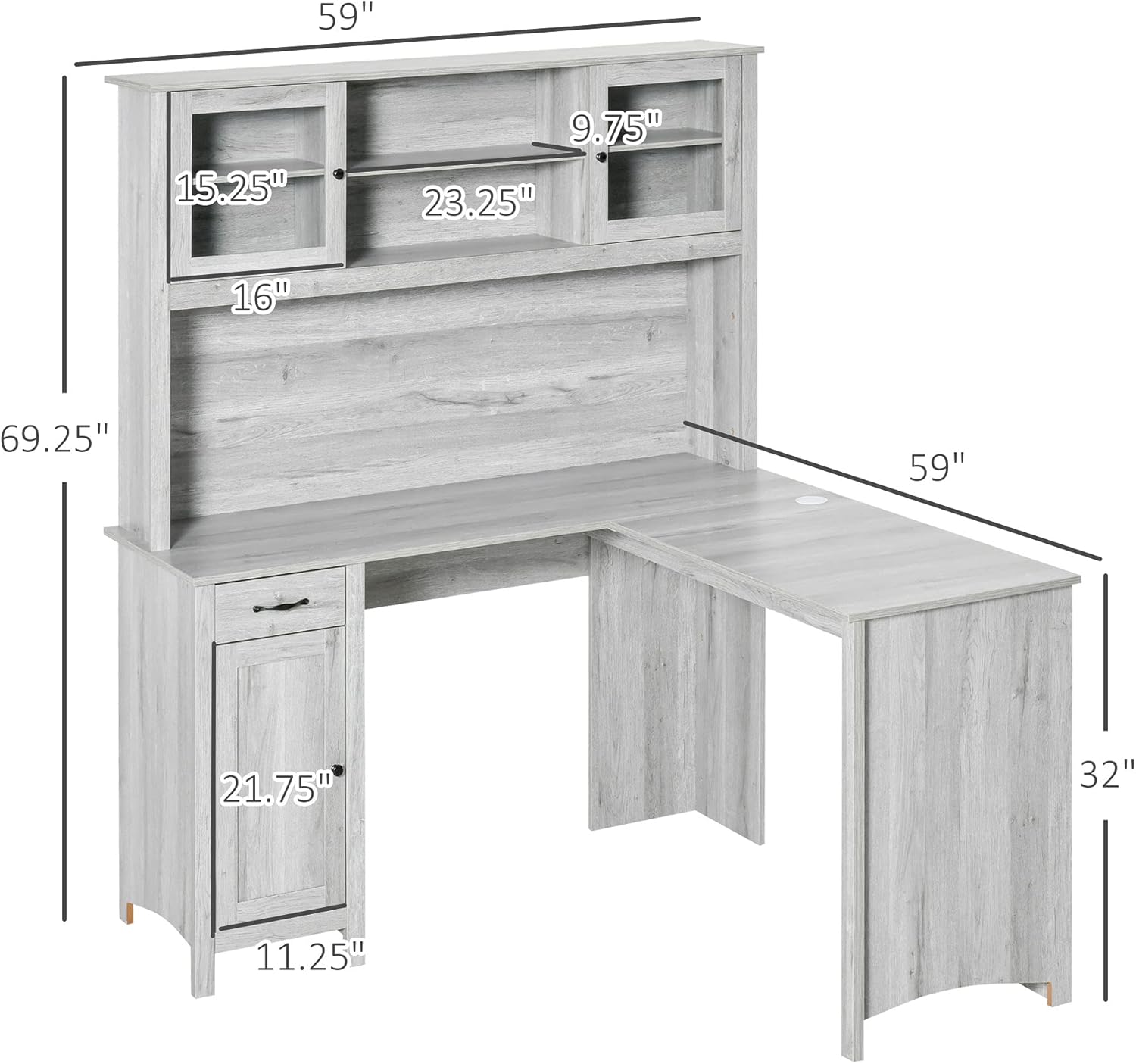
Image: Detailed dimensions of the L-shaped desk and hutch, showing overall length, width, and height, as well as specific measurements for shelves, cabinets, and drawer.
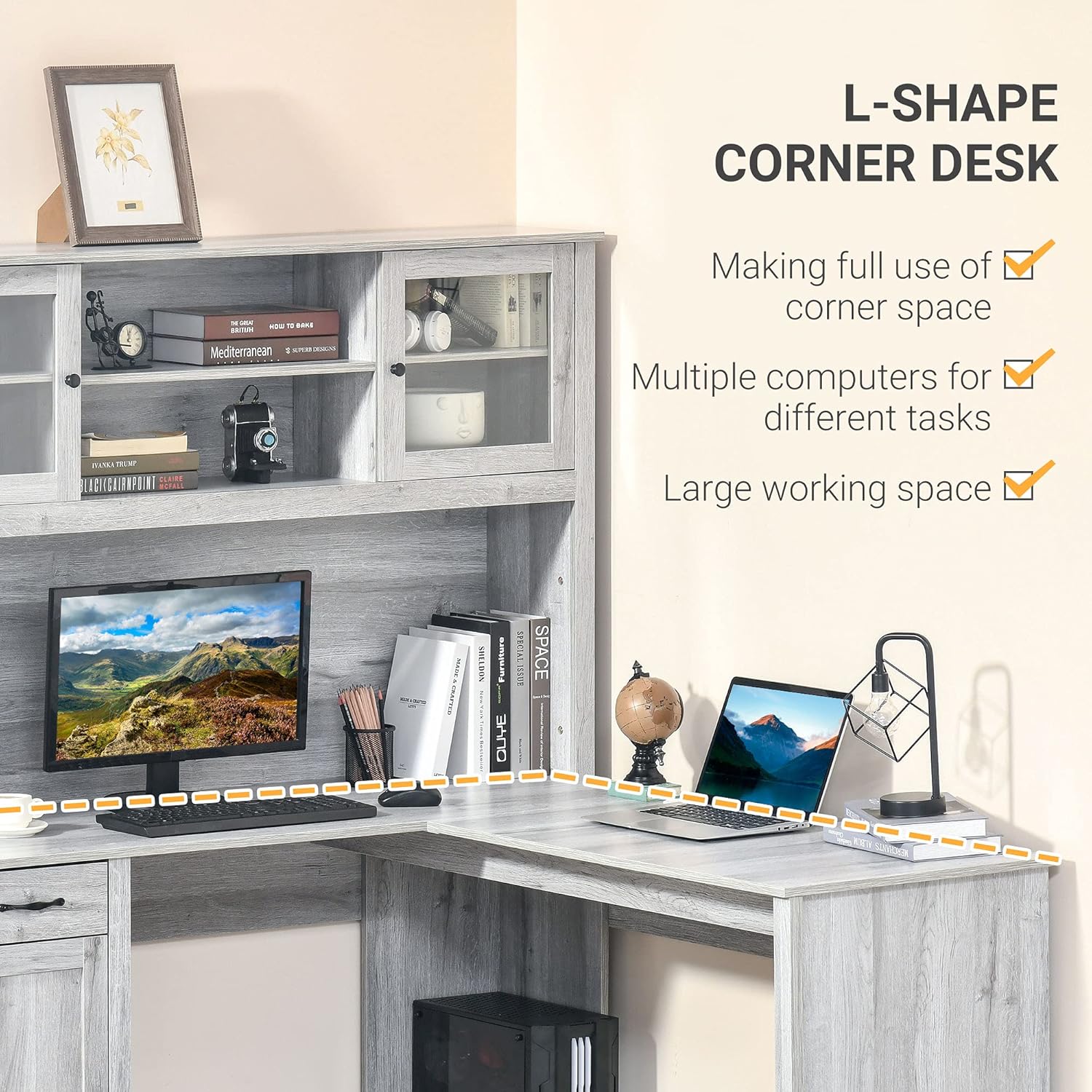
Aworan: Ohun oke view highlighting the L-shape design of the desk, demonstrating its suitability for corner placement and providing a large working surface.
Awọn ilana Iṣiṣẹ
Your HOMCOM L-Shaped Desk with Hutch is designed for efficient organization and a comfortable workspace.
Awọn ẹya ipamọ:
- Hutch Shelves: Utilize the open shelves and glass-front cabinets in the hutch for books, decorative items, or frequently accessed office supplies. The inner shelves of the cabinets are adjustable to accommodate different item heights.
- Apẹrẹ: The small drawer provides convenient storage for pens, notepads, and other small essentials, keeping your desktop clutter-free.
- Àpótí ìsàlẹ̀: The lower cabinet offers concealed storage for larger items or personal belongings.
Iṣakoso USB:
The desk includes a built-in cable grommet on the desktop. Use this feature to route power cords and data cables for your computer, monitor, and other electronics, helping to maintain an organized and tidy workspace.
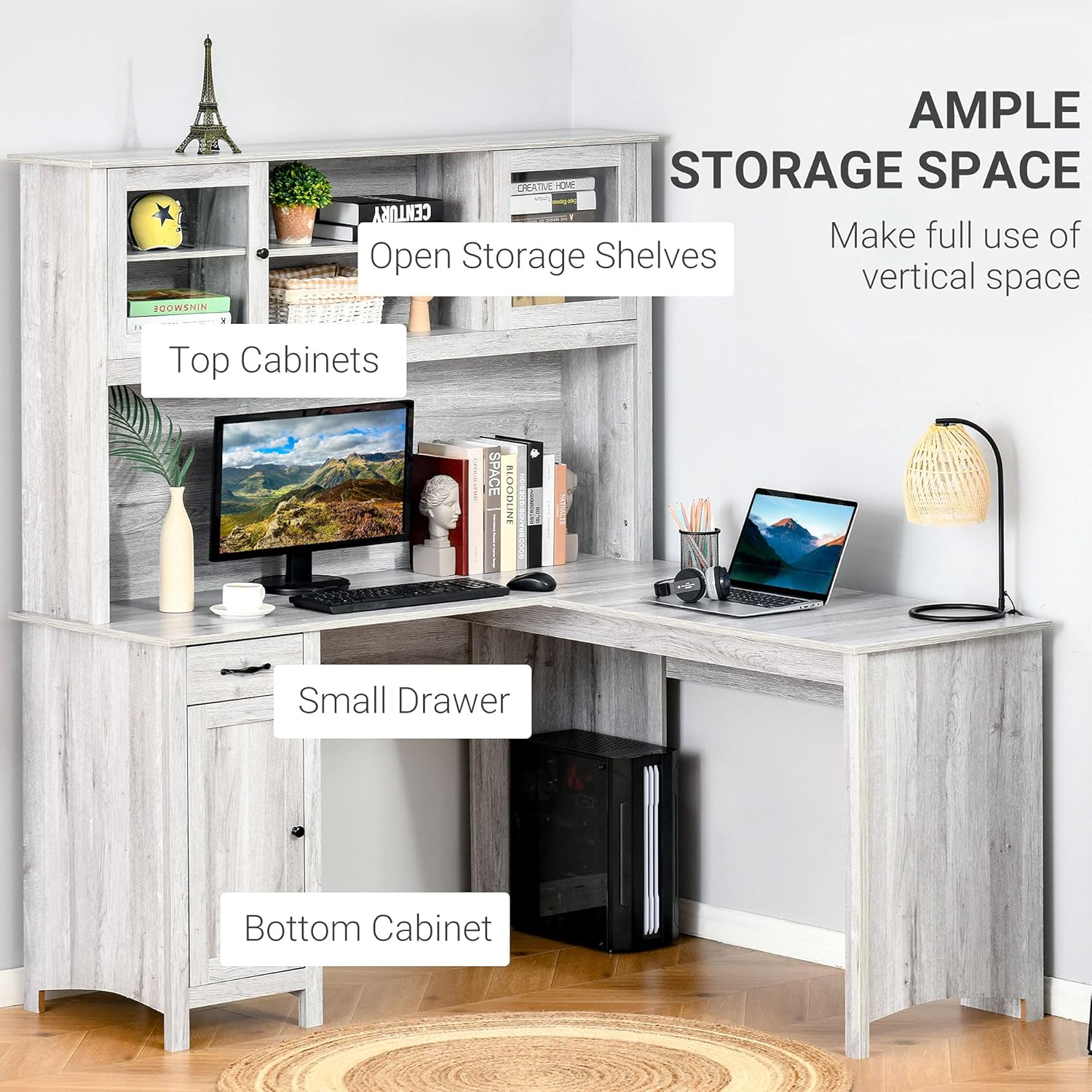
Image: The desk showcasing its various storage options: top cabinets, open storage shelves, a small drawer, and a bottom cabinet, designed to maximize vertical space.
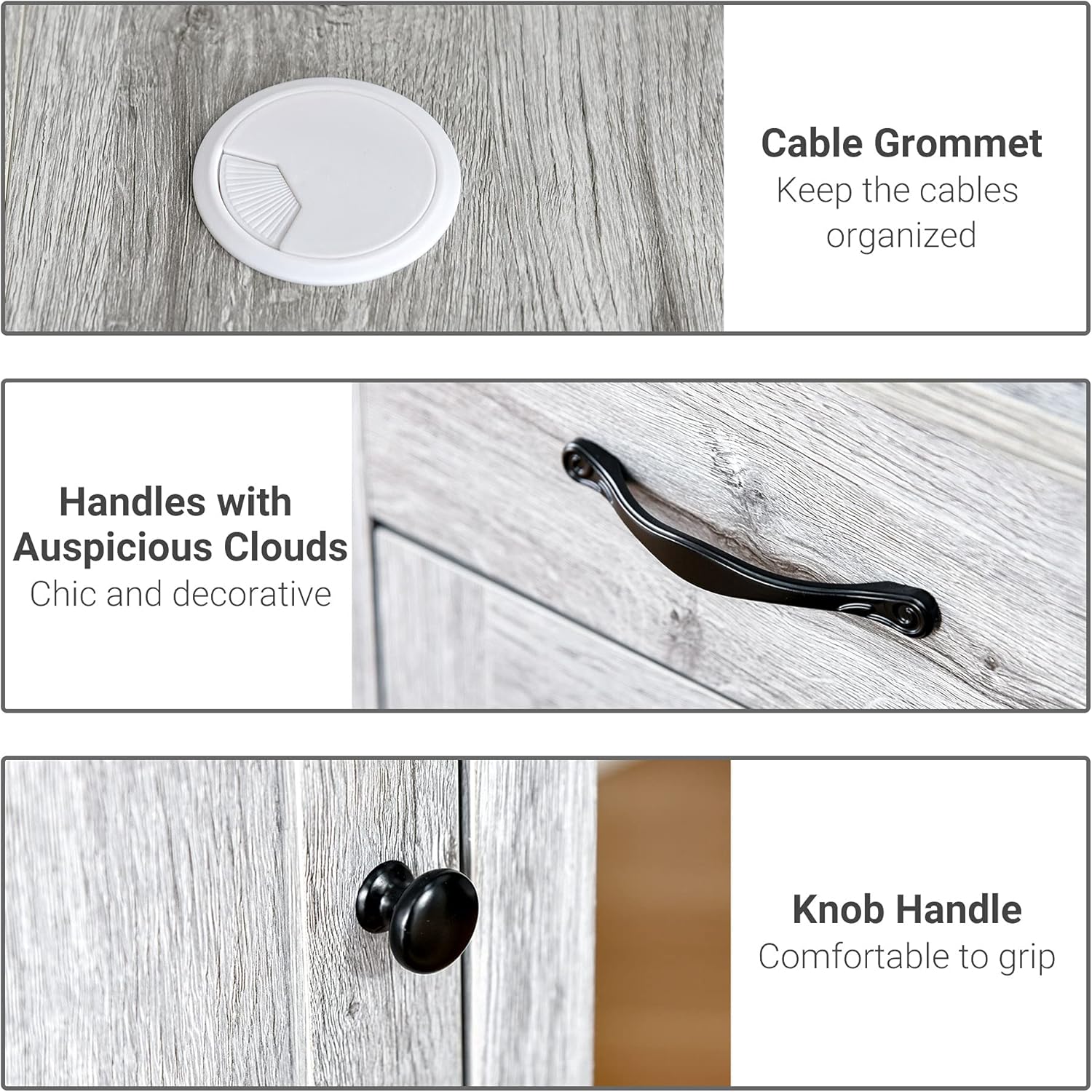
Image: A composite image showing a close-up of the white cable grommet for cable organization, decorative black handles on the drawer, and a black knob handle on the cabinet door.
Itoju
To ensure the longevity and appearance of your HOMCOM L-Shaped Desk, follow these maintenance guidelines:
- Ninu: Mu awọn oju ilẹ pẹlu asọ, damp cloth. Avoid abrasive cleaners or harsh chemicals, as these can damage the engineered wood finish.
- Idasonu: Clean up spills immediately to prevent moisture damage or staining.
- Ooru ati Ọrinrin: Avoid placing hot items directly on the desk surface. Use coasters for drinks. Keep the desk away from excessive moisture or direct sunlight to prevent warping or fading.
- Awọn ohun mimu: Periodically check and retighten all screws and fasteners to maintain stability.

Image: A detailed close-up of the grey wood grain texture, illustrating the finish of the engineered wood material used for the desk.
Laasigbotitusita
Ti o ba pade awọn ọran lakoko apejọ tabi lilo, tọka si awọn solusan ti o wọpọ wọnyi:
- Sonu tabi Awọn apakan ti bajẹ: If you find any parts missing or damaged upon opening the package, do not proceed with assembly. Contact HOMCOM customer support with your model number and a description of the issue for assistance.
- Ìṣòro Ṣíṣe Àwọn Ẹ̀yà: Ensure you are following the assembly diagrams precisely. Sometimes, loosening adjacent screws slightly can help with alignment before re-tightening everything.
- Iduro Wobbly: Check that all fasteners are securely tightened. Ensure the desk is placed on a level surface. If necessary, use furniture levelers (not included) under the legs.
- Drawer Ko Sisun Lara: Verify that the drawer slides are installed correctly and are free of obstructions. Ensure the drawer box is assembled squarely.
Awọn pato
| Ẹya ara ẹrọ | Ẹ̀kúnrẹ́rẹ́ |
|---|---|
| Nọmba awoṣe | Ọdun 836-326GY |
| Ìwò Mefa | 59" L x 59" W x 69.25" H (tó fẹ́rẹ̀ tó bẹ́ẹ̀) |
| Awọn iwọn tabili | 48"D x 55"W x 37"H (isunmọ.) |
| Agbara iwuwo (Tabili) | 44 lbs |
| Agbara iwuwo (Drawer) | 17.6 lbs |
| Agbara iwuwo (Selifu kọọkan) | 17.6 lbs |
| Ohun elo | Igi Ẹ̀rọ (MDF) |
| Àwọ̀ | Grẹy |
| Nọmba ti Drawers | 1 |
| Nọmba ti selifu | 2 (open) + adjustable in cabinets |
| Nọmba ti Minisita | 3 (2 hutch, 1 base) |
| Apejọ ti a beere | Bẹẹni |
Àkíyèsí: Gbogbo ìwọ̀n àti ìwọ̀n jẹ́ ìsúnmọ́, ó sì lè yàtọ̀ díẹ̀.
Image: Detailed dimensions of the L-shaped desk and hutch, showing overall length, width, and height, as well as specific measurements for shelves, cabinets, and drawer.
Atilẹyin ọja ati Support
HOMCOM products typically come with a limited warranty. For specific warranty details, claims, or technical support, please refer to the warranty information included with your product or visit the official HOMCOM website. You may also contact the retailer where the product was purchased.
When contacting support, please have your model number (836-326GY) and proof of purchase readily available.


